
Produkt overview
The GOBOULT Y1 Pro Wireless Earbuds are designed to provide a high-quality audio experience with features like extended playtime, clear calling, and low-latency gaming. This manual provides detailed instructions for setting up, operating, and maintaining your earbuds.

Billede: En collageudstillingasing key features of the GOBOULT Y1 Pro Earbuds, including 60 hours playtime, Zen Quad Mic ENC, 45ms low latency gaming, 13mm bass drivers, Type-C fast charging, and Bluetooth 5.3.
Pakkens indhold
- GOBOULT Y1 Pro Wireless Earbuds
- Opladningsetui
- USB Type-C opladerkabel
- Ørepuder (forskellige størrelser)
- Ørepropper (forskellige størrelser)
- Garantikort
Opsætning
1. Opladning af øretelefoner og etuiet
Sørg for, at både ørepropperne og opladningsetuiet er fuldt opladet, inden de tages i brug første gang. Dette optimerer batteriets levetid og ydeevne.
- Connect the provided USB Type-C charging cable to the charging port on the case and to a compatible USB power adapter (not included).
- The LED indicator on the charging case will illuminate to show charging status.
- A full charge typically takes a few hours. A quick 10-minute charge can provide approximately 120 minutes of playtime.

Image: The GOBOULT Y1 Pro earbuds and charging case, illustrating the Type-C fast charging capability, where 10 minutes of charge provides 120 minutes of playtime.
2. Indledende parring
Følg disse trin for at parre dine ørepropper med din enhed for første gang:
- Remove any protective film from the charging contacts on the earbuds.
- Place both earbuds into the charging case and close the lid for a few seconds.
- Open the charging case lid. The earbuds will automatically power on and enter pairing mode, indicated by flashing LED lights.
- Gå til Bluetooth-indstillingerne på din smartphone eller anden Bluetooth-aktiveret enhed.
- Søg efter tilgængelige enheder og vælg "GOBOULT Y1 Pro" fra listen.
- Når forbindelsen er oprettet, vil en stemmemeddelelse bekræfte den gennemførte parring.

Image: A diagram illustrating the initial setup steps, including removing protective film and opening the case, along with a detailed guide to the touch controls for both left and right earbuds.
3. Automatisk genforbindelse
Efter den første parring opretter ørepropperne automatisk forbindelse til den sidst parrede enhed, når de tages ud af opladningsetuiet, og Bluetooth er aktiveret på enheden.

Image: GOBOULT Y1 Pro earbuds and charging case, demonstrating Bluetooth 5.3 for stable, efficient, and fast pairing with a connected smartphone.
Betjeningsvejledning
Tænd/sluk
- Tænd: Open the charging case lid. The earbuds will power on automatically. Alternatively, if outside the case, long press the touch area on both earbuds for 3 seconds.
- Sluk: Place both earbuds back into the charging case and close the lid. They will power off automatically. Alternatively, long press the touch area on both earbuds for 5 seconds.
Tryk på kontrolelementer
The GOBOULT Y1 Pro earbuds feature intuitive touch controls for managing music, calls, and other functions. Refer to the diagram below and the following list for specific actions:
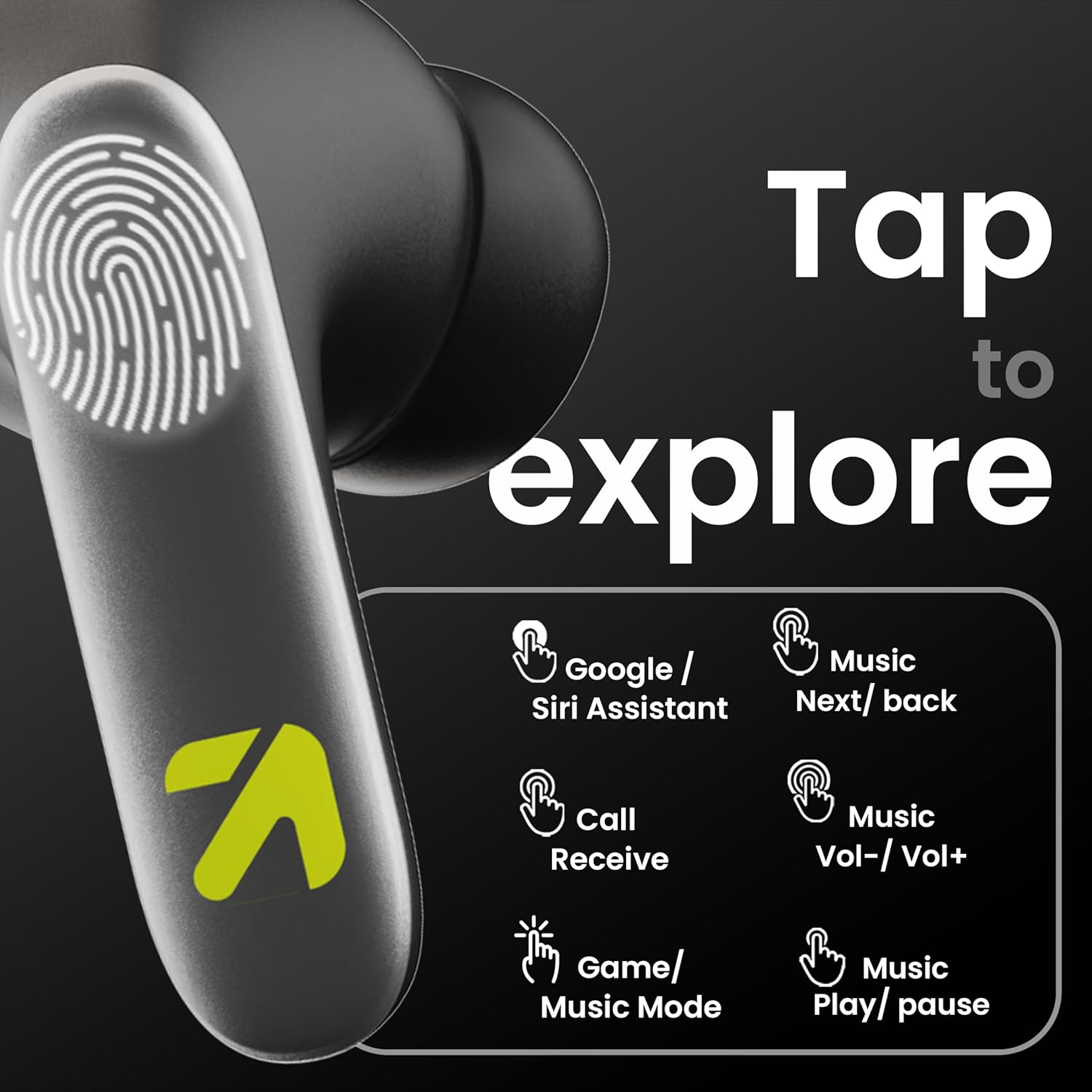
Image: A visual guide to the touch controls on the GOBOULT Y1 Pro earbuds, detailing actions for Google/Siri Assistant, music navigation, call management, volume control, and game/music mode switching.
- Single Tap (Left/Right): Afspil/pause musik, besvar/afslut opkald.
- Dobbelttryk (venstre øretelefon): Forrige sang.
- Dobbelttryk (højre øretelefon): Næste sang.
- Tredobbelt tryk (venstre øreprop): Lydstyrke ned.
- Tredobbelt tryk (højre øreprop): Lydstyrke op.
- Long Press (2 seconds, Left/Right): Reject incoming call, Activate Voice Assistant (Google/Siri).
- Four Taps (Left/Right): Activate/Deactivate Gaming Mode.
Spiltilstand
For an enhanced gaming experience, activate the ultra-low latency Gaming Mode:
- Aktivering: Tap the touch area four times on either earbud.
- Deaktivering: Tap the touch area four times again.

Image: GOBOULT Y1 Pro earbuds and charging case, highlighting the 45ms low latency gaming mode for real-time audio synchronization, activated by four taps.
Stemmeassistent
Quickly access your device's voice assistant (Siri or Google Assistant) for hands-free control:
- Aktivering: Perform a long tap on the touch area of either earbud.

Image: Illustration showing how to access Siri or Google Assistant with a long tap on the earbud's touch sensor.
Miljømæssig støjreduktion (ENC)
The GOBOULT Y1 Pro features Zen Quad Mic ENC technology, ensuring crystal-clear calls by effectively filtering out ambient noise from your surroundings.

Image: A diagram explaining how Environmental Noise Cancellation (ENC) works by isolating your voice from environmental noise, ensuring clear communication during calls.
Opretholdelse
Rensning
- Rengør regelmæssigt ørepropperne og opladningsetuiet med en blød, tør og fnugfri klud.
- Ensure the charging contacts on both the earbuds and inside the case are free from dust and debris to maintain proper charging.
- Do not use abrasive cleaners, solvents, or harsh chemicals, as these may damage the product.
Vandmodstand
The GOBOULT Y1 Pro earbuds are rated IPX5 water-resistant. This means they are protected against low-pressure water jets from any direction, making them suitable for workouts and light splashes.
- Dyp ikke ørepropperne i vand.
- Avoid exposing them to heavy rain or extreme moisture.
- Sørg for, at ørepropperne er tørre, før du sætter dem tilbage i opladningsetuiet, for at forhindre skader.

Image: GOBOULT Y1 Pro earbuds with water droplets, illustrating their IPX5 water resistance, providing protection against sweat and splashes.
Fejlfinding
If you encounter any issues with your GOBOULT Y1 Pro earbuds, refer to the following common troubleshooting steps:
Ørepropper parrer eller opretter ikke forbindelse
- Sørg for, at både ørepropperne og opladningsetuiet har tilstrækkelig batterikapacitet.
- Turn off Bluetooth on your device, wait 5 seconds, then turn it back on.
- On your device, "Forget" or "Unpair" "GOBOULT Y1 Pro" from the Bluetooth list, then attempt the pairing process again.
- Place both earbuds back into the charging case, close the lid, wait 10 seconds, then open the lid to re-enter pairing mode.
Kun én øretelefon virker
- Sørg for, at begge øretelefoner er opladet.
- Sæt begge ørepropper tilbage i opladningsetuiet, luk låget, og åbn det derefter igen. Dette synkroniserer dem ofte igen.
- Hvis problemet fortsætter, kan du prøve at nulstille ørepropperne (se producentens vejledning). webwebsted for specifikke nulstillingsinstruktioner, hvis de ikke er beskrevet her).
Dårlig lydkvalitet eller lav lydstyrke
- Ensure the earbuds are properly seated in your ears to create a good seal. Try different sized eartips.
- Rengør eventuelt snavs fra øreproppernes gitre.
- Kontroller lydkildeenhedens lydstyrke- og lydindstillinger.
- Flyt tættere på din tilsluttede enhed for at undgå signalforstyrrelser.
Opladningsproblemer
- Sørg for, at opladningskablet er korrekt tilsluttet til både etuiet og strømkilden.
- Try a different USB Type-C charging cable or power adapter.
- Rengør opladningskontakterne på både ørepropperne og indersiden af etuiet med en tør vatpind.
Specifikationer
| Feature | Detalje |
|---|---|
| Mærke | GOBOULT |
| Modelnavn | AirBass |
| Bluetooth version | 5.3 |
| Øreplacering | In Ear |
| Støjkontrol | Miljømæssig støjreduktion (ENC) |
| Audio driver størrelse | 13 millimeter |
| Samlet spilletid | Op til 60 timer (med opladningsetui) |
| Lav latens | 45ms (spiltilstand) |
| Opladningstype | Type-C hurtig opladning |
| Vandmodstand | IPX5 |
| Kontrolmetode | Røre |
| Kompatible enheder | Smartphones, tablets, bærbare computere, stationære computere, smarthøjttalere |
| Varens vægt | 50 gram |
| Oprindelsesland | Kina |
Garantioplysninger
The GOBOULT Y1 Pro Wireless Earbuds are covered by a 1 års producentgaranti fra købsdatoen.
This warranty covers manufacturing defects. Please retain your proof of purchase for any warranty claims. The warranty does not cover damage caused by misuse, accidents, unauthorized modifications, or normal wear and tear.
Støtte
For further assistance, technical support, or warranty inquiries, please contact:
- Fabrikant: Exotic Mile Private Limited, B-67 Wazirpur Industrial Area, New Delhi 110052
- Importør: Exotic Mile Pvt. Ltd. , B67 Wazirpur Industrial Area , New Delhi 110052
- For customer service contact details, please refer to the GOBOULT official webwebstedet eller platformen, hvor du købte produktet.