
Indledning
The Motorola DLR1060 is a 6-channel digital business radio designed for reliable and private communication in various professional environments. Operating in the digital 900 MHz ISM license-free band, this radio offers enhanced clarity and security compared to analog systems. Its compact and lightweight design, combined with robust features, makes it an essential tool for efficient team coordination.
Hvad er inkluderet
The Motorola DLR1060 package typically includes the following items:
- Motorola DLR1060 2-Way Digital Business Radio (quantity as per pack size)
- Genopladeligt lithium-ion-batteri
- Charging Tray with Power Adapter
- Swivel Belt Holster
- User Guide and Safety Leaflet

Image: A typical 6-pack of Motorola DLR1060 digital business radios, showcasindet kompakte design af hver enhed.
Nøglefunktioner
- Digital 900 MHz ISM License-Free Band: Ensures private and reliable communication.
- Udvidet rækkevidde: Covers up to 300,000 square feet or 20 floors.
- 6 kanaler: Provides multiple communication lines for different teams or purposes.
- Stemmemeddelelser: User-friendly voice prompts for channel navigation, battery status, and feature customization.
- Radio Profile ID: Unique 4-digit ID for enhanced privacy and direct communication.
- Computer Programming Software (CPS): Allows for personalized setups, including Private Groups, custom channel names, and radio settings.
- Holdbar konstruktion: Complies with Military Standards 810 C, D, E, F, and G for resistance against shock, vibration, extreme temperatures, and dust.
- Lang batterilevetid: Internal rechargeable battery provides up to 14 hours of continuous operation.
- Øjeblikkelig lydløs: Quickly silence the radio when needed.
- Tilpasset topknap: Assign frequently used functions for quick access.
Opsætning
1. Opladning af batteriet
- Insert the rechargeable Lithium-Ion battery into the radio, ensuring it clicks securely into place.
- Place the radio into the charging tray.
- Connect the power adapter to the charging tray and plug it into a standard electrical outlet.
- The charging indicator light on the tray will illuminate to show charging status. A full charge typically takes several hours.

Image: The Motorola DLR1060 radio securely seated in its charging cradle, ready for power connection.
2. Attaching the Belt Holster
- Align the radio with the swivel belt holster.
- Slide the radio into the holster until it locks into position.
- Attach the holster to your belt or clothing for convenient carrying.
Betjeningsvejledning
1. Tænd/sluk
- For at tænde skal du trykke på og holde nede Strøm/menu button (usually located on the top or side) until you hear a tone or voice prompt.
- For at slukke, skal du trykke på og holde nede Strøm/menu button again until the radio shuts down.

Billede: Side view of the DLR1060 radio, highlighting the power button and volume controls for easy access.
2. Justering af lydstyrke
- Brug Lydstyrke op (+) og Skrue ned (-) knapperne på siden af radioen til at justere lyttelydstyrken.
3. Valg af en kanal
- Drej på Kanalvælgerknap (typically on the top) to choose one of the 6 available channels.
- The radio will provide a voice prompt announcing the selected channel number.
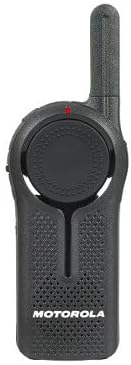
Billede: Forside view of the DLR1060 radio, featuring the prominent channel selector knob and integrated speaker.
4. Sending og modtagelse
- For at sende, tryk og hold nede Tryk og tal (PTT) knappen på siden af radioen. Tal tydeligt ind i mikrofonen.
- Slip PTT-knappen for at lytte efter et svar.
- Sørg for at du er på samme kanal som den person, du ønsker at kommunikere med.
5. Private Communication (Radio Profile ID)
- The DLR1060 uses a unique 4-digit Radio Profile ID for private communication. This ID must be programmed into all radios intended for a private group.
- Refer to the Computer Programming Software (CPS) manual for detailed instructions on setting up and managing Radio Profile IDs and Private Groups.
Opretholdelse
Rengøring af radioen
- Tør radioens yderside af med en blød kludamp klæde.
- Brug ikke skrappe kemikalier, rengøringsmidler eller stærke rengøringsmidler, da disse kan beskadige radioens casing og interne komponenter.
- Ensure the radio is powered off and disconnected from any charging accessories before cleaning.
Batteripleje
- Always use genuine Motorola batteries and charging accessories.
- Undgå at udsætte batteriet for ekstreme temperaturer.
- If the radio will not be used for an extended period, store the battery separately in a cool, dry place.
Fejlfinding
| Problem | Mulig løsning |
|---|---|
| Radioen tænder ikke. | Sørg for, at batteriet er fuldt opladet og korrekt isat. |
| Kan ikke sende eller modtage. | Verify that all radios are on the same channel and have the correct Radio Profile ID. Check if the battery is low. |
| Dårlig lydkvalitet eller statisk støj. | Move closer to the other radio or to an open area. Check for obstructions. Ensure the antenna is clear. |
| Batteriets levetid er kortere end forventet. | Ensure the battery is fully charged before use. Battery performance can degrade over time; consider replacing older batteries. |
Specifikationer
| Feature | Detalje |
|---|---|
| Frekvensbånd | 900 MHz ISM (License-Free) |
| Kanaler | 6 |
| Rækkevidde | Up to 300,000 sq ft / 20 Floors |
| Batterilevetid | Op til 14 timer (typisk brug) |
| Holdbarhedsstandarder | Military Standards 810 C, D, E, F, G |
| Materiale til hus | Polycarbonat |
| FCC ID | AZ489FT5870 |
| Kompatible enheder | Speaker, Headphone, Laptop (for CPS) |
| Farve | Sort |
Garanti og support
For detailed warranty information and technical support, please refer to the documentation provided with your product or visit the official Motorola Solutions webwebsted. Behold din købskvittering som købsbevis i tilfælde af garantikrav.