
Indledning
This instruction manual provides guidance for the proper use and maintenance of your ZdalaMit RMT-AM120U replacement remote control. This remote is designed to be compatible with various Sony Home Audio Systems, offering direct functionality without the need for programming.
Kompatibilitet
The RMT-AM120U remote control is compatible with the following Sony Home Audio System models:
- SHAKE-X7D
- MHC-GT3D
- MHC-GT5D
- MHC-V7D
- SHAKE-X1D
- SHAKE-X3D
- HCD-SHAKEX3
- HCD-SHAKEX1
- SS-SHAKEX3
- SS-SHAKEX1
Opsætning
Installation af batteri
- Find batterirummet på bagsiden af fjernbetjeningen.
- Skub batteridækslet nedad eller i den retning, der er angivet med en pil, for at åbne det.
- Insert two (2) 1.5V AAA alkaline batteries, ensuring the positive (+) and negative (-) terminals match the diagrams inside the compartment.
- Luk batteridækslet ved at skubbe det tilbage på plads, indtil det klikker sikkert.
Note: Batteries are not included with the remote control. Please use new alkaline batteries for optimal performance.
Indledende brug
No programming is required for this replacement remote control. Once batteries are installed correctly, the remote is ready for immediate use with your compatible Sony Home Audio System.
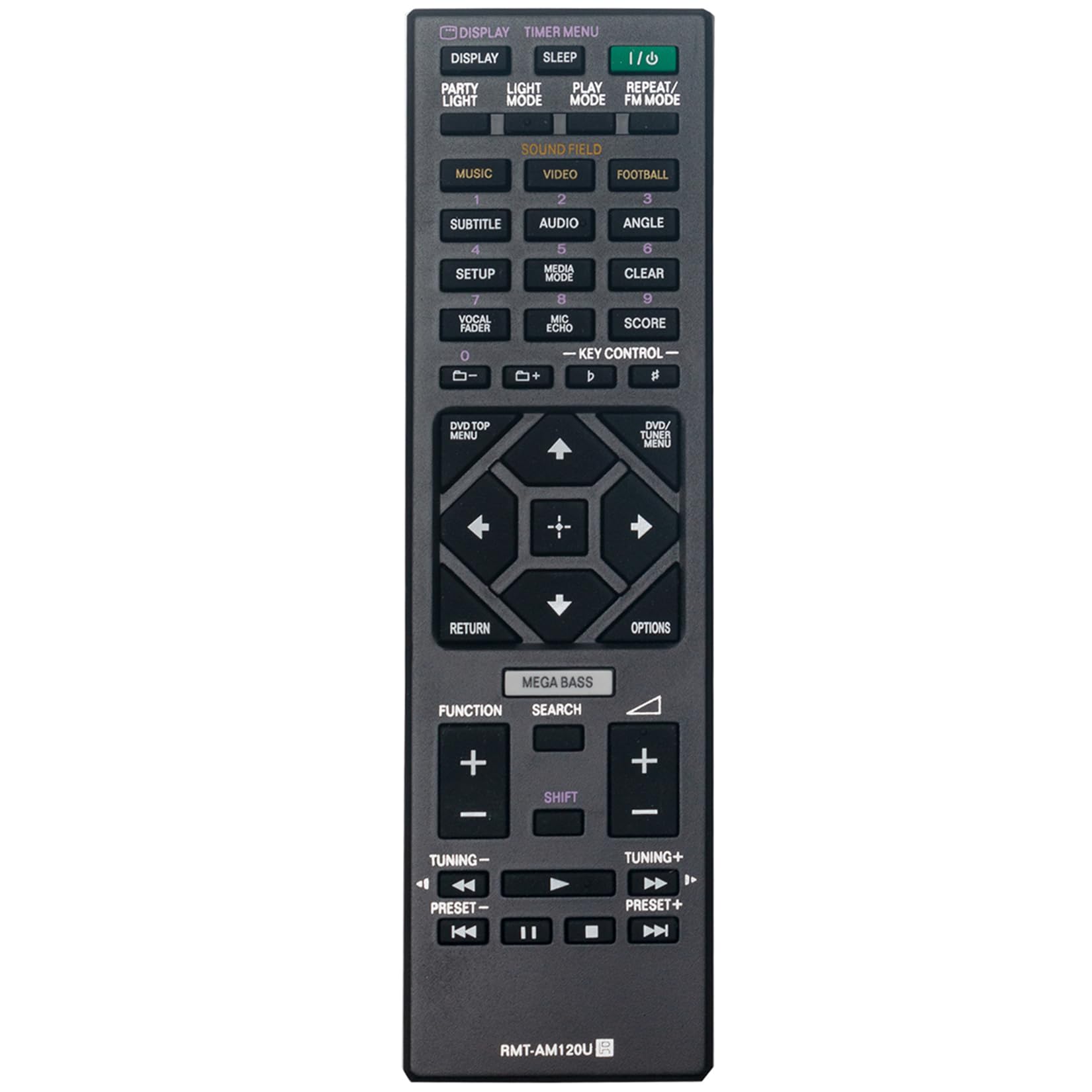
Figur 1: Forside view of the RMT-AM120U remote control.
Betjeningsvejledning
Point the remote control directly at the infrared sensor on your Sony Home Audio System. Ensure there are no obstructions between the remote and the system.
Nøglefunktioner
The remote control features various buttons for controlling your audio system. Common functions include:
- Strøm (I/O): Tænder eller slukker for lydsystemet.
- Vise: Ændrer eller viser displayoplysninger.
- Timer Menu: Accesses timer settings.
- Sove: Indstiller en sleeptimer.
- Afspilningstilstand: Selects playback modes (e.g., Normal, Shuffle).
- Gentag/FM-tilstand: Toggles repeat playback or switches FM radio mode.
- Music/Video/Football: Selects input sources or sound modes.
- Subtitle/Audio/Angle: Controls DVD/Blu-ray playback options.
- Opsætning: Giver adgang til systemindstillinger.
- Medietilstand: Selects media input.
- Klar: Rydder indtastninger eller valg.
- Vocal Fader/Mic Echo/Score: Controls microphone and karaoke functions.
- Nøglestyring: Adjusts key for karaoke.
- Numeriske knapper (0-9): Til direkte sporvalg eller input.
- DVD/TOP MENU: Accesses the top menu of a DVD/Blu-ray disc.
- DVD/TUNER MENU: Accesses the menu for DVD or tuner functions.
- Navigationsknapper (op, ned, venstre, højre, enter): Til menunavigation og valg.
- Retur: Vender tilbage til den forrige skærm eller menu.
- Valgmuligheder: Displays options menu.
- MEGA BAS: Enhances bass sound.
- Søge: Starter søgefunktionen.
- Fungere: Cycles through functions or inputs.
- Lydstyrke (+/-): Justerer lydstyrken.
- Tuning (+/-): Tunes radio frequencies.
- Preset (+/-): Vælger forudindstillede radiostationer.
- Playback Controls (Play, Pause, Stop, Fast Forward, Rewind, Skip Forward, Skip Back): Styrer medieafspilning.

Figur 2: Vinklet view highlighting the button layout.
Opretholdelse
Udskiftning af batteri
Replace batteries when the remote control's response becomes sluggish or stops functioning. Always replace both batteries at the same time with new 1.5V AAA alkaline batteries. Do not mix old and new batteries, or different types of batteries.
Rensning
Wipe the remote control with a soft, dry cloth. Do not use abrasive cleaners, solvents, or alcohol, as these can damage the surface or internal components.
Opbevaring
Hvis fjernbetjeningen ikke skal bruges i længere tid, skal batterierne fjernes for at forhindre lækage og potentiel skade.
Fejlfinding
- Fjernbetjeningen svarer ikke:
- Kontroller, om batterierne er isat korrekt med den korrekte polaritet.
- Udskift gamle batterier med nye.
- Ensure there are no obstructions between the remote control and the audio system's sensor.
- Make sure you are within the effective operating range (approximately 33 feet).
- Limited range or intermittent operation:
- Ensure the batteries are fresh.
- Verify that the remote control is pointed directly at the audio system.
- Avoid strong light sources (e.g., direct sunlight, fluorescent lights) that might interfere with the infrared signal.
Specifikationer
| Feature | Specifikation |
|---|---|
| Model | RMT-AM120U |
| Strømforsyning | 2 x 1.5V AAA alkaliske batterier |
| Forbindelsesteknologi | Infrarød |
| Knap Antal | 15 |
| Maksimal rækkevidde | 33 fod (10 meter) |
| Dimensioner (L x B x H) | 6.35" x 1.79" x 0.55" (16.13 cm x 4.55 cm x 1.40 cm) |
| Varens vægt | 40 gram (0.09 pund) |
| Farve | Sort |

Figure 3: Remote control with approximate dimensions.
Garantioplysninger
This ZdalaMit RMT-AM120U replacement remote control comes with a 1 års garanti fra købsdatoen. Denne garanti dækker fabrikationsfejl ved normal brug. Den dækker ikke skader forårsaget af misbrug, ulykker, uautoriserede ændringer eller batterilækage.
For warranty claims or support, please contact your retailer or the manufacturer directly.
Støtte
For further assistance or inquiries regarding your ZdalaMit RMT-AM120U remote control, please refer to the contact information provided by your seller or visit the ZdalaMit official support channels.