
ACETECH Predator MKIII Blaster
ACETECH Predator MKIII Tracer Unit User Manual
Model: Predator MKIII Blaster
Indledning
This manual provides comprehensive instructions for the installation, operation, and maintenance of your ACETECH Predator MKIII Tracer Unit. Please read this manual thoroughly before use to ensure proper function and longevity of the device.
Produkt overview
The ACETECH Predator MKIII is an advanced airsoft tracer unit designed to enhance your airsoft experience with realistic muzzle flash and tracer BB illumination. It features a Quick Detach (QD) system for easy installation and removal.

Image: The ACETECH Predator MKIII Tracer Unit, showing the main unit, the Blaster MS module, and the QD adaptor. The product packaging is also visible.

Billede: En detaljeret view of the Predator MKIII Tracer Unit, highlighting its textured surface and "PREDATOR MKIII BY ACETECH" engraving.

Image: A close-up of the front end of the Blaster MS module, showing the internal LED lighting components.

Image: The Blaster MS module disassembled, showing its internal components and the main module unit.
Funktioner
- Trådkompatibilitet: 14mm Counter Clockwise (Negative) thread, suitable for airsoft rifle GBB/AEG as a barrel extension.
- BB Support: Compatible with standard airsoft BBs, Green BBs, and Gel BBs.
- Lyseffekter: Simulates LED flame/flare lighting effect for the front end with standard BBs, and provides standard tracer unit lighting for glow-in-the-dark tracer BBs.
- Tactical Versatility: Features a Quick Detach (QD) Rapid Installation system for quick attachment and detachment without tools.
- Intelligent Power Control: The unit incorporates intelligent power management for efficient operation.
- Changeable Module: The Blaster MS module is changeable, allowing for versatility.
- Multiple Tracer Modes: Supports various tracer modes for different effects.
- USB Type-C Charge: Convenient charging via USB Type-C.
Opsætning og installation
- Udpak komponenter: Ensure all components are present: Predator MKIII Tracer Unit, Blaster MS Module, QD Adaptor (M14-), Allen Key, and User Manual.
- Modulindsættelse: Insert the Blaster MS Module into the Predator MKIII Tracer Unit. Ensure it is seated correctly.
- Attach QD Adaptor: Secure the 14mm Counter Clockwise (Negative) QD Adaptor to your airsoft rifle's barrel. Use the provided Allen key if necessary to tighten.
- Attach Tracer Unit: Utilize the QD system to quickly attach the Predator MKIII Tracer Unit to the QD Adaptor on your airsoft rifle. Ensure it clicks securely into place.

Image: Illustration of the package contents, including the Predator MKIII unit, tracer module, QD adaptor, tracer unit protection case, and user manual.
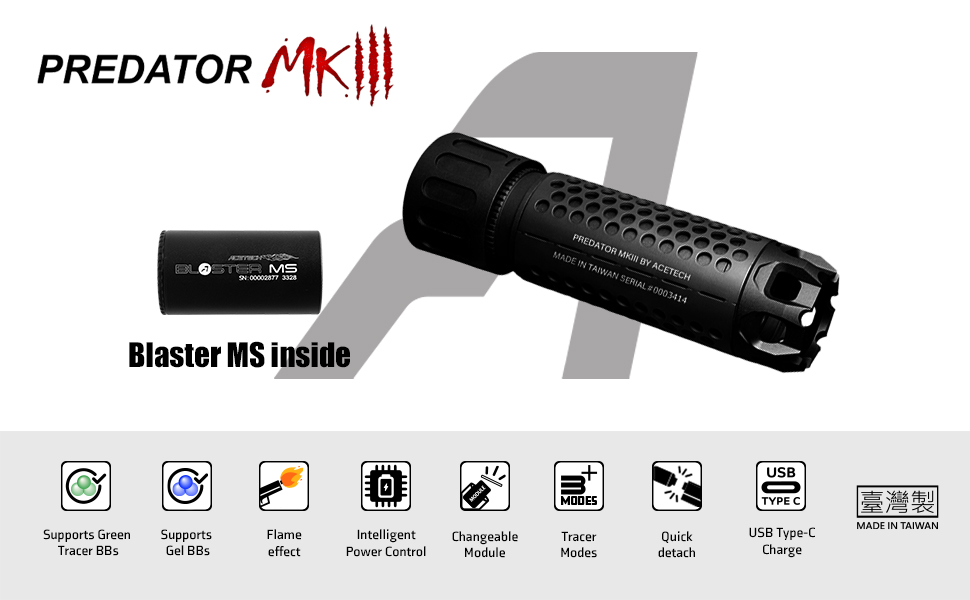
Image: The Predator MKIII unit with the Blaster MS module indicated as being inside, demonstrating the modular design.
Operation
- Tænd/sluk: Refer to the specific instructions in the included user manual for power control. The unit features intelligent power control.
- BB Loading: Load your airsoft magazine with desired BBs. The unit supports standard, green tracer, and gel BBs.
- Tracer Effect: When using green tracer BBs, the unit will illuminate them as they pass through, creating a visible tracer effect.
- Flame/Flare Effect: The Predator MKIII Blaster MS provides a flame/flare front-end BB track function, which can be achieved with standard BBs due to the built-in LED.
- Valg af tilstand: The unit supports multiple tracer modes. Consult the included user manual for instructions on how to switch between modes.

Image: A visual representation of the Blaster MS Tracer Unit Module in operation, showing a green tracer BB path and simulated muzzle flash.
Opretholdelse
- Batteriopladning: Charge the internal battery using the USB Type-C port. It is crucial to charge the battery at least every 2 months when the tracer unit is not in use to prevent complete discharge.
- Rensning: Keep the optical sensors and internal components free from dust and debris. Use a soft, dry cloth for cleaning.
- Opbevaring: Opbevar enheden et køligt, tørt sted væk fra direkte sollys og ekstreme temperaturer.
Fejlfinding
- Unit Not Lighting Up: Ensure the unit is charged. Check if the Blaster MS module is correctly inserted.
- Inconsistent Tracer Effect: Verify that you are using compatible tracer BBs (green or gel). Ensure the unit is securely attached and aligned with the barrel.
- QD System Issues: If the QD system is difficult to attach or detach, ensure no debris is obstructing the mechanism. Do not force it.
Specifikationer
| Attribut | Værdi |
|---|---|
| Modelnavn | Predator MKIII Blaster |
| Tråd | 14mm Counter Clockwise (Negative) |
| BB Compatibility | Standard, Green BBs, Gel BBs |
| Materiale | Aluminium |
| Varens vægt | 0.5 kilo |
| Emnedimensioner (LxBxH) | 4.41 x 6.57 x 3.15 tommer |
| Farve | Sort |
Garanti og support
The ACETECH Predator MKIII Tracer Unit comes with a 1-year Repair Service against Manufacturer Defects. Please note that defects resulting from completely discharging the battery are not covered under warranty. For support or warranty claims, please contact ACETECH customer service.
For more information, visit the official ACETECH store: ACETECH Store
Relaterede dokumenter - Predator MKIII Blaster
 |
ACETECH Predator MKIII Brugermanual: Airsoft Tracer-enhedsvejledning Omfattende brugermanual til ACETECH Predator MKIII tracer-enheden, der beskriver funktioner, installation, betjening, sikkerhedsforanstaltninger og specifikationer for airsoft- og gelblaster. |
 |
Acetech Predator MKIII User Manual User manual for the Acetech Predator MKIII tracer unit, detailing features, installation, operation, specifications, and warranty information for airsoft and gel blaster enthusiasts. |
 |
ACETECH Alignmentor User Manual: Setup, Operation, and Specifications User manual for the ACETECH Alignmentor, a smart shooting target system. This guide covers setup, installation, app connection and operation, system settings, specifications, and warranty information. Learn how to use the Alignmentor with your smartphone for impact point detection and voice scoring. |
 |
ACETECH ALIGNMENTOR User Manual - BB Target System Setup and Operation Comprehensive user manual for the ACETECH ALIGNMENTOR BB target system. Learn about installation, app connection, features, specifications, and warranty. |
 |
AceTech Bifrost BT brugermanual Brugermanual til AceTech Bifrost BT-tracerenheden, der dækker sikkerhedsforanstaltninger, produktfunktioner, betjeningsvejledning, opladning, intelligent strømstyring, installation, selvtesttilstand, specifikationer og garanti. |
 |
ACETECH ALIGNMENTOR User Manual - Setup and Operation Guide This user manual provides comprehensive instructions for the ACETECH ALIGNMENTOR, a smart BB target system. Learn about installation, app connectivity, operation, specifications, and warranty information for enhanced shooting practice. |
Ask a question about this manual
Ask about setup, troubleshooting, compatibility, parts, safety, or missing instructions. Manuals+ will review the question and use this page’s manual context to help answer it.