
1. Introduktion
This manual provides comprehensive instructions for the installation, operation, and maintenance of your XSDTS GL02 Biometric Digital Glass Door Lock. Designed for frameless glass doors, this advanced lock offers multiple unlocking methods to enhance security and convenience for offices, homes, hotels, and apartments.
The GL02 lock is suitable for frameless glass doors with a thickness of 10-12 mm, including sliding doors, swing doors, double doors, and single doors. It operates on a lithium battery (2600mAh) and supports English language prompts.
2. Produktfunktioner
- 7-i-1 oplåsningsmetoder:
- 3D Facial Recognition
- Tuya App (Mobile Phone)
- Fingeraftryk
- Adgangskode
- IC-kort
- Fjernbetjening
- Mekanisk nøgle
- Fast Verification: Password verification speed of 0.4 seconds.
- Høj brugerkapacitet: Stores up to 100 fingerprints, 200 cards, and 200 passwords.
- Bred driftstemperatur: Functions reliably from -25°C to 65°C.
- Gældende dørtyper: Specifically designed for frameless glass doors (sliding, swing, double, single) with a thickness of 10-12 mm.
- Smarte funktioner: Anti-peeping password function, automatic locking, rechargeable battery.

Figur 2.1: Overview of the seven unlocking methods supported by the GL02 lock.
3. Pakkens indhold
Når du åbner pakken, skal du kontrollere, at alle følgende komponenter er inkluderet:
- Frontpanel x 1
- Bagpanel x 1
- Smartkort x 2
- Mekanisk nøgle x 2
- Skruesæt x 1

Figur 3.1: Detaljeret view af produktets komponenter og dimensioner.
4. Opsætning og installation
The XSDTS GL02 lock is designed for easy installation on frameless glass doors. For optimal performance and security, professional installation is recommended.
4.1 Dørkompatibilitet
Ensure your glass door meets the following specifications:
- Dørtype: Frameless glass doors (sliding, swing, double, single).
- Dørtykkelse: 10-12 mm.
- Dørgab: 5-15 mm (distance between door and frame/another door).
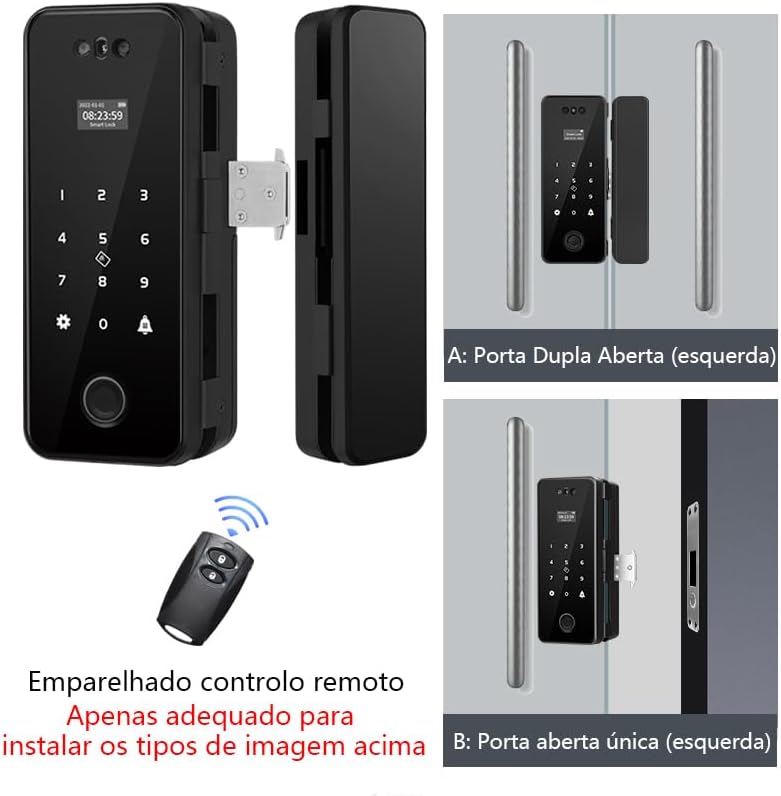
Figur 4.1: Eksamples of GL02 lock installation on double and single glass doors.

Figure 4.2: Supported door opening configurations for the GL02 lock.
4.2 Indledende opsætning
- Batteri installation: Open the battery compartment on the rear panel and insert the 2600mAh lithium battery.
- Sprogvalg: Follow the on-screen prompts to select English as the operating language.
- Administratoropsætning: The first fingerprint, password, or facial scan registered will automatically be set as the administrator. This administrator has full control over user management and lock settings.
5. Betjeningsvejledning
The GL02 lock offers multiple convenient ways to unlock your door.
5.1 Unlocking with 3D Facial Recognition
- Stand directly in front of the lock's facial recognition module.
- Ensure your face is within the recognition area. The lock will automatically scan and unlock if a registered face is detected.

Figure 5.1: 3D Facial Recognition in action.
5.2 Oplåsning med fingeraftryk
- Place your registered finger flat on the fingerprint reader.
- The lock will verify your fingerprint in less than 0.5 seconds and unlock.

Figure 5.2: Fingerprint unlocking process.
5.3 Oplåsning med adgangskode
- Tryk på tastaturet for at aktivere det.
- Enter your registered password followed by the '#' key.
- The lock supports an anti-peeping password feature, allowing you to enter random digits before or after your actual password to prevent others from guessing it.
5.4 Oplåsning med IC-kort
- Præsenter dit registrerede IC-kort for kortlæserområdet på låsen.
- The lock will read the card and unlock.

Figure 5.3: Using an encrypted IC card for access.
5.5 Unlocking via Tuya App
- Download and install the Tuya Smart or Smart Life app on your mobile phone.
- Follow the app instructions to pair your GL02 lock via Wi-Fi.
- Once paired, you can remotely unlock the door, manage temporary passwords, and view få adgang til logfiler hvor som helst.
- The app also allows remote unlocking when a visitor rings the doorbell.

Figure 5.4: Remote unlocking and smart app management via Tuya.
5.6 Unlocking with Remote Control
If your lock package includes a remote control, it can be paired for convenient remote unlocking.
- Refer to the remote control pairing instructions provided separately or within the lock's on-screen menu.
- Press the unlock button on the remote control to open the door.
5.7 Oplåsning med mekanisk nøgle
In case of battery depletion or electronic malfunction, the mechanical key provides a reliable backup unlocking method.
- Locate the keyhole, usually discreetly placed on the lock's exterior.
- Sæt den mekaniske nøgle i, og drej den for at låse døren op.
6. Vedligeholdelse
To ensure the longevity and optimal performance of your XSDTS GL02 lock, follow these maintenance guidelines:
- Rensning: Wipe the lock's surface with a soft, dry cloth. Avoid using abrasive cleaners, solvents, or harsh chemicals, as they can damage the finish and electronic components.
- Batteristyring: The lock is powered by a rechargeable lithium battery. Recharge the battery when the low battery indicator appears on the display. Regular charging helps maintain battery health.
- Sensorpleje: Keep the fingerprint reader and facial recognition module clean and free of dust or smudges to ensure accurate recognition.
- Miljøforhold: While designed for a wide temperature range, avoid exposing the lock to extreme moisture or direct water spray.
7. Fejlfinding
Her er nogle almindelige problemer og deres løsninger:
| Problem | Mulig årsag | Løsning |
|---|---|---|
| Lås reagerer ikke. | Batteriet er afladet. | Recharge the lithium battery. Use the mechanical key for immediate access. |
| Fingerprint/Facial recognition fails. | Sensor is dirty; Finger not placed correctly; Face not aligned; Unregistered user. | Clean the sensor. Ensure proper placement/alignment. Register the user if not already done. Try another unlocking method. |
| Kan ikke oprette forbindelse til Tuya-appen. | Wi-Fi signal weak; Incorrect pairing steps; App not updated. | Ensure strong Wi-Fi signal. Re-attempt pairing process. Update the Tuya app to the latest version. |
| Fjernbetjening virker ikke. | Fjernbetjeningens batteriniveau er lavt; Ikke parret; Uden for rækkevidde. | Replace remote battery. Re-pair the remote control. Ensure you are within operating range. |
If you encounter issues not listed here or require further assistance, please contact XSDTS customer support.
8. Specifikationer
| Feature | Detalje |
|---|---|
| Modelnummer | GL02 |
| Mærke | XSDTS |
| Oplåsningsmetoder | 3D Facial Recognition, Tuya App, Fingerprint, Password, IC Card, Remote Control, Mechanical Key |
| Password Verification Speed | 0.4 sekunder |
| Gældende dørtykkelse | 10-12 mm |
| Door Gap Distance | 5-15 mm |
| Brugerkapacitet (fingeraftryk) | 100 |
| User Capacity (IC Card) | 200 |
| Brugerkapacitet (adgangskode) | 200 |
| Operation Voltage | Litiumbatteri (2600mAh) |
| Driftstemperatur | -25°C til 65°C |
| Materiale | Aluminium |
| Produktmål (L x B x H) | 20 x 10 x 8 cm |
| Produktets vægt | 2 kg |
9. Garanti og support
All XSDTS products come with a direct 12-month warranty. We are committed to providing unlimited technical consultation to our customers.
Our team of certified XSDTS technicians is available to assist you via phone, chat, or video calls. Additionally, we provide installation, configuration, and troubleshooting videos, which will be made available to you after your purchase to ensure a smooth experience.
For any inquiries or support needs, please refer to the contact information provided with your purchase or visit the official XSDTS webwebsted.