
Indledning
Thank you for choosing the UGREEN Revodok Pro 8-in-1 USB-C Hub. This instruction manual provides essential information for setting up, operating, and maintaining your device. This hub is designed to expand the connectivity of your USB-C enabled devices, offering a versatile solution for various peripherals and display needs.

A silver UGREEN Revodok Pro 8-in-1 USB-C Hub, showcasing its compact design and the attached USB-C cable.
Produktegenskaber
- 8-i-1-tilslutning: The UGREEN Revodok Pro 8-in-1 USB-C Hub provides comprehensive connectivity with a 4K@60Hz HDMI video output, one USB-A 3.2 port, two USB-C 3.2 ports, one USB-A 2.0 port, an SD/TF card slot, and a 100W USB-C Power Delivery input port.
- Rapid 10Gbps Data Transfer: Experience rapid data transfer speeds of up to 10Gbps via the USB-A 3.2 and two USB-C 3.2 data ports. This allows for quick transfer of large files, including HD videos. Note: The 10Gbps USB-C data ports do not support video transmission or charging functions.
- Ultra 4K@60Hz HD Resolution: The HDMI port supports 4K resolution at 60Hz, providing a clear and stable image for external displays. This allows you to mirror or extend your laptop or mobile device screen to a TV, monitor, or projector for enhanced viewing, video editing, gaming, or business presentations.
- Professional Storage Solution: The integrated SD/TF card reader offers data transfer speeds up to 170MB/s, enabling quick access to photos and videos from your camera's memory cards. Simultaneous reading and writing are supported.
- Fast and Secure 100W PD Charging: The 100W Power Delivery (PD) port allows you to charge your laptop or other compatible devices while using the hub. It supports up to 85W pass-through charging for your host device, with 15W reserved for hub operations. Built-in protections against over-voltage, over-current, and short-circuit ensure safe charging.
- Bred kompatibilitet: This hub is compatible with most USB-C enabled devices, including MacBook Pro/Air (M1, M2, M3, M4), iMac, iPad Pro, iPhone 16 Pro/Pro Max, Chromebooks, Surface devices, Nintendo Switch, Steam Deck, and Rog Ally.
Produktlayout
Familiarize yourself with the various ports and their functions on your UGREEN Revodok Pro 8-in-1 USB-C Hub:

Diagram illustrating the UGREEN Revodok Pro 8-in-1 USB-C Hub with labels for each port: SD/TF card reader (170 MB/s), HDMI (4K@60Hz), USB-C PD (100W for charging only), two USB-C 3.2 (10Gbps for data only), USB-A 3.2 (10Gbps), and USB-A 2.0 (480Mbps).
- 1. USB-C Host Connector: Tilsluttes USB-C-porten på din bærbare computer, tablet eller smartphone.
- 2. SD/TF-kortlæser: Supports SD and Micro SD cards for data transfer up to 170 MB/s.
- 3. HDMI Port: Connects to an external display for 4K@60Hz video output.
- 4. USB-C PD (Power Delivery) Port: For connecting a USB-C power adapter to charge your host device (up to 100W input, 85W pass-through).
- 5. USB-C 3.2 Data Ports (x2): For connecting USB-C peripherals and transferring data at up to 10Gbps. These ports do not support video output or charging.
- 6. USB-A 3.2 Port: For connecting USB-A peripherals and transferring data at up to 10Gbps.
- 7. USB-A 2.0 Port: For connecting USB-A peripherals, ideal for mouse, keyboard, or other low-bandwidth devices, with data transfer up to 480Mbps.
Opsætningsinstruktioner
- Tilslut hubben til din enhed: Plug the integrated USB-C cable of the UGREEN Revodok Pro hub into a full-function USB-C port on your laptop, tablet, or smartphone. Ensure the USB-C port on your host device supports data transfer, video output (DisplayPort Alternate Mode), and Power Delivery for full functionality.
- Tilslut strøm (valgfrit): If your host device requires charging or if you are connecting power-intensive peripherals, connect your USB-C power adapter (not included) to the USB-C PD port on the hub.
- Tilslut ydre enheder: Plug your desired peripherals (e.g., external monitor, USB drives, mouse, keyboard, SD/TF cards) into the corresponding ports on the hub.

En eksample setup showing the UGREEN Revodok Pro USB-C Hub connected to a Mac Mini, expanding its connectivity options.
Betjeningsvejledning
Brug af HDMI-porten
Connect an HDMI cable from the hub's HDMI port to your external monitor, TV, or projector. Your host device should automatically detect the external display. You can then configure display settings (mirror or extend) through your operating system's display preferences.

Two individuals collaborating, with a laptop connected to an external 4K@60Hz monitor via the UGREEN Revodok Pro USB-C Hub, demonstrating its display extension capability.
Using USB Data Ports (USB-A 3.2, USB-C 3.2, USB-A 2.0)
Plug your USB devices (e.g., flash drives, external hard drives, keyboards, mice) into the available USB-A or USB-C data ports. The 10Gbps ports (USB-A 3.2 and USB-C 3.2) are suitable for high-speed data transfer, while the USB-A 2.0 port is ideal for standard peripherals.

Close-up of the UGREEN Revodok Pro USB-C Hub highlighting the USB 3.2 ports with 10Gbps transfer speeds, indicating fast data transfer for files.
Using the SD/TF Card Reader
Insert your SD or Micro SD card into the corresponding slot. The card will appear as a removable drive on your host device, allowing you to access and transfer files.
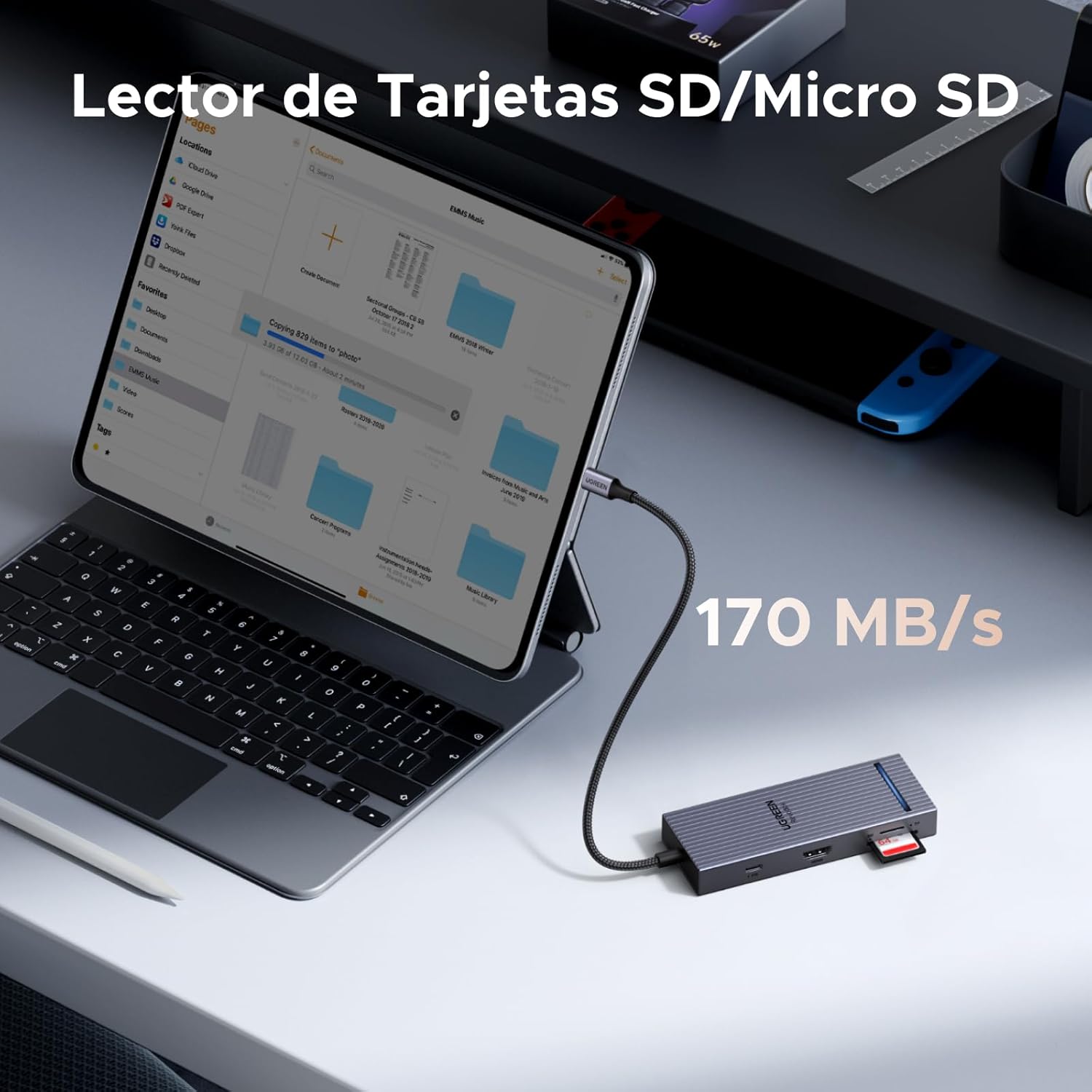
A tablet connected to the UGREEN Revodok Pro USB-C Hub, with an SD card inserted into the card reader slot, illustrating its use for accessing memory card data at 170 MB/s.
Opladning af strømforsyning (PD)
To charge your host device through the hub, connect a USB-C power adapter (e.g., your laptop's original charger) to the USB-C PD port on the hub. The hub supports up to 100W input, providing up to 85W pass-through charging to your host device.

A MacBook Pro M4 being charged via the UGREEN Revodok Pro USB-C Hub's 100W PD port, showing 85W output to the laptop from a 100W input power adapter.
Kompatibilitet
The UGREEN Revodok Pro 8-in-1 USB-C Hub is designed for broad compatibility with devices featuring a full-function USB-C port that supports data, video (DisplayPort Alternate Mode), and Power Delivery. Compatibility includes:
- Værtsenheder: MacBook Pro/Air (M1, M2, M3, M4), iMac, iPad Pro, iPhone 16 Pro/Pro Max, Chromebooks, Surface devices, Nintendo Switch, Steam Deck, Rog Ally, and other laptops/tablets with a full-function USB-C port.
- Operativsystemer: Windows, macOS, Linux, Android.

A chart detailing the universal compatibility of the UGREEN Revodok Pro USB-C Hub with various host devices (MacBook, Mac mini, PC, Tablet, iPhone, Gaming Console) and operating systems (Windows, macOS, Linux, Android), emphasizing the requirement for a full-function USB-C port.
Specifikationer
| Mærke | UGRØN |
| Model | 75027 |
| Farve | Sølv |
| Hardware-interface | HDMI, MiniSD, USB 2.0 Type-A, USB 3.2 Gen 2, USB-C |
| Kompatible enheder | MacBook Air, MacBook Pro, Thinkpad, XPS, iPad Pro, etc. |
| Samlet USB-porte | 4 (1x USB-A 3.2, 1x USB-A 2.0, 2x USB-C 3.2 Data) |
| Number of Total Ports | 8 (including HDMI, SD/TF, USB-C PD) |
| HDMI porte | 1 (4K@60Hz) |
| Strøm levering | 100W (Input), 85W (Pass-through to host) |
| Emnedimensioner (LxBxH) | 11.9 x 4.5 x 1.6 cm |
| Varens vægt | 80 gram |
Opretholdelse
To ensure the longevity and optimal performance of your UGREEN Revodok Pro USB-C Hub, follow these maintenance guidelines:
- Rensning: Brug en blød, tør klud til at rengøre navet. Undgå flydende rengøringsmidler eller aerosoler.
- Opbevaring: Opbevar hubben et køligt, tørt sted væk fra direkte sollys og ekstreme temperaturer.
- Håndtering: Avoid dropping the hub or subjecting it to strong impacts. Do not bend or pull the integrated USB-C cable excessively.
- Varmeafledning: Navet har en aluminiumslegering casing for efficient heat dissipation. Ensure it is placed in a well-ventilated area during prolonged use.
- Sikkerhed: The hub includes built-in protections against overcurrent, overvoltage, overtemperature, and short-circuit. Do not attempt to disassemble or modify the device.

Et billedshowasing the UGREEN Revodok Pro's aluminum alloy casing for heat dissipation, a luminous indicator for operational status, and a shield icon representing 4-level safety protection against overcurrent, overvoltage, overtemperature, and short-circuit.
Fejlfinding
If you encounter issues with your UGREEN Revodok Pro USB-C Hub, refer to the following common solutions:
- Ingen skærmudgang via HDMI:
- Ensure your host device's USB-C port supports DisplayPort Alternate Mode (video output).
- Check the HDMI cable connection between the hub and the monitor. Try a different HDMI cable.
- Kontroller, at skærmens inputkilde er indstillet korrekt til HDMI.
- Genstart din værtsenhed.
- Periferiudstyr genkendes ikke:
- Sørg for, at hubben er sikkert forbundet til din værtsenhed.
- Try connecting the peripheral directly to your host device to confirm it functions independently.
- For power-intensive devices (e.g., external hard drives), ensure the hub is connected to a power adapter via its PD port.
- Try connecting the peripheral to a different port on the hub.
- Langsom dataoverførselshastighed:
- Sørg for at bruge USB 3.2-portene til enheder med høj hastighed.
- Verify your host device's USB-C port supports USB 3.2 speeds.
- Undgå at tilslutte for mange strømkrævende enheder samtidigt uden ekstern strøm til hubben.
- Værtsenhed oplader ikke:
- Sørg for, at din USB-C-strømadapter er tilsluttet hubbens USB-C PD-port.
- Verify your power adapter and USB-C cable are functional and support Power Delivery.
- Confirm your host device's USB-C port supports Power Delivery input.
Garanti og support
The UGREEN Revodok Pro 8-in-1 USB-C Hub comes with an 18 måneders garanti fra købsdatoen. Denne garanti dækker fabrikationsfejl og sikrer, at produktet opfylder de specificerede ydeevnestandarder under normal brug.
For technical support, warranty claims, or any inquiries regarding your product, please contact UGREEN customer service through the official UGREEN website or your point of purchase. Please have your model number (75027) and proof of purchase ready when contacting support.