
1. Introduktion
This manual provides comprehensive instructions for the safe and efficient operation, installation, and maintenance of your DELLA 8,000 BTU Portable Air Conditioner with Heat Pump. Please read this manual thoroughly before use and retain it for future reference.

Figure 1.1: DELLA 8,000 BTU Portable Air Conditioner with included remote control and smartphone app interface.
2. Sikkerhedsoplysninger
Følg altid grundlæggende sikkerhedsforanstaltninger, når du bruger elektriske apparater, for at mindske risikoen for brand, elektrisk stød eller personskade.
- Læs alle instruktioner, inden du betjener apparatet.
- Ensure the unit is connected to a properly grounded 120 Volt outlet. Do not use extension cords or surge protectors.
- Bloker ikke luftindtag eller -udtag. Sørg for tilstrækkelig afstand omkring enheden for korrekt luftgennemstrømning.
- Stik ikke fingre eller fremmedlegemer ind i luftventilerne.
- Tag stikket ud af enheden, før du rengør eller udfører vedligeholdelse.
- Hold enheden væk fra vand og andre væsker.
- Dette apparat er ikke beregnet til brug af personer (inklusive børn) med nedsatte fysiske, sensoriske eller mentale evner, eller mangel på erfaring og viden, medmindre de har fået opsyn eller instruktion i brugen af apparatet af en person, der er ansvarlig for deres sikkerhed.
3. Produktfunktioner
The DELLA Portable Air Conditioner is designed with multiple functionalities to enhance your comfort:
- 4-i-1 funktionalitet: Offers Cooling, Heating, Fan, and Dehumidifier modes for year-round comfort.
- Smart tilslutning: WiFi enabled and compatible with Alexa for convenient control from anywhere within range using the Della app.
- Efficient Cooling & Heating: 8,000 BTU ASHRAE (5,000 BTU SACC) cooling capacity and 6,500 BTU heating capacity, suitable for rooms up to 150 sq. ft.
- Stille drift: Features a 49dB Whisper-Quiet Mode, designed to be 18% quieter than comparable units.
- Avanceret luftstrøm: MightyAir X Tech provides 30% more speed and long-range wind blowing up to 15ft.
- affugtning: Built-in dehumidifier removes up to 48 pints/day, offering 20% higher dehumidifier capacity than traditional models.
- Brugervenlig kontrol: Includes a 24-hour timer, auto-restart, sleep mode, child lock function, and water-full indicator.
- Nem mobilitet: Equipped with casters on the bottom and side handles for effortless movement between rooms.
- Justerbare ventilationsåbninger: Manually adjustable vents allow for smooth and quick redirection of airflow.

Figure 3.1: The 4-in-1 functionality of the DELLA Portable AC, including cooling, fan, heating, and dehumidifying modes.

Figure 3.2: Illustrates the quiet operation and high efficiency of the unit, highlighting its 49dB whisper-quiet mode and 8K BTU capacity covering 150 sq ft.

Figure 3.3: Demonstrates the MightyAir X Tech for faster cooling/warming and smart device app control, including Alexa compatibility.
4. Opsætning
Setting up your DELLA Portable Air Conditioner is designed to be quick and toolless. Follow these steps for proper installation:
- Fastgør udstødningsslange: Connect the exhaust hose to the back of the AC unit by sliding it into the designated port.
- Prepare Window Kit: Attach the exhaust hose to the sealing board port of the window kit.
- Installer vinduessæt: Place the adjustable 3-section sealing board into your window frame. The kit adapts to both horizontal and vertical windows (25.5"-64.1" width/height). Ensure a snug fit for maximum efficiency.
- Position Enhed: Roll the unit into position using its caster wheels. Ensure there is at least 19 inches of clearance around the unit for proper airflow and to accommodate the exhaust tube.

Figure 4.1: Step-by-step guide for damage-free installation of the exhaust hose and window kit.
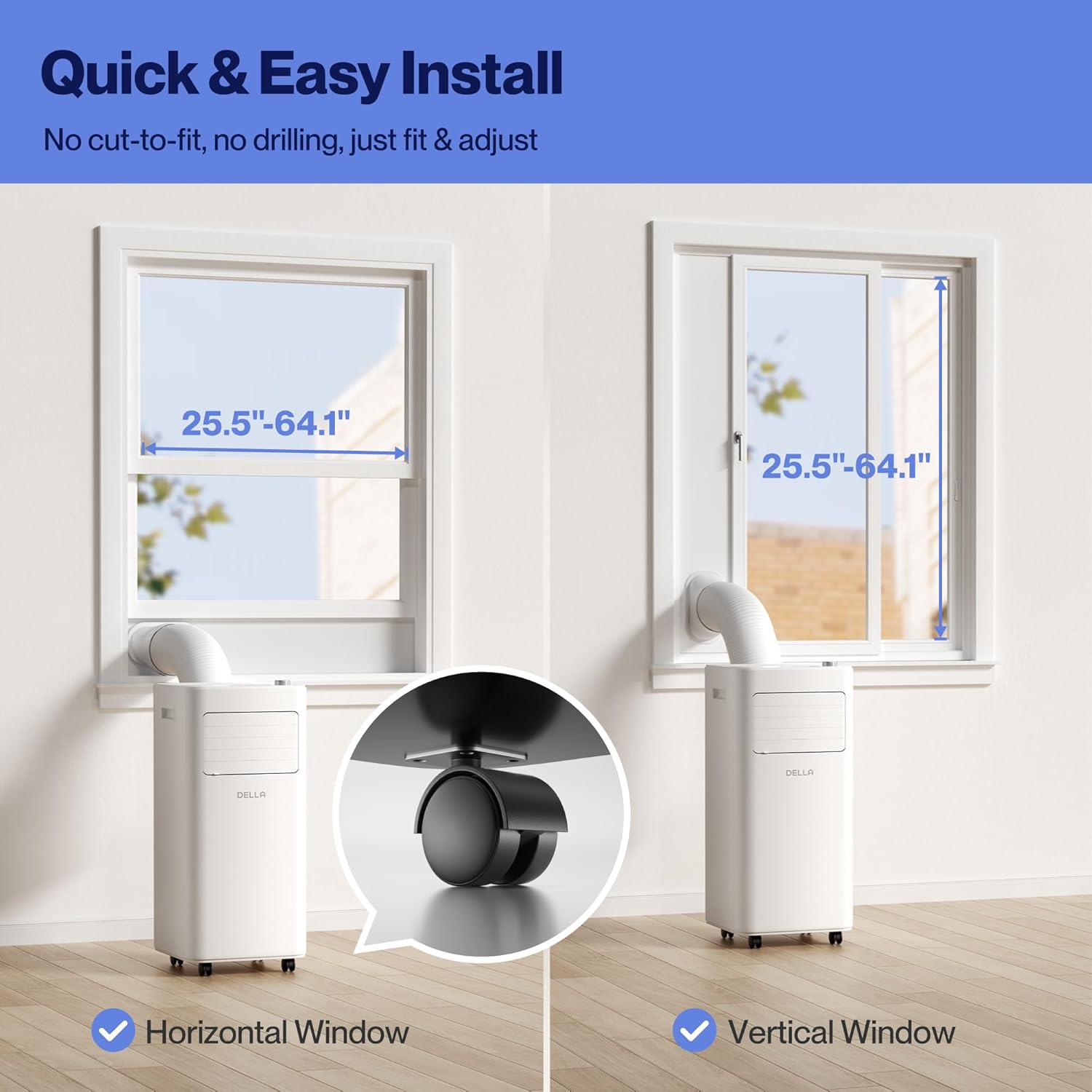
Figure 4.2: Visual guide for quick and easy installation, demonstrating compatibility with both horizontal and vertical window types.
Opsætning af videoguide
Video 4.1: Official Della Portable AC setup and feature overview. This video demonstrates the unit's mobility, control panel, adjustable vents, quick setup process, and maintenance features like filter removal and water drainage.
5. Betjening
Your DELLA Portable Air Conditioner can be operated using the intuitive soft-touch control panel on the unit, the included remote control, or via the Della app on your smartphone.
Kontrolpanel og fjernbetjening
The top panel features a digital display and touch controls for various functions. The remote control provides convenient access to all settings from a distance.

Figur 5.1: Detaljeret view of the intuitive soft-touch control panel on the unit.
Driftstilstande
- Cool tilstand: Adjust temperature from 61°F (16°C) to 90°F (32°C) to cool your room.
- Varmetilstand: Utilizes a built-in heat pump function with 6,500 BTU capacity to warm your space efficiently.
- Ventilatortilstand: Adjustable with 2 fan speeds for optimal air circulation, including auto-swing up-down.
- Tørretilstand (affugter): Removes up to 48 pints of moisture per day, providing dry comfort on humid days.
Smarte funktioner
- 24-timers timer: Programmér enheden til at tænde eller slukke automatisk.
- Sove mode: Reducerer støj og justerer temperaturen for en behagelig søvn.
- Børnelås: Forhindrer utilsigtede ændringer af indstillinger.
- WiFi og app kontrol: Connect to the Della app to control the unit remotely, set schedules, and utilize Geo Fencing for automatic operation based on your location.

Figur 5.2: Overview of the four primary operating modes: Cool, Dry, Fan, and Heating.
6. Vedligeholdelse
Regelmæssig vedligeholdelse sikrer optimal ydeevne og levetid for dit bærbare klimaanlæg.
Filterrensning
The unit features a removable and washable double-layer filter designed to protect against dust and pet dander. Clean the filters regularly to maintain air quality and unit efficiency.
- Sluk og tag stikket ud af enheden.
- Remove the filter covers from the back of the unit.
- Gently pull out the filters.
- Vask filtrene med varmt sæbevand. Skyl grundigt.
- Allow filters to air dry completely before reinserting.
Bortskaffelse af vand
The unit has a self-evaporate system, but manual drainage may be required, especially in high humidity or when the water-full indicator (FL) illuminates.
- Sluk og tag stikket ud af enheden.
- Find afløbsporten nederst på bagsiden af enheden.
- Place a shallow pan or connect a drain hose (included) to the drain port.
- Fjern aftapningsproppen, så vandet kan løbe ud.
- Når den er tømt, skal du sætte aftapningsproppen ordentligt på.

Figur 6.1: Overview of water disposal options, including the self-evaporate system, water-full indicator, and manual drainage.
7. Fejlfinding
If you encounter issues with your DELLA Portable Air Conditioner, please refer to the following common problems and solutions. If the problem persists, contact customer support.
- Enheden tænder ikke: Check if the power cord is securely plugged into a grounded outlet. Ensure the unit is not on an extension cord or surge protector. Verify the power button has been pressed.
- Enheden køler ikke effektivt: Check if the air filters are clean. Ensure the exhaust hose is properly installed and not kinked. Verify windows and doors are closed in the room. The room size should be within the recommended 150 sq. ft.
- Water-full indicator (FL) is on: The internal water tank is full. Perform manual drainage as described in the Maintenance section.
- Enheden larmer: Sørg for, at enheden står på en plan, stabil overflade. Kontroller for eventuelle blokeringer i luftindtag eller -udtag.
- Fjernbetjening virker ikke: Kontrollér og udskift batterierne om nødvendigt. Sørg for, at der ikke er nogen forhindringer mellem fjernbetjeningen og enhedens sensor.
- Problemer med WiFi-forbindelse: Ensure your router is within range and the unit is in pairing mode. Refer to the Della app instructions for detailed troubleshooting steps.
8. Specifikationer
| Feature | Specifikation |
|---|---|
| Produktdimensioner | 12.2 x 12.2 x 27.6 tommer |
| Varens vægt | 44.9 pund |
| Kølekapacitet | 8,000 BTU ASHRAE (5,000 BTU SACC) |
| Varmekapacitet | 6,500 BTU |
| Dækningsområde | Op til 150 kvm. Ft. |
| Temperaturområde | 16°C - 32°C |
| Voltage | 120 volt |
| Kølemiddel | R-32 |
| Modelnavn | 048-OPAC-5H |
| UPC | 192928066258 |
| Inkluderede komponenter | Portable air conditioner, remote control, window kit, manual |
9. Garanti og support
Your DELLA Portable Air Conditioner comes with a 1-Year Warranty. For any product support or technical assistance, Della offers 24/7 customer support.
Please refer to your purchase documentation for specific warranty terms and conditions. For direct assistance, contact Della customer support through the information provided on the official Della webwebstedet eller din produktemballage.


Figure 9.1: Della's commitment to 24/7 customer support and a 1-year warranty.