
1. Introduktion
This manual provides essential information for the safe and efficient operation, installation, and maintenance of the ABB CM10 Universal Process Controller. The CM10 is designed for precise control and monitoring in various industrial applications, offering robust performance and versatile functionality.
Please read this manual thoroughly before installing, operating, or performing any maintenance on the device. Keep this manual accessible for future reference.
2. Sikkerhedsoplysninger
Always observe the following safety precautions to prevent injury to personnel and damage to the equipment:
- Kvalificeret personale: Installation, drift og vedligeholdelse bør kun udføres af kvalificeret og uddannet personale.
- Strømafbrydelse: Ensure the power supply is disconnected before performing any installation, wiring, or maintenance procedures.
- Elektrisk sikkerhed: Adhere to all local and national electrical codes and regulations. The device operates on 100-240V AC, 50/60Hz.
- Korrekt jording: Sørg for, at enheden er korrekt jordforbundet for at forhindre elektrisk stød.
- Miljøforhold: Do not expose the controller to conditions outside its specified operating environment (e.g., extreme temperatures, excessive humidity, corrosive atmospheres).
- Originale dele: Use only genuine ABB replacement parts and accessories.
3. Produktet er slutview
The ABB CM10 Universal Process Controller is a compact and powerful device designed for accurate process control. It features a clear display and intuitive navigation buttons for easy configuration and monitoring.
3.1 Frontpanel
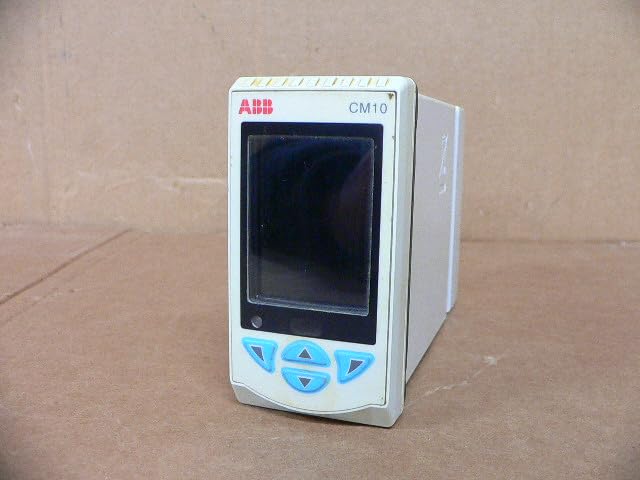
Figur 3.1: Forside view of the ABB CM10 Universal Process Controller. This image shows the main display screen and the array of light blue control buttons below it, including up, down, left, right, and enter buttons.
The front panel includes the main display for process values and configuration menus, along with tactile buttons for navigation and parameter adjustment.
3.2 Bagpanel og tilslutninger

Figur 3.2: Bagside og side view of the ABB CM10 Universal Process Controller. This image highlights the multiple terminal blocks for input/output connections and printed wiring diagrams on the side casing.
The rear panel provides access to the electrical terminal blocks for connecting power, inputs (e.g., RTD, mA, mV), and outputs. Detailed wiring diagrams are typically printed on the side of the unit for reference.
3.3 Produktetiket
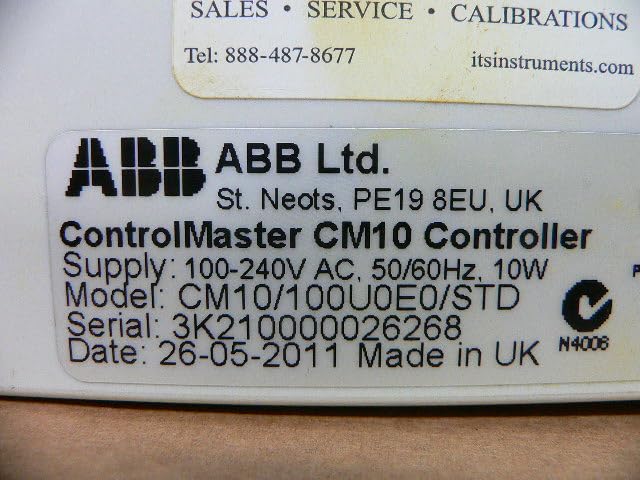
Figure 3.3: Close-up of the product label on the ABB CM10 Controller. The label clearly displays "ControlMaster CM10 Controller", supply voltage (100-240V AC, 50/60Hz, 10W), model number (CM10/100U0E0/STD), serial number, and manufacturing date.
The product label contains critical information such as the model number, serial number, power requirements, and manufacturing details. This information is essential for support and identification.
4. Opsætning og installation
Proper installation is crucial for the reliable operation of the CM10 controller. Follow these steps carefully:
- Montering: Mount the controller in a suitable panel cutout, ensuring adequate ventilation and clearance for wiring. Refer to the product's dimensional drawings for precise cutout dimensions.
- Ledningsstrøm: Connect the 100-240V AC, 50/60Hz power supply to the designated power terminals on the rear of the unit. Ensure correct polarity and proper grounding.
- Indgangsledning: Connect process inputs (e.g., thermocouples, RTDs, 4-20mA current loops, voltage signals) to the appropriate input terminals as indicated by the wiring diagrams on the unit or in detailed wiring schematics.
- Udgangsledning: Connect control outputs (e.g., relays, analog outputs) to the controlled devices according to the application requirements and wiring diagrams.
- Verifikation: Before applying power, double-check all wiring connections for correctness, security, and insulation.
5. Betjeningsvejledning
The CM10 controller is designed for user-friendly operation. Basic operation involves navigating menus and setting parameters.
5.1 Tænd
Once all wiring is complete and verified, apply power to the unit. The controller will perform a self-test and then display the main process value screen.
5.2 Navigation
Use the front panel buttons to navigate through menus:
- Pil op/ned: Scroll through menu options or adjust parameter values.
- Venstre/højre pile: Move between digits when setting numerical values or navigate sub-menus.
- Enter knap: Select an option, confirm a setting, or enter a menu.
5.3 Parameterkonfiguration
Access the configuration menus to set control parameters such as setpoints, PID constants, alarm limits, and input/output types. Refer to the detailed programming guide (usually a separate document or advanced section of the manual) for specific parameter definitions and configuration procedures.
6. Vedligeholdelse
The ABB CM10 controller is designed for minimal maintenance. However, regular checks can ensure long-term reliability.
- Rensning: Keep the front panel clean using a soft, damp klæde. Brug ikke slibende rengøringsmidler eller opløsningsmidler.
- Tilslutningstjek: Kontrollér regelmæssigt alle elektriske forbindelser for tæthed og tegn på korrosion.
- Miljøovervågning: Ensure the operating environment remains within specified limits (temperature, humidity, vibration).
- Firmwareopdateringer: Check the ABB website for any available firmware updates that may improve performance or add features. Consult ABB technical support before performing any updates.
Note: All internal maintenance or repairs should only be performed by authorized ABB service personnel.
7. Fejlfinding
This section provides solutions to common issues encountered with the CM10 controller. For problems not listed here, contact ABB technical support.
| Problem | Mulig årsag | Løsning |
|---|---|---|
| Controlleren tænder ikke. | Ingen strømforsyning; forkert ledningsføring; sprunget sikring. | Check power connections; verify wiring against diagram; check internal fuse (if accessible and user-serviceable, otherwise contact support). |
| Displayet viser fejlmeddelelse. | Input sensor fault; configuration error; internal malfunction. | Refer to the error code list in the detailed programming manual; check sensor connections; verify configuration settings; if persistent, contact support. |
| Incorrect process value reading. | Sensor calibration issue; incorrect input type configured; wiring fault. | Calibrate sensor; verify input type setting in configuration; check sensor wiring. |
8. Specifikationer
Key technical specifications for the ABB CM10 Universal Process Controller:
- Model: CM10/100U0E0/STD
- Forsyning Voltage: 100-240V AC, 50/60Hz
- Strømforbrug: 10W
- Produktdimensioner: 7.09 x 6.3 x 8.27 tommer (180 x 160 x 210 mm)
- Vægt: Cirka 0.6 kg
- Fabrikant: ABB Ltd.
- Dato først tilgængelig: 14. februar 2025
9. Garanti og support
For specific warranty terms and conditions, please refer to the documentation provided with your purchase or contact ABB directly. Warranty periods and coverage may vary based on region and product type.
For technical support, service, or to inquire about genuine ABB replacement parts, please visit the official ABB webwebstedet eller kontakt deres kundeserviceafdeling. Du kan finde flere oplysninger på ABB Store on Amazon or their global support portal.