
Indledning
Welcome to the OYIB S75 Wireless Earbuds user manual. This guide provides comprehensive instructions for setting up, operating, maintaining, and troubleshooting your new wireless earbuds. The OYIB S75 earbuds feature advanced Bluetooth 5.4 technology, deep stereo bass, an ENC microphone for clear calls, IP7 waterproofing, and a long-lasting 50-hour battery life with the charging case. Designed for comfort and stability, they are ideal for sports and daily use.
Hvad er der i æsken
Kontroller venligst pakkens indhold for at sikre, at alle varer er til stede:
- S75 Headphones (Left/Right) x 2
- USB-C ladekabel x 1
- Bærbart opladningsetui x 1
- Brugervejledning x 1
- Eartips with 3 Sizes (S, M, L)

Image: OYIB S75 Wireless Earbuds in their charging case, showcasing the cream white color and earhook design.
Produkt overview
Komponenter
- høretelefoner Left and Right earbuds with integrated earhooks and touch control areas.
- Opladningsetui: Portable case for charging and storing earbuds, featuring a dual LED digital display for battery status.
- USB-C-port: Til opladning af etuiet.
- ENC Microphone: Built-in for clear call quality.
- 13 mm dynamiske drivere: For immersive stereo sound.
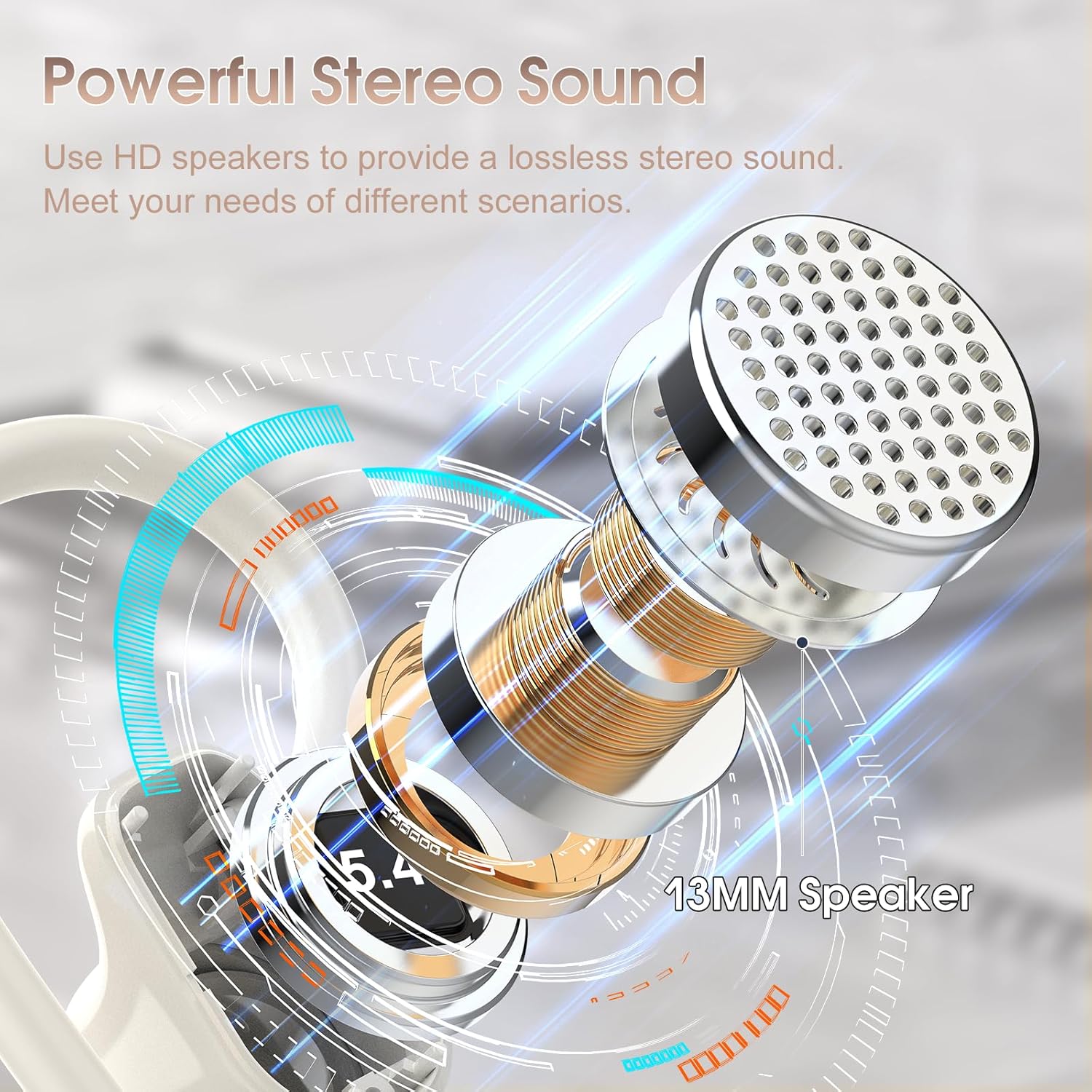
Image: Detailed diagram illustrating the 13mm speaker driver within the OYIB S75 earbud, highlighting its components for powerful stereo sound.
Tryk på kontrolelementer
The earbuds feature smart touch controls located on the upper part of the earbud surface. Refer to the table below for specific functions:
| Handling | Fungere |
|---|---|
| One Click (R/L) | Afspil/pause musik |
| Short Tap (R/L) | Besvar/afslut opkald |
| Long Tap (R/L) | Afvis opkald |
| One Click Tap R | Volumen + |
| One Click Tap L | Volumen - |
| Langt tryk 2s L | Track Reverse |
| Langt tryk 2s R | Spor frem |
| Triple Click (R/L) | Aktiver Voice Assistant |

Image: Visual representation of the smart touch control functions on the OYIB S75 earbuds, showing various tap and long-press actions.
Opsætning
1. Opladning af øretelefoner og etuiet
- Placer ørepropperne i opladningsetuiet. Sørg for, at de sidder korrekt.
- Connect the USB-C charging cable to the charging port on the case and plug the other end into a USB power source (e.g., wall adapter, computer).
- Det digitale LED-display på opladningsetuiet viser batteriprocenten.tage. The earbuds will also indicate their charging status.
- A full charge for the case and earbuds typically takes about 1 hour.
The earbuds provide approximately 10 hours of playtime on a single charge, and the charging case offers multiple additional charges, extending total playtime to about 50 hours.

Image: Diagram illustrating the 50-hour total battery life, 10 hours per earbud charge, and 1.5-hour fast charging via USB-C.
2. Parring med din enhed
- Indledende parring: Åbn låget på opladningsetuiet. Øretelefonerne tænder automatisk og går i parringstilstand.
- On your device (smartphone, tablet, laptop), go to the Bluetooth settings and ensure Bluetooth is enabled.
- Søg efter tilgængelige enheder, og vælg "S75" fra listen.
- Når der er forbindelse, hører du en bekræftelsestone, og ørepropperne er klar til brug.
- Automatisk genforbindelse: After the initial pairing, the earbuds will automatically connect to the last paired device when you open the charging case lid.
The earbuds maintain a stable connection within a range of up to 15 meters (49 feet) from the paired device.
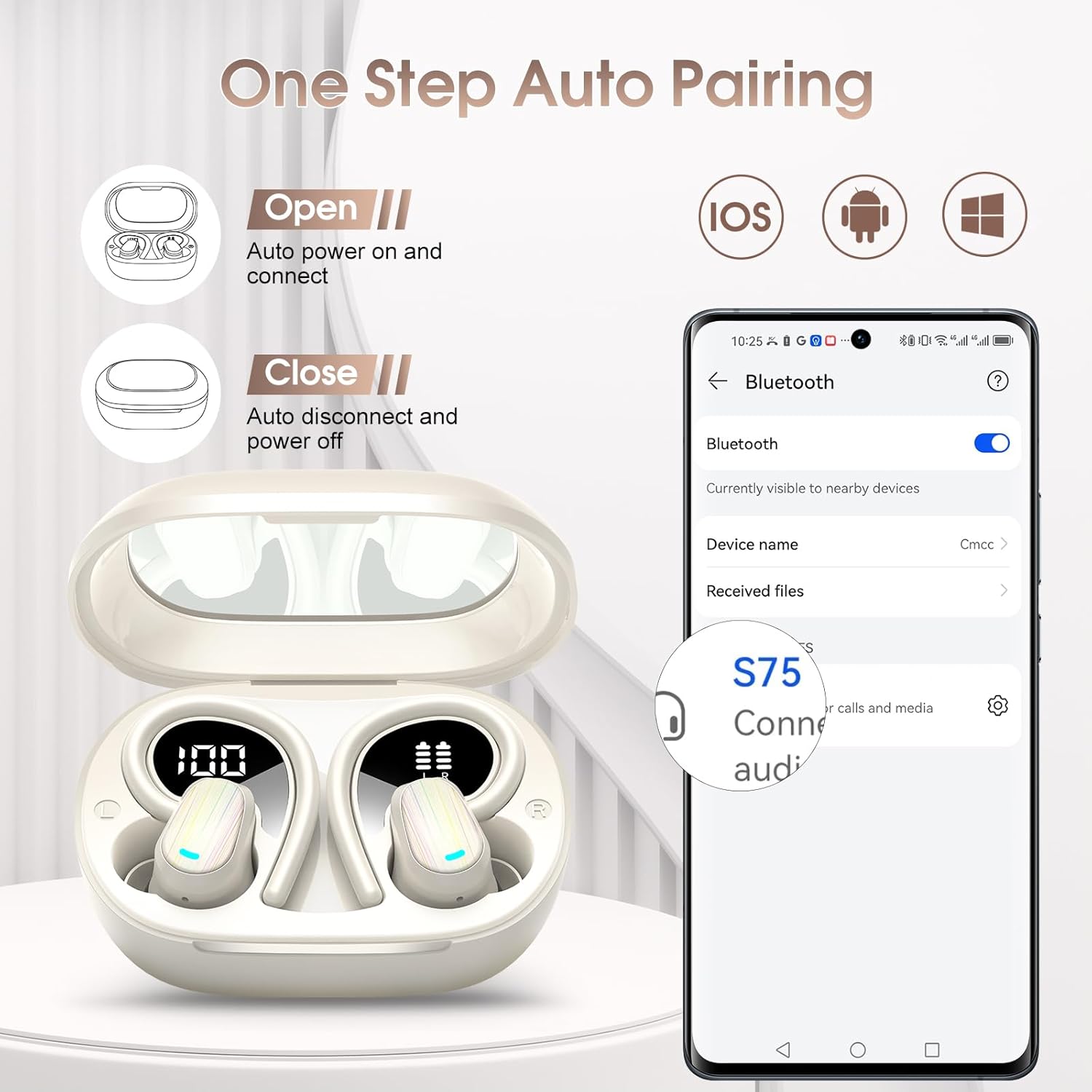
Image: Illustration of the one-step auto-pairing process for OYIB S75 earbuds, showing opening the case and selecting "S75" on a smartphone's Bluetooth menu.
3. Sådan tager du ørepropperne på
- Choose the best-fitting eartips (S, M, L) for optimal comfort and sound quality.
- Insert the headphones along the ear canal.
- Revolve the earhooks until they are securely inserted behind your ears.
- Adjust the headphones to a comfortable angle for a stable fit.

Image: Step-by-step guide on how to wear the OYIB S75 earbuds stably, including eartip selection and earhook adjustment, shown with a woman exercising.
Betjeningsvejledning
Musikafspilning
- Afspil/pause: One click on either earbud.
- Lydstyrke op: One click on the Right earbud.
- Skrue ned for lyden: One click on the Left earbud.
- Næste nummer: Long tap for 2 seconds on the Right earbud.
- Forrige nummer: Long tap for 2 seconds on the Left earbud.
Opkaldsstyring
- Besvar/afslut opkald: Short tap on either earbud.
- Afvis opkald: Long tap on either earbud.
Stemmeassistent
- Aktiver stemmeassistent: Triple click on either earbud.
Opretholdelse
Rensning
- Rengør regelmæssigt ørepropperne og opladningsetuiet med en blød, tør og fnugfri klud.
- Fjern ørepropperne, og rengør dem med mild sæbe og vand, hvis det er nødvendigt. Sørg for, at de er helt tørre, før du sætter dem på igen.
- Undgå at bruge slibende rengøringsmidler, opløsningsmidler eller aerosolspray.
Opbevaring
- Når ørepropperne ikke er i brug, skal de altid opbevares i deres opladningsetui for at beskytte dem og holde dem opladede.
- Opbevares køligt og tørt, væk fra ekstreme temperaturer og direkte sollys.
Vandmodstand
The OYIB S75 earbuds have an IP7 waterproof rating, making them resistant to water splashes and sweat. They are suitable for exercise and daily use. However, they are not designed for swimming or prolonged submersion in water.

Image: A woman wiping sweat after a workout, illustrating the waterproof design of the S75 earbuds for daily and exercise use.
Fejlfinding
If you encounter any issues with your OYIB S75 Wireless Earbuds, please refer to the following common solutions:
| Problem | Mulig løsning |
|---|---|
| Øretelefoner parrer ikke |
|
| Ingen lyd eller lav lydstyrke |
|
| Øretelefoner oplader ikke |
|
| Problemer med opkaldskvaliteten |
|
Specifikationer
| Feature | Detalje |
|---|---|
| Modelnavn | S75 |
| Mærke | OYIB |
| Forbindelsesteknologi | Trådløs (Bluetooth) |
| Bluetooth version | 5.4 |
| Bluetooth rækkevidde | 15 meter |
| Audio driver type | Dynamisk driver (13 mm) |
| Batterilevetid (ørepropper) | 10 timer |
| Samlet spilletid (med etui) | 50 timer |
| Opladningstid | 1 time (for fuld opladning) |
| Opladningsport | USB-C |
| Vandmodstandsniveau | IP7 vandtæt |
| Kontrolmetode | Røre |
| Mikrofon | Built-in ENC Mic |
| Øreplacering | In Ear |
| Formfaktor | Over Ear (with earhooks) |
| Kompatible enheder | iOS, Android, and all Bluetooth-enabled devices |
| Varens vægt | 0.11 kilo (3.84 ounce) |
| Pakkedimensioner | 3.7 x 3.46 x 1.46 tommer |
Garanti og support
OYIB products are designed for reliability and performance. For specific warranty information, please refer to the warranty card included in your product packaging or contact OYIB customer support.
If you require further assistance or have questions not covered in this manual, please contact OYIB customer support through the retailer where you purchased the product or visit the official OYIB webwebsted for supportmuligheder.