
1. Introduktion
The DJI Air 3S Drone with RC 2 Fly More Combo is an advanced aerial photography platform designed for capturing high-quality images and videos. It features a dual-camera system, extended flight time, and comprehensive safety mechanisms. This manual provides essential information for the safe and effective setup, operation, and maintenance of your DJI Air 3S drone.
2. Hvad er der i æsken
Bekræft at alle komponenter er til stede i din pakke:
- DJI Air 3S Drone
- RC 2 fjernbetjening
- 3 x Intelligent Flight Battery
- 128GB Extreme microSD Memory Card
- High USB Speed Memory Card Reader
- Skuldertaske
- Drone Photography Backpack
- 3 x Extra Pair of Low-Noise Propellers
- Kardanbeskytter
- USB-C PD-kabel
- ND Filter Set (ND8, ND32 & ND128)
- Batteriopladningshub
- Drone Landing Pad
- Camera Lens Cleaning Kit
- 6-Slot Memory Card Wallet
- CPS 2 Year Warranty
- Bundle It Better Lens Cloth

Image: Contents of the DJI Air 3S Drone Fly More Combo package, including drone, controller, batteries, and accessories.
Video: En udpakning og mereview of the DJI Air 3S Fly More Combo components, demonstrating what is included in the package.
Video: A user's experience with the DJI Air 3S, showcasindens funktioner og komponenter.
3. Opsætning
3.1 Udfoldning af dronen
- Place the drone on a flat, stable surface.
- Gently unfold the front arms, then the rear arms, until they lock into position.
- Sørg for, at alle propeller er sikkert fastgjort og ikke er beskadigede.

Image: The DJI Air 3S Drone fully unfolded, ready for flight, showing its front camera and sensors.
Video: Demonstrates the process of unfolding the DJI Air 3S drone's arms and preparing it for flight.
3.2 Preparing the RC 2 Remote Controller
- Remove the control sticks from their storage slots on the controller.
- Screw the control sticks into the designated ports.
- Ensure the controller is fully charged using the provided USB-C PD cable.
Video: A demonstration of setting up the RC 2 remote controller, including attaching the control sticks.
3.3 Batteriinstallation og opladning
- Insert a fully charged Intelligent Flight Battery into the drone's battery compartment until it clicks into place.
- Use the Battery Charging Hub to charge multiple batteries efficiently. Connect the hub to a suitable power adapter (not included) and then to a power source.
3.4 Første opstart og aktivering
- Press the power button on the drone once, then press and hold for two seconds to power on. Repeat for the remote controller.
- Follow the on-screen instructions on the RC 2 controller to activate the drone and link it to your DJI account. Ensure a stable internet connection for activation.
4. Betjening af dronen
4.1 Grundlæggende flyvekontrol
Familiarize yourself with the RC 2 controller's joysticks and buttons. The left stick typically controls altitude and yaw, while the right stick controls forward, backward, and sideways movement. Always perform a pre-flight check before takeoff.
4.2 Kamerabetjening
The DJI Air 3S features a dual-camera system: a 1" CMOS 24mm 50MP wide-angle camera and a 1/1.3" CMOS 70mm 48MP medium telephoto camera. It supports 4K/60fps HDR video recording and 48MP still images. Use the DJI Fly app on the RC 2 controller to switch between cameras, adjust settings, and initiate recording or photo capture.
- MasterShots: Automated flight and shooting sequences for cinematic results.
- QuickShots: Pre-programmed flight paths for dynamic video clips.
- 2.7K vertikal optagelse: Available on both cameras for social media content.

Image: The DJI Air 3S Drone in mid-flight, showcasing its design and operational capabilities.
4.3 Sikkerhedsfunktioner
The Air 3S is equipped with advanced safety features:
- Omnidirectional Obstacle Sensing (APAS): Detects obstacles in all directions, providing comprehensive protection.
- Advanced Return-to-Home (RTH): The drone can intelligently return to its takeoff point, utilizing a forward-facing LiDAR sensor for obstacle avoidance during nighttime RTH.
- Non-GPS RTH: If GPS is unavailable, the drone can retrace its flight path to return safely.
4.4 O4 HD Video Transmission
The O4 HD video transmission system, with its six-antenna array, provides a stable 1080p/60fps live feed up to 20 km, ensuring clear and reliable communication between the drone and controller.
Video: En genudgivelseview of the DJI Air 3S Drone with RC 2 Fly More Combo, highlighting its operational features and performance.
5. Vedligeholdelse
5.1 Pleje af batterier
- Charge batteries fully before each flight.
- Opbevar batterier med en opladning på cirka 50-60%, hvis de ikke bruges i længere perioder.
- Undgå ekstreme temperaturer under opladning og opbevaring.
5.2 Inspektion og udskiftning af propeller
- Før hver flyvning skal propellerne inspiceres for revner, bøjninger eller skader.
- Replace damaged propellers immediately using the extra pairs provided. Follow the drone's manual for correct installation.

Billede: Top view of the DJI Air 3S Drone, showing its propellers and overall design.
5.3 Gimbal and Lens Care
- Always attach the gimbal protector when transporting or storing the drone.
- Use the provided lens cleaning kit to keep the camera lenses free from dust and smudges.
5.4 firmwareopdateringer
Regularly check for and install firmware updates via the DJI Fly app to ensure optimal performance, new features, and enhanced safety.
6. Fejlfinding
This section addresses common issues you might encounter. For detailed troubleshooting, refer to the official DJI support resources.
- Intet GPS-signal: Ensure you are flying in an open area away from tall buildings or strong magnetic interference.
- Remote Controller Disconnection: Ensure the drone and controller are within range and there is no significant interference. Re-link the controller if necessary.
- Obstacle Avoidance Warnings: Pay attention to on-screen warnings and adjust flight path. Ensure sensors are clean and unobstructed.
- Gimbal-fejl: Check for physical obstructions. Restart the drone and controller. If the issue persists, contact support.
- Batteri oplades ikke: Verify the charging cable and adapter are functioning correctly. Ensure batteries are inserted properly into the charging hub.
7. Specifikationer
| Feature | Specifikation |
|---|---|
| Mærke | DJI |
| Modelnavn | Air 3S |
| Særlige funktioner | Omnidirectional Obstacle Sensing, Six-Antenna Array |
| Videooptagelsesopløsning | 4K |
| Effektiv stillopløsning | 50 MP (Wide-angle), 48 MP (Telephoto) |
| Max flyvetid | Op til 45 minutter |
| Maksimal rækkevidde | 20 Kilometers (O4 HD Transmission) |
| Batteritype | Lithium Ion |
| Varens vægt | 151 Grams (Drone only, approximate) |
| Varedimensioner (L x B x H) | 12.8"L x 10.5"W x 4.2"H (Unfolded, approximate) |
| Forbindelsesteknologi | USB, Wi-Fi |
| Optisk sensorteknologi | CMOS |
8. Garanti
This product includes a CPS 2 Year Warranty, providing coverage for protection, repair, and replacement services. Please refer to the warranty documentation included in your package for full terms and conditions.
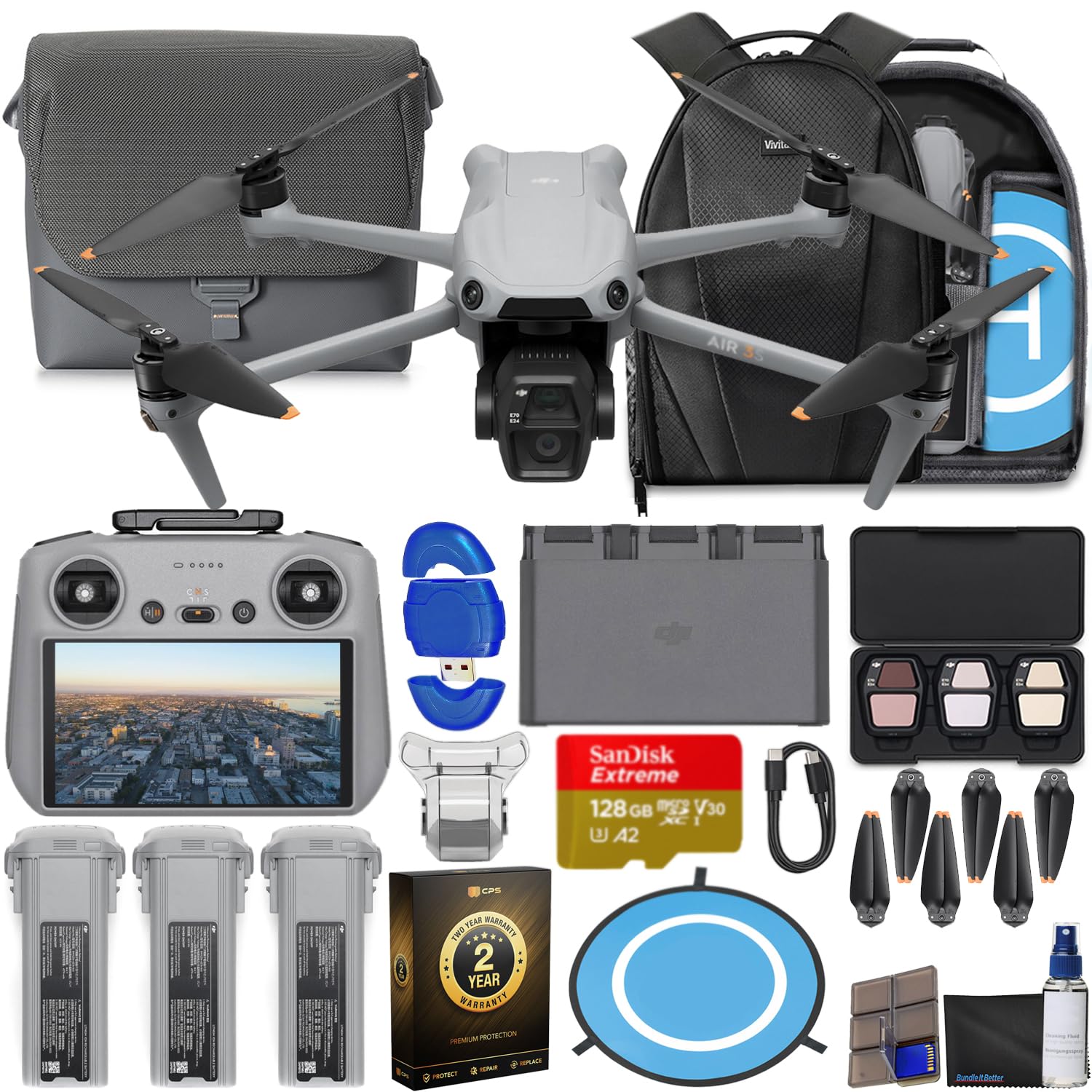
Image: The CPS 2 Year Warranty box, indicating premium protection, repair, and replacement services.
9. Support
For further assistance, detailed user guides, firmware downloads, and technical support, please visit the official DJI support website. You can also find FAQs and community forums for additional help.
Officiel DJI Webwebsted: www.dji.com/support