
OHOVIV N10
OHOVIV Portable Charger Power Bank N10 User Manual
Model: N10 | Brand: OHOVIV
Indledning
Thank you for choosing the OHOVIV N10 Portable Charger Power Bank. This device is designed to provide reliable and fast charging for a wide range of electronic devices, ensuring you stay powered on the go.
With its massive 50000mAh capacity and versatile built-in cables, it's an essential companion for travel, outdoor activities, and daily use.

Figure 1: OHOVIV N10 Portable Charger Power Bank
Produkt overview & Funktioner
The OHOVIV N10 Power Bank is engineered with convenience and efficiency in mind. Key features include:
- Huge Capacity 50000mAh: Provides approximately 10 full charges for an iPhone 15, utilizing a new high-density polymer battery. Ideal for extended trips and multiple device charging.
- Charge 6 Devices at Once: Equipped with 4 built-in cables (Lightning, Type-C, Micro, USB-A) and 3 additional charging ports (2 USB-A, 1 Type-C), allowing simultaneous charging of up to 6 devices. The built-in cables are made from high-quality, bendable TPU material, tested to withstand over 10,000 bends.
- 22.5 W superhurtig opladning: Features PD 22.5W output and QC4.0 quick charging technology, capable of charging an iPhone to 55% in just 30 minutes.
- USB-C Two-Way Charging (IN&OUT): The USB-C port supports both input and output, offering flexible recharging and device charging options.
- LED digitalt display: Giver batteriprocent i realtidtage, eliminating power anxiety.
- Kompakt design: Measures 5.82 x 2.83 x 1.18 inches and weighs 1.07 lb, making it easy to carry in a backpack, pocket, or bag.
- Overlegen sikkerhed: Built-in quality batteries and 10 multiple system protections prevent overcharge, short circuit, and other potential dangers. Features an upgraded AI smart chip and NTC temperature control technology to minimize power loss and reduce overheating risks by 97%.
- Bred kompatibilitet: Compatible with nearly all electronics, including iPhone 16/15/14/13/12 series, iPad series, Samsung S24/S23/S22/S21/S20, Google Pixel, other Android devices, and tablets.

Figur 2: Detaljeret view of the power bank's outputs and inputs.

Figure 3: High-quality, bendable built-in cables.
Opsætning
Before first use, it is recommended to fully charge your OHOVIV N10 Power Bank.
Opladning af Power Bank:
The power bank can be recharged in two ways:
- Brug af det indbyggede USB-A-kabel: Locate the built-in USB-A cable. Plug the USB-A end into any compatible USB wall adapter (not included), computer USB port, or power strip.
- Brug af Type-C-porten: Connect a USB-C to USB-C cable (not included) to the power bank's Type-C port and plug the other end into a compatible USB-C wall adapter or device.
Det digitale LED-display viser opladningsforløbet og angiver batteriprocenten.tage. A full charge is indicated by 100% on the display.

Figure 4: Recharging options for the power bank.
Video 1: This video demonstrates the various charging capabilities of the OHOVIV 50000mAh Portable Charger, including its built-in cables and fast charging features. It shows how to charge the power bank itself and how to use it to charge multiple devices simultaneously.
Betjeningsvejledning
The OHOVIV N10 Power Bank offers multiple ways to charge your devices:
Opladningsenheder:
- Brug af indbyggede kabler:
- Identify the correct built-in cable for your device (Lightning for Apple, Type-C for modern Android/other devices, Micro for older Android/accessories).
- Træk forsigtigt det ønskede kabel ud af dets opbevaringsplads.
- Plug the cable directly into your device's charging port.
- Brug af eksterne porte:
- For devices requiring a different cable or faster charging, use your own USB-A or USB-C cable.
- Plug your cable into one of the available USB-A output ports (USB-A1, USB-A2) or the Type-C input/output port.
- Tilslut den anden ende af kablet til din enhed.
- Samtidig opladning: You can charge up to 6 devices concurrently by utilizing a combination of the built-in cables and external ports.
Kontrol af batteriniveau:
Press the power button on the side of the power bank. The LED digital display will illuminate, showing the remaining battery percentage.

Figure 5: Charging a device using a built-in cable.
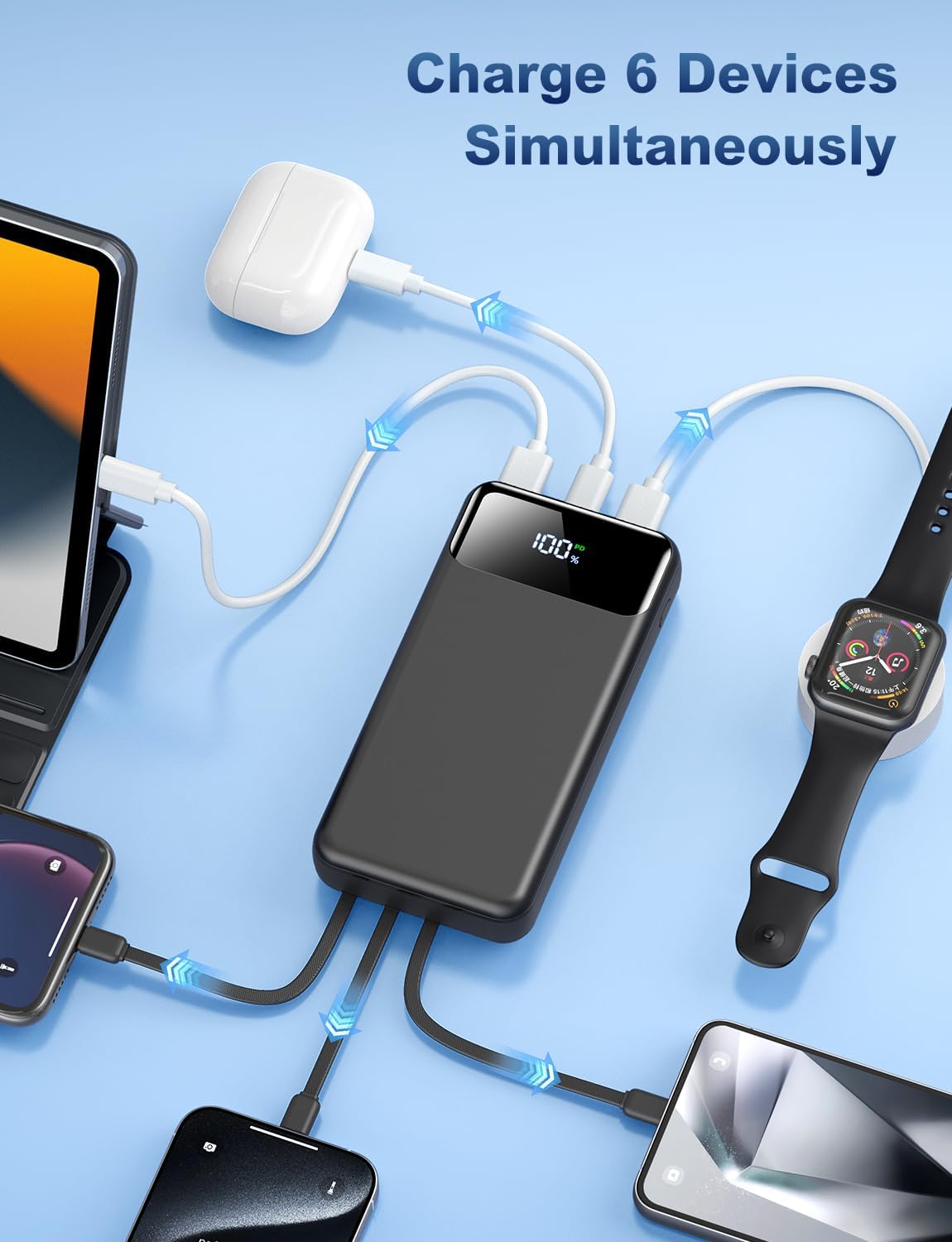
Figure 6: The power bank charging multiple devices at once.
Opretholdelse
To ensure the longevity and optimal performance of your OHOVIV N10 Power Bank, follow these maintenance guidelines:
- Opbevaring: Opbevar powerbanken et køligt, tørt sted væk fra direkte sollys og ekstreme temperaturer.
- Rensning: Brug en blød, tør klud til at rengøre overfladen på powerbanken. Undgå at bruge skrappe kemikalier eller slibende materialer.
- Undgå fysisk skade: Do not drop, disassemble, or expose the power bank to water or excessive moisture.
- Regelmæssig brug: For best battery health, use and recharge the power bank regularly, even if not frequently used.
- Sikkerhedsfunktioner: The power bank includes multiple protection systems (overcharge, short circuit, temperature control). Do not attempt to bypass or modify these features.

Figur 7: Overview of the power bank's superior safety protections.
Fejlfinding
If you encounter any issues with your OHOVIV N10 Power Bank, please refer to the following common solutions:
- Enheden oplades ikke:
- Sørg for, at powerbanken har tilstrækkelig opladning (tjek LED-displayet).
- Kontroller, at kablet er korrekt tilsluttet til både powerbanken og din enhed.
- Try a different built-in cable or an external cable to rule out a faulty cable.
- Sørg for, at din enhed er kompatibel med powerbankens outputspecifikationer.
- Power Bank Not Recharging:
- Check if the charging cable (built-in USB-A or external Type-C) is properly connected to a power source.
- Prøv en anden vægadapter eller USB-port.
- Sørg for, at strømkilden er aktiv og leverer strøm.
- Langsom opladning:
- Ensure you are using a fast-charging compatible cable and wall adapter if charging the power bank.
- For device charging, ensure your device supports 22.5W fast charging and that you are using the appropriate port/cable.
- Opladning af flere enheder samtidigt kan reducere individuelle opladningshastigheder.
- LED-displayet virker ikke:
- Tryk hårdt på tænd/sluk-knappen.
- Hvis powerbanken er helt afladet, lyser displayet muligvis ikke, før den er opladet.
If the issue persists after trying these steps, please contact OHOVIV customer support for assistance.
Specifikationer
| Feature | Detalje |
|---|---|
| Modelnummer | N10 |
| Batterikapacitet | 50000 mioamp Timer |
| Produktdimensioner | 5.82 x 2.83 x 1.18 tommer |
| Varens vægt | 1.19 pund |
| Opladningsudgang | 22.5W (PD & QC4.0) |
| Indbyggede kabler | Lightning, Type-C, Micro, USB-A |
| Yderligere havne | 2 x USB-A Output, 1 x Type-C (IN&OUT) |
| Vise | LED digitalt display |
| Farve | Sort |
| Fabrikant | Shenzhen Daximen Import og Export Trading Co., LTD |
| Oprindelsesland | Kina |
Garanti og support
OHOVIV is committed to providing excellent customer service and product reliability.
- Garanti: Enjoy peace of mind with a 365-day replacement guarantee.
- Kundesupport: 24/7 professional customer support is available to assist you with any issues or questions you may encounter.
- Kontakte: For support, please refer to the contact information provided in your product packaging or visit the official OHOVIV store on Amazon. When contacting support, please provide your order number and detailed information about the issue for a faster resolution.

Figure 8: OHOVIV's commitment to customer service and support.
Ask a question about this manual
Ask about setup, troubleshooting, compatibility, parts, safety, or missing instructions. Manuals+ will review the question and use this page’s manual context to help answer it.