
Indledning
Thank you for choosing the Mibro Smartwatch Lite 3. This manual provides essential information for setting up, operating, and maintaining your device. Please read it carefully to ensure proper use and to maximize the performance of your smartwatch.
Pakkens indhold
Sørg for at alle varer er til stede i pakken:
- Mibro Smartwatch Lite 3 (with strap)
- Magnetisk opladningskabel
- Brugermanual
Produkt overview
The Mibro Smartwatch Lite 3 features a 1.3-inch AMOLED display, designed for clear visuals and intuitive interaction. It integrates various sensors for health monitoring and supports Bluetooth calling.
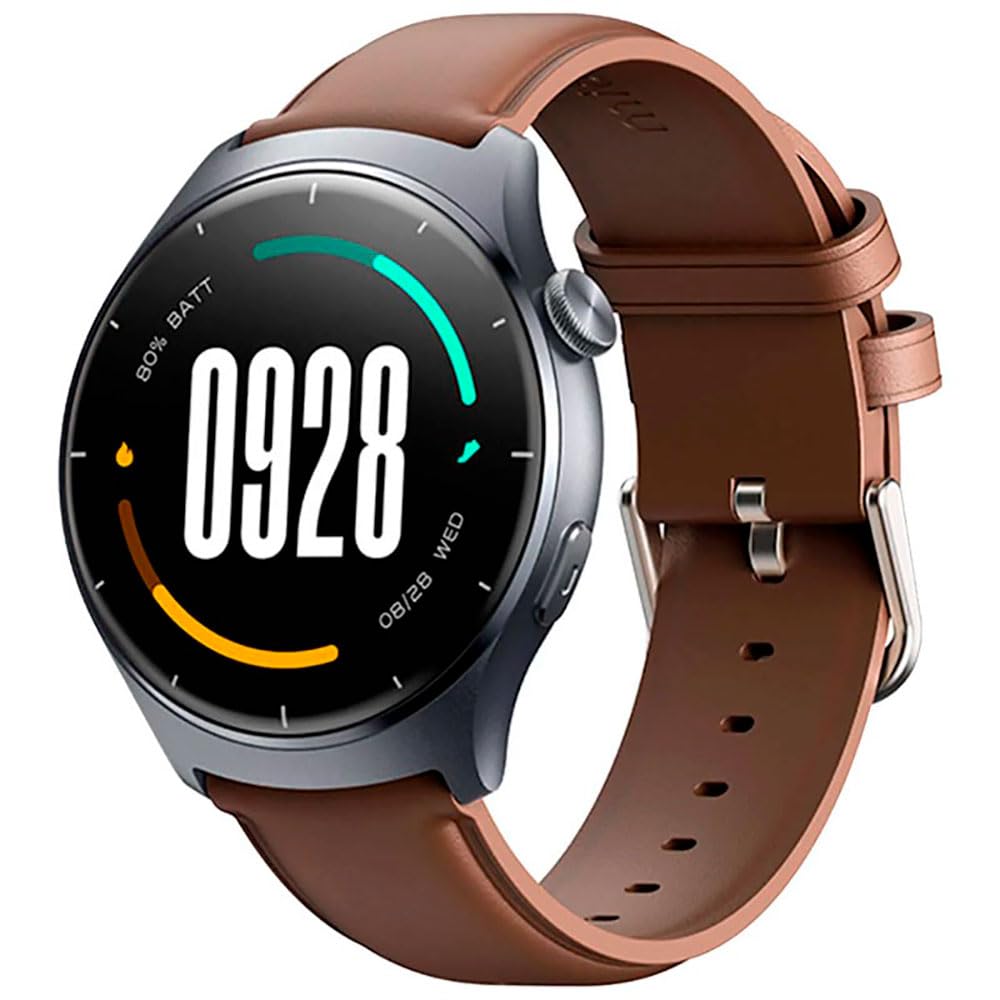
Billede: Forside view of the Mibro Smartwatch Lite 3, showcasing its round display and strap.
Opsætning
1. Opladning af smartwatchet
- Tilslut det magnetiske opladningskabel til opladningskontakterne på bagsiden af smartwatchet.
- Sæt USB-enden af kablet i en standard USB-strømadapter (5V/1A anbefales) eller en computers USB-port.
- The watch display will show a charging indicator. Ensure the watch is fully charged before first use.
2. Appinstallation og parring
- Download the official Mibro Fit application from your smartphone's app store (App Store for iOS, Google Play Store for Android).
- Åbn Mibro Fit-appen, og opret en konto, eller log ind.
- Sørg for, at Bluetooth er aktiveret på din smartphone.
- In the Mibro Fit app, navigate to 'Device' or 'Add Device' and select 'Mibro Lite 3' from the list of available devices.
- Confirm the pairing request on both your smartphone and the smartwatch. A successful connection will be indicated on the watch display.
Drift
1. Grundlæggende navigation
- Stryg ned: Access quick settings (e.g., brightness, do not disturb, battery saver).
- Stryg op: View meddelelser.
- Stryg til venstre/højre: Navigate through widgets (e.g., heart rate, weather, activity data).
- Tryk på sideknappen: Return to the watch face or access the main menu.
- Langt tryk på sideknappen: Power on/off or restart the device.
2. Sportstilstande
The Mibro Lite 3 supports over 100 sports modes. To start a workout:
- From the main menu, select the 'Workout' or 'Sports' icon.
- Choose your desired activity (e.g., running, cycling, swimming).
- Tap 'Start' to begin tracking. The watch will display real-time data such as duration, heart rate, and calories burned.
- To pause or end a workout, press the side button or swipe on the screen as prompted.
3. Bluetooth-opkald
Once paired with your smartphone, the Mibro Lite 3 allows you to make and receive calls directly from your wrist.
- Modtagelse af opkald: Når et opkald kommer ind, viser uret nummeret på opkalderen. Tryk på det grønne ikon for at besvare eller det røde ikon for at afvise.
- Foretage opkald: Access the 'Phone' or 'Dialer' function on the watch, then select a contact or dial a number.
4. Sundhedsovervågning
- Puls: Uret overvåger løbende din puls. View real-time data by swiping to the heart rate widget or accessing the 'Heart Rate' app.
- SpO2 (blodilt): Measure your blood oxygen levels through the 'SpO2' app on the watch. Ensure the watch is snug on your wrist for accurate readings.
- Søvnsporing: Wear the watch to bed for automatic sleep monitoring. Data on sleep stages and duration can be viewed in the Mibro Fit app.
- Stress Monitoring & Breath Training: Utilize these features to manage stress and improve relaxation.
5. Andre funktioner
- Musik kontrol: Styr musikafspilningen på din smartphone direkte fra uret.
- App Message Reminders: Receive notifications from various apps on your watch.
- Vejr: Få vejropdateringer i realtid.
- Alarm, timer, stopur: Standardfunktioner.
- Find din telefon: Locate your paired smartphone by triggering an alert sound.
- Kvinders sundhed: Spor menstruationscyklusser og relaterede data.
Opretholdelse
1. Rensning
- Rengør regelmæssigt urkassen og remmen med en blød klud.amp klæde.
- Ensure the charging contacts are free from dust and debris to maintain efficient charging.
- Undgå at bruge skrappe kemikalier eller slibende materialer til rengøring.
2. Vandafvisende
The Mibro Lite 3 is 2ATM waterproof, meaning it can withstand splashes, rain, and brief immersion in shallow water. It is suitable for activities like swimming in pools. However, it is not recommended for hot showers, saunas, or diving, as steam and high-pressure water jets may compromise the seal.
Fejlfinding
- Uret tænder ikke: Sørg for, at uret er fuldt opladet. Tilslut det til opladeren i mindst 30 minutter.
- Kan ikke parres med telefonen:
- Tjek, om Bluetooth er aktiveret på din telefon.
- Sørg for, at uret er inden for din telefons Bluetooth-rækkevidde.
- Genstart både uret og din telefon, og prøv derefter at parre igen.
- Make sure the Mibro Fit app is updated to the latest version.
- Unøjagtige sundhedsdata: Ensure the watch is worn snugly on your wrist, about one finger's width from the wrist bone. Avoid excessive movement during measurements.
- Ikke modtaget meddelelse:
- Check notification permissions for the Mibro Fit app in your phone settings.
- Ensure 'Do Not Disturb' mode is not active on either the watch or the phone.
- Verify that the app is running in the background on your phone.
- Kort batterilevetid: Reduce screen brightness, disable continuous heart rate monitoring if not needed, and limit background app refresh.
Specifikationer
| Feature | Specifikation |
|---|---|
| Modelnavn | Mibro Watch Lite 3 |
| Dimensioner | φ44.8mm, T=11.2mm (Without HR protrusion) |
| Vægt | 53.2g (with leather strap), 56g (with rubber strap) |
| Vise | 1.3-inch AMOLED, 360*360 resolution, AOD, PPI 277 |
| Forbindelse | Bluetooth V5.3 |
| Sensorer | PPG Heart Rate/SpO2 Sensor/Accelerometer |
| Vandtæt vurdering | 2 ATM |
| Batterilevetid (daglig tilstand) | Op til 12 dage |
| Batterilevetid (standbytilstand) | Op til 50 dage |
| Batterilevetid (musiktilstand) | Op til 5 timer |
| Battery Life (BT-Calling Mode) | Op til 6 timer |
| Driftstemperatur | 0°C ~ 45°C |
Garanti og support
The Mibro Smartwatch Lite 3 comes with a 12-month warranty from the date of purchase. This warranty covers manufacturing defects under normal use. It does not cover damage caused by misuse, accidents, unauthorized modifications, or normal wear and tear.
For technical support, warranty claims, or further assistance, please contact Mibro customer service through the official Mibro webwebstedet eller kontaktoplysningerne i din købsdokumentation.