
Electronic Spices W88-B
Electroni Spices W88-B 20A Solar Charger Controller User Manual
Model: W88-B
1. Introduktion
The Electronic Spices W88-B 20A Solar Charger Controller is designed to efficiently manage the charging and discharging of 12V/24V solar power systems. This controller optimizes battery performance and extends battery life by preventing overcharging, over-discharging, and short circuits. It features dual USB ports for charging mobile devices and other USB-powered gadgets directly from the solar system. Utilizing intelligent PWM charging technology, it enhances energy conversion efficiency, making it suitable for off-grid solar setups, RVs, boats, and small solar installations. The user-friendly LCD display provides real-time data for effective monitoring and management. Constructed with durable and heat-resistant materials, the W88-B controller offers reliable long-term performance in various environmental conditions.
2. Nøglefunktioner
- Model: W88-B
- Nominel voltage: 12V/24V automatic identification
- Vurderet strøm: 20A
- Maks. PV Voltage: 50V
- Maks. PV-indgangseffekt: 130W (for 12V system) / 260W (for 24V system)
- Skærmtype: LCD/LED display for real-time monitoring
- Opladningsteknologi: PWM battery charging
- USB-porte: To USB-porte til opladning af enheden
- Beskyttelsesfunktioner: Overcharging, over-discharging, short circuit, over-current, over-voltage, overheating, and lightning protection.
- Batterikompatibilitet: Suitable for lead-acid battery, lithium iron battery, lithium battery.
- Materiale: Holdbar plast- og metalkonstruktion.
3. Produktet er slutview og Dimensioner
The W88-B solar charge controller features a compact design with clearly labeled terminals and an intuitive LCD display. Below are images illustrating the product's appearance and its key dimensions.

Figur 3.1: Forside view of the Electroni Spices W88-B Solar Charger Controller, showing the LCD display, control buttons, USB ports, and terminal connections.

Figure 3.2: Dimensions of the W88-B Solar Charger Controller, indicating a length of 131 mm and a width of 69 mm.
4. Sikkerhedsoplysninger og beskyttelsesfunktioner
Always observe safety precautions when working with electrical systems. Ensure all connections are secure and correct before applying power. The W88-B controller incorporates multiple protection features to ensure safe operation of your solar system:
- Overstrømsbeskyttelse: Forhindrer skader fra for høj strøm.
- Overopladningsbeskyttelse: Stops charging when the battery is full to prevent overcharging.
- Kortslutningsbeskyttelse: Afbryder automatisk i tilfælde af kortslutning.
- Over Voltage Beskyttelse: Protects against damage from excessively high voltage.
- Overophedningsbeskyttelse: Slukker ned, hvis den indre temperatur overstiger sikre grænser.
- Lynbeskyttelse: Tilbyder beskyttelse mod lynnedslag.

Figure 4.1: Visual representation of the various protection features integrated into the W88-B Solar Charger Controller.
5. Opsætning og installation
Proper installation is crucial for the optimal performance and longevity of your solar charge controller. Follow these steps carefully:
- Tilslut batteriet først: Tilslut batteriet til laderegulatoren. Sørg for korrekt polaritet (+ til + og - til -). Regulatoren vil registrere batteriets spænding.tage (12V eller 24V) automatisk.
- Tilslut solpaneler: Connect the solar panels to the charge controller. Again, observe correct polarity.
- Tilslut DC-belastning (valgfrit): Connect your DC load (e.g., DC lights) to the load terminals of the controller.
- Connect Inverter (Optional): If using an inverter for AC loads, connect it to the battery terminals (not directly to the controller's load terminals).
Vigtig: Always connect the battery to the controller first, then the solar panels, and finally the load. Disconnect in the reverse order: load, then solar panels, then battery.
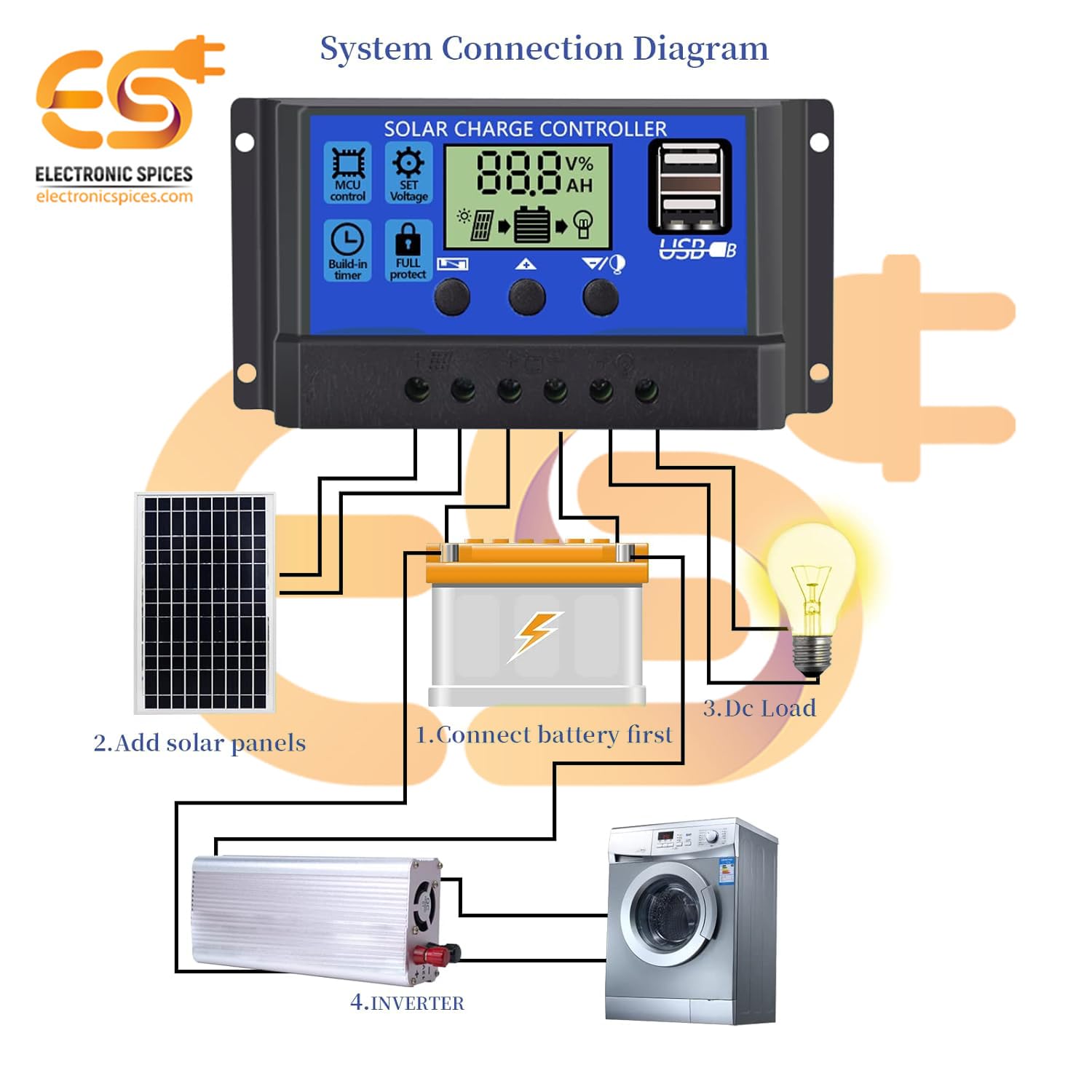
Figure 5.1: System connection diagram illustrating the proper sequence for connecting the battery, solar panels, DC load, and inverter to the solar charge controller.

Figure 5.2: A quick visual guide for connecting the solar panels, battery, and DC load to the W88-B controller.
6. Betjeningsvejledning
The W88-B controller features an LCD display that provides real-time information about your solar system's status.

Figure 6.1: Explanation of the digital display on the W88-B controller, showing indicators for solar panel charge, battery status, and load output.
6.1. Visningstilstande
The LCD cycles through various display modes automatically. You can also manually cycle through them using the control buttons. Common displays include:
- Batteri Voltage: Viser det aktuelle lydstyrkeniveautage af det tilsluttede batteri.
- Solar Panel Charge Status: Indicates if the solar panels are actively charging the battery.
- Load Output Status: Shows if the load output is active or inactive.
6.2. Kontrolknapper
The controller has three buttons for navigation and setting adjustments:
- Menu-knap: Bruges til at aktivere og afslutte indstillingstilstande.
- Op-knap: Bruges til at øge værdier eller navigere opad i menuer.
- Ned-knap: Bruges til at mindske værdier eller navigere nedad i menuer.
Refer to the specific icons on the controller for functions like MCU control, set voltage, build-in timer, and full protect indicators.
7. Vedligeholdelse
To ensure the long-term reliability and performance of your W88-B solar charge controller, follow these maintenance guidelines:
- Regelmæssig rengøring: Hold controlleren ren og fri for støv og snavs. Brug en blød, tør klud til rengøring.
- Tjek forbindelser: Kontrollér regelmæssigt alle ledningsforbindelser for at sikre, at de er tætte og fri for korrosion. Løse forbindelser kan føre til strømsvigt eller overophedning.
- Ventilation: Sørg for, at controlleren er installeret i et godt ventileret område for at forhindre overophedning. Ventilationshullerne må ikke blokeres.
- Miljøforhold: While designed for durability, avoid exposing the controller to extreme moisture or direct sunlight for prolonged periods if not rated for such exposure.
- Batteriets sundhed: Monitor your battery's health regularly. A failing battery can impact the controller's performance.
8. Fejlfinding
If you encounter issues with your W88-B solar charge controller, refer to the following common problems and their solutions:
| Problem | Mulig årsag | Løsning |
|---|---|---|
| Ingen skærm eller strøm | Batteri ikke tilsluttet eller lav spændingtage; omvendt polaritet; løs forbindelse. | Kontroller batteriforbindelser og voltage. Sørg for korrekt polaritet. Spænd alle terminaler. |
| Batteriet oplades ikke | Solar panels not connected; insufficient sunlight; faulty solar panel; controller fault. | Check solar panel connections. Ensure panels are receiving adequate sunlight. Test solar panel output. |
| Indlæsningen virker ikke | Load disconnected; battery voltage for lav (lav volumentage disconnect); overload protection activated. | Check load connections. Charge battery. Reduce load or check for short circuit in load. |
| Controller overophedning | Poor ventilation; excessive load; short circuit. | Ensure adequate airflow around the controller. Reduce load. Check for short circuits in the system. |
Hvis problemet fortsætter efter at have forsøgt disse løsninger, bedes du kontakte kundesupport.
9. Specifikationer
| Parameter | Værdi |
|---|---|
| Model | W88-B |
| Nominel voltage | 12V/24V (Auto) |
| Nominel strøm | 20A |
| Maks. PV Voltage | 50V |
| Maks. PV-indgangseffekt (12V) | 130W |
| Maks. PV-indgangseffekt (24V) | 260W |
| Display Type | LCD/LED |
| Type opladningsport | USB (Dual) |
| Varens vægt | 150 gram |
| Dimensioner (LxB) | 13.1 cm x 6.9 cm |
| Materiale | Plast, Metal |
| Farve | Blå |
| Oprindelsesland | Indien |
10. Garanti og support
This product is manufactured by Electronic Spices. For any technical assistance, troubleshooting beyond this manual, or warranty inquiries, please contact Electronic Spices customer support. Please have your product model number (W88-B) and purchase details ready when contacting support.
Fabrikant: Elektroniske krydderier
Kontaktoplysninger: Refer to the contact details provided with your purchase or visit the official Electronic Spices webwebstedet for de mest opdaterede supportoplysninger.
Ask a question about this manual
Ask about setup, troubleshooting, compatibility, parts, safety, or missing instructions. Manuals+ will review the question and use this page’s manual context to help answer it.