
1. Introduktion
Tak for købetasing the Deeyaple G4 60W Gaming Soundbar. This manual provides essential information for setting up, operating, and maintaining your soundbar to ensure optimal performance and longevity. Please read this manual thoroughly before use and retain it for future reference.
2. Sikkerhedsoplysninger
- Udsæt ikke soundbaren for ekstreme temperaturer, fugtighed eller direkte sollys.
- Undgå at tabe eller udsætte enheden for kraftige stød.
- Keep the soundbar away from water and other liquids. The IPX5 rating indicates resistance to splashes, but it is not fully submersible.
- Do not attempt to disassemble, repair, or modify the soundbar yourself. Contact qualified service personnel for assistance.
- Brug kun det medfølgende strømkabel og tilbehør.
- Sørg for tilstrækkelig ventilation omkring soundbaren under brug.
3. Pakkens indhold
Tjek venligst pakken for følgende varer:
- Deeyaple G4 60W Gaming Soundbar
- Strømkabel
- Brugervejledning (dette dokument)
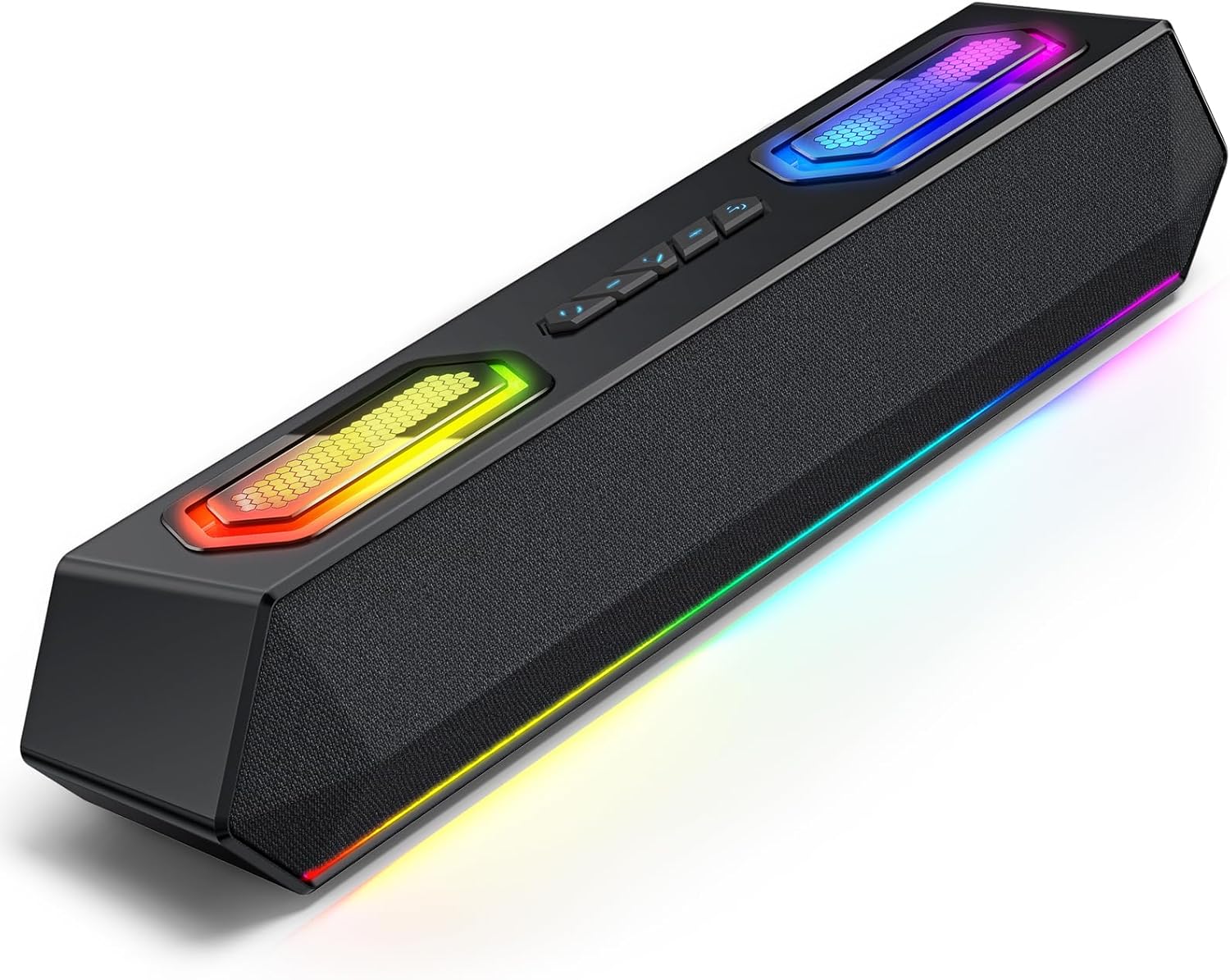
Image: Deeyaple G4 Soundbar, showcasing dens design og RGB-belysning.
4. Produktet er slutview
Nøglefunktioner:
- 60W Dual Speakers: Delivers rich bass, clear mids, and crisp highs.
- RGB belysning: Dynamic lights that pulse in sync with music, offering multiple atmosphere modes.
- Bluetooth 5.3: Stable wireless connectivity with a 66-foot range.
- Extended 20-Hour Battery: 2500mAh battery for long playback (at 50% volume with lights off).
- Vandtæt IPX5: Resistant to splashes and rain.
- Trådløs stereoparring (TWS): Connect two soundbars for immersive stereo sound.
- Precision Audio Positioning: Enhanced stereo sound effects for gaming.
Kontrol og porte:
The soundbar features intuitive controls for power, volume, and RGB lighting modes. Connection options include Bluetooth, USB, and 3.5mm AUX.

Billede: Top view of the Deeyaple G4 Soundbar highlighting the control buttons and RGB lighting panels.

Image: Diagram illustrating the internal speaker components of the 60W soundbar.
5. Opsætning
Tænder:
- Connect the provided power cable to the soundbar's power input.
- Sæt den anden ende af strømkablet i en passende stikkontakt.
- Press and hold the power button on the soundbar until the RGB lights illuminate, indicating the device is on.
Tilslutning via Bluetooth:
- Ensure the soundbar is powered on and in Bluetooth pairing mode (indicated by a flashing blue light, if applicable).
- Aktiver Bluetooth på din enhed (smartphone, tablet, computer) og søg efter tilgængelige enheder.
- Select "Deeyaple G4" from the list of devices.
- Once connected, the soundbar will indicate a successful pairing (e.g., a solid blue light or an audible prompt).
Video: Demonstrates connecting a soundbar via Bluetooth and other modes. While not the exact Deeyaple G4, the connection process is similar.
Connecting via AUX (3.5mm Audio Cable):
- Connect one end of a 3.5mm AUX audio cable (not included) to the AUX input port on the soundbar.
- Connect the other end of the AUX cable to the audio output jack of your device (e.g., computer, TV, smartphone).
- The soundbar should automatically switch to AUX mode. If not, use the mode button (if available) to select AUX.
Tilslutning via USB:
- Connect the soundbar to your computer's USB port using a compatible USB cable (not included).
- The soundbar should be recognized as an audio output device by your computer. Select it from your computer's sound settings.
- Some soundbars may also support USB drives for direct music playback. Insert a USB drive into the designated USB port.
Video: Shows a soundbar connecting via USB and demonstrating RGB lighting. This video is for a related product (LENRUE E-1103) but illustrates similar functionality.
6. Betjeningsvejledning
Lydstyrkekontrol:
- Rotate the main knob on the soundbar to adjust the volume.
- Alternatively, adjust the volume directly from your connected device.
RGB-lystilstande:
- The soundbar features dynamic RGB lighting. Use the dedicated light effect button (if available) or a short press on the main knob to cycle through different lighting modes.
- Long press the light effect button or main knob to turn the lights on/off.

Image: Visual representation of different RGB pulse light modes available on the soundbar.
Playback Control (Bluetooth/USB Mode):
- Use the Play/Pause button to start or pause audio playback.
- Use the Next Track and Previous Track buttons to skip between songs.
Trådløs stereoparring (TWS):
To connect two Deeyaple G4 soundbars for a true stereo experience:
- Ensure both soundbars are powered on and in Bluetooth pairing mode.
- On one soundbar, long press the TWS pairing button (refer to product diagram if available, otherwise assume a dedicated button or combination).
- The soundbars will attempt to connect to each other. Once paired, they will function as a stereo pair.
- Connect your device to one of the paired soundbars via Bluetooth.
7. Vedligeholdelse
- Clean the soundbar with a soft, dry cloth. Do not use abrasive cleaners or solvents.
- Hold portene fri for støv og snavs.
- Store the soundbar in a cool, dry place when not in use for extended periods.
8. Fejlfinding
| Problem | Mulig løsning |
|---|---|
| Ingen strøm | Ensure the power cable is securely connected to both the soundbar and the power outlet. Check if the outlet is functional. |
| Ingen lyd | Check volume levels on both the soundbar and the connected device. Ensure the correct input mode (Bluetooth, AUX, USB) is selected. Verify audio cable connections. |
| Bluetooth-parring mislykkes | Ensure the soundbar is in pairing mode. Turn off and on Bluetooth on your device. Move closer to the soundbar. Clear previous Bluetooth connections on your device and try again. |
| Lydforvrængning | Reduce the volume on both the soundbar and the connected device. Check audio source quality. Ensure cables are not damaged. |
| RGB-lys virker ikke | Press the light effect button to cycle through modes or turn them on/off. Ensure the soundbar is powered on. |
9. Specifikationer
- Modelnavn: G4
- Højttalertype: Bærbar højttaler
- Højttalers maksimale udgangseffekt: 60 watt
- Forbindelse teknologi: Bluetooth
- Trådløs kommunikationsteknologi: Bluetooth 5.3
- Maksimal rækkevidde: 66 fod
- Lydudgangstilstand: Stereoanlæg
- Speciel funktion: Vandtæt (IPX5)
- Strømkilde: Corded Electric (Internal 2500mAh battery for portable use)
- Produktdimensioner: 13D x 8B x 41.3H Centimeter
- Varens vægt: 1.18 kg
- Kontrolmetode: App, Touch (Physical buttons/knob)
- Fabrikant: Deeyaple
10. Garanti og support
The Deeyaple G4 Soundbar comes with a limited warranty. For detailed warranty information, product support, or technical assistance, please refer to the official Deeyaple webwebstedet eller kontakt deres kundeservice direkte. Behold din købskvittering som købsbevis.
For yderligere hjælp, besøg venligst Deeyaple Store on Amazon.