
1. Introduktion
This manual provides essential information for setting up, operating, maintaining, and troubleshooting your CyberpowerPC Gamer Supreme Gaming PC, model SLCAI15000A2. Please read this manual thoroughly before using your new computer to ensure proper functionality and longevity.
2. Sikkerhedsoplysninger
Observe the following safety guidelines to prevent damage to your system and ensure personal safety:
- Strømforsyning: Use only the power cord provided with your system. Ensure the power outlet is properly grounded.
- Ventilation: Do not block ventilation openings. Ensure adequate airflow around the computer to prevent overheating.
- Væske og fugt: Keep the computer away from liquids and excessive moisture. Do not operate the computer with wet hands.
- Placering: Placer computeren på en stabil, plan overflade. Undgå at placere den i nærheden af varmekilder eller i direkte sollys.
- Service: Do not attempt to service the computer yourself. Refer all servicing to qualified service personnel.
3. Pakkens indhold
Bekræft at alle varer er til stede i pakken:
- CyberpowerPC Gamer Supreme Gaming PC (SLCAI15000A2)
- Strømledning
- Gaming tastatur
- Gaming mus
- Documentation (Quick Start Guide, Driver Discs if applicable)
4. Opsætning
4.1. Fysisk opsætning
- Pak pc'en ud: Tag forsigtigt computeren og alt tilbehør ud af emballagen.
- Tilslut ydre enheder:
- Connect your monitor(s) to the graphics card ports (HDMI or DisplayPort) located at the rear of the PC.
- Tilslut tastaturet og musen til alle tilgængelige USB-porte.
- Tilslut højttalere eller hovedtelefoner til lydstikkene, hvis det ønskes.
- For wired internet, connect an Ethernet cable to the LAN port. For wireless, ensure antennas are attached if provided.
- Tilslut strøm: Plug the power cord into the power supply unit (PSU) at the rear of the PC, then plug the other end into a grounded electrical outlet.
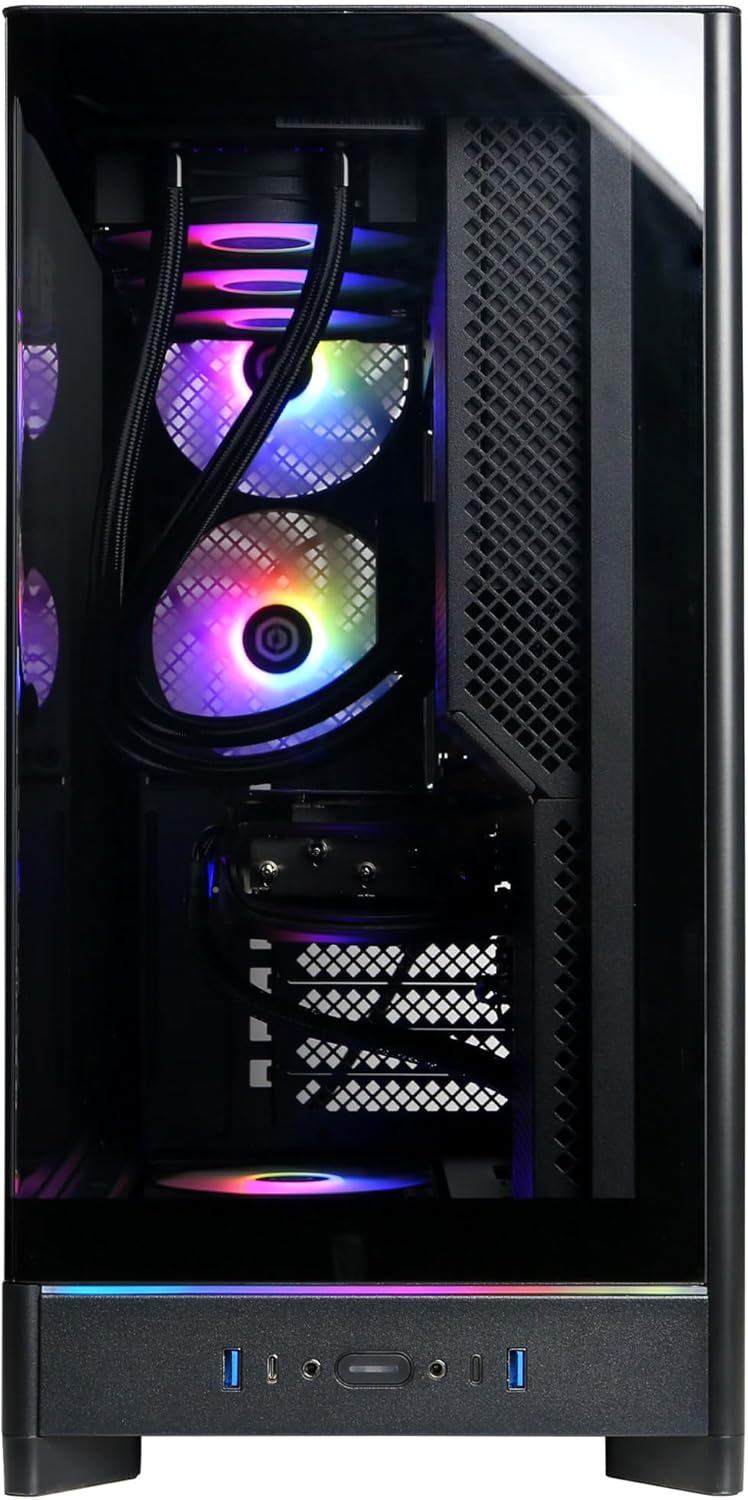
Image: Front panel connections including USB ports and power button.

Billede: Detaljeret view of the front input/output ports for easy access.
4.2. Første opstart
- Tryk på tænd/sluk-knappen, der er placeret på forsiden af pc'en.
- The system will boot up, and you should see the operating system loading on your monitor.
4.3. Opsætning af operativsystem
Your CyberpowerPC comes with Windows 11 Home pre-installed. Follow the on-screen instructions to complete the initial setup, which includes:
- Valg af region og tastaturlayout.
- Connecting to a network (wired or wireless).
- Log ind med en Microsoft-konto eller opret en lokal konto.
- Opsætning af privatlivsindstillinger.
5. Betjening af din pc
5.1. Generel brug
Once the operating system setup is complete, your PC is ready for use. You can install applications, browse the internet, and engage in gaming. Familiarize yourself with the Windows 11 interface for optimal experience.

Image: Internal components of the PC, showcasing the liquid cooling and RGB lighting.

Image: A different angle of the PC's interior, showing the high-performance graphics card and memory.
5.2. Forbindelse
Your PC offers a variety of connectivity options:
- USB-porte: Includes 2 x USB-C 3.1, 4 x USB-A 3.1, and 2 x USB-A 2.0 for connecting various devices.
- Videooutput: 1 x HDMI and 3 x DisplayPort for multiple monitor setups.
- Netværk: 1 x LAN port for wired internet and WiFi 6 for high-speed wireless connectivity.
- Bluetooth: Bluetooth 5.3 til tilslutning af trådløse eksterne enheder.
- Lyd: 7.1 Channel Audio for immersive sound experiences.
6. Vedligeholdelse
Regular maintenance helps ensure the longevity and performance of your PC:
- Rensning: Periodically clean the exterior of the case with a soft, dry cloth. Use compressed air to clear dust from ventilation grilles and internal components (ensure the PC is powered off and unplugged).
- Softwareopdateringer: Keep your operating system, drivers (especially graphics drivers), and applications updated to the latest versions for security and performance improvements.
- Data backup: Sikkerhedskopier regelmæssigt vigtige data til et eksternt drev eller cloud-lagring.

Billede: Top view of the PC chassis, illustrating the ventilation design.

Billede: Side view of the PC, showing the solid panel and potential rear airflow.
7. Fejlfinding
If you encounter issues with your PC, consider the following basic troubleshooting steps:
- Ingen strøm: Ensure the power cord is securely connected to both the PC and the wall outlet. Check if the power supply switch at the back of the PC is in the 'ON' position.
- Ingen visning: Verify that your monitor is powered on and correctly connected to the graphics card ports (not the motherboard video outputs). Try a different video cable or monitor if available.
- System fryser/nedbryder: Restart the PC. Ensure all drivers are updated. Check for overheating by monitoring temperatures with software.
- Periferiudstyr virker ikke: Prøv at tilslutte den eksterne enhed til en anden USB-port. Sørg for, at driverne til den eksterne enhed er installeret.
- Langsom ydeevne: Close unnecessary applications. Check for malware or viruses. Ensure sufficient free space on your primary drive.
For more complex issues, refer to the CyberpowerPC support webwebstedet eller kontakt teknisk support.
8. Specifikationer
| Komponent | Specifikation |
|---|---|
| Modelnummer | SLCAI15000A2 |
| Operativsystem | Windows 11 Home |
| CPU | AMD Ryzen 9 9950X 4.3GHz (16 Cores) |
| Chipsæt | AMD B850 |
| Grafikkort | NVIDIA GeForce RTX 5090 32GB |
| VÆDDER | 64GB DDR5 |
| Opbevaring | 4 TB PCIe 4.0 NVMe SSD |
| Forbindelse | WiFi 6, Bluetooth 5.3, 1x LAN |
| USB-porte | 2x USB-C 3.1, 4x USB-A 3.1, 2x USB-A 2.0 |
| Video output | 1x HDMI, 3x DisplayPort |
| Lyd | 7.1-kanals lyd |
| Køling | Liquid Cool CPU |
| Dimensioner | 17.6 x 9.2 x 20 tommer |
9. Garanti og support
Your CyberpowerPC Gamer Supreme Gaming PC is covered by a 1 års garanti på reservedele og arbejdskraftDerudover modtager du Gratis livstids teknisk support.
For warranty claims, technical assistance, or further inquiries, please visit the official CyberpowerPC support webwebstedet eller kontakt deres kundeserviceafdeling. Hav din købskvittering og produktets serienummer klar, når du søger support.
Online support: www.cyberpowerpc.com/support