
1. Introduktion
The Fanvil V66 is a professional IP videophone designed for business environments, offering advanced communication features and a modern design. It features a 7-inch color touchscreen, Bluetooth, and WiFi 6 connectivity, ensuring versatile and high-quality communication.
Hvad er der i æsken
- Fanvil V66 IP-telefon
2. Produktet er slutview
Familiarize yourself with the components of your Fanvil V66 Prime Business Phone.
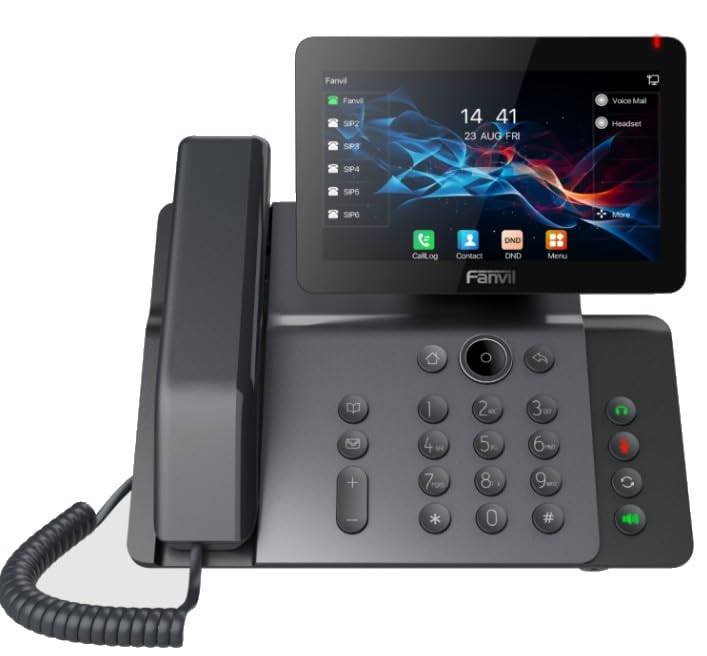
Figur 1: Forside view of the Fanvil V66 Prime Business Phone, showing the 7-inch color display, numeric keypad, and function keys.
Nøglefunktioner
- 7-inch HD Color LCD Screen: Inclinable design for optimal viewing.
- Bluetooth & WiFi 6 Connectivity: For hurtige og stabile trådløse forbindelser.
- 116-Key Numeric Keypad: Provides comprehensive control over phone functions.
- Integrated Audio and Video System: Supports high-quality professional calls and videoconferences.
- Intuitiv brugergrænseflade: Quick menu access for calls, contacts, and main functions.
3. Opsætning
3.1 Samling af telefonen
- Fastgør skrivebordsstativet: Align the stand with the slots on the back of the phone and push until it clicks into place.
- Tilslut håndsættet: Sæt den ene ende af den spiralformede håndsætledning i håndsættet og den anden ende i håndsætporten på telefonens baseenhed.
3.2 Tilslutning til netværk og strøm
- Ethernet-forbindelse: Plug one end of the Ethernet cable into the LAN port on the back of the phone and the other end into your network switch or router.
- Power Connection (Choose one):
- Power over Ethernet (PoE): If your network switch supports PoE, the phone will power on automatically once connected via the Ethernet cable. No separate power adapter is needed.
- Strømadapter: If PoE is not available, connect a compatible power adapter to the DC 12V port on the phone and then plug it into a power outlet.
- The phone will automatically power on and begin the boot-up sequence.
3.3 Indledende konfiguration
Upon first boot, the phone may prompt you for initial network settings or firmware updates. Follow the on-screen instructions. For advanced network settings or SIP account configuration, consult your network administrator or IT support.
4. Betjeningsvejledning
4.1 Foretage opkald
- Opkald: Pick up the handset, press the Speaker button, or press the New Call soft key. Dial the desired number using the keypad.
- Hurtigopkald: If configured, press the assigned speed dial key.
- Fra kontakter: Tap the "Contacts" icon on the display, select a contact, and tap the call icon.
4.2 Modtagelse af opkald
When an incoming call rings, you can:
- Svar: Pick up the handset, press the Speaker button, or tap the "Answer" soft key on the display.
- Nedgang: Tap the "Decline" soft key.
4.3 Using the 7-inch Color Display
The touchscreen display provides access to various functions and settings:
- Startskærm: Displays time, date, line status, and quick access icons.
- Navigation: Swipe left/right or tap icons to navigate through menus.
- Softkeys: Context-sensitive buttons displayed at the bottom of the screen.
- Indstillinger: Access phone settings, network configuration, and user preferences.
4.4 Bluetooth and WiFi Connectivity
- Bluetooth: Go to "Settings" > "Bluetooth" to enable and pair with Bluetooth headsets or other devices.
- WiFi 6: Go to "Settings" > "Wi-Fi" to enable, scan for available networks, and connect. Enter the password if required.
5. Vedligeholdelse
5.1 Rengøring af telefonen
- Use a soft, dry, anti-static cloth to clean the phone's surface.
- For the screen, use a screen-specific cleaning solution and a microfiber cloth.
- Undgå at bruge skrappe kemikalier, slibende rengøringsmidler eller for meget fugt.
5.2 Softwareopdateringer
Periodically check for firmware updates to ensure optimal performance and security. Updates can usually be found in the phone's "Settings" menu under "System" or "Firmware Update," or provided by your IT department.
6. Fejlfinding
| Problem | Mulig årsag | Løsning |
|---|---|---|
| Telefonen tænder ikke. | Ingen strømforbindelse eller defekt strømkilde. | Check power adapter connection or Ethernet cable for PoE. Ensure power outlet is functional. |
| Kan ikke oprette forbindelse til netværket. | Ethernet cable disconnected, incorrect network settings, or Wi-Fi issues. | Verify Ethernet cable is securely connected. Check Wi-Fi settings and password. Contact network administrator for IP configuration. |
| No dial tone or audio during calls. | Handset/headset not connected properly, volume too low, or SIP registration issue. | Ensure handset/headset is plugged in correctly. Adjust volume. Verify SIP account registration status on the display. |
| Skærmen reagerer ikke. | Midlertidig softwarefejl. | Restart the phone by disconnecting and reconnecting power. If issue persists, contact support. |
7. Specifikationer
| Feature | Detalje |
|---|---|
| Mærke | Fanvil |
| Modelnummer | V62 PRO (Note: Product series is V66) |
| Farve | Sort |
| Vise | 7-inch HD Color LCD, Inclinable |
| Forbindelse | Bluetooth, WiFi 6, Ethernet (PoE support) |
| Tastatur | 116 nøgler |
| Materiale | Plast |
| Strømkilde | Strømadapter / PoE |
| Dimensioner (L x B x H) | 20 x 20 x 15 cm |
| Varens vægt | 600 gram |
| Kompatible enheder | EHS (Electronic Hook Switch) headsets |
8. Garanti og support
For garantioplysninger henvises til garantikortet, der følger med dit produkt, eller besøg den officielle Fanvil website. If you encounter any issues not covered in this manual or require further assistance, please contact your vendor or Fanvil technical support.
- Online support: Visit the Fanvil official webwebsted med ofte stillede spørgsmål, dokumentation og supportressourcer.
- Teknisk assistance: Contact your authorized Fanvil reseller or service provider.