1. Sikkerhedsoplysninger
- Læs alle instruktioner omhyggeligt før brug.
- Gem denne vejledning til fremtidig reference.
- Udsæt ikke enheden for regn eller fugt.
- Må ikke placeres i nærheden af varmekilder såsom radiatorer, varmeapparater, komfurer eller andre apparater (herunder ampløftere), der producerer varme.
- Rengør kun med en tør klud.
- Træk stikket ud af dette apparat under tordenvejr, eller når det ikke skal bruges i længere perioder.
2. Pakkens indhold
- Escape AM/FM Alarm Clock Radio
- Strømadapter
- Instruktionsmanual
3. Produktet er slutview
The Escape AM/FM Alarm Clock Radio is designed for reliable timekeeping and customizable wake-up options. It features a compact design, digital display, and intuitive controls for ease of use.
Front View
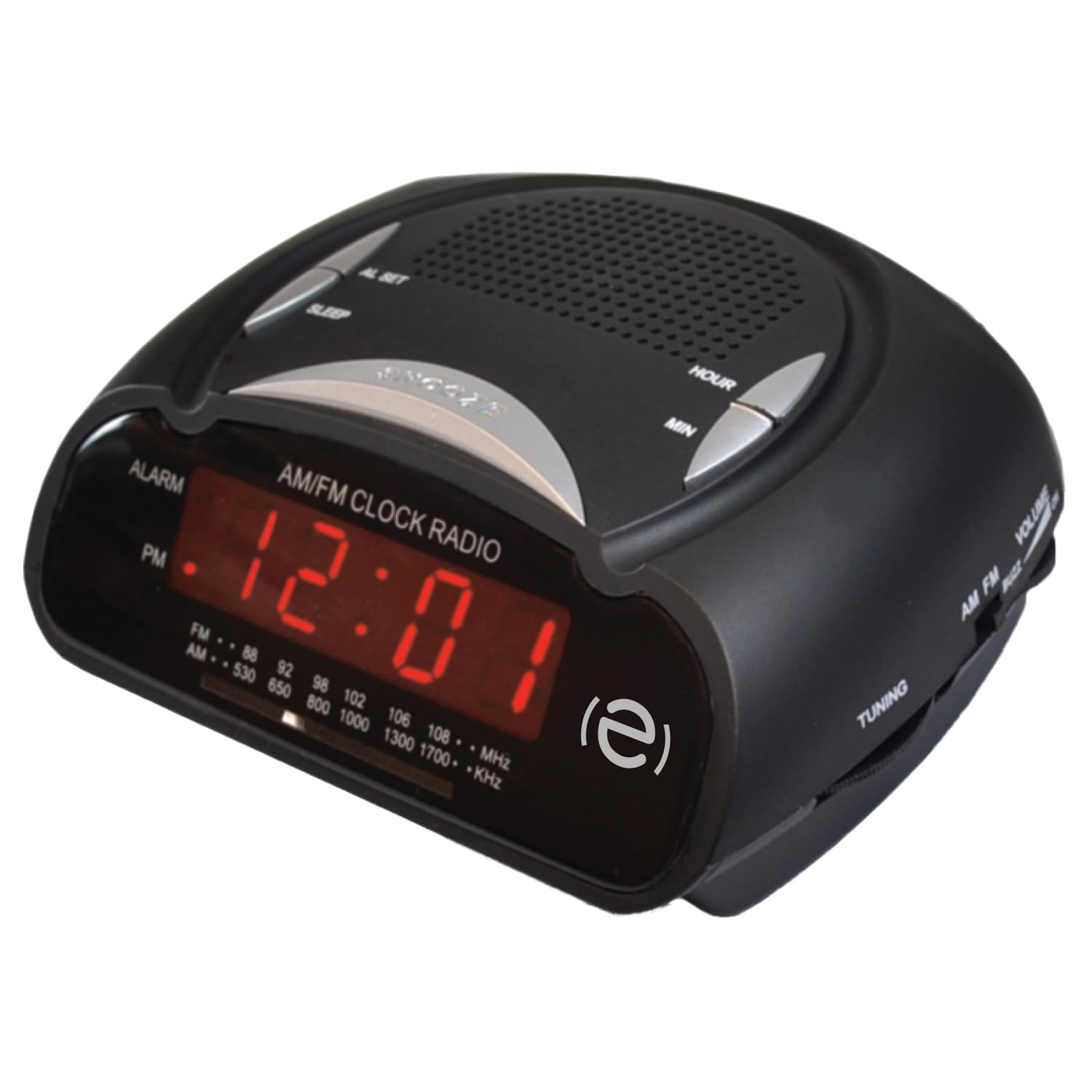
Front view of the Escape AM/FM Alarm Clock Radio, showing the digital display and top control buttons.
Nøglefunktioner

Product packaging highlighting key features like snooze, sleep timer, and alarm options.
- Digital tidsvisning
- AM/FM-radiotuner
- Dual Alarm Settings (Buzzer or Radio)
- Snooze funktion
- Sleep Timer
- Telescopic Antenna for improved radio reception
- 9V Battery Backup Option (battery not included)
4. Opsætning
4.1 Strømtilslutning
Plug the power adapter into a standard wall outlet and connect it to the DC input port on the back of the alarm clock. The display will illuminate, and the time will flash, indicating it is ready for time setting.
4.2 Batteribackup
For power outage protection, insert a 9V battery (not included) into the battery compartment located on the bottom of the unit. This will maintain time and alarm settings during a power interruption.
4.3 Indstilling af klokkeslæt
When the unit is first plugged in, the time display will flash. To set the current time:
- Tryk på FASTSAT TIDSPUNKT knappen. Timecifrene vil begynde at blinke.
- Brug HR (Hour) button to adjust the hour. Press and hold for faster adjustment. Observe the PM indicator for correct AM/PM setting.
- Tryk på MIN (Minute) button to adjust the minutes. Press and hold for faster adjustment.
- Trykke FASTSAT TIDSPUNKT again to confirm and save the time. The display will stop flashing.
To adjust the time after initial setup, press and hold the FASTSAT TIDSPUNKT button until the display flashes, then follow steps 2-4.
Video: Instructions on how to set the time on a similar alarm clock model. Please note that button labels or exact steps may vary slightly from your Escape model.
5. Betjeningsvejledning
5.1 Indstilling af alarmen
Vækkeuret har to uafhængige alarmer. Sådan indstiller du en alarm:
- Ensure the radio is off. If the radio is playing, press the AM/FM knappen for at slukke den.
- Tryk på og hold en af ALARM 1 or ALARM 2 button for 2 seconds. The alarm time will start flashing.
- Brug HR (Time) og MIN (Minute) buttons to set your desired alarm time.
- Tryk på ALARM 1 or ALARM 2 button repeatedly to cycle through alarm options: Buzzer, Radio, or Off. The corresponding icon (bell for buzzer, music note for radio) will appear on the display.
- Tryk på FASTSAT TIDSPUNKT -knappen eller vent 10 sekunder, indtil indstillingerne gemmes automatisk.
The alarm volume cannot be adjusted independently; it will sound at a preset level for the buzzer or the last radio volume for the radio alarm.
Video: Instructions on how to set the alarm on a similar alarm clock model. Please note that button labels or exact steps may vary slightly from your Escape model.
5.2 Using the Radio
- Tryk på AM/FM knappen for at tænde for radioen.
- Adjust the telescopic antenna for optimal reception.
- Brug TUNING knob (usually on the side) to select your desired radio station.
- Brug BIND knob (usually on the side) to adjust the sound level.
- Tryk på for at slukke for radioen AM/FM knappen igen.
5.3 Snooze -funktion
Når alarmen lyder, skal du trykke på den store SLUM button (often labeled SNOOZE/SLEEP/DIM) on the top of the unit. The alarm will pause for approximately 9 minutes and then sound again.
5.4 Sleep Timer
Sleep-timeren giver dig mulighed for at falde i søvn til radioen, som automatisk slukker efter et bestemt tidsrum.
- Mens radioen spiller, skal du trykke på SOVE button (often combined with SNOOZE).
- Each press will cycle through preset sleep times (e.g., 90, 60, 30, 15 minutes, or OFF). Select your desired duration.
- Radioen vil spille i den valgte varighed og derefter slukke automatisk.
6. Vedligeholdelse
- Tør enheden af med en blød, tør klud. Brug ikke slibende rengøringsmidler eller opløsningsmidler.
- Keep the unit away from direct sunlight, extreme temperatures, and dusty environments.
- Ensure the telescopic antenna is not bent or damaged.
7. Fejlfinding
| Problem | Løsning |
|---|---|
| Urdisplayet er tomt. | Ensure the power adapter is securely plugged into both the unit and a working wall outlet. Check if the power outlet is functional. |
| Alarmen lyder ikke. | Verify that the alarm time is set correctly and the alarm is activated (Buzzer or Radio icon visible). Check if the volume is not set too low for radio alarm. |
| Dårlig radiomodtagelse. | Extend and adjust the telescopic antenna. Try repositioning the unit to improve signal. |
| Tidspunktet er forkert efter strømafbrydelsetage. | Ensure a fresh 9V battery is installed for backup. Reset the time manually if no backup battery is present or if the battery is depleted. |
8. Specifikationer
- Mærke: Flugt
- Model: B0DVBJ7SJF
- Farve: Sort
- Produktdimensioner: 11 x 3.81 x 5 cm
- Strømkilde: AC Power Adapter, 9V Battery Backup (not included)
- Alarmtype: Buzzer or AM/FM Radio
- Vise: Digital LED
9. Garanti og support
For warranty information or technical support, please refer to the contact details provided on the product packaging or visit the official Escape webwebstedet. Behold din købskvittering som købsbevis.