
1. Produktet er slutview
The AYANEO Pocket S is an Android-based portable gaming handheld designed for a premium gaming experience. It integrates a powerful Snapdragon G3x Gen 2 Gaming Platform, a high-resolution touch display, and ergonomic controls within a compact form factor. This device is engineered to deliver robust performance for a wide range of gaming applications, from classic titles to modern Android games.

Image 1.1: AYANEO Pocket S device in use.
2. Nøglefunktioner
- Kraftig ydeevne: Equipped with the Snapdragon G3x Gen 2 Gaming Platform, featuring an 8-core Kyro CPU and Adreno A32 GPU at 1.2GHz, ensuring high performance and efficiency with a 15W TDP.
- Fantastiske billeder: Features a 6-inch 1440P IPS touch Bezel-less mirror screen for vivid colors and sharp details.
- AmpHukommelse og lagring: Includes 12GB of LPDDR5x RAM for smooth multitasking and 128GB UFS storage for extensive game libraries.
- Ergonomiske betjeningselementer: Incorporates RGB hall sensor joysticks, linear hall triggers, and conduction rubber buttons for precise and comfortable gaming.
- Avanceret forbindelse: Runs on a custom Android OS, supporting Wi-Fi 7 and Bluetooth 5.3 for robust multiplayer and network capabilities.
- Integreret software: Comes with AYA SPACE, a dedicated software suite for game browsing and system management.

Billede 2.1: Overview of key features and components.
3. Enhedslayout og kontroller
The AYANEO Pocket S is designed with intuitive controls for an optimal gaming experience. Familiarize yourself with the layout:
- Vise: 6-inch 1440P IPS touch screen.
- Joysticks: Dual RGB Hall sensor joysticks for precise analog input.
- D-Pad: Crystal-textured D-pad for directional input.
- Ansigtsknapper: ABXY buttons, typically located on the right side.
- Skulderknapper/-udløsere: Linear Hall triggers and shoulder buttons for additional input.
- Systemknapper: Buttons for menu, home, and other system functions.
- Porte: USB Type-C-port til opladning og dataoverførsel.

Billede 3.1: Detaljeret view of the device's design and control elements.
4. Opsætningsvejledning
4.1. Første opstart
- Oplad enheden: Before first use, ensure the device is fully charged. Connect the provided USB Type-C cable to the device and a compatible power adapter.
- Tænd: Press and hold the power button (usually located on the top or side) for a few seconds until the screen illuminates.
- Indledende konfiguration: Følg vejledningen på skærmen for at vælge dit sprog og din region og acceptere servicevilkårene.
4.2. Opladning af enheden
To charge your AYANEO Pocket S:
- Find USB Type-C-porten på enheden.
- Connect one end of the USB Type-C cable to the device and the other end to a power adapter (not always included) or a powered USB port.
- The charging indicator light (if present) will show the charging status. A full charge typically takes several hours.
4.3. Netværksforbindelse (Wi-Fi)
Sådan opretter du forbindelse til et Wi-Fi-netværk:
- Fra startskærmen skal du navigere til Indstillinger.
- Vælge Netværk og internet, så Wi-Fi.
- Slå Wi-Fi til/fra OnEnheden vil scanne efter tilgængelige netværk.
- Vælg det ønskede netværk fra listen.
- Indtast netværksadgangskoden, hvis du bliver bedt om det, og tryk derefter på Forbinde.
5. Betjeningsvejledning
5.1. Navigation
- Touchskærm: Use your finger to tap, swipe, and pinch on the display for navigation.
- Joysticks/D-Pad: Use the physical controls to navigate menus and select options within games or the operating system.
- Systemknapper: Utilize the dedicated buttons for functions like Home, Back, and Menu as per Android standards.
5.2. Spil
- Start spil: Games can be launched directly from the Android home screen or through the AYA SPACE application.
- Controller Mapping: For some games, you may need to configure controller mapping within the game settings or using AYA SPACE's button mapping feature.
- Ydeevnetilstande: The device may offer different performance modes (e.g., balanced, performance) accessible via system settings or AYA SPACE to optimize battery life or gaming fluidity.
5.3. AYA SPACE Application
AYA SPACE is a custom software suite designed to enhance your gaming experience. It provides features such as:
- Game library management and browsing.
- System performance monitoring and adjustment.
- Button remapping for various games.
- Quick access to system settings.
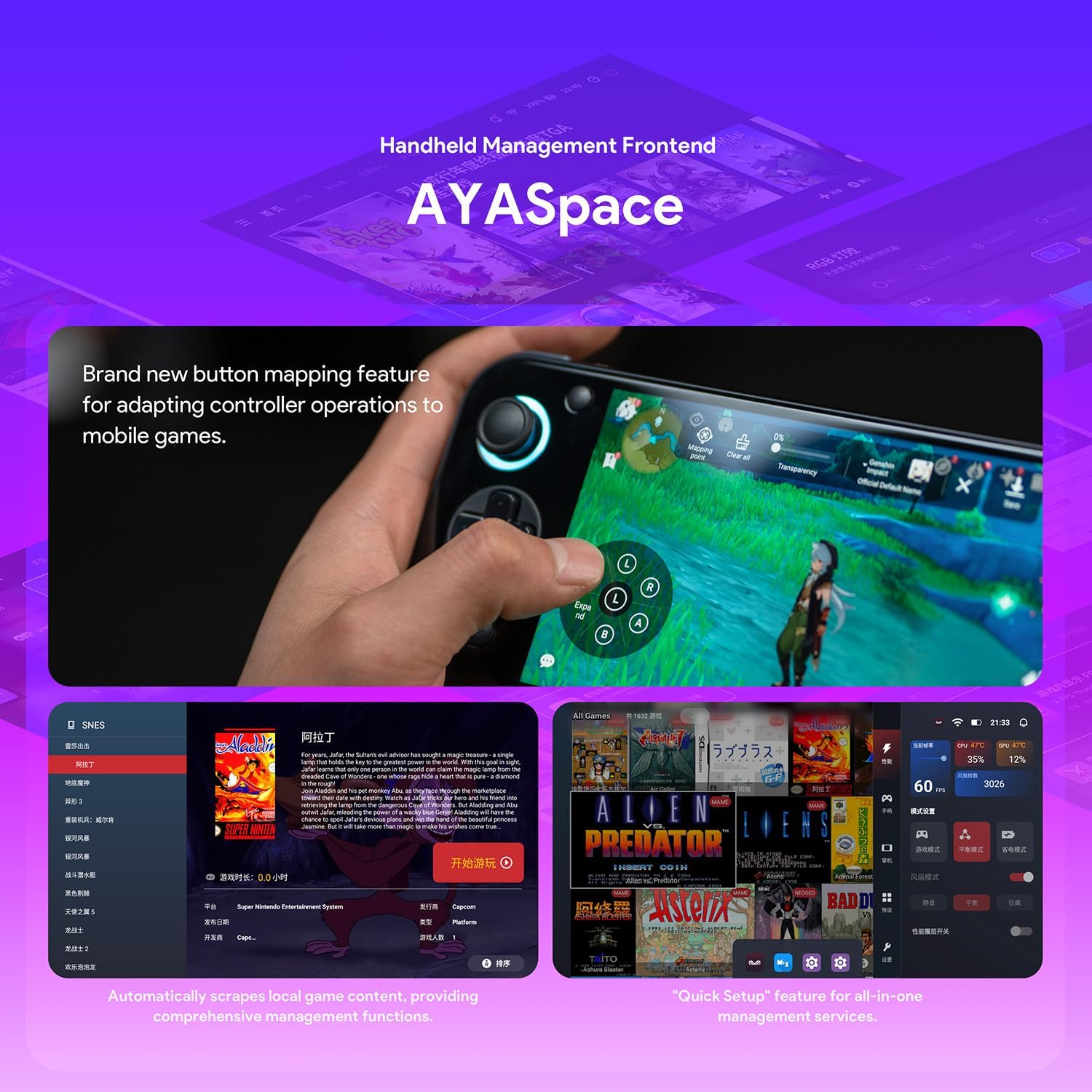
Image 5.1: AYA SPACE handheld management frontend.
6. Vedligeholdelse
- Rensning: Use a soft, dry, lint-free cloth to clean the screen and exterior. Avoid abrasive materials or harsh chemicals. For stubborn smudges, a slightly damp en klud med vand kan bruges, så det sikres, at der ikke trænger fugt ind i portene.
- Softwareopdateringer: Regularly check for system and AYA SPACE software updates to ensure optimal performance, security, and access to new features. Updates can typically be found in the device's Settings menu or within AYA SPACE.
- Opbevaring: Opbevar enheden et køligt, tørt sted væk fra direkte sollys og ekstreme temperaturer.
- Batteripleje: To prolong battery life, avoid fully discharging the device frequently. If storing for extended periods, charge the battery to approximately 50%.
7. Fejlfinding
Se tabellen nedenfor for almindelige problemer og løsninger på disse:
| Spørgsmål | Mulig årsag | Løsning |
|---|---|---|
| Enheden tænder ikke. | Lavt batteri; enheden er frosset. | Charge the device for at least 30 minutes. Perform a hard reset by holding the power button for 10-15 seconds. |
| Problemer med Wi-Fi-forbindelse. | Forkert adgangskode; uden for rækkevidde; routerproblem. | Verify Wi-Fi password. Move closer to the router. Restart the device and the Wi-Fi router. |
| Games are lagging or performing poorly. | Background apps; low system resources; outdated software. | Close unnecessary background applications. Check for system and game updates. Adjust performance settings in AYA SPACE. |
| Touchscreen reagerer ikke. | Softwarefejl; interferens med skærmbeskytter. | Restart the device. Ensure the screen is clean. If a screen protector is installed, check for proper application. |
8. Specifikationer
Detailed technical specifications for the AYANEO Pocket S:
| Feature | Detalje |
|---|---|
| Processor | Snapdragon G3x Gen 2 Gaming Platform (8-core Kyro CPU, Adreno A32 GPU @ 1.2GHz) |
| Vise | 6-inch 1440P IPS Touch Bezel-less Mirror Screen |
| VÆDDER | 12 GB LPDDR5X |
| Opbevaring | 128GB UFS |
| Operativsystem | Custom Android OS |
| Forbindelse | Wi-Fi 7, Bluetooth 5.3 |
| Kontrolelementer | RGB Hall Sensor Joysticks, Linear Hall Triggers, Conduction Rubber Buttons |
| Batterilevetid (gennemsnitlig) | 5 timer |
| Dimensioner | 3.35 x 8.42 x 0.55 tommer |
| Vægt | 350 gram |
| Hardware-interface | USB Type C |
| Materiale Type | Plast |

Image 8.1: Snapdragon G3x Gen 2 Gaming Platform details.
9. Garanti og support
For warranty information and technical support, please refer to the official AYANEO webwebstedet eller kontakt deres kundeservice. Gem din købsbevis til garantikrav.
Official AYANEO Store: AYANEO Amazon Store