
Indledning
This manual provides detailed instructions for the installation, operation, and maintenance of your lvifloae Smart Door Lock. This advanced door lock offers multiple unlocking methods and smart features to enhance your home security and convenience.
Nøglefunktioner:
- Five-in-One Unlocking: Access your door using the TTlock App, fingerprint, password, IC card, or mechanical key.
- Automatisk låsefunktion: The lock automatically secures your door after closing, providing peace of mind.
- Remote Control via TTlock App: Manage your lock remotely, grant temporary access, and monitor access records from anywhere.
- Holdbart design: With an IP65 rating, the lock is resistant to harsh weather conditions, including rain and dust.
- Nem installation: Designed for straightforward installation, compatible with most standard doors (38-48mm thickness).
Pakkens indhold
Kontroller venligst, at alle nedenstående komponenter er inkluderet i din pakke:
- 1 set x Smart Door Locks (Front and Back Panels)
- 1 set x Levers
- 3 x IC-kort
- 2 x Mekaniske nøgler
- 1 set x Installation Tools
- 1 x Metal Mounting Plate
- 1 x Single Tongue Lock Body
- 1 set x Handle Locks
- 1 x Brugermanual (dette dokument)
- 1 x Hole Opening Diagram
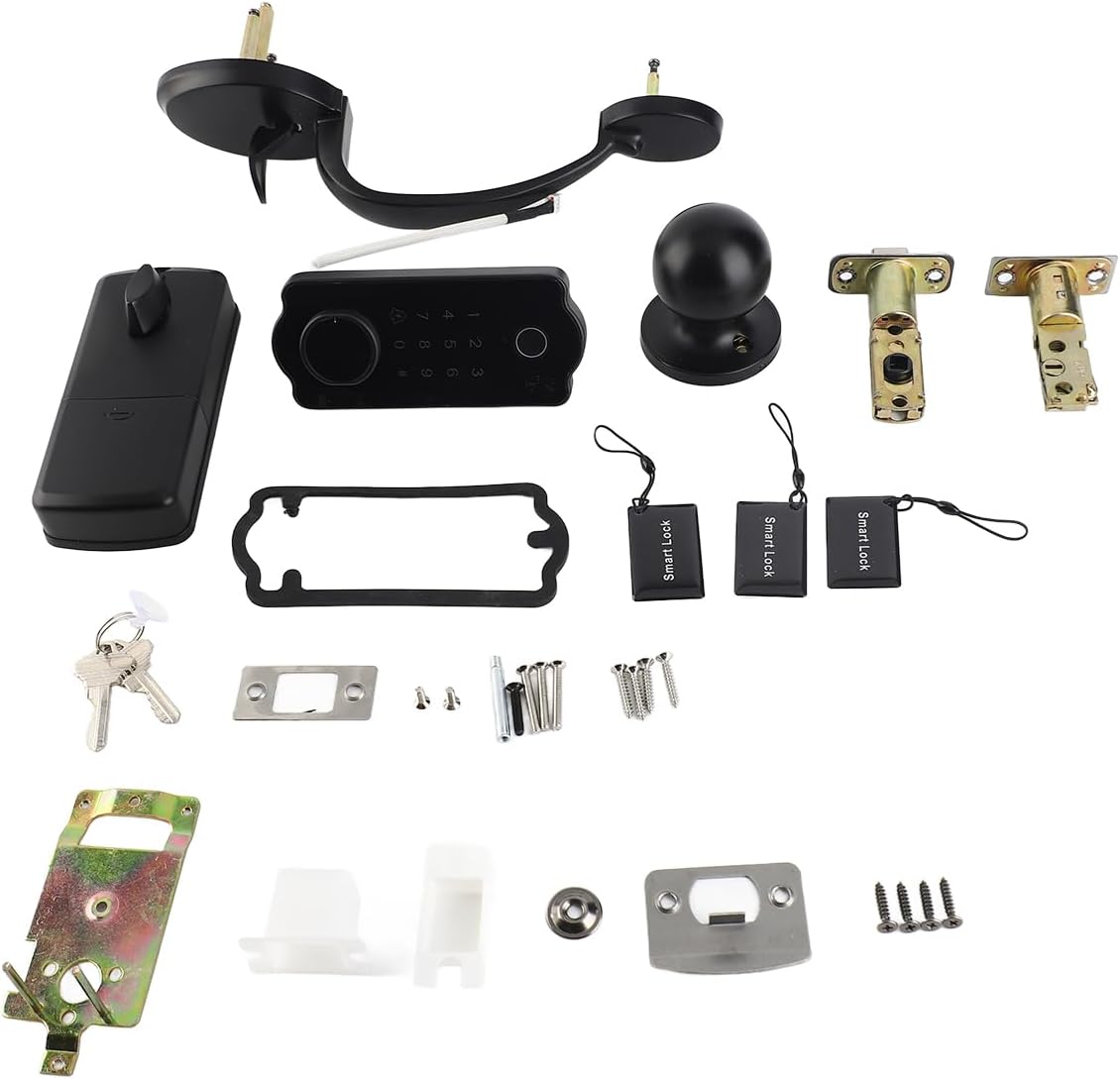
Image: All components included in the lvifloae Smart Door Lock package.
Specifikationer
| Feature | Specifikation |
|---|---|
| Produkt materiale | Zinc Alloy + ABS Plastic |
| Produkt farve | Sort |
| Frontpanel størrelse | 137 x 60 mm / 5.39 x 2.36 tommer |
| Bagpanelstørrelse | 155 x 65 mm / 6.1 x 2.55 tommer |
| Spring Bolt Size | 60/70mm - 2.36/2.75in (adjustable mortise) |
| Passende dørtykkelse | 38-48 mm / 1.49-1.88 tommer |
| Oplåsningsmetoder | TTlock App, Fingerprints (100 groups), IC Cards (200 groups), Passwords (150 groups), Mechanical Keys (2pcs) |
| Password Længde | 6-9 cifre |
| Statisk strømforbrug | <30uA |
| Arbejdsenergiforbrug | 200mA |
| Arbejdstemperatur | -20 - 70°C |
| Arbejdsfugtighed | 20%-80%RH |
| Strømforsyning | 4 x AA batterier (medfølger ikke) |
| Batterilevetid | Approximately 1 year of normal standby |
| IP-vurdering | IP65 |
Opsætning og installation
The lvifloae Smart Door Lock is designed for easy installation. Please follow the steps outlined in the included Hole Opening Diagram and the detailed manual provided in the package. Ensure your door thickness is between 38-48mm (1.49-1.88in) for proper fit.
Vigtige installationspunkter:
- Forbered døren: Use the provided Hole Opening Diagram to drill necessary holes in your door.
- Install Mortise: Insert the single tongue lock body (mortise) into the door edge. The spring bolt size is adjustable (60/70mm).
- Mount Front Panel: Secure the front panel, ensuring the spindle and cable pass through the door.
- Tilslut kabler: Connect the cable from the front panel to the back panel.
- Installer bagpanelet: Attach the back panel, ensuring it aligns correctly with the front panel and the mortise.
- Install Handle Lever Set: Attach the handle levers according to the instructions.
- Indsæt batterier: Install 4 AA batteries (not included) into the battery compartment on the back panel.
- Test funktionalitet: After installation, test all unlocking methods and the auto-locking feature.

Image: Separate front and back units of the smart door lock, showing internal components and keyhole.

Billede: Intern view of the smart door lock's back panel, showing circuit board and battery compartment area.
Betjeningsvejledning
1. TTlock App Setup and Control:
Download the TTlock App from your smartphone's app store. Follow the in-app instructions to pair your lock. The app allows you to:
- Unlock/Lock the door remotely.
- Add/Delete fingerprints, IC cards, and passwords.
- Generer midlertidige adgangskoder til gæster.
- View access logs and battery status.
- Adjust auto-lock settings.
2. Fingerprint Unlocking:
Place your registered finger on the fingerprint sensor located on the front panel. The lock will unlock if the fingerprint is recognized.

Image: Front panel of the smart door lock, highlighting the fingerprint sensor and numeric keypad.
3. Password Unlocking:
Enter your registered 6-9 digit password on the keypad, then press the '#' key to confirm. The lock will unlock if the password is correct.
4. IC Card Unlocking:
Tap your registered IC card against the card reader area on the front panel. The lock will unlock if the card is recognized.
5. Mechanical Key Unlocking:
In case of emergency or battery depletion, insert the mechanical key into the keyhole on the front panel and turn to unlock.
6. Automatic Locking Function:
The lock is equipped with an automatic locking feature. After the door closes, the lock will automatically engage after a preset time (configurable via the TTlock App), ensuring your door is always secured.
Opretholdelse
- Udskiftning af batteri: The lock requires 4 AA batteries. Replace them when the low battery warning is indicated by the lock or the TTlock App. Typically, batteries last about 1 year under normal standby conditions.
- Rensning: Tør låsens overflade af med en blød, tør klud. Undgå at bruge slibende rengøringsmidler eller opløsningsmidler, der kan beskadige overfladen eller de elektroniske komponenter.
- Miljøbeskyttelse: The IP65 rating ensures protection against dust and water splashes. However, avoid submerging the lock in water or exposing it to extreme conditions beyond its specified operating temperature range (-20°C to 70°C).
- Regelmæssig kontrol: Kontrollér regelmæssigt, at alle skruer er spændte, og at låsen fungerer problemfrit.
Fejlfinding
- Låsen svarer ikke: Check battery levels. Replace batteries if low. Ensure the lock is properly installed and all connections are secure.
- Fingeraftryk ikke genkendt: Ensure your finger is clean and dry. Try re-registering your fingerprint through the TTlock App.
- Adgangskoden virker ikke: Double-check the entered password. Ensure you press '#' after entering the password. Verify the password in the TTlock App.
- IC-kort virker ikke: Ensure the IC card is registered. Try tapping the card firmly against the reader.
- TTlock App connection issues: Ensure your phone's Bluetooth is enabled and you are within range of the lock. Restart the app or your phone if necessary.
- Automatisk låsning aktiveres ikke: Check the auto-lock settings in the TTlock App to ensure it is enabled and the delay time is set correctly.
- Lock is jammed or difficult to operate: Sørg for, at dørkarmen og slutblikket er korrekt justeret. Kontroller for eventuelle forhindringer.
Garanti og support
For warranty information, please refer to the documentation provided at the time of purchase or contact your retailer. For technical support or further assistance, please reach out to the manufacturer or seller directly. Contact details are typically found on the product packaging or the seller's webwebsted.