
Indledning
Thank you for choosing the MIXX Analog System 5. This Hi-Fi vinyl record player bundle combines a precision turntable with powerful wireless speakers, offering a rich audio experience. This manual provides essential instructions for setting up, operating, and maintaining your system to ensure optimal performance and longevity.
Opsætning
1. Udpakning og komponenter
Carefully unpack all items from the box. Ensure all components are present and undamaged. The bundle includes:
- Record Turntable
- Two Wireless Speakers
- Regional Power Adapter for Speakers (x1)
- Regional Power Adapter for Record Player (x1)
- Twin Male RCA to Twin Male RCA Cable (x1)
- Speaker Connector Cable (x1)
- Fjernbetjening
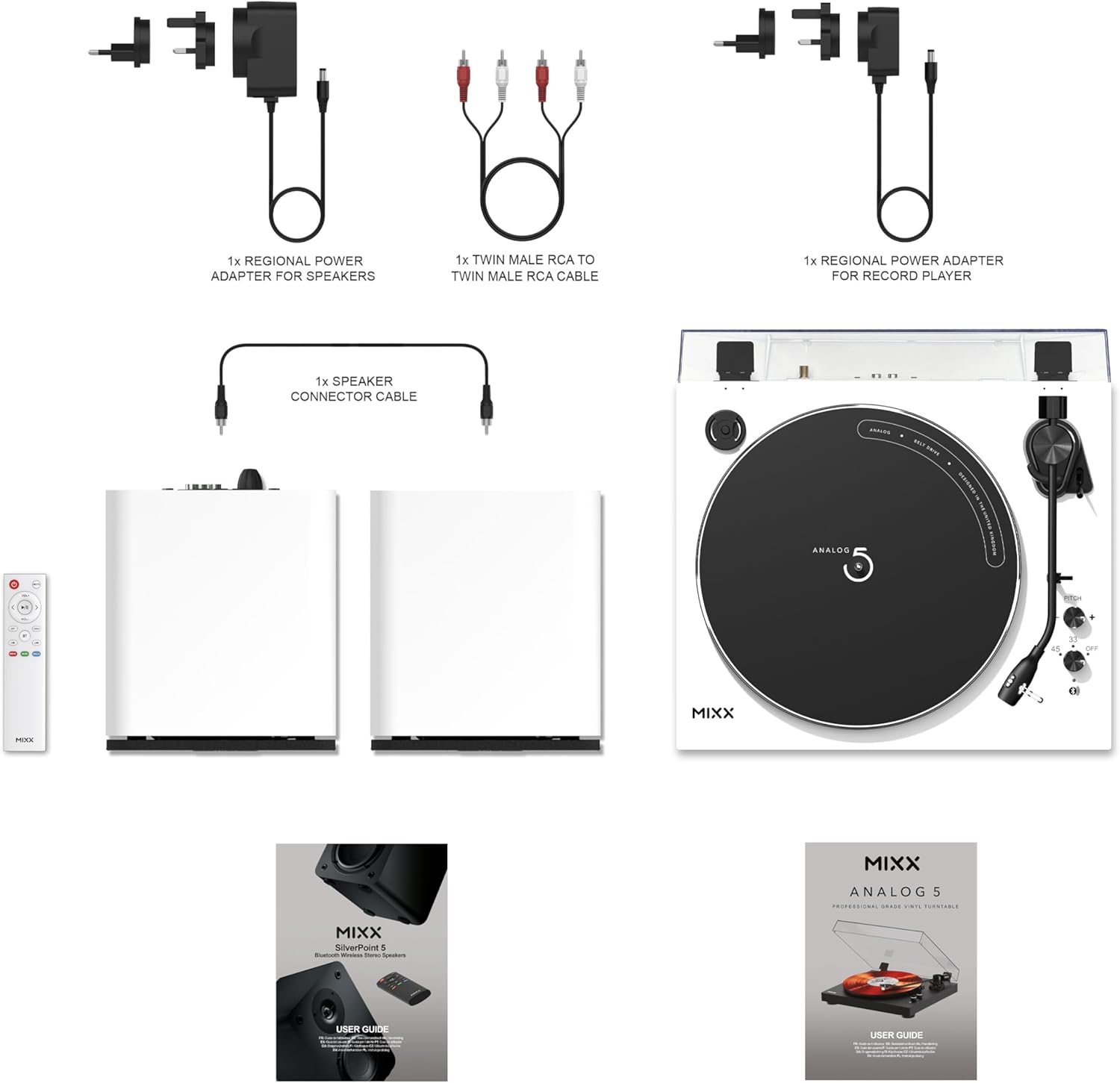
Figure 1: Included Components. This image displays all parts of the Mixx Analog System 5 bundle, including power adapters, cables, speakers, remote, and the turntable itself.
2. Pladespillermontering
- Place the platter onto the turntable spindle.
- Install the anti-slip mat on top of the platter.
- Ensure the Audio-Technica AT3600L cartridge is securely attached to the tonearm. If not, refer to the cartridge manufacturer's instructions for proper installation.
- Position the dust cover over the turntable.

Figure 2: Audio-Technica AT3600L Cartridge. A detailed view of the pre-installed cartridge, crucial for high-fidelity sound reproduction.
3. Højttalerplacering
Place the two wireless speakers on a stable, flat surface, equidistant from your listening position for optimal stereo imaging. Avoid placing them too close to walls or corners, which can affect bass response.

Figure 3: Optimal Speaker Placement. The turntable and speakers arranged on a shelf, demonstrating a typical setup.
4. Connecting Speakers and Power
- Connect the speaker connector cable between the two wireless speakers.
- Connect the regional power adapter for speakers to one of the speakers and then to a power outlet.
- Connect the regional power adapter for the record player to the turntable and then to a power outlet.
Betjeningsvejledning
1. Tænd/sluk
Press the power button on the turntable or the remote control to turn the system on or off. Indicators will illuminate when the system is active.
2. Afspilning af en vinylplade
- Placer en vinylplade på pladetallerkenen.
- Select the appropriate speed (33 or 45 RPM) using the speed selector switch on the turntable.
- Løft tonearmen ved hjælp af cue-håndtaget.
- Placer forsigtigt pennen over det ønskede spor på pladen.
- Sænk cue-håndtaget for forsigtigt at placere pennen på pladen.
- At the end of the record, lift the tonearm using the cueing lever and return it to its rest.
3. Bluetooth Connectivity (Speakers)
To stream audio from a Bluetooth-enabled device (e.g., smartphone, tablet) to the speakers:
- Sørg for, at højttalerne er tændt.
- Activate Bluetooth pairing mode on the speakers (refer to speaker controls or remote).
- On your device, search for available Bluetooth devices and select "MIXX Analog System 5 Speakers".
- Når den er parret, afspilles lyd fra din enhed gennem højttalerne.
4. Bluetooth Connectivity (Turntable)
To connect the turntable wirelessly to Bluetooth headphones or other Bluetooth speakers:
- Sørg for, at pladespilleren er tændt.
- Activate Bluetooth pairing mode on your desired receiving device (headphones/speakers).
- Activate Bluetooth pairing mode on the turntable (refer to turntable controls).
- The turntable will automatically search for and connect to nearby Bluetooth devices.
5. Wired Audio Inputs (Speakers)
The speakers support Optical In, Line In (RCA), Coax Digital In, and USB In. Connect your external audio sources to the corresponding ports on the speakers. Use the remote control or speaker controls to select the desired input source.

Figur 4: System overview with Features. This image illustrates the turntable and speakers, detailing their connectivity options and key features.

Figure 5: Speaker Details. A close-up of a speaker, showing its design and hinting at its various input ports.
Opretholdelse
1. Rensning
- Turntable and Speakers: Use a soft, dry, lint-free cloth to wipe down the surfaces. Avoid abrasive cleaners or solvents.
- Støvdæksel: Rengør med en blød, damp cloth and mild soap if necessary. Dry thoroughly.
- Stylus: Gently brush the stylus from back to front using a specialized stylus cleaning brush. Be extremely careful to avoid bending the cantilever.
2. Udskiftning af pen
The stylus (needle) has a limited lifespan and should be replaced periodically (typically after 300-500 hours of play) to maintain sound quality and prevent record damage. Refer to the Audio-Technica AT3600L cartridge documentation for specific replacement instructions or consult a professional.
Fejlfinding
| Problem | Mulig årsag | Løsning |
|---|---|---|
| Ingen strøm | Strømkabel ikke tilsluttet; stikkontakt ikke aktiv. | Ensure power cables are securely connected to the turntable/speakers and a working power outlet. |
| Ingen lyd fra højttalerne | Incorrect input selected; volume too low; speaker cable disconnected; Bluetooth not paired. | Select the correct input source on the speakers. Increase volume. Check speaker connector cable. Re-pair Bluetooth devices. |
| Forvrænget lyd | Dirty stylus; damaged record; incorrect speed; speaker placement. | Clean the stylus. Use clean records. Ensure correct RPM is selected. Adjust speaker placement. |
| Pladespiller drejer ikke | Belt dislodged; motor issue. | Check if the drive belt is correctly positioned around the platter and motor pulley. If the issue persists, contact support. |
| Problemer med Bluetooth-parring | Device too far; pairing mode not active; interference. | Ensure devices are within range. Activate pairing mode on both devices. Reduce interference from other wireless devices. |
Specifikationer
| Mærke | MIXX |
| Modelnavn | Analog System 5 |
| Maksimal rotationshastighed | 78 RPM (Note: Product description mentions 33/45 RPM, 78 RPM might be a general spec or require specific stylus) |
| Inkluderede komponenter | Record turntable, Cables, Speakers |
| Speciel funktion | Justerbar hastighed |
| Materiale | Metal, Plast |
| Varens vægt | 10.29 kilo |
| Farve | Hvid |
| Kompatible enheder | Headphone, Remote control, Smartphone, Speaker |
| Cykler | Bæltdrevet |
| Signalformat | Linjeniveau |
| Strømkilde | Elektrisk med ledning |
| Forbindelsesteknologi | Hjælpefunktion, Bluetooth |
| Emnemål L x B x H | 19.89 cm L x 17.44 cm B x 16.6 cm H |
| Fabrikant | Mixx |
| UPC | 810148210595 |
| Mfr varenummer | USRP-A5-BK-058 |
Garantioplysninger
The product comes with a 1-year limited warranty. Please retain your proof of purchase for warranty claims. For detailed terms and conditions, refer to the official MIXX warranty documentation included with your product or visit the MIXX webwebsted.
Støtte
If you encounter any issues not covered in this manual or require further assistance, please contact MIXX customer support. You can find contact information on the official MIXX webhjemmeside eller gennem din forhandler.
Online ressourcer: Visit the MIXX Store on Amazon