
Edifier es20
Brugermanual til bærbar Bluetooth-højttaler fra Edifier
Model: ES20
Your comprehensive guide to setting up, operating, and maintaining your Edifier ES20 Portable Bluetooth Speaker.
Produkt overview
The Edifier ES20 is a compact and powerful portable Bluetooth speaker designed for both indoor and outdoor use. It features IP67 waterproof and dustproof capabilities, ensuring durability in various environments. With Bluetooth V5.4 connectivity, it offers stable wireless audio and supports stereo pairing for an enhanced sound experience. The speaker also includes a built-in microphone for hands-free calls and customizable ambient lighting.
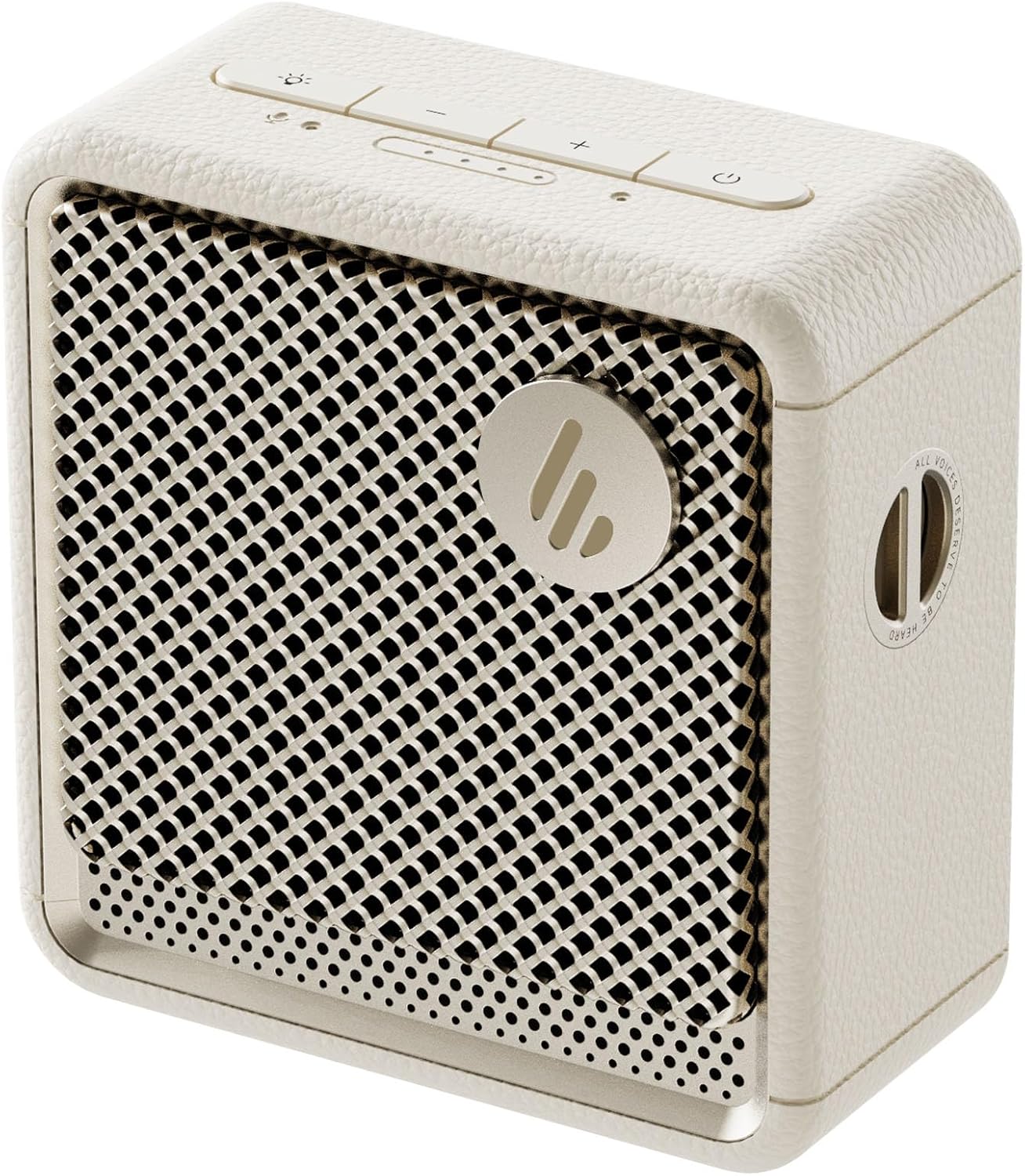
Billede: Forside view of the Edifier ES20 Portable Bluetooth Speaker in Ivory, showcasing dens kompakte design og højttalergitter.

Image: The Edifier ES20 speaker placed on a desk, demonstrating its suitability for home or office environments.
Nøglefunktioner omfatter:
- Premium lydkvalitet: 6W (RMS) output with a 1.7'' full-range driver and 2'' passive bass radiators for rich, punchy sound.
- Bluetooth V5.4 & Stereo Pairing: Seamless wireless connectivity and the ability to pair two speakers for stereo sound.
- IP67 vandtæt og støvtæt: Designed to withstand splashes, rain, and dust, making it ideal for outdoor use.
- Long Lasting Playtime: Op til 15 timers spilletid på en enkelt opladning.
- Omgivende belysning: Features a customizable ambient light system for enhanced atmosphere.
- Indbygget mikrofon: High-sensitivity microphone for clear hands-free communication.
- Let at kontrollere: Intuitive top-mounted buttons and control via the EDIFIER ConneX app.
Opsætningsvejledning
Hvad er der i æsken
Før du begynder, skal du sørge for, at alle komponenter er til stede i emballagen:
- Edifier ES20 bærbar Bluetooth-højttaler
- Rem
- Hurtig startvejledning
- USB-C til USB-C kabel
- Vigtige sikkerhedsinstruktioner

Image: A visual representation of the Edifier ES20 speaker and its included accessories, such as the strap, charging cable, and documentation.
Opladning af højttaleren
The ES20 speaker comes with a built-in rechargeable battery. Before first use, it is recommended to fully charge the speaker.
- Connect the provided USB-C to USB-C cable to the charging port on the speaker.
- Tilslut den anden ende af kablet til en kompatibel USB-strømadapter (medfølger ikke) eller en computers USB-port.
- The battery indicator lights on the top panel will illuminate to show charging progress. All lights will be solid when fully charged.
Indledende Bluetooth-parring
Follow these steps to connect your ES20 speaker to a Bluetooth device for the first time:
- Sørg for, at højttaleren er opladet og tændt. Bluetooth-indikatorlampen blinker, hvilket indikerer, at den er i parringstilstand.
- Aktiver Bluetooth på din enhed (smartphone, tablet, bærbar computer), og søg efter tilgængelige enheder.
- Select "EDIFIER ES20" from the list of found devices.
- Once connected, the Bluetooth indicator light on the speaker will remain solid.
For advanced features and easier control, download the EDIFIER ConneX app from your device's app store.

Image: Screenshots illustrating the EDIFIER ConneX mobile application, which provides additional control and customization options for the speaker.
Betjeningsvejledning
Knap funktioner
The ES20 speaker features intuitive top-mounted buttons for easy control:

Image: A detailed diagram outlining the functions of each button on the top panel of the ES20 speaker, including power, volume, playback, and lighting controls.
| Knap/indikator | Fungere |
|---|---|
| Power knap | Press and hold for 1.5s to power on/off. Short press to play/pause. |
| Lydstyrke op (+) | Kort tryk for at øge lydstyrken. |
| Skrue ned (-) | Kort tryk for at reducere lydstyrken. |
| Mode/Lys knap | Short press to cycle through sound effects. Press and hold for 1.5s to cycle through ambient light modes. |
| Bluetooth knap | Short press to disconnect current Bluetooth device. Press and hold for 1.5s to enter Bluetooth pairing mode. Double press to enable/disable stereo pairing. |
| Batteristrømindikator | Angiver det aktuelle batteriniveau. |
| Tilstandsindikator | Blue for Bluetooth mode, White for Bluetooth stereo pairing mode. |
Bluetooth Stereo Parring
You can pair two ES20 speakers together for a true wireless stereo experience. This requires two ES20 units.
- Ensure both ES20 speakers are powered on and not connected to any other Bluetooth devices.
- On one speaker (this will be the primary speaker), double-press the Bluetooth button. The Bluetooth indicator will flash rapidly.
- The primary speaker will automatically search for and connect to the second ES20 speaker.
- Once connected, the Bluetooth indicator on both speakers will remain solid, and you will hear an audible confirmation.
- Now, connect your device to the primary ES20 speaker via Bluetooth as you normally would.

Image: Two ES20 speakers, one black and one ivory, positioned to illustrate Bluetooth stereo pairing, with a smartphone displaying music playback.
Bluetooth Multi-Point Connectivity
The ES20 supports connecting to two Bluetooth devices simultaneously, allowing for seamless switching between audio sources.
- Connect the first device to the ES20 speaker via Bluetooth.
- Once connected, put the speaker back into pairing mode (press and hold the Bluetooth button for 1.5s).
- Connect the second device to the ES20 speaker.
- The speaker will now be connected to both devices. To switch audio playback, simply pause playback on the active device and start playback on the other.

Image: A visual representation of the ES20 speaker connected to multiple smartphones, highlighting its Bluetooth multi-point connectivity feature.
Ambient Light System
The ES20 features an ambient light system with multiple modes to enhance your listening experience or provide utility.
- Vejrtrækning: Light gently fades in and out.
- Regnbue: Cyklisere gennem et spektrum af farver.
- Statisk: En enkelt, konstant farve.
- Glittering and Colorful: Dynamic, multi-color effects.
- Nødlys: Flashing red light for signaling.
To change the ambient light mode, press and hold the Mode/Light button for 1.5 seconds.

Image: The ES20 speaker showcasing its ambient light system, with icons representing different light effects like breathing, rainbow, static, glittering, and emergency light.
Flere lydeffekter
Optimize your audio experience by selecting from four preset sound modes:
- Musik: Balanceret lydprofffile til generel musiklytning.
- Spil: Enhanced audio cues for gaming.
- Film: Optimized for dialogue and cinematic soundscapes.
- Udendørs: Forøget lydstyrke og bas til udendørs miljøer.
To cycle through sound effects, short press the Mode/Light button.

Image: The ES20 speaker set in a natural environment, surrounded by icons representing its various sound effect modes: Music, Game, Movie, and Outdoor.
Built-in MEMS Microphone
The ES20 includes a high-sensitivity MEMS microphone with intelligent noise cancellation, allowing for clear hands-free calls when connected to your smartphone.

Image: The ES20 speaker positioned next to a smartphone showing an active call screen, illustrating the use of its built-in MEMS microphone for hands-free communication.
Opretholdelse
Rensning
- Use a soft, dry cloth to clean the surface of the speaker.
- Brug ikke slibende rengøringsmidler, voks eller opløsningsmidler, da de kan beskadige finishen.
- For the speaker grille, use a soft brush to gently remove dust or debris.
Waterproof and Dustproof Care (IP67)
While the ES20 is IP67 rated for water and dust resistance, proper care is essential to maintain its integrity:
- Sørg for, at dækslet til opladningsporten er forsvarligt lukket, før højttaleren udsættes for vand eller støv.
- Do not intentionally submerge the speaker beyond 1 meter (3 feet) or for longer than 30 minutes.
- After exposure to water, especially saltwater or chlorinated water, rinse the speaker with fresh water and allow it to air dry completely before charging or using.
- Undgå at udsætte højttaleren for ekstreme temperaturer eller direkte sollys i længere perioder.

Image: The black version of the ES20 speaker partially submerged in water, illustrating its IP67 waterproof and dustproof protection rating.
Batteripleje
- For at forlænge batteriets levetid bør du undgå at aflade højttaleren helt ofte.
- Charge the speaker regularly, even if not in use, to prevent deep discharge.
- Opbevar højttaleren et køligt og tørt sted, når den ikke er i brug i længere perioder.

Image: A circular graphic depicting the 15-hour playtime of the ES20 speaker, with the speaker itself at the center.
Fejlfinding
| Problem | Mulig årsag | Løsning |
|---|---|---|
| Højttaleren tænder ikke. | Lavt batteri; Tænd/sluk-knappen er ikke trykket korrekt ind. | Charge the speaker fully. Press and hold the power button for 1.5 seconds. |
| Kan ikke parre med Bluetooth-enhed. | Speaker not in pairing mode; Device Bluetooth off; Speaker too far from device; Interference. | Ensure speaker is in pairing mode (flashing Bluetooth light). Turn device Bluetooth off/on. Move speaker closer to device. Avoid strong Wi-Fi signals or other Bluetooth devices. |
| Ingen lyd eller lav lydstyrke. | Volume too low on speaker or device; Paused playback; Incorrect audio output selected on device. | Increase volume on both speaker and device. Ensure music is playing. Check device's audio output settings. |
| Lydforvrængning. | Lydstyrken er for høj; Svagt Bluetooth-signal. | Lower the volume. Move speaker closer to the Bluetooth device. |
| Stereoparring mislykkes. | Only one speaker in pairing mode; Speakers too far apart. | Ensure both speakers are powered on and not connected to other devices before initiating stereo pairing. Keep speakers within close proximity during pairing. |
If the issue persists, try resetting the speaker by holding the power button for 10 seconds, or consult the EDIFIER ConneX app for further assistance.
Specifikationer
Detailed technical specifications for the Edifier ES20 Portable Bluetooth Speaker:

Image: A comprehensive table listing the technical specifications of the ES20 speaker, including output power, frequency response, dimensions, and weight.
| Feature | Detalje |
|---|---|
| Modelnavn | ES20 |
| Højttaler type | Bærbar højttaler |
| Samlet udgangseffekt | 6W (RMS) |
| Driver enheder | Full-range: φ43mm, Passive bass radiator: φ55mm |
| Frekvensrespons | 93Hz – 19KHz |
| Signal-støjforhold | ≥85dB (A) |
| Bluetooth version | V5.4 |
| Codecs | SBC |
| Forbindelsesprotokol | Bluetooth, EDIFIER ConneX App |
| Batterilevetid | 15 timer |
| IP-vurdering | IP67 (Vandtæt og støvtæt) |
| Produktmål (B × H × D) | 90.4mm × 93.7mm × 49.7mm (3.55"D x 3.68"W x 1.95"H) |
| Nettovægt | 326 g (1.01 pund) |
| Kontrolmetode | Røre |

Image: The ES20 speaker with its dimensions (width, height, depth) clearly marked, providing a visual reference for its compact size.
Garanti og support
The Edifier ES20 Portable Bluetooth Speaker comes with a limited warranty. Please refer to the "Warranty Card" included in your product packaging for detailed terms and conditions.
For technical support, troubleshooting assistance beyond this manual, or warranty claims, please visit the official Edifier website or contact their customer service. The EDIFIER ConneX app may also provide direct support options or frequently asked questions.
Du kan finde mere information og supportressourcer på Edifier-butik på Amazon.
Ask a question about this manual
Ask about setup, troubleshooting, compatibility, parts, safety, or missing instructions. Manuals+ will review the question and use this page’s manual context to help answer it.