
HITIME XVX H61
HITIME XVX H61 60% Wired Aluminum Gaming Keyboard Instruction Manual
Model: XVX H61
1. Introduktion
Thank you for choosing the HITIME XVX H61 60% Wired Aluminum Gaming Keyboard. This compact mechanical keyboard is designed for both gamers and typists, offering a blend of performance, durability, and aesthetic appeal. This manual provides essential information for setting up, operating, and maintaining your new keyboard.
2. Pakkens indhold
Kontroller venligst, at alle varer er til stede i din pakke:
- XVX H61 60% Wired Aluminum Gaming Keyboard
- USB-C til USB-A-kabel
- Detachable Theme Strap
- Keycap aftrækker
- Aftrækker
- Spare Switches (Creamy Linear Switch)
- Brugermanual

Figure 2.1: Contents of the HITIME XVX H61 package.
3. Nøglefunktioner
- 60% kompakt layout: Space-saving design ideal for gamers and typists, providing more desktop area.
- Helaluminiumshus: Crafted from premium aluminum for enhanced durability and a robust feel. Features a glitter powder layer for visual appeal in changing light.
- Hot-swap printkort: Compatible with 3-pin and 5-pin mechanical switches, allowing for easy customization and replacement without soldering.
- Pre-lubed Creamy Linear Switches: Equipped with switches designed for a smooth and satisfying typing experience with a 50 million keystroke lifespan.
- Noise-Dampening Foam & Switch Pads: Features unique shock-absorbing foam and IXPE switch pads to reduce noise and optimize switch sound.
- Kanagawa Anime PBT Keycaps: Durable double-shot PBT keycaps with a matte surface, non-fading characters, and a Cherry profile for komfortabel skrivning.
- Dynamisk RGB-baggrundsbelysning: 19 built-in backlight modes with a variety of dynamic RGB effects, monochrome, and full-color options. Customizable via software.
- Programmable Software: Personalize keyboard layout, shortcut keys, and backlight effects.
- USB-C tilslutning: Wired connection with data transmission speeds up to 4 Gbps.
- Høj kompatibilitet: Works seamlessly with Windows and MacOS devices.
4. Opsætningsvejledning
4.1 Tilslutning af tastaturet
- Find USB-C-porten på bagsiden af tastaturet.
- Tilslut det medfølgende USB-C-kabel til tastaturets USB-C-port.
- Tilslut USB-A-enden af kablet til en ledig USB-port på din computer.
- Tastaturet vil automatisk blive genkendt af dit operativsystem.
4.2 Attaching the Detachable Theme Strap
The keyboard includes a detachable theme strap for portability and aesthetic customization. To attach the strap:
- Identify the small leather-like pieces and the strap.
- Insert the ends of the strap into the designated slots on the side of the keyboard.
- Secure the strap by attaching the leather-like pieces with the provided screws, ensuring the strap is firmly held in place.
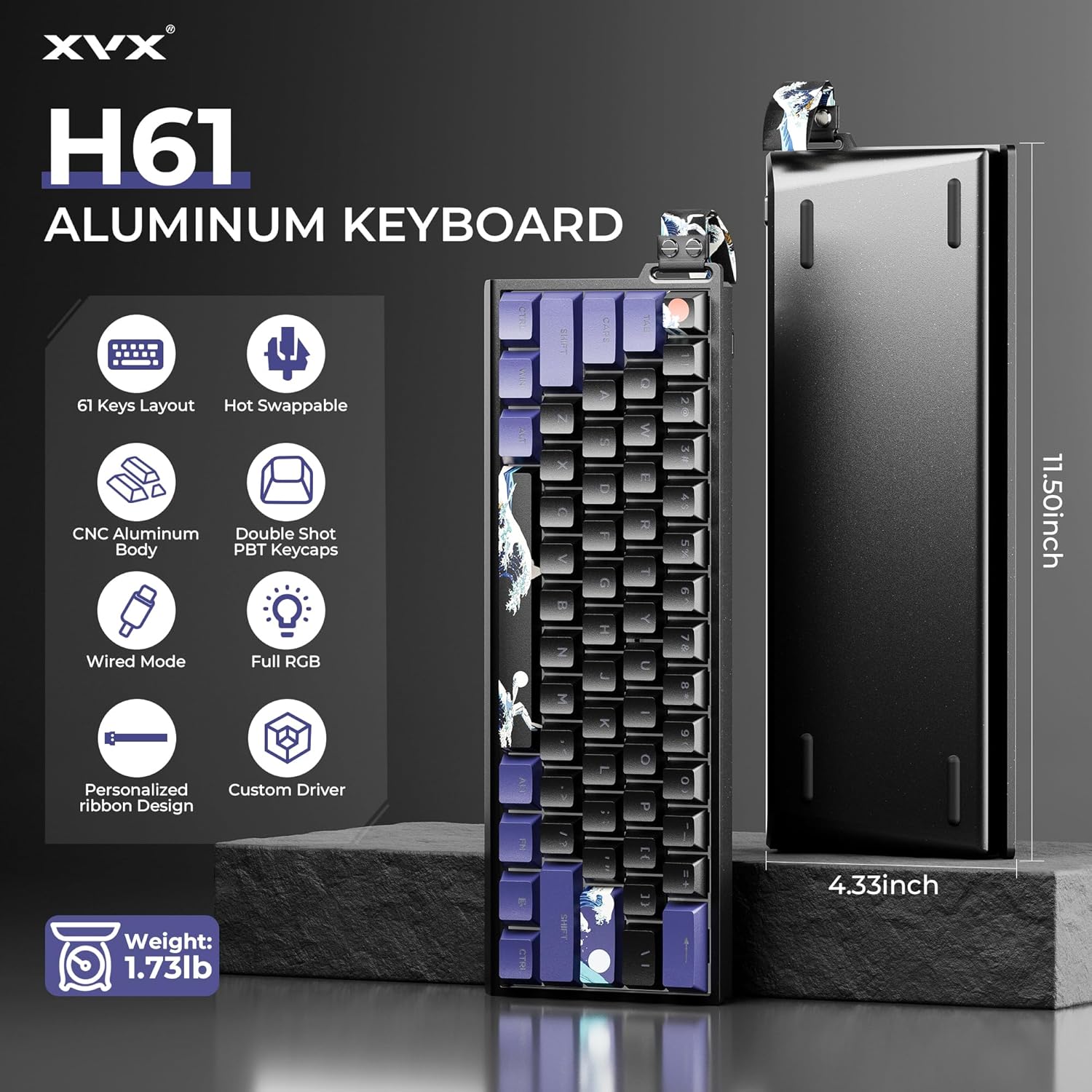
Figur 4.1: Overview of the XVX H61 Aluminum Keyboard features and dimensions.
Video 4.1: Official product video demonstrating the features and setup of the XVX H61 Wired Aluminum Gaming Keyboard, including the detachable strap and hot-swappable switches.
5. Betjening
5.1 RGB-baggrundsbelysningskontrol
The XVX H61 keyboard features dynamic RGB backlighting with 19 built-in modes. You can adjust the lighting directly on the keyboard using function key combinations:
- FN + < : Skift lysfarver.
- FN + \| : Skift mellem 19 lyseffekter.
- FN + [{ or ]} : Juster lysstyrkeniveauer.
For advanced customization, including personalized RGB modes and colors, please use the dedicated software.
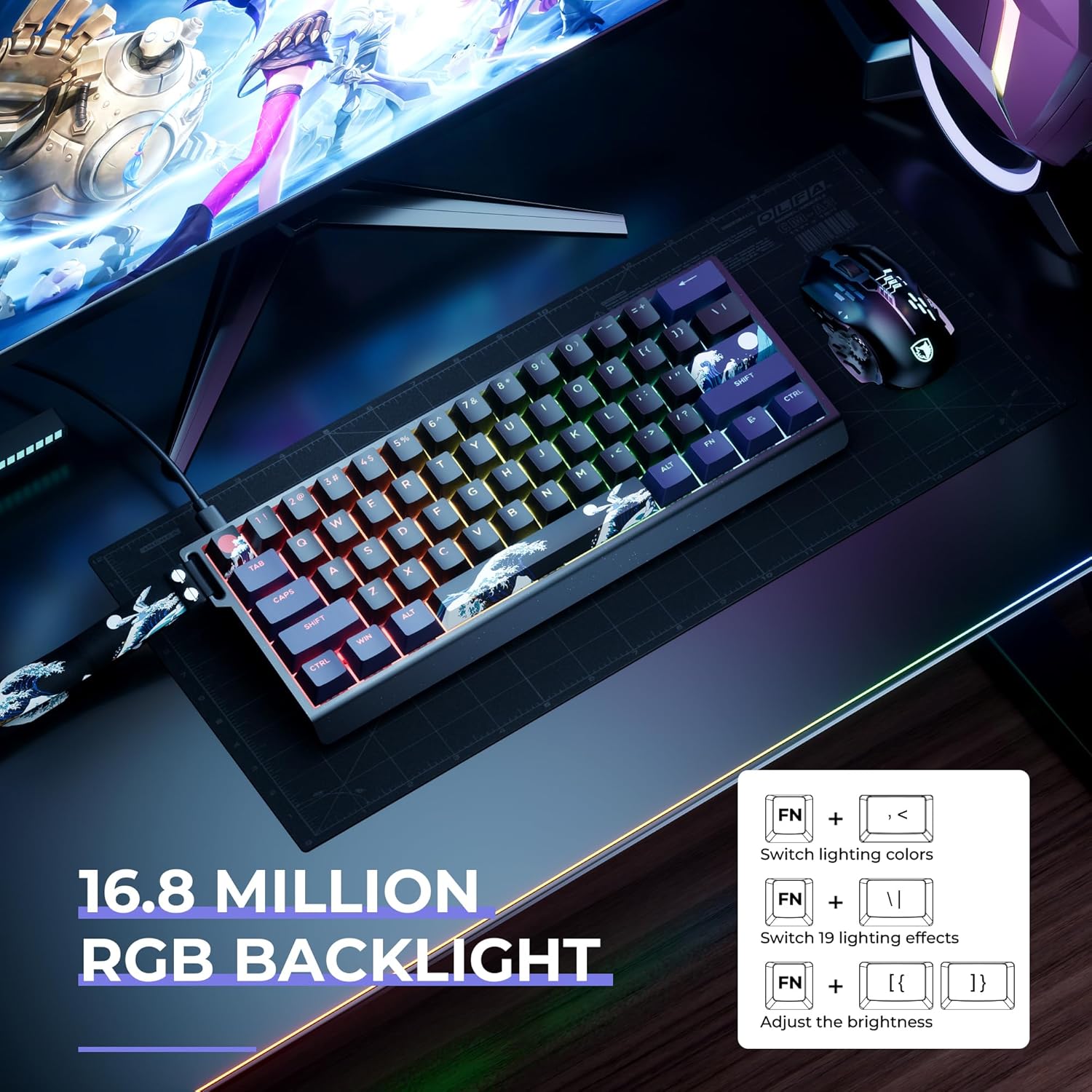
Figure 5.1: Dynamic RGB Backlight in operation.
5.2 Hot-swap-kontakter
The keyboard's hot-swappable PCB allows you to easily change mechanical switches without soldering. This feature enables customization of typing feel and sound.
- Brug den medfølgende afbryder til forsigtigt at fjerne den ønskede afbryder.
- Juster benene på den nye kontakt med fatningerne på printkortet.
- Tryk forsigtigt den nye kontakt på plads, indtil den klikker. Sørg for, at den sidder korrekt for at undgå bøjede stifter.
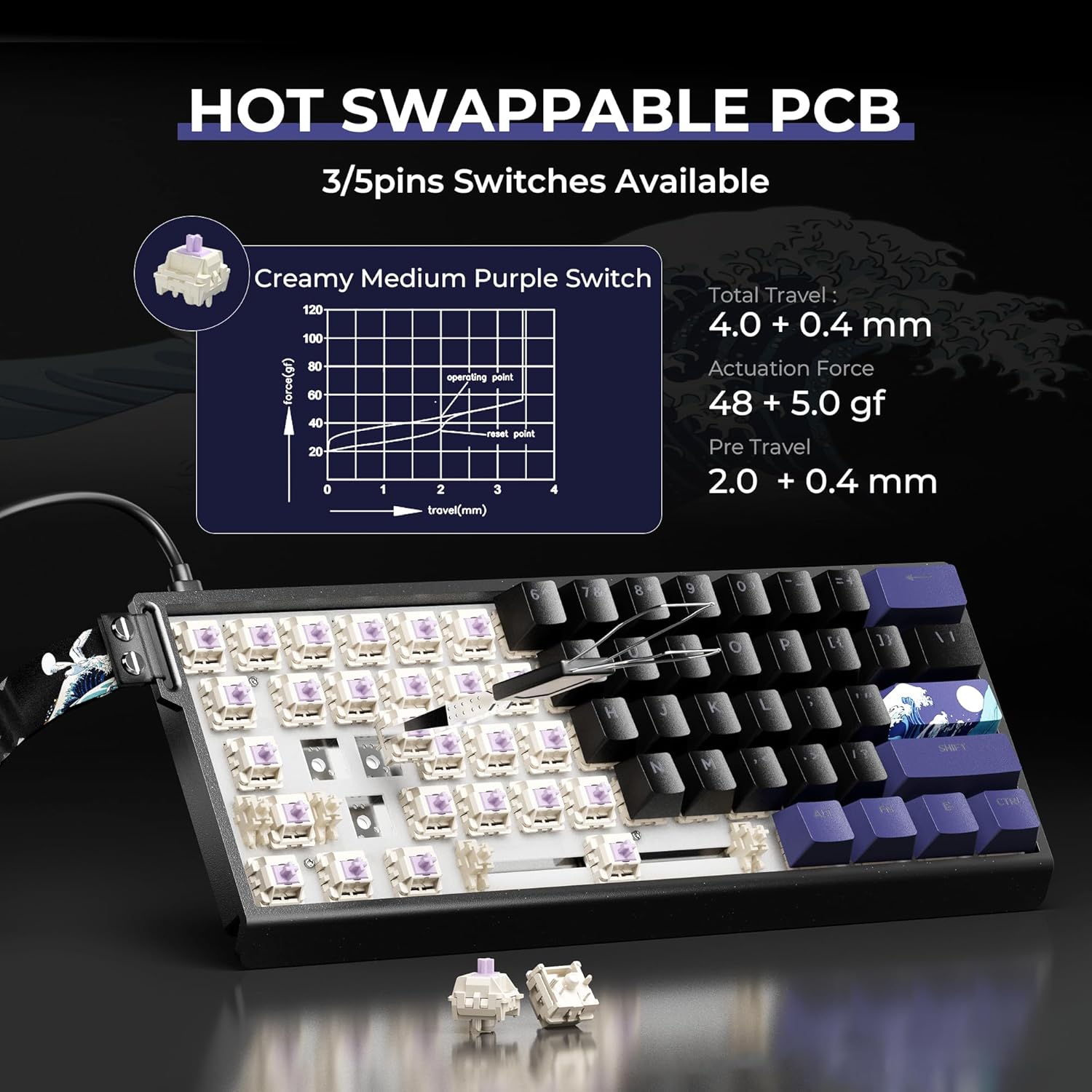
Figur 5.2: Hot-swap-afbrydermekanisme.
5.3 Programmerbar software
Utilize the custom driver software to personalize your keyboard experience. This software allows you to:
- Customize key assignments and create macros.
- Adjust and create unique RGB lighting profiles.
- Opdater firmware for optimal ydeevne.
Refer to the software's documentation for detailed instructions on its features and usage.
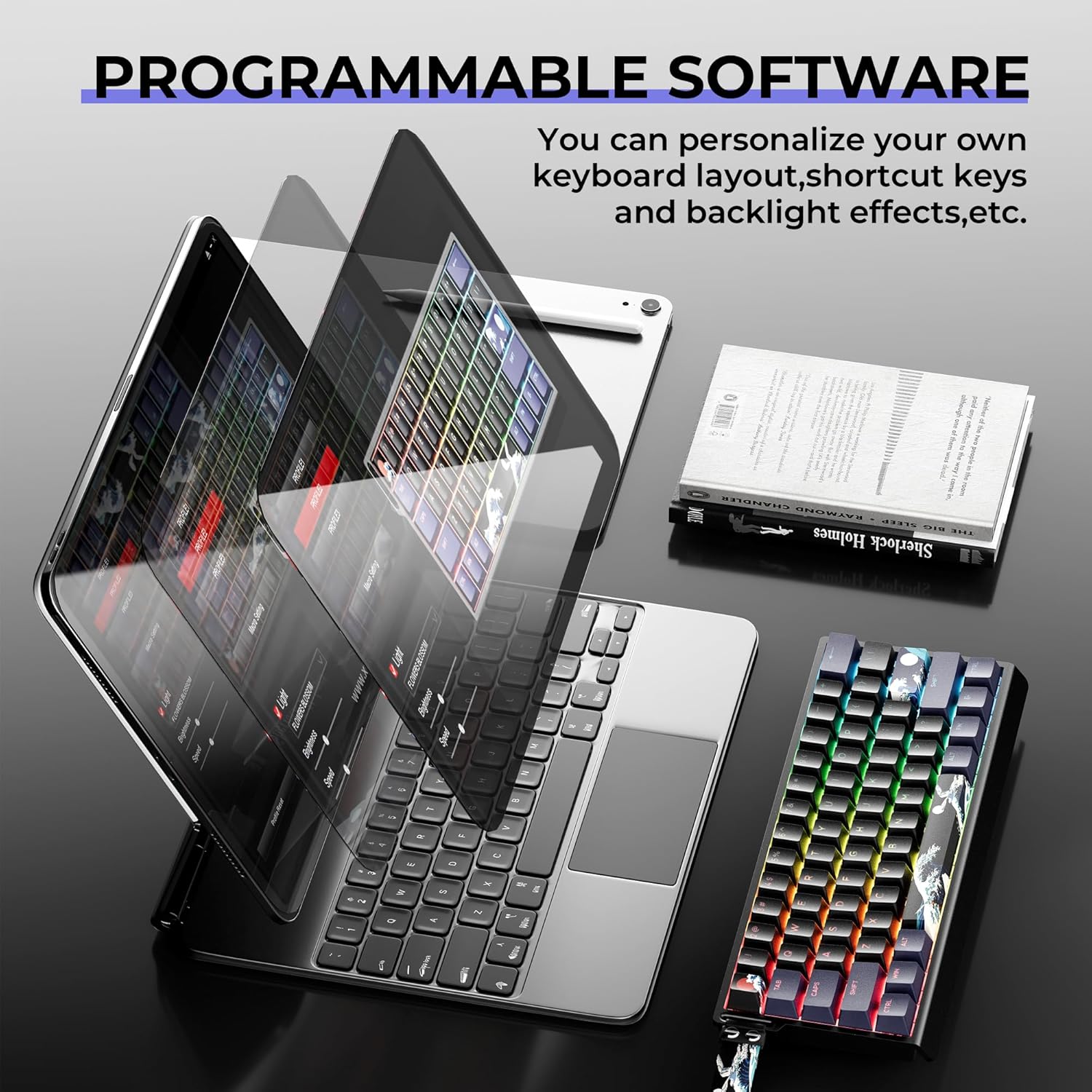
Figure 5.3: Programmable software interface.
6. Vedligeholdelse
6.1 Rengøring af tastaturet
To ensure the longevity and performance of your keyboard:
- Frakobl tastaturet fra computeren, før du rengør det.
- Brug en tastehætteaftrækker til at fjerne tastehætterne for grundig rengøring.
- Tør tastaturets overflade og tastaturets overflade af med en blød klud.amp klæde. Undgå skrappe kemikalier.
- Brug trykluft til at fjerne støv og snavs mellem tasterne og kontakterne.
6.2 Vedligeholdelse af taster og kontakter
The PBT keycaps are designed for durability and resistance to fading. If replacing switches, handle them carefully to avoid bending the pins.
7. Fejlfinding
- Tastaturet reagerer ikke: Sørg for, at USB-C-kablet er korrekt tilsluttet til både tastaturet og computeren. Prøv en anden USB-port eller et andet kabel.
- RGB-lys virker ikke: Check the FN key combinations for brightness and mode selection. Ensure the software is correctly installed and configured if using custom settings.
- Nøgler registreres ikke: If a specific key is not working, try removing and re-inserting its switch. If the issue persists, replace the switch with a spare one.
- Softwareproblemer: Reinstall the keyboard software or check the manufacturer's website for updated drivers and troubleshooting guides.
8. Specifikationer
| Feature | Detalje |
|---|---|
| Model | XVX H61 |
| Layout | 60% (61 taster) |
| Forbindelse | Kablet (USB-C) |
| Materiale | Aluminiumslegering |
| Afbrydere | Hot-Swappable Creamy Linear Switches (3-pin/5-pin compatible) |
| tasterne | Dobbelt-Shot PBT, Cherry Profile, Kanagawa Anime Theme |
| Baggrundsbelysning | 19 Dynamic RGB Modes, Customizable via Software |
| Lyd Dampslutning | EVA Sound Absorbing Foam, IXPE Switch Pad |
| Dimensioner | 11.50 x 4.33 inches (approximate, based on image) |
| Varens vægt | 2.07 pund |
| Kompatibel OS | Windows, MacOS |
9. Garanti og support
HITIME is dedicated to designing and manufacturing quality peripherals with a focus on user experience. For any product inquiries, technical support, or warranty claims, please refer to the contact information provided in your product packaging or visit the official HITIME webwebsted.
Vi anbefaler, at du registrerer dit produkt for at modtage opdateringer og support.