
1. Introduktion
This manual provides instructions for the safe and efficient use of your Generic 300W 6-Pin Power Supply Unit. Please read this manual thoroughly before installation and operation to ensure proper functionality and safety.
Sikkerhedsforanstaltninger:
- Always disconnect power from the wall outlet before installing, removing, or performing any maintenance on the power supply unit.
- Åbn ikke strømforsyningen casing. There are no user-serviceable parts inside, and opening it may expose you to dangerous voltages.
- Overlad al service til kvalificeret personale.
- Ensure proper ventilation around the power supply unit to prevent overheating.
- Avoid exposing the unit to moisture, extreme temperatures, or corrosive environments.
2. Produktet er slutview
The Generic 300W 6-Pin Power Supply Unit is designed to provide stable and reliable power for desktop and server computer systems. It features an efficient design suitable for various computing needs.
Nøglefunktioner:
- Output Wattage: 300W
- PFC Type: Active Power Factor Correction for improved efficiency.
- Køling: Equipped with a single fan for effective air cooling.
- Design: Non-modular cable design.
- Effektivitet: 80 PLUS BRONZE certified for energy efficiency.
- Input bindtage: Understøtter en bred inputvolumentage område på 100V-240V AC.
- Forbindelser: Includes a 4-pin CPU power connector and a 6-pin connector.
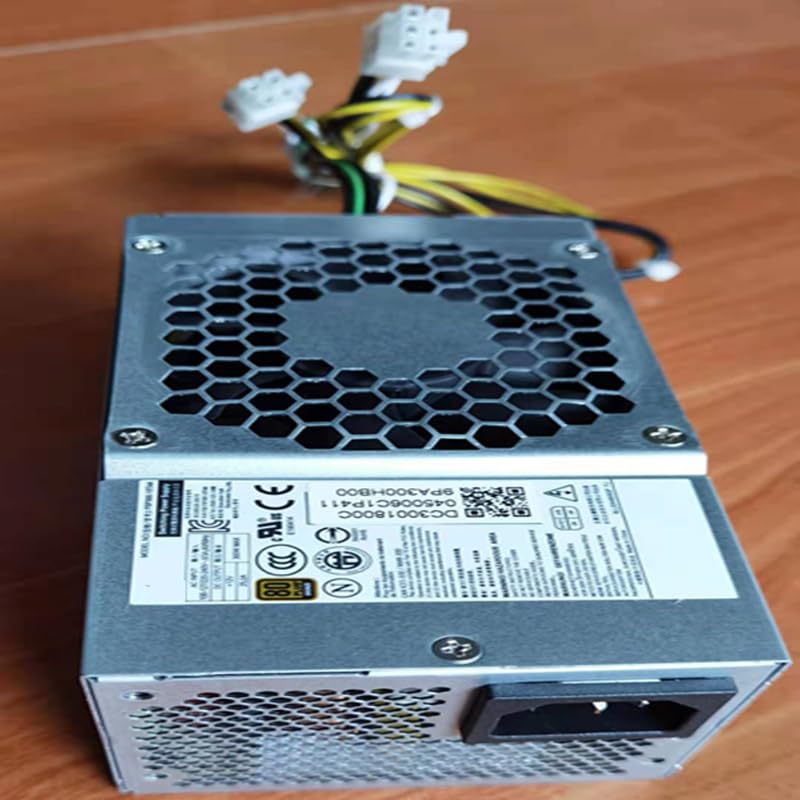
Dette billede viser toppen view of the power supply unit, highlighting the cooling fan and the product's model identification labels.
3. Opsætning og installation
Follow these steps to properly install the power supply unit into your computer system:
- Forberedelse: Ensure your computer system is completely powered off and disconnected from the main power outlet. Open your computer case.
- Fjern den gamle strømforsyning (hvis relevant): If replacing an existing power supply, disconnect all cables from the motherboard and components, then unmount and remove the old unit.
- Installer ny strømforsyning: Carefully slide the new power supply unit into the designated power supply bay in your computer case.
- Sikker strømforsyning: Secure the power supply unit to the computer case using the provided screws.
- Tilslut kabler: Connect the necessary power cables to your motherboard and other components. Ensure the 24-pin main power connector is securely attached to the motherboard. Connect the 4-pin CPU power connector to the appropriate socket on your motherboard. Connect any other required cables (e.g., SATA for drives, PCIe for graphics cards if applicable) to your components.
- Endelig kontrol: Double-check all connections to ensure they are firm and correctly seated. Ensure no cables are obstructing fans or airflow.
- Luk sag: Close your computer case and secure it.

This image shows the various power cables extending from the unit, including the 6-pin and 4-pin connectors, which are essential for connecting to the motherboard and other components.
4. Betjeningsvejledning
After successful installation, follow these steps to operate your power supply unit:
- Tilslut til strøm: Connect the power supply to a wall outlet using a compatible AC power cord.
- Tænd: Locate the power switch on the back of the power supply unit and flip it to the 'ON' position (usually indicated by 'I').
- Systemstart: You can now power on your computer system using its main power button.
Enheden understøtter en inputvolumentage range of 100V to 240V AC, automatically adjusting to the local power grid within this range.

This image displays the rear of the power supply unit, showing the AC power input socket and the exhaust fan grille, which is crucial for heat dissipation.
5. Vedligeholdelse
Korrekt vedligeholdelse sikrer strømforsyningens levetid og optimale ydeevne.
Rensning:
- Periodically inspect the power supply's fan and ventilation grilles for dust accumulation.
- With the computer powered off and unplugged, use compressed air to gently clear dust from the fan blades and grilles. Do not use liquid cleaners.
- Avoid inserting any objects into the fan or ventilation openings.
Miljøforhold:
- Operate the power supply in a well-ventilated area to prevent heat buildup.
- Keep the unit away from direct sunlight, excessive heat sources, high humidity, and corrosive chemicals.
6. Fejlfinding
If you encounter issues with your power supply unit, refer to the following troubleshooting guide:
Ingen strøm til systemet:
- Kontrol af netledning: Ensure the AC power cord is securely connected to both the power supply unit and a functional wall outlet.
- Afbryderen: Verify that the power switch on the back of the power supply is in the 'ON' (I) position.
- Interne forbindelser: Confirm all internal power connections (24-pin motherboard, 4-pin CPU, etc.) are firmly seated.
- Stikkontakt: Test the wall outlet with another device to ensure it is providing power.
Systemustabilitet eller tilfældige nedlukninger:
- Wattage Sufficiency: Ensure the 300W output of the power supply is sufficient for all connected components. An underpowered system can lead to instability.
- Ventilation: Check for proper airflow within your computer case to prevent the power supply or other components from overheating.
- Komponentkontrol: Temporarily disconnect non-essential components to see if the issue persists, which might indicate a faulty component drawing too much power.
If issues persist after performing these checks, it is recommended to consult a qualified computer technician.
7. Specifikationer
Below are the detailed technical specifications for the Generic 300W 6-Pin Power Supply Unit:
| Feature | Specifikation |
|---|---|
| Produktmål (L x B x H) | 15 x 8.2 x 6.5 cm |
| Varens vægt | 1 kg |
| Mærke | Generisk |
| Kompatible enheder | ATX form factor desktop and server systems |
| Connector Type | ATX, 24 Pin System Bus, 4 Pin CPU, 6 Pin |
| Output Wattage | 300W |
| Formfaktor | ATX |
| Afkølingsmetode | Luft (1 ventilator) |
| Input bindtagRækkevidde | 100V - 240V AC |
| PFC type | Aktiv |
| 80 PLUS certificering | 80+ BRONZE |
| Certificeringer | CE, DOT, EAC, EPA, FCC, GMP, RoHS, TGA, UL, KC, pse, WEEE |
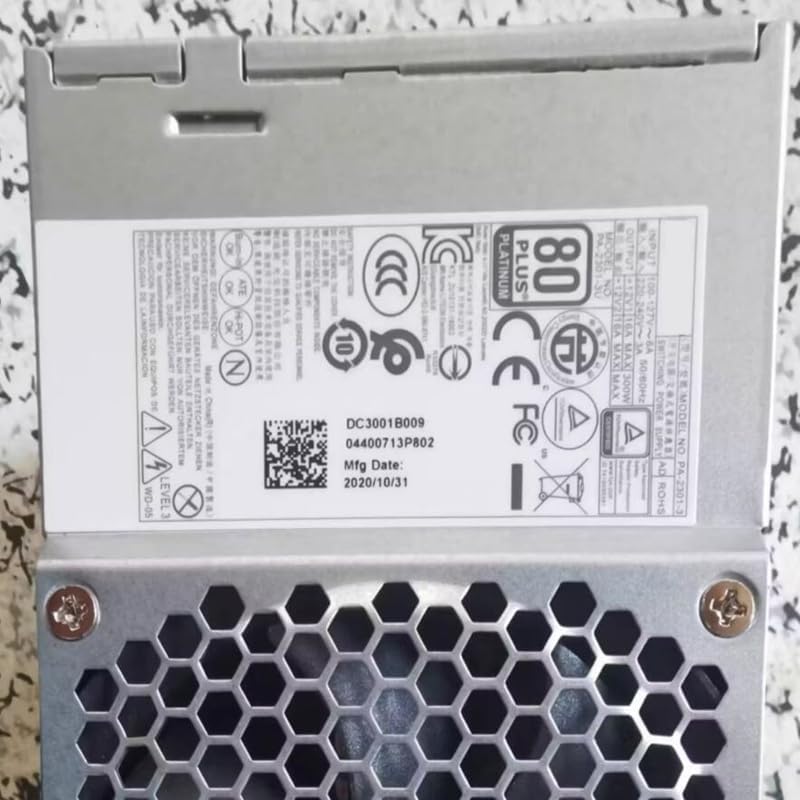
This image displays the product label, which includes important regulatory certifications, electrical specifications, and manufacturing details.
8. Garanti og support
For specific warranty information regarding your Generic 300W 6-Pin Power Supply Unit, please refer to the retailer from whom you purchased the product or consult your purchase documentation.
For technical support or further assistance, please contact the vendor or a qualified computer technician. Do not attempt to repair the unit yourself.