
Edifier ES850NB
Edifier Active Noise Cancelling Headphones ES850NB User Manual
Model: ES850NB | Brand: Edifier
Indledning
Thank you for choosing the Edifier Active Noise Cancelling Headphones ES850NB. These over-ear Bluetooth headphones are designed to provide an immersive audio experience with advanced features such as Hi-Res Audio certification, extended playtime, fast charging, and clear call quality. This manual will guide you through the setup, operation, and maintenance of your new headphones to ensure optimal performance and longevity.
Hvad er der i æsken
Kontroller venligst indholdet af din pakke for at sikre, at alle varer er til stede:
- Edifier ES850NB Headphones
- Trådløs opladningsetui
- Brugermanual
- Rejsetaske
- Type-C opladerkabel
- Vigtige sikkerhedsinstruktioner

Image: The contents of the Edifier ES850NB package, showing the headphones, charging case, and accompanying accessories.
Produkt overview
Nøglefunktioner
- Immersive Hi-Res Audio: Features 40mm titanium-coated drivers and supports LDAC/AAC/SBC codecs for superb Hi-Res Audio and Hi-Res Audio Wireless.
- Upgraded Hybrid Active Noise Cancellation: Blocks up to -45dB of ambient noise with multiple ANC modes (high, medium, wind reduction, ambient sound).
- Extended Battery Life & Fast Charging: Up to 92 hours of playtime (ANC off) or 53 hours (ANC on). A 15-minute charge provides up to 11.5 hours of playback (ANC off).
- Clear Calls & Versatile Connectivity: Built-in mics with AI noise cancellation for crystal-clear calls. Supports Bluetooth 5.4 and wired connection.
- Komfort hele dagen: Designed with skin-friendly leather ear cushions, an ergonomic steel headband, and a lightweight 260g build.
Kontroller og indikatorer
The Edifier ES850NB headphones feature intuitive controls located on the earcups for easy management of audio playback, calls, and noise cancellation modes.

Billede: Detaljeret view of the headphone controls, including volume up/down, power, play/pause, call management, and ANC mode switch.
- Lydstyrke op (+): Single press to increase volume. Press and hold for next track.
- Skrue ned for lyden (-): Single press to decrease volume. Press and hold for previous track.
- Power ON/OFF / Play/Pause: Press and hold for power. Single press for play/pause.
- Opkaldshåndtering: Single press to answer/end a call. Double press to reject a call.
- Stemmeassistent: Double press to activate voice assistant.
- ANC Modes Switch / Bluetooth Pairing: Single press to cycle through ANC modes. Press and hold to initiate Bluetooth pairing.
Opsætning
Opladning af hovedtelefoner
Before first use, fully charge your headphones. Connect the provided Type-C charging cable to the charging port on the headphones and the other end to a USB power source. The indicator light will show charging status. A full charge provides up to 92 hours of playback (ANC off). A quick 15-minute charge can provide up to 11.5 hours of playback (ANC off).
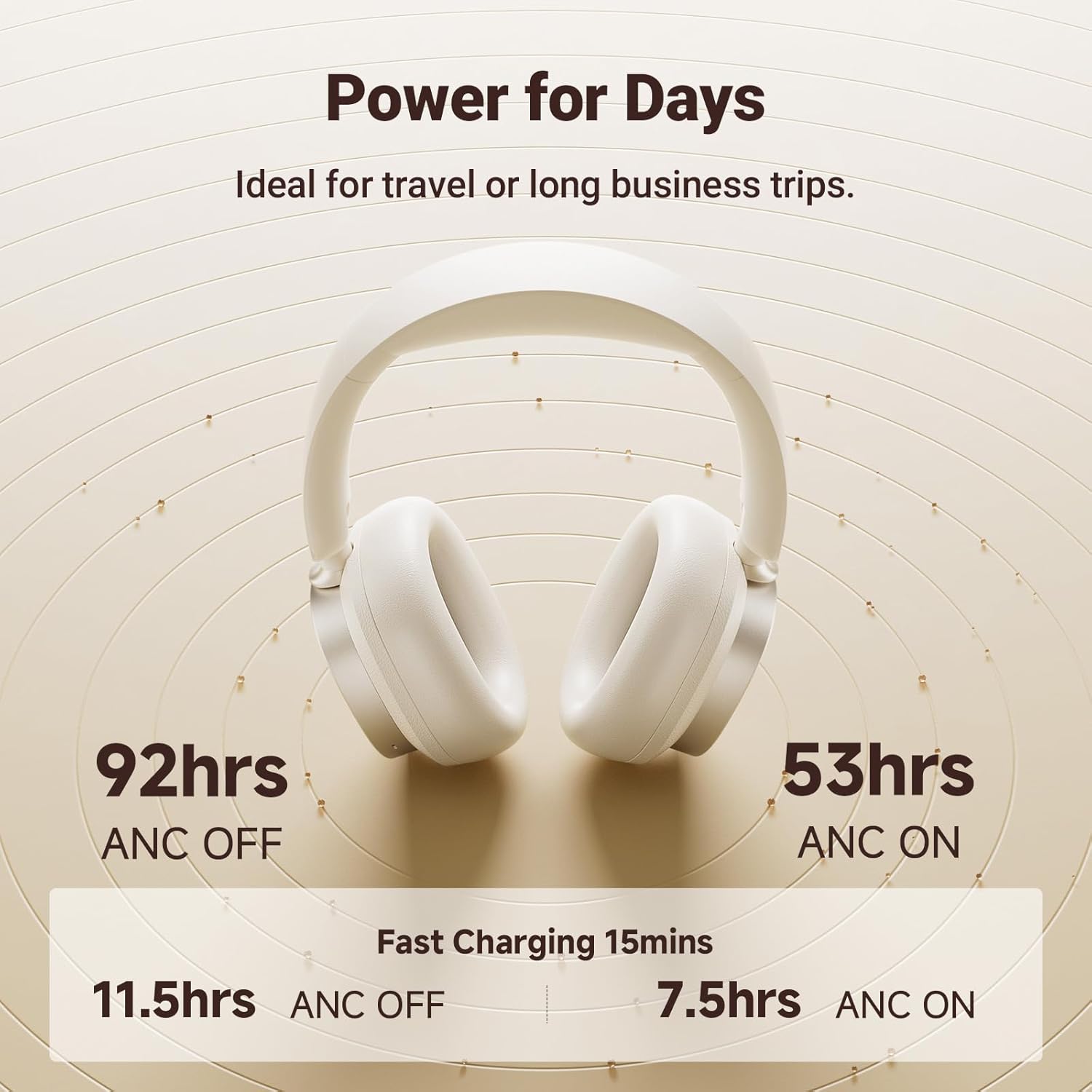
Image: Visual representation of the impressive battery life and fast charging capabilities of the headphones.
Bluetooth-parring
- Sørg for, at hovedtelefonerne er slukket.
- Press and hold the ANC/Bluetooth pairing button until the indicator light flashes rapidly, indicating pairing mode.
- On your device (smartphone, tablet, computer), enable Bluetooth and search for "Edifier ES850NB" in the list of available devices.
- Select "Edifier ES850NB" to connect. Once connected, the indicator light will turn solid blue or off, depending on the model.
- The headphones support multipoint connection, allowing seamless switching between two paired Bluetooth devices.
Video: An official product video demonstrating the Edifier Active Noise Cancelling Headphones, highlighting features like multipoint Bluetooth connectivity and comfort.
Betjeningsvejledning
Aktiv støjafbrydelse (ANC)
The ES850NB headphones feature advanced hybrid active noise cancellation. Press the ANC button to cycle through different modes:
- Høj støjreduktion: Ideal for noisy environments like flights, metros, or buses.
- Mellem støjreduktion: Suitable for offices, coffee shops, or parks.
- Vindreduktion: Minimerer vindstøj under udendørsaktiviteter.
- Omgivende lyd: Giver dig mulighed for at høre dine omgivelser, mens du stadig nyder lyd.

Image: A visual guide to the various Active Noise Cancellation modes and their recommended uses.
Sound Effects and Personalization
Customize your listening experience with three distinct sound effects:
- Musiktilstand: Optimeret til generel musiklytning.
- Spiltilstand: Provides 0.08s low latency for immersive gaming audio.
- Rumlig lyd: Creates a lifelike, surround-sound audio experience.
These modes can be selected via the Edifier Connect app, which also allows for EQ customization and firmware upgrades.

Image: The headphones emphasizing their Hi-Res Audio capabilities for an immersive sound experience.
Foretage og modtage opkald
The built-in microphones with AI noise cancellation ensure crystal-clear calls. Use the multi-function button for call management:
- Tryk én gang for at besvare et indgående opkald.
- Enkelt tryk for at afslutte et aktivt opkald.
- Dobbelttryk for at afvise et indgående opkald.

Image: Demonstrating the clear hands-free call feature of the headphones.
Wired and Wireless Use
The ES850NB headphones offer both wireless Bluetooth 5.4 connectivity and a wired option for versatile use. Simply connect the included USB-C to USB-A cable for a wired connection to compatible devices.

Image: Comparison showing the flexibility of using the headphones wirelessly via Bluetooth or with a wired connection.
Touch-to-Chat Functionality
For quick conversations without removing your headphones, simply touch and hold the right ear cup. This action will pause your audio and activate ambient sound mode, allowing you to hear your surroundings clearly. Release to resume playback instantly.
Opretholdelse
- Rensning: Brug en blød, tør klud til at rengøre hovedtelefonerne. Brug ikke slibende rengøringsmidler eller opløsningsmidler.
- Opbevaring: When not in use, store the headphones in the provided travel bag or charging case to protect them from dust and damage.
- Batteripleje: For at forlænge batterilevetiden bør du undgå at aflade hovedtelefonerne helt ofte. Oplad dem regelmæssigt, selvom de ikke bruges i længere perioder.
- Temperatur: Undgå at udsætte hovedtelefonerne for ekstreme temperaturer (varme eller kolde) eller høj luftfugtighed.
Fejlfinding
| Problem | Mulig årsag | Løsning |
|---|---|---|
| Ingen lyd fra hovedtelefoner | Headphones not powered on; Not paired; Volume too low; Device issue. | Ensure headphones are on. Re-pair with device. Increase headphone and device volume. Test with another device. |
| Kan ikke parres med enheden | Headphones not in pairing mode; Device Bluetooth off; Too many paired devices. | Put headphones in pairing mode. Ensure device Bluetooth is on. Clear old Bluetooth connections on device. |
| Dårlig lydkvalitet | Out of Bluetooth range; Interference; Low battery. | Move closer to the device. Avoid strong Wi-Fi or other wireless signals. Charge headphones. |
| ANC er ikke effektiv | Incorrect ANC mode; Poor fit. | Cycle through ANC modes. Adjust headphones for a snug fit over your ears. |
Specifikationer
| Feature | Detalje |
|---|---|
| Model | ES850NB |
| Bluetooth version | 5.4 |
| Lyd-codecs | LDAC, AAC, SBC |
| Bluetooth rækkevidde | Ca.. 10m |
| Lydtrykniveau | 91 ± 3 dB (A) |
| Frekvensrespons | 20Hz-40KHz |
| Batterilevetid (ANC FRA) | Ca. 92 timer |
| Batterilevetid (ANC TIL) | Ca. 53 timer |
| Input | 5V=1A |
| Varens vægt | 1.5 pund (ca. 260 g) |
| Øreplacering | Over Ear |
| Støjkontrol | Aktiv støjreduktion |
Garanti og support
Edifier products come with a standard manufacturer's warranty. For detailed warranty information, technical support, or service inquiries, please visit the official Edifier webwebstedet eller kontakt deres kundesupport direkte.
Officiel redaktør Webwebsted: www.edifier.com
Ask a question about this manual
Ask about setup, troubleshooting, compatibility, parts, safety, or missing instructions. Manuals+ will review the question and use this page’s manual context to help answer it.