
1. Introduktion
This manual provides detailed instructions for the installation, operation, and maintenance of your Locstar LS-8015FM Keyless Entry Door Lock. Please read this manual thoroughly before installation and use to ensure proper function and safety.
2. Sikkerhedsoplysninger
- Forsøg ikke selv at skille låsen ad eller reparere den. Kontakt kundesupport for at få hjælp.
- Use only the specified battery type (4 AA alkaline batteries). Do not mix old and new batteries or different types of batteries.
- Opbevar mekaniske nøgler et sikkert sted uden for ejendommen for at forhindre udlåsning i tilfælde af elektronisk fejl eller døde batterier.
- Protect your passcode from unauthorized access.
3. Pakkens indhold
Kontroller, at alle komponenter er til stede, før installationen påbegyndes:
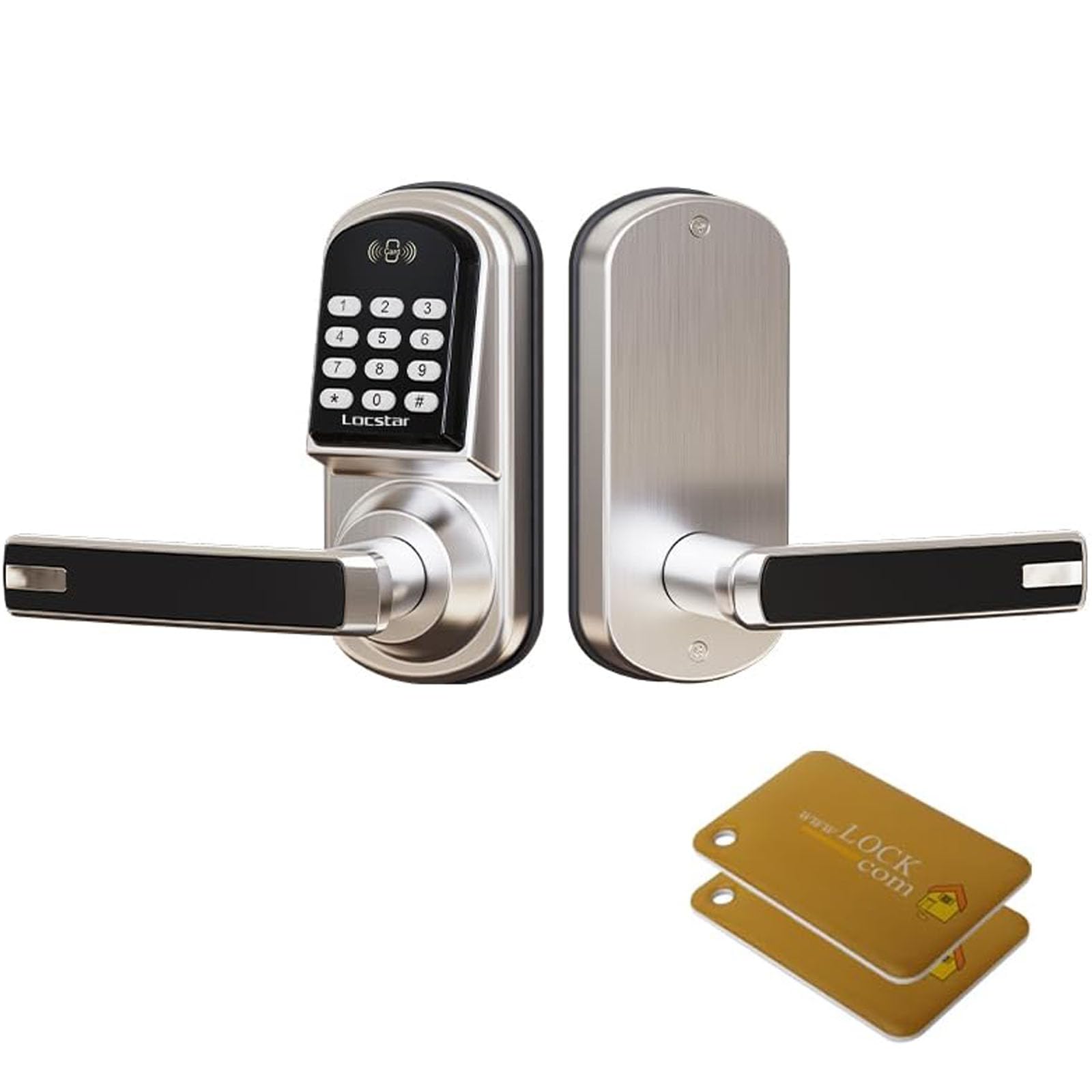
- Smart Lock Assembly (Exterior and Interior Handles)
- Lock Body / Latch
- Brugervejledning
- Monteringsskruer og tilbehør
- Mekaniske nøgler

Image: Complete set of accessories for the Locstar LS-8015FM smart lock.
4. Specifikationer
| Mærke | Locstar |
| Modelnavn | LS-8015FM |
| Speciel funktion | Auto-lås |
| Låsetype | Left (Handed) |
| Materiale | Zink |
| Varedimensioner (L x B x H) | 2.7 x 3.38 x 6.11 tommer |
| Varens vægt | 4.62 pund |
| Batterier påkrævet | Yes (4 AA alkaline batteries, not included) |

Image: Detailed dimensions for the Locstar LS-8015FM lock and its latch, suitable for DIY installation.
5. Opsætning og installation
The Locstar LS-8015FM lock is designed for easy DIY installation, typically requiring only a Phillips screwdriver. It is compatible with most standard door types and thicknesses (1.5 to 2.1 inches).
5.1 Forberedelse
- Ensure your door is within the specified thickness range.
- Gather a Phillips head screwdriver.
- Fjern eventuelle eksisterende dørbeslag.

Image: The Locstar LS-8015FM smart lock ready for DIY installation on a door.
5.2 Installationstrin
- Install the lock tongue: Sæt låsen ind i dørkanten og fastgør den med skruer.
- Monter frontpanelet: Connect the front panel to the lock tongue, rotate, and tighten the insertion holes.
- Secure the center shaft: Install the center shaft and insert the pin into the fork, ensuring it is secure.
- Juster og indsæt: Align the holes and insert the lock assembly into the door.
- Thread the cable: Carefully thread the connecting cable through the back panel of the door.
- Secure the back panel: Attach the back panel to the door with screws.
- Tilslut ledningen: Connect the cable from the front panel to the back panel.
- Installer batterier: Insert four AA alkaline batteries into the battery compartment.
- Nulstil (hvis nødvendigt): Press and hold the reset button for 10 seconds to restore default settings. (Press 0# for default unlocking).
- Cover the back panel: Attach the cover to the back panel and tighten the screws to complete installation.
Image: Installation steps 1-6 for the Locstar LS-8015FM smart lock.

Image: Installation steps 7-12 for the Locstar LS-8015FM smart lock, including battery installation and final cover attachment.
6. Betjeningsvejledning
The Locstar LS-8015FM offers multiple convenient ways to unlock your door.
Billede: Overview of unlocking methods: Card, Passcode, and Key, along with the lock's aluminum alloy construction and battery box location.
6.1 Oplåsningsmetoder
- Oplåsning med adgangskode: Enter your programmed passcode on the keypad, then press '#'. The lock will provide audible and visual feedback upon successful entry.
- Kortoplåsning: Present a registered IC card to the card reader area on the lock. The lock will unlock automatically.
- Nøgleoplåsning: Insert the mechanical key into the keyway and turn to unlock the door. This is a backup method for emergencies or battery depletion.

Image: Visual representation of IC card and password unlock options for the Locstar smart lock.
6.2 Programming Passcodes and Cards
Refer to the specific programming section in your detailed user guide for initial setup and modification of user passcodes and IC cards. This typically involves entering a master code followed by specific commands to add or delete user credentials.
6.3 Automatisk låsefunktion
The lock is equipped with an auto-lock feature that automatically re-locks the door after a set period once it has been unlocked. This feature enhances security and can usually be configured or disabled through the lock's programming menu.
6.4 Backlit Keypad
The keypad features backlighting, allowing for clear visibility and operation even in low-light conditions or at night.
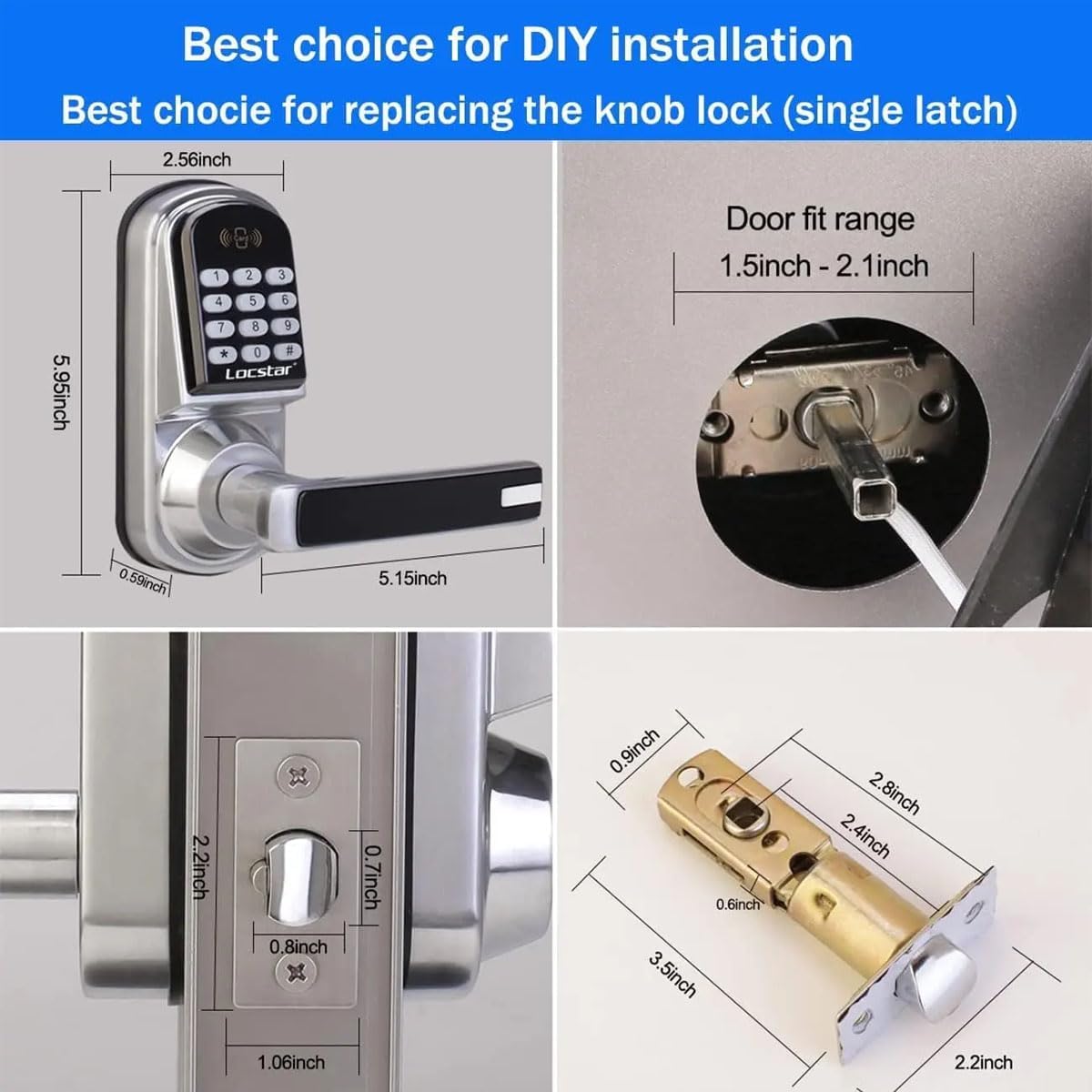
Image: The Locstar LS-8015FM smart lock with its backlit keypad clearly visible at night.
7. Vedligeholdelse
7.1 Udskiftning af batteri
The lock requires 4 AA alkaline batteries. When the batteries are low, the lock will typically provide an audible or visual low-battery warning. Replace all four batteries simultaneously to ensure optimal performance.
- Open the battery compartment cover on the interior side of the lock.
- Fjern de gamle batterier.
- Isæt nye AA alkaline-batterier, og sørg for at polariteten (+/-) vender korrekt.
- Luk batterirummets dæksel.
7.2 Rengøring
Rengør låsens yderside med en blød, damp klud. Undgå at bruge slibende rengøringsmidler, opløsningsmidler eller kemiske spray, da disse kan beskadige overfladen og de elektroniske komponenter.
8. Fejlfinding
If you encounter issues with your Locstar LS-8015FM lock, refer to the following common problems and solutions:
- Låsen svarer ikke: Check battery levels. Replace batteries if necessary. Ensure the cable connection between the front and back panels is secure.
- Adgangskoden virker ikke: Verify that you are entering the correct passcode. Ensure the lock is not in a 'locked out' state due to multiple incorrect entries. Try resetting the lock to factory settings (refer to installation step 5.2, point 9).
- Mekanisk nøgle virker ikke: Sørg for, at nøglen er sat helt i og drejet korrekt. Hvis nøglen er bøjet eller beskadiget, må du ikke tvinge den ind.
- Automatisk låsning aktiveres ikke: Check the lock's programming settings to ensure the auto-lock feature is enabled and configured with the desired delay.
- Vanskeligheder med at dreje håndtaget: Ensure the lock body/latch is properly aligned and installed. Check for any obstructions in the door frame or strike plate.
Ved vedvarende problemer, kontakt kundesupport.
9. Garanti og support
Locstar provides a comprehensive warranty that covers defects in materials and workmanship for the LS-8015FM Keyless Entry Door Lock. For specific warranty terms and conditions, please refer to the warranty card included with your product or contact Locstar customer support.
Kundesupport
If you have any questions, require technical assistance, or need to report an issue, please contact Locstar customer support through the retailer where the product was purchased or via the official Locstar webwebsted.