
1. Introduktion
Thank you for choosing the ZIHNIC AI Translation Earphones S11A. These earphones are designed to provide seamless communication across language barriers with real-time translation capabilities. This manual will guide you through the setup, operation, and maintenance of your device to ensure optimal performance.
2. Produktet er slutview
2.1 Pakkens indhold
- ZIHNIC AI Translation Earphones S11A
- Ladekabel
- Brugermanual
2.2 Nøglefunktioner
- 3 Smart Translation Modes: Supports real-time translation in up to 138 languages.
- IPX5 vandtæt bedømmelse: Resistant to sweat and rain, suitable for various environments.
- Intuitiv berøringskontrol: Manage music, calls, and voice assistant with simple taps.
- Bluetooth Wireless Freedom: Stable and quick pairing with compatible devices.
- Komfortabelt åbent øredesign: Flexible earhooks ensure a secure and comfortable fit for extended wear.
- HiFi stereolyd: Delivers clear audio quality for music and calls.
- HD Noise-Canceling Calls: Forbedrer opkaldsklarheden ved at reducere baggrundsstøj.

Image: ZIHNIC AI Translation Earphones S11A and charging case. The earphones are shown with text indicating translation capabilities.

Image: Diagram illustrating HiFi Stereo Sound and Voice Assistant features of the earphones.

Image: Diagram highlighting 360-degree surround sound quality, HD Noise-canceling Calls, Open Ear Design, IPX5 Water Resistance, and Convenient Touch Control.
3. Opsætning
3.1 Opladning af øretelefonerne
Before first use, fully charge the earphones and their charging case. Connect the provided charging cable to the charging case and a USB power source. The indicator lights on the case will show the charging status.
3.2 Sådan tager du øretelefonerne på
For optimal comfort and sound quality, ensure the earphones are worn correctly.
- Take out the earbud from the charging case.
- Hang the end of the earbud on the ear bone.
- Turn the earbud and slide it behind the ear.
- Adjust the ear hook to fit your ears securely.

Image: Step-by-step guide on how to wear the earphones for a secure and comfortable fit.
3.3 Bluetooth -parring
- Åbn opladningsetuiet; øretelefonerne vil automatisk gå i parringstilstand.
- Aktiver Bluetooth på din smartphone eller enhed, og søg efter tilgængelige enheder.
- Select "ZIHNIC S11A" from the list to connect.
- Once connected, you will hear an audio prompt, and the indicator light on the earphones will change.
3.4 App Installation for Translation
To utilize the full translation features, you will need to download and install the dedicated ZIHNIC translation application on your smartphone. Refer to the QR code provided in the product packaging or search for the official ZIHNIC translation app in your device's app store. Follow the in-app instructions for setup and language selection.
4. Betjeningsvejledning
4.1 Tryk på kontrolelementer
The ZIHNIC S11A earphones feature intuitive touch controls on each earbud. Specific functions may vary slightly based on the connected device and app settings.
- Afspil/sæt musik på pause: Et enkelt tryk på begge øretelefoner.
- Besvar/afslut opkald: Et enkelt tryk på begge øretelefoner.
- Afvis opkald: Tryk på en af øretelefonerne, og hold den nede i 2 sekunder.
- Næste nummer: Tryk to gange på den højre øretelefon.
- Forrige nummer: Dobbelttryk på venstre øretelefon.
- Aktiver stemmeassistent: Tryk tre gange på en af øretelefonerne.
- Juster lydstyrken: Typically controlled via your connected device. Some apps may offer in-app volume control.
4.2 Oversættelsestilstande
The earphones support multiple translation modes through the dedicated ZIHNIC translation app:
- Oversættelse ansigt til ansigt: Ideal for direct conversations. One person speaks, and the earphones provide real-time translation to the other person.
- AI Automatic Translation: For continuous conversations, the earphones automatically detect pauses in speech and provide translations.
- AI-chattilstand: Use the app to type or speak, and the earphones will translate and output the audio.
To initiate translation, open the ZIHNIC translation app, select the desired mode and languages, then follow the on-screen prompts. A simple tap on the earbud may activate the translation function within the app.

Image: Illustration of face-to-face translation using the earphones, showing translated text on screen.

Image: Depiction of automatic AI translation in a business setting, with the app interface visible.
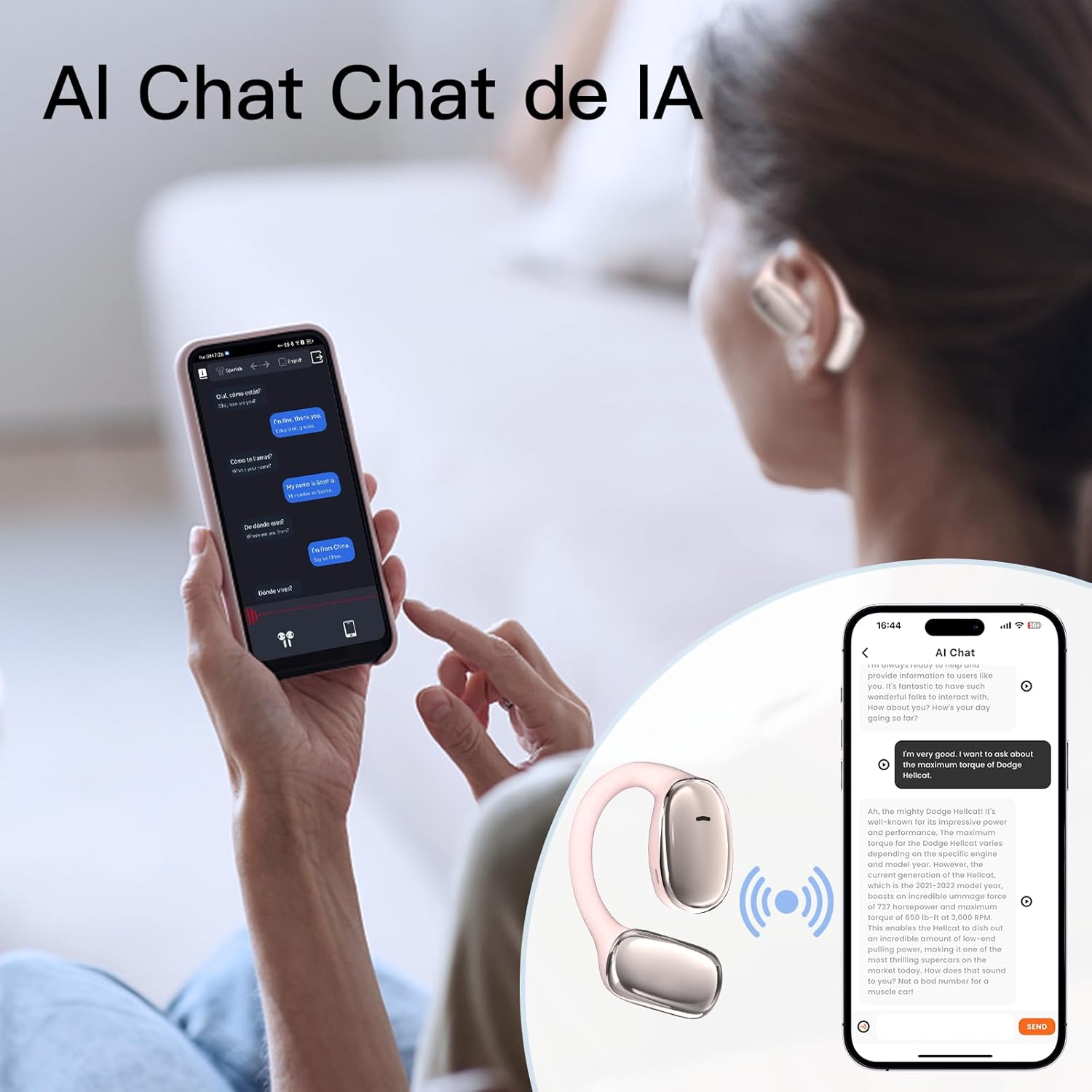
Image: User interacting with an AI chat application on a smartphone, with the earphones providing translation.

Image: A woman using the earphones with a smartphone showing real-time translation in a chat interface.
5. Vedligeholdelse
5.1 Rengøring
- Tør forsigtigt øretelefonerne og opladningsetuiet af med en blød, tør og fnugfri klud.
- Brug ikke slibende rengøringsmidler, alkohol eller kemiske opløsningsmidler.
- Sørg for, at opladningskontakterne er rene og fri for snavs.
5.2 Opbevaring
- Opbevar øretelefonerne i deres opladningsetui, når de ikke er i brug, for at beskytte dem og holde dem opladede.
- Undgå opbevaring i ekstreme temperaturer, direkte sollys eller høj luftfugtighed.
5.3 Vandtæthed
The earphones have an IPX5 waterproof rating, meaning they are resistant to sweat and light splashes of water. They are not designed for submersion in water or use during swimming. Ensure the earphones are dry before placing them back in the charging case to prevent damage.
6. Fejlfinding
If you encounter issues with your ZIHNIC AI Translation Earphones S11A, please refer to the following common solutions:
| Problem | Mulig løsning |
|---|---|
| Høretelefoner parrer/forbinder ikke |
|
| Ingen lyd eller dårlig lydkvalitet |
|
| Oversættelsen virker ikke |
|
| Earphones not charging or holding charge |
|
| Berøringskontroller reagerer ikke |
|
7. Specifikationer
- Model: S11A
- Varens vægt: 1.76 ounce (ca. 50 gram)
- Pakkedimensioner: 4.92 x 3.82 x 1.54 tommer
- Batteritype: Lithium Polymer (inkluderet)
- Vandtæt vurdering: IPX5
- Oversættelsessprog: Op til 138 sprog
- Forbindelse: Bluetooth trådløs

Image: Illustration indicating long battery life, with a 450mAh battery capacity likely referring to the charging case.
8. Garantioplysninger
ZIHNIC products are covered by a limited warranty. Please refer to the warranty card included in your product packaging or visit the official ZIHNIC webwebstedet for detaljerede garantivilkår og -betingelser. Gem din købskvittering som købsbevis i tilfælde af garantikrav.
9. Kundesupport
For further assistance, technical support, or inquiries regarding your ZIHNIC AI Translation Earphones S11A, please contact ZIHNIC customer service through the following channels:
- Officiel Webwebsted: Visit the ZIHNIC official webwebsted med ofte stillede spørgsmål, supportressourcer og kontaktformularer.
- E-mail support: Se din produktemballage eller den officielle webwebsted for kundesupportens e-mailadresse.