1. Introduktion
Thank you for choosing the Generic GTS-1191 Wireless HD Sound Speaker. This portable speaker is designed to deliver clear, high-definition audio with versatile playback options, including Bluetooth, USB, Micro SD card, and FM radio. Its compact design and dynamic LED lighting make it suitable for various environments. This manual provides essential information for setting up, operating, and maintaining your speaker to ensure optimal performance.
2. Sikkerhedsoplysninger
- Udsæt ikke højttaleren for vand, fugt eller ekstreme temperaturer.
- Undgå at tabe eller udsætte højttaleren for kraftige stød.
- Forsøg ikke selv at skille ad, reparere eller modificere højttaleren. Kontakt kvalificeret servicepersonale.
- Hold højttaleren væk fra varmekilder og direkte sollys.
- Brug kun det medfølgende opladningskabel eller et tilsvarende certificeret kabel.
- Bortskaf produktet og dets batteri på en ansvarlig måde i henhold til lokale regler.
3. Pakkens indhold
Tjek venligst pakken for følgende varer:
- GTS-1191 Wireless HD Sound Speaker
- Ladekabel
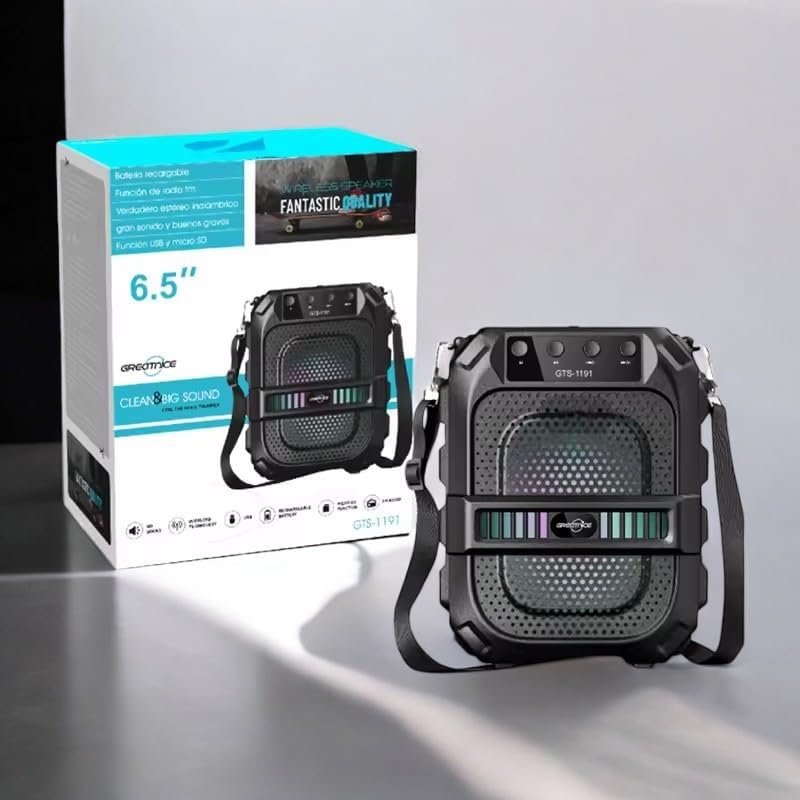
Image: The GTS-1191 speaker shown alongside its retail packaging, highlighting the included shoulder strap for portability.
4. Produktet er slutview
Gør dig bekendt med højttalerens betjeningselementer og porte:
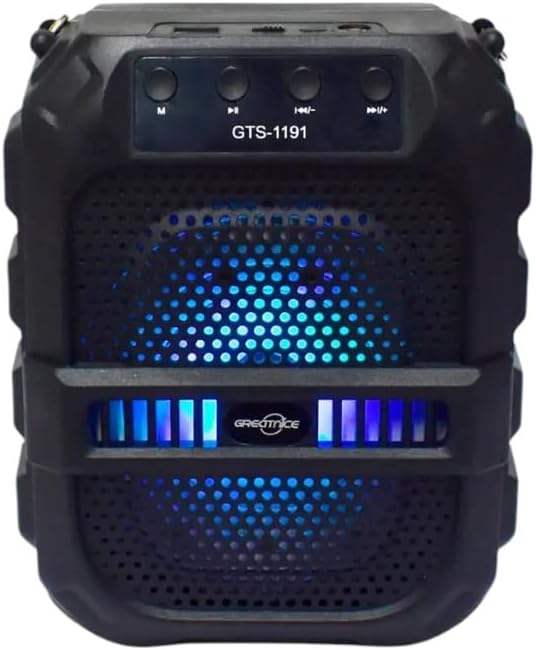
Billede: Forside view of the GTS-1191 speaker, displaying the control panel at the top, the speaker grille, and active blue LED lighting.
Kontrolpanel (øverst)
- M (tilstand) knap: Press to switch between Bluetooth, USB, Micro SD, and FM radio modes.
- Previous Track / Volume Down Button: Short press for previous track (in music modes), long press to decrease volume.
- Afspil/pause knap: Press to play or pause audio. In FM mode, long press to auto-scan and save stations.
- Next Track / Volume Up Button: Short press for next track (in music modes), long press to increase volume.
Ports (Top/Rear)
- USB-port: Til afspilning fra USB-flashdrev.
- Micro SD -kortplads: Til afspilning af Micro SD-kort.
- Opladningsport: Til tilslutning af ladekablet.
5. Opsætning
5.1 Opladning af højttaleren
- Connect the small end of the charging cable to the charging port on the speaker.
- Connect the large end of the charging cable to a USB power adapter (not included) or a computer's USB port.
- Opladningsindikatorlampen lyser typisk rødt under opladning.
- Once fully charged, the indicator light may change color or turn off. A full charge provides up to 12 hours of playtime.
5.2 Tænd/sluk
- To power on, locate the power switch (usually on the back or side) and slide it to the 'ON' position. You will hear an audible prompt.
- For at slukke skal du skubbe tænd/sluk-knappen til 'OFF'-positionen.
6. Betjeningsvejledning
6.1 Bluetooth -parring
- Ensure the speaker is powered on and in Bluetooth mode. If not, press the 'M' (Mode) button until you hear a Bluetooth pairing prompt. The LED lights may flash to indicate pairing mode.
- Aktiver Bluetooth på din mobilenhed (smartphone, tablet osv.) og søg efter tilgængelige enheder.
- Select 'GTS-1191' from the list of devices.
- Once paired, you will hear a confirmation sound, and the LED lights may change their pattern.
- Du kan nu afspille lyd fra din enhed via højttaleren.
6.2 USB-afspilning
- Indsæt et USB-flashdrev med MP3-lyd files i USB-porten.
- Press the 'M' (Mode) button to switch to USB mode. The speaker will automatically begin playing audio files fra USB-drevet.
- Use the 'Previous Track' and 'Next Track' buttons to navigate through songs.
6.3 Afspilning fra Micro SD-kort
- Indsæt et Micro SD-kort, der indeholder MP3-lyd files ind i Micro SD-kortstikket.
- Press the 'M' (Mode) button to switch to Micro SD card mode. The speaker will automatically begin playing audio files fra kortet.
- Use the 'Previous Track' and 'Next Track' buttons to navigate through songs.
6.4 FM radio
- Press the 'M' (Mode) button to switch to FM radio mode.
- Long press the 'Play/Pause' button to initiate an automatic scan for FM stations. The speaker will scan and save available stations.
- Once scanning is complete, use the 'Previous Track' and 'Next Track' buttons to switch between saved FM stations.
6.5 Lydstyrkekontrol
- To increase volume, long press the 'Next Track / Volume Up' button.
- To decrease volume, long press the 'Previous Track / Volume Down' button.
6.6 Dynamic LED Light Display
The GTS-1191 speaker features dynamic LED lights that enhance the listening experience. These lights typically activate automatically when the speaker is powered on and may change patterns based on the audio playback. There is no specific control button for the LED lights; they operate as an integrated visual feature.

Image: The GTS-1191 speaker positioned next to its retail box, showcasing its active red LED light display.
7. Vedligeholdelse
- Rensning: Brug en blød, tør klud til at rengøre højttalerens yderside. Brug ikke slibende rengøringsmidler eller opløsningsmidler.
- Opbevaring: Når højttaleren ikke er i brug i længere perioder, skal den opbevares køligt og tørt, væk fra direkte sollys og ekstreme temperaturer.
- Batteripleje: For at forlænge batteriets levetid bør du undgå at aflade højttaleren helt ofte. Oplad den regelmæssigt, selvom den ikke er i konstant brug.
8. Fejlfinding
| Problem | Mulig årsag | Løsning |
|---|---|---|
| Højttaleren tænder ikke. | Batteriet er afladet. | Oplad højttaleren i mindst 2-3 timer. |
| Ingen lyd fra højttaleren. | Volume is too low or muted. Device not paired. Incorrect mode. | Increase volume. Ensure Bluetooth device is paired. Switch to correct mode (Bluetooth, USB, SD, FM). |
| Bluetooth-parring mislykkes. | Højttaleren er ikke i parringstilstand. Enheden er for langt væk. Interferens. | Ensure speaker is in Bluetooth mode and discoverable. Move device closer. Turn off other Bluetooth devices. |
| USB/Micro SD-afspilning virker ikke. | Ukorrekt file format. Drive/card not inserted correctly. | Sikre files are MP3 format. Reinsert USB drive/Micro SD card. Press 'M' to select correct mode. |
9. Specifikationer
| Feature | Detalje |
|---|---|
| Modelnavn | GTS-1191 |
| Højttaler type | Bærbar højttaler |
| Forbindelse | Bluetooth, USB, Micro SD, FM Radio |
| Farve | Sort |
| Batterilevetid | Op til 12 timer (kontinuerlig spilletid) |
| Produktdimensioner | 10D x 8W x 20H centimeter |
| Pakkedimensioner | 23.6 x 19.2 x 12.4 cm |
| Pakkevægt | 920 g |
| Inkluderede komponenter | Speaker, Charging Cable |
10. Garanti og support
The Generic GTS-1191 Wireless HD Sound Speaker comes with a manufacturer's warranty of 6 måneder fra købsdatoen. Denne garanti dækker fabrikationsfejl ved normal brug. Den dækker ikke skader forårsaget af misbrug, ulykker, uautoriserede ændringer eller normal slitage.
For warranty claims or technical support, please contact your retailer or the point of purchase with your proof of purchase.


