
Indledning
Thank you for choosing the Casio MWA-300H Series watch. This manual provides essential information regarding the setup, operation, and maintenance of your new timepiece. Please read this manual carefully to ensure proper use and to fully understand the features of your watch.
The Casio MWA-300H is an analog watch featuring a chronograph, 100-meter water resistance, and luminous hands for enhanced readability. It is designed for versatile wear, suitable for both daily use and recreational water activities.
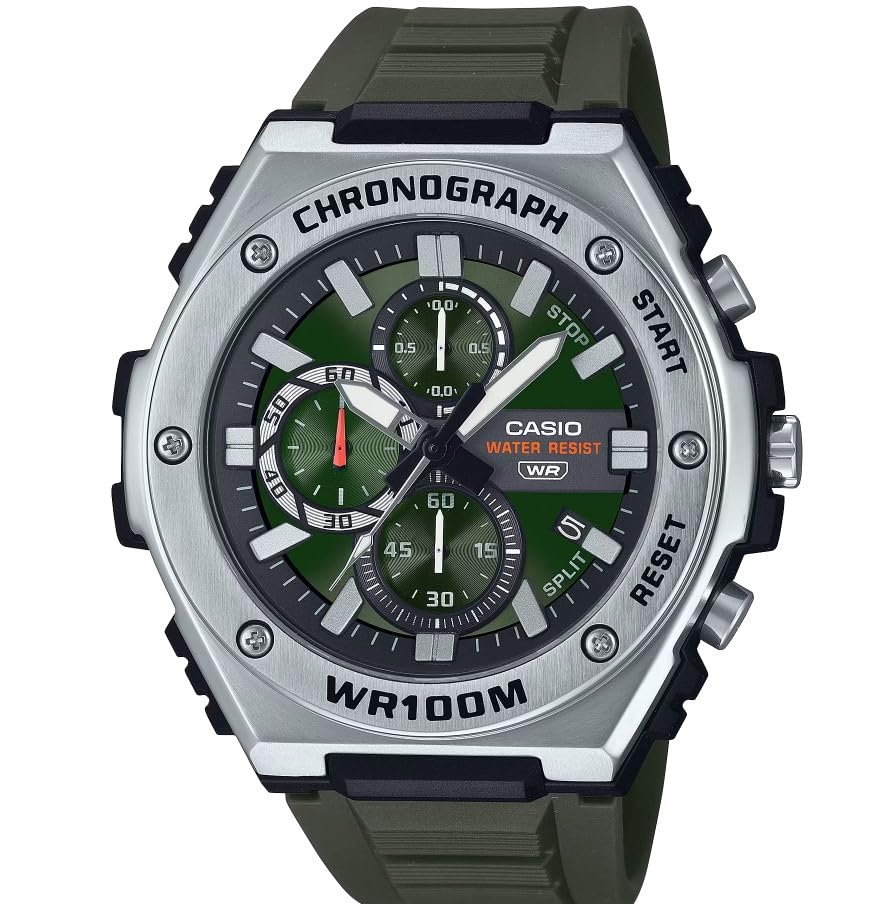
Billede: Forside view of the Casio MWA-300H Series watch, highlighting its green dial, chronograph sub-dials, and black resin band.
Setup: Initial Settings
Indstilling af tid
- Pull the crown out to the second click (time setting position). The second hand will stop.
- Rotate the crown to set the hour and minute hands. Ensure the AM/PM setting is correct if your watch has a 24-hour indicator or date changes at midnight.
- Skub kronen tilbage i normal position. Sekundviseren genoptager bevægelsen.
Indstilling af dato
- Pull the crown out to the first click (date setting position).
- Drej kronen for at indstille datoen. Undgå at indstille datoen mellem kl. 21.00 og 03.00, da dette kan forstyrre den automatiske datoændringsmekanisme.
- Skub kronen tilbage til normal position.
Batterioplysninger
Your Casio MWA-300H watch is powered by 1 LR44 battery, which is included. The battery life is approximately 3 years. When the battery runs low, the watch may exhibit irregular movement or stop. It is recommended to have the battery replaced by a qualified watch technician to maintain water resistance.
Operating: Watch Functions
Brug af kronografen (stopuret)
The chronograph function allows for precise timing of events. Your watch features a 1/10-second stopwatch that captures elapsed, split, and 1st/2nd place times across three dedicated sub-dials.
- Starting the Stopwatch: Press button A (typically the upper right button) to start the stopwatch.
- Stopping the Stopwatch: Press button A again to stop the stopwatch.
- Resetting the Stopwatch: After stopping, press button B (typically the lower right button) to reset the stopwatch hands to zero.
- Mellemtidsmåling: While the stopwatch is running, press button B to measure split times. The stopwatch hands will momentarily stop to indicate the split time, then resume timing. Press button B again to release the split time and display the current elapsed time.
Note: Refer to the specific button layout on your watch for exact button assignments.
Water Resistance (100 Meters)
Your Casio MWA-300H watch is water resistant up to 100 meters (330 feet). This rating means the watch is suitable for swimming, showering, and recreational water activities. It is not suitable for diving or snorkeling where significant water pressure changes occur.
- Do not operate the crown or buttons while the watch is wet or submerged.
- Efter udsættelse for saltvand, skyl uret med ferskvand og tør det af.
Lysende visere og markører
The watch features luminous hands and markers that absorb light and glow in the dark, providing readability in low-light conditions. The intensity and duration of the glow depend on the amount and type of light exposure.
Opretholdelse
Almen pleje
- Tør uret regelmæssigt af med en blød, tør klud for at fjerne snavs og fugt.
- Undgå at udsætte uret for ekstreme temperaturer, direkte sollys i længere perioder eller stærke magnetfelter.
- Keep the watch away from solvents, detergents, perfumes, and cosmetics, as these can damage the resin materials.
Udskiftning af batteri
When the battery needs replacement, it is highly recommended to take your watch to an authorized Casio service center or a reputable watch repair shop. This ensures that the watch is properly sealed and its water resistance is maintained after battery replacement.
Vandtæthedskontroller
To maintain the water resistance of your watch, it is advisable to have it inspected periodically (e.g., every 2-3 years) by an authorized service center, especially if it is frequently exposed to water.
Fejlfinding
| Problem | Mulig årsag | Løsning |
|---|---|---|
| Watch hands do not move or move irregularly. | Lavt batteri. | Udskift batteriet. Kontakt en professionel urtekniker. |
| Tidspunktet er forkert. | Time not set correctly; watch has stopped and restarted. | Nulstil tiden i henhold til instruktionerne under "Indstilling af tid". |
| Datoen ændres ved middagstid i stedet for midnat. | AM/PM-indstillingen er forkert. | Fremskyd tiden med 12 timer. |
| Kronografviserne nulstilles ikke. | Chronograph hands misalignment. | Consult the full Casio module manual for chronograph hand adjustment procedures, or contact customer support. |
| Fugt inde i uret. | Crown or buttons operated underwater; seals compromised. | Tag straks uret til et autoriseret servicecenter for inspektion og reparation for at forhindre yderligere skade. |
Specifikationer
| Modelnavn | MWA-300H |
| Display Type | Analog |
| Bevægelsestype | Kvarts |
| Vandmodstandsdybde | 100 meter (330 fod) |
| Yderligere funktioner | Chronograph, Date Display, Luminous Hands |
| Strømkilde | Battery Powered (1 x LR44 included) |
| Etui materiale | Harpiks |
| Båndmateriale | Harpiks |
| Krystal materiale | Harpiks |
| Æske diameter | 50.9 millimeter |
| Sags tykkelse | 14.3 millimeter |
| Båndbredde | 22 millimeter |
| Spændetype | Spænde |
Garanti og support
Begrænset garanti
Your Casio MWA-300H watch comes with a limited warranty. Please refer to the warranty card included with your purchase for specific terms, conditions, and duration of coverage. The warranty typically covers manufacturing defects under normal use.
Kundesupport
For further assistance, technical support, or warranty claims, please contact Casio customer service. You can find contact information on the official Casio webwebstedet eller i den dokumentation, der fulgte med dit ur.
For more detailed information, including specific module operations or advanced settings, please visit the official Casio support website or refer to the full module manual for your watch.