
1. Introduktion
This manual provides detailed instructions for setting up, operating, and maintaining your BenQ EW2790U 27-inch 4K monitor. Please read this manual thoroughly before using the monitor to ensure proper functionality and to prevent damage.
2. Sikkerhedsoplysninger
Følg altid disse grundlæggende sikkerhedsforanstaltninger for at mindske risikoen for brand, elektrisk stød og personskade:
- Udsæt ikke skærmen for regn eller fugt.
- Åbn ikke skærmen casing; overlad service til kvalificeret personale.
- Sørg for korrekt ventilation omkring skærmen.
- Use only the power cord and adapter provided by BenQ.
- Tag stikket ud af skærmen under tordenvejr eller når den ikke bruges i længere perioder.
3. Pakkens indhold
Bekræft at alle varer er til stede i din pakke:
- BenQ EW2790U 27-inch 4K Monitor
- Strømledning
- HDMI kabel
- USB-C kabel
- Hurtig startvejledning
- Garantikort
4. Opsætning
4.1 Samling af stativet
- Placer skærmen med forsiden nedad på en blød, ren overflade for at forhindre ridser.
- Fastgør stativets base til stativets hals, og fastgør den med den medfølgende skrue.
- Juster stativet med monteringshullet på bagsiden af skærmen, og skub det, indtil det klikker på plads.

Figure 4.1: Assembled BenQ EW2790U monitor.
4.2 Tilslutningskabler
Tilslut de nødvendige kabler til skærmen og din computer:
- Magt: Tilslut netledningen til skærmens strømindgang og derefter til en stikkontakt.
- Video:
- HDMI: Connect an HDMI cable from your computer's HDMI output to one of the monitor's HDMI ports (HDMI 1, 2, or 3).
- USB-C: Connect a USB-C cable from your computer's USB-C port to the monitor's USB-C (65W) port for video, data, and power delivery.
- USB downstream: Connect USB-A devices to the USB-A 3.2 downstream ports on the monitor.
- Lyd: Tilslut hovedtelefoner til hovedtelefonstikket, hvis det ønskes.

Figur 4.2: Bagside view of BenQ EW2790U showing connectivity ports.

Figur 4.3: Detaljeret view of BenQ EW2790U input/output ports.
4.3 Justering af ergonomi
The EW2790U monitor offers various adjustments for comfortable viewing:
- Højdejustering: Hæv eller sænk skærmen til din foretrukne øjenhøjde.
- Vip: Juster skærmens lodrette vinkel.
- Drejelig: Drej skærmen vandret.
- Pivot: Drej skærmen 90 grader for portrættilstand.

Figure 4.4: BenQ EW2790U monitor pivot adjustment.
5. Betjening af monitoren
5.1 Tænd/sluk
Press the Power key located on the bottom right of the monitor to turn it on or off.

Figure 5.1: Monitor controls: Scenario hotkey, 5-way controller, and Power key.
5.2 On-Screen Display (OSD) menu
Use the 5-way controller on the bottom bezel to navigate the OSD menu and adjust settings such as brightness, contrast, color mode, and input source.
5.3 Scenario Hotkey
The Scenario hotkey allows quick access to custom or preset optimal monitor settings for various uses like work, studying, gaming, or watching movies.
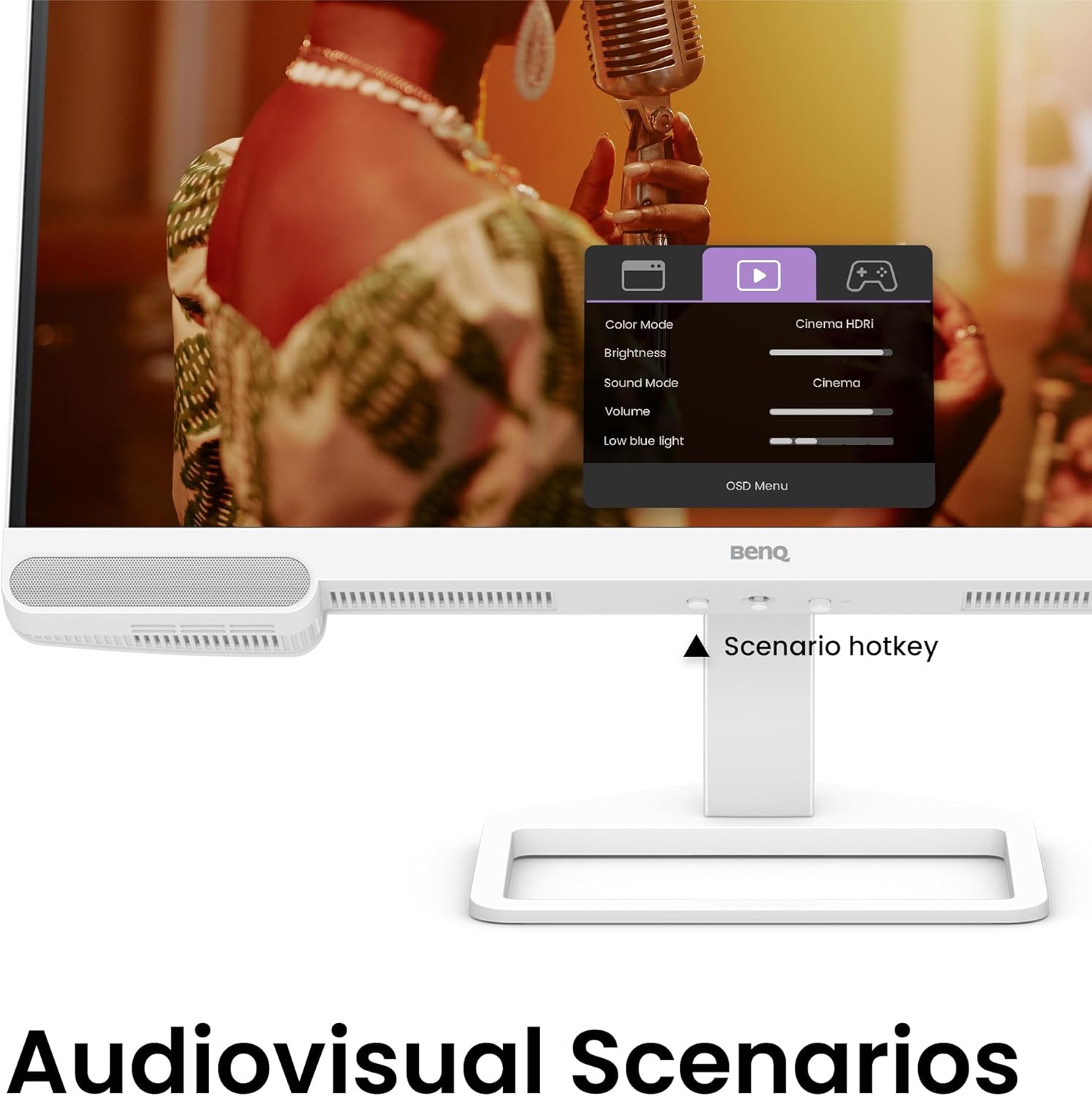
Figure 5.2: OSD menu accessed via Scenario hotkey.
5.4 AI Contrast Technology
The exclusive AI Contrast technology intelligently adjusts the contrast based on the displayed content, optimizing image quality without affecting other areas of the screen.

Figure 5.3: Demonstration of AI Contrast technology.
5.5 Indbyggede højttalere
The monitor includes a pair of 5W built-in speakers for audio output. Adjust the volume through the OSD menu or your connected device.

Figure 5.4: BenQ EW2790U built-in 5W speakers.
6. Vedligeholdelse
6.1 Rengøring af monitoren
- Tag altid stikket ud af skærmen før rengøring.
- Brug let en blød, fnugfri klud damprengøres med vand eller et mildt, ikke-slibende rengøringsmiddel.
- Sprøjt ikke rengøringsmiddel direkte på skærmen.
- Undgå at bruge alkohol, ammoniak eller slibende rengøringsmidler, da de kan beskadige skærmen ellerasing.
6.2 Opbevaring
Store the monitor in a cool, dry place away from direct sunlight and extreme temperatures. If storing for an extended period, consider using the original packaging for protection.
7. Fejlfinding
| Problem | Mulig årsag | Løsning |
|---|---|---|
| Intet billede på skærmen | Strømkabel frakoblet; Videokabel frakoblet; Forkert indgangskilde valgt. | Ensure power and video cables are securely connected. Press the Scenario hotkey to select the correct input source. |
| Billedet er sløret eller forvrænget | Forkert opløsning; Løst videokabel. | Set the display resolution to 3840x2160. Check video cable connections. |
| Ingen lyd fra højttalerne | Lydstyrken er for lav; Slået fra; Forkert lydoutput valgt på computeren. | Adjust volume via OSD menu or computer settings. Ensure monitor is selected as audio output device. |
| AI Contrast not working as expected | Feature disabled; Specific content not optimized. | Check OSD settings to ensure AI Contrast is enabled. Performance may vary with different content. |
8. Specifikationer
| Feature | Detalje |
|---|---|
| Skærmstørrelse | 27 tommer |
| Opløsning | 3840x2160 (4K UHD) |
| Aspektforhold | 16:9 |
| Farvedækning | 95 % P3 |
| AI Contrast Technology | Ja |
| Indbyggede højtalere | 2 x 5W |
| Forbindelse | 1x USB Type-C (65W), 3x HDMI (2.0), USB-C 3.2 downstream, USB-A 3.2 downstream, Headphone Jack |
| Ergonomisk design | Højdejustering, vipning, drejefunktion, pivot |
| Varens vægt | 21.4 pund |
| Produktmål (LxBxH) | 17 x 8 x 21 tommer |
9. Garanti og support
Your BenQ EW2790U monitor is covered by a manufacturer's warranty. Please refer to the warranty card included in your package for specific terms and conditions. For technical support, product registration, or service inquiries, please visit the official BenQ webwebsted eller kontakt deres kundeserviceafdeling.
Official BenQ Webwebsted: www.benq.com