
1. Produktet er slutview
The LNDU WL01 Smart Lock is a state-of-the-art keyless entry system designed to enhance home security and convenience. It offers multiple unlocking methods, including fingerprint, PIN code, eKey, and traditional mechanical key. With built-in Wi-Fi, it allows for seamless remote management and integration with smart home ecosystems like Amazon Alexa and Google Assistant.
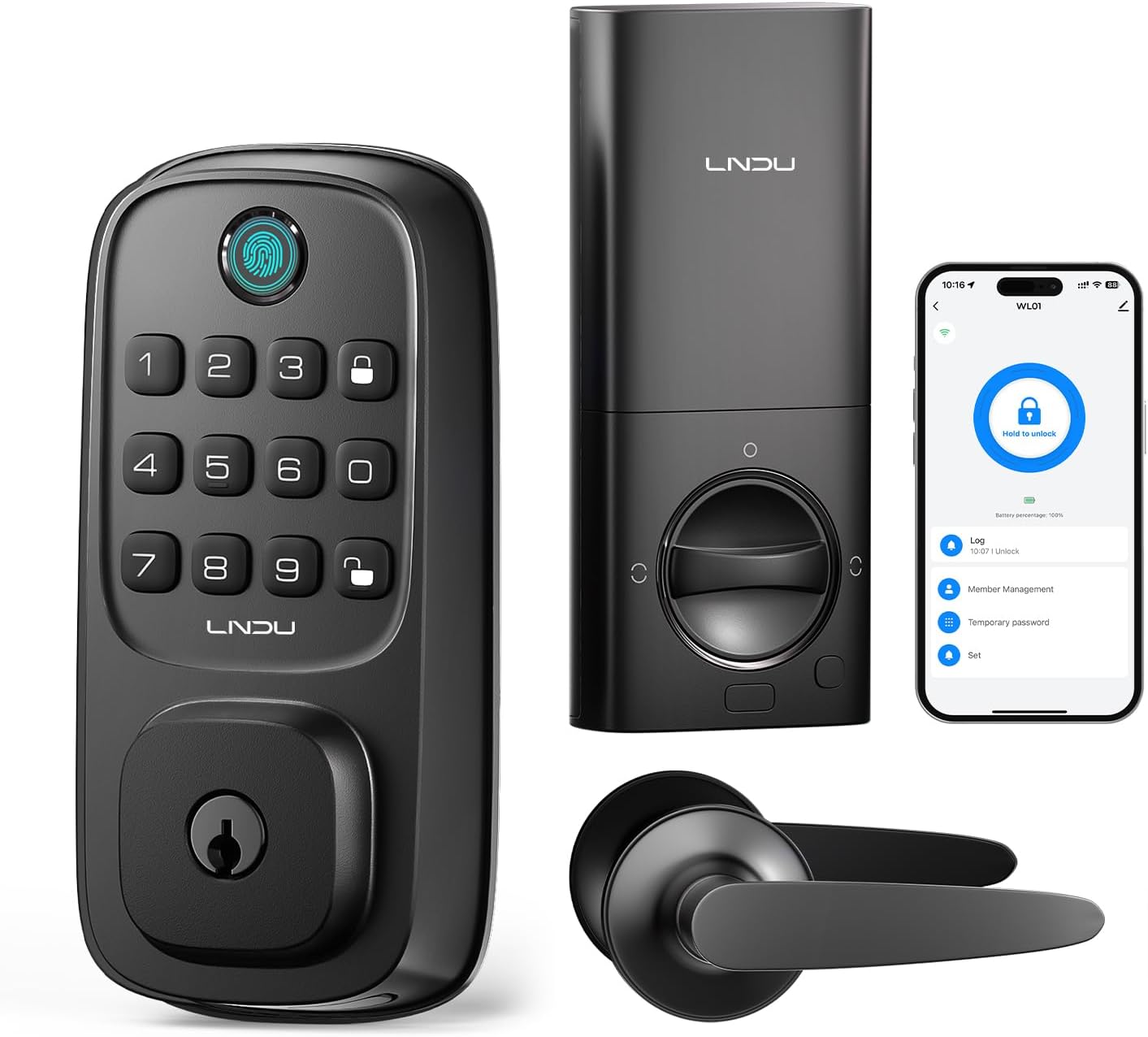
Figur 1.1: LNDU WL01 Smart Lock and included handle set. This image displays the complete smart lock system, including the exterior keypad with fingerprint sensor, the interior deadbolt mechanism, the accompanying door handle set, and a smartphone screen illustrating the lock's mobile application interface.
2. Nøglefunktioner
- Versatile Keyless Entry: Unlock using fingerprint, PIN, eKey, or mechanical key. Supports up to 50 fingerprints and over 100 PINs.
- Indbygget Wi-Fi: Enables remote management via the Tuya app, allowing for creation of temporary/scheduled passcodes, access granting/revoking, and entry tracking from anywhere.
- Advanced Biometric Fingerprint Recognition: 0.3-second unlock time with 99% recognition accuracy, even for aging fingerprints. Includes anti-spoofing technology.
- Holdbart og vejrbestandigt design: ANSI Grade 3 certified for pick/impact resistance. Outdoor panel is IP54 water-resistant, operating reliably from -4°F to 140°F.
- Langvarig kraft: Powered by 8 AA batteries (not included) with an estimated 8-month lifespan. Features a Type-C emergency port for backup power.
- Adgangskode mod kig: Allows users to enter random numbers before or after the actual password to prevent unauthorized viewing.
- Automatisk låsefunktion: Configurable auto-lock feature for added security.

Figur 2.1: Remote unlocking capabilities and key features. This image illustrates the convenience of managing the LNDU smart lock remotely via a mobile application, highlighting features such as user code management, fingerprint access, temporary password generation, and real-time unlocking records.
3. Pakkens indhold
Kontroller venligst, at alle komponenter er til stede og i god stand, når du åbner pakken:
- LNDU WL01 Deadbolt Lock (1)
- Handle Set (1)
- Door Bolt (1)
- Backup nøgle (2)
- Brugervejledning (1)

Figur 3.1: All components included in the LNDU WL01 Smart Lock package. This visual guide helps users confirm they have received all necessary parts for installation and operation.
4. Specifikationer
| Feature | Detalje |
|---|---|
| Modelnavn | WL01 |
| Låsetype | Biometrisk, Deadbolt, Tastatur |
| Forbindelse | Wi-Fi |
| Kontrolmetode | App, stemme (Amazon Alexa, Google Assistant) |
| Materiale | Metal |
| Farve | Mat sort |
| Dimensioner (L x B x H) | 10 x 1.98 x 2.69 tommer |
| Varens vægt | 3.5 pund (1.59 kilo) |
| Strømkilde | 8 AA batterier (medfølger ikke) |
| Driftstemperatur | -4°F til 140°F |
| Vandmodstand | IP54 (Outdoor Panel) |
| Sikkerhedsgrad | ANSI klasse 3 |

Figur 4.1: Durability and weather resistance of the LNDU WL01 Smart Lock. This image highlights the lock's ability to function in various weather conditions and displays its robust testing results for keypad longevity, salt spray resistance, impact strength, and humidity tolerance.
5. Installationsvejledning
The LNDU WL01 Smart Lock is designed for easy installation, typically taking around 15 minutes with a screwdriver. No additional drilling is required for standard door setups.
5.1 Dørkompatibilitet
This lock fits doors with a thickness of 55–70mm (1.38"–2.17"). It is compatible with both left-handed and right-handed doors, automatically identifying the orientation during installation.
- Dørtykkelse: 1.38"–2.17" (35mm–55mm)
- Diameter for boring: 1.5" or 2.13" (38mm–54mm)
- Borehul bagsæt: 2.36" or 2.76" (60mm–70mm)

Figur 5.1: Door compatibility measurements for the LNDU Smart Lock. This diagram provides essential dimensions for door thickness, bore hole diameter, and backset, ensuring proper fit and installation.
5.2 Installationstrin (Oversigt)
For detailed step-by-step instructions, please refer to the included printed user manual. A general overview installationsprocessen er som følger:
- Prepare the door by ensuring the correct bore hole and backset dimensions.
- Installer deadbolt-låsen i dørkanten.
- Monter det udvendige tastatur.
- Install the interior unit, connecting the necessary cables.
- Attach the handle set.
- Insert the batteries and test the lock's basic functions.

Figur 5.2: Easy installation guide for the LNDU Smart Lock. This image provides a visual summary of the installation process, including key measurements for door preparation.

Figur 5.3: Quick installation of the LNDU WL01 Smart Lock. This image shows a user performing the installation, emphasizing the ease and speed of the process, which can be completed in approximately 15 minutes.
6. Opsætning og konfiguration
After physical installation, configure your LNDU WL01 Smart Lock for optimal use.
6.1 App Connection and Initial Setup
- Download Tuya Smart-appen fra din enheds appbutik.
- Opret en konto eller log ind.
- Add the LNDU WL01 lock by following the in-app instructions. Ensure your phone is connected to a 2.4GHz Wi-Fi network during setup.
- Perform lockside calibration through the app to ensure proper operation.

Figur 6.1: Built-in Wi-Fi for seamless app control. This image demonstrates the direct Wi-Fi connectivity of the LNDU smart lock, allowing users to control it remotely via the app without needing an additional gateway.
6.2 Tilføjelse af fingeraftryk
The lock supports up to 50 unique fingerprints. Follow the app's instructions to register new fingerprints. Ensure your finger covers the sensor completely during the registration process.

Figur 6.2: Fingerprint unlock feature. This image illustrates the ease of using the fingerprint sensor for quick access, highlighting the lock's capacity for 50 fingerprints and its AI intelligent chips for accurate recognition.
6.3 Setting Passcodes
You can set various types of passcodes via the Tuya app:
- Permanent Passcodes: For almindelige brugere.
- Timed Passcodes: Valid for specific periods (e.g., for cleaners or contractors).
- Engangsadgangskoder: For single use, ideal for deliveries or temporary access.
- Cyclic Passcodes: Valid on recurring days/times.

Figur 6.3: One-Time Code generation and usage. This image demonstrates how to generate a temporary access code via the app and how a visitor can use it to gain entry, providing secure and flexible access management.
6.4 Anti-Peeking Password Feature
To prevent others from guessing your password, you can enter random numbers before or after your actual PIN code. The lock will still recognize the correct sequence within the longer string of numbers.

Figur 6.4: Anti-Peeking Keypad functionality. This image visually explains how the anti-peeking feature allows users to input extra digits before or after their actual password, enhancing security by making it harder for onlookers to discern the correct code.
7. Betjeningsvejledning
7.1 Oplåsning af døren
- Fingeraftryk: Place your registered finger on the sensor. The lock will unlock in approximately 0.3 seconds.
- PIN-kode: Enter your registered PIN code on the keypad, optionally adding random numbers before or after for privacy, then press the unlock key.
- App kontrol: Open the Tuya Smart app, select your lock, and tap the unlock icon.
- Mekanisk nøgle: Sæt reservenøglen i nøglehullet og drej for at låse op.
- Stemmestyring: Integrate with Amazon Alexa or Google Assistant. Say commands like "Alexa, open the door" (voice password may be required for security).

Figur 7.1: Voice control via Amazon Alexa and Google Assistant. This image demonstrates the convenience of unlocking the LNDU smart lock using voice commands through compatible smart home devices.
7.2 Låsning af døren
- Autolås: The lock will automatically re-lock after a set period (configurable in the app, typically 10 seconds to 3 minutes).
- Manuel lås: Press and hold the lock button on the keypad or use the interior thumb turn.
- App kontrol: Open the Tuya Smart app, select your lock, and tap the lock icon.

Figur 7.2: Smart lock settings and features. This image displays the various configurable options within the LNDU smart lock app, including auto-lock, secure lockdown, sleep mute mode, and anti-peep functionality.
7.3 Adgangslogfiler
The Tuya app provides a detailed log of all lock and unlock events, including the method used (fingerprint, PIN, remote unlock) and the timestamp. This feature is useful for monitoring access to your property.

Figur 7.3: Gennemsigtig view of past access. This image shows the access log feature within the LNDU smart lock app, providing a clear record of all lock and unlock events, including the method and time.
8. Vedligeholdelse
8.1 Udskiftning af batteri
The LNDU WL01 Smart Lock is powered by 8 AA batteries. When the battery level is low, the lock will provide an alert via the app and potentially an audible/visual indicator on the lock itself. Replace all 8 batteries simultaneously with new, high-quality alkaline AA batteries.

Figur 8.1: Long battery life of the LNDU Smart Lock. This image highlights the lock's power source, indicating an approximate 8-month battery life based on 10 lock/unlock cycles per day.
8.2 Nødstrøm
In case of complete battery depletion, the lock features a Type-C emergency port. Connect a portable power bank to this port to temporarily power the lock and gain access.

Figur 8.2: Low battery reminder and emergency charging. This image shows the low battery alert on the app and the Type-C port on the lock, which can be used for emergency backup power.
8.3 Rengøring
Tør låsens yderflader af med en blød kludamp klud. Undgå at bruge slibende rengøringsmidler eller opløsningsmidler, da disse kan beskadige overfladen og de elektroniske komponenter.
9. Fejlfinding
If you encounter issues with your LNDU WL01 Smart Lock, refer to the following common troubleshooting steps:
- Låsen svarer ikke: Check battery level and replace if necessary. Ensure the lock is properly installed and all connections are secure.
- Fingeraftryk ikke genkendt: Ensure your finger is clean and dry. Try re-registering your fingerprint. Ensure the sensor is clean.
- PIN-koden virker ikke: Verify the correct PIN code. Ensure you are pressing the unlock key after entering the code. Check if the anti-peeking feature is causing confusion (try entering only the correct PIN).
- Problemer med app-forbindelse: Ensure your Wi-Fi network is active and the lock is within range. Restart your router and the lock. Verify the app is updated to the latest version.
- Automatisk låsning aktiveres ikke: Check the auto-lock settings in the Tuya app to ensure it is enabled and the delay time is set correctly.
- Lock is making unusual noises: This may indicate a mechanical issue. Contact customer support for assistance.
10. Garanti og support
LNDU is committed to providing exceptional support and assurance for your smart lock. Your LNDU WL01 Smart Lock comes with:
- 30-dages pengene-tilbage-garanti: Hvis du ikke er tilfreds med dit køb.
- 18-Month Assurance: Ved produktfejl eller funktionsfejl.
- Livsvarig teknisk support: Dedicated support team available 24/7 via email to assist with any technical queries or issues.
For assistance, please contact LNDU customer service through the contact information provided in your purchase documentation or on the official LNDU webwebsted.