Indledning
The YL81C E-bike LCD display is designed to provide comprehensive functionality for your riding needs. It offers a range of features including power display, power gear adjustment, headlight indication, various speed measurements (real-time, maximum, average), mileage tracking (total and single trip), error code display, and parameter setting capabilities. This display is built with durable ABS and LCD housing, a tempered glass screen, and a nylon bracket, ensuring robust performance in diverse conditions.
Produkt overview
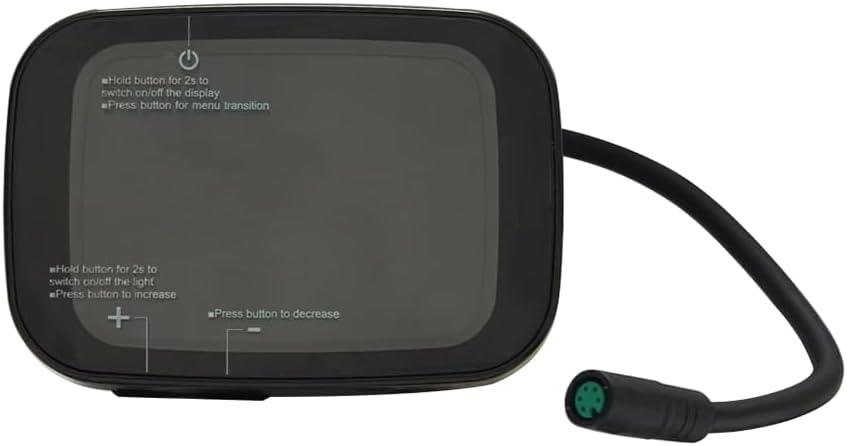
Figur 1: Front view of the YL81C E-bike LCD Display. This image highlights the display screen and the integrated control buttons for power, menu navigation, and adjustment.

Figur 2: Bag view of the YL81C E-bike LCD Display. This view shows the robust mounting bracket and the attached waterproof cable with a 5-hole female connector.

Figur 3: Key dimensions of the YL81C display. The display measures approximately 70mm in length, 47mm in height (including the mounting bracket), and 49mm in depth.
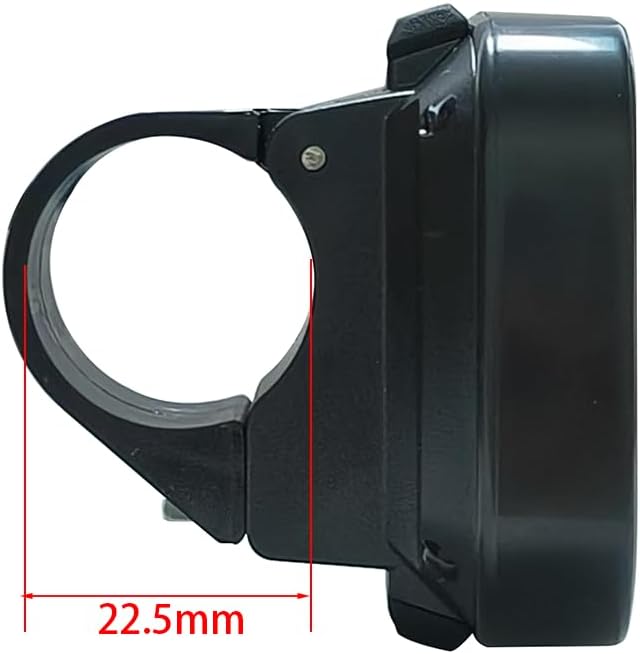
Figur 4: Side view illustrating the handlebar clamp. The flexible bracket is designed to fit handlebar sizes of 22.2 mm, 25.4 mm, and 31.8 mm, with a visible clamp diameter of 22.5mm in this specific view.
Opsætning og installation
The YL81C display is designed for straightforward installation. Ensure your e-bike's battery voltage is compatible (24V, 36V, 48V, or 60V).
Kompatibilitetstjek
- Voltage: The YL81C display is compatible with 24V, 36V, 48V, and 60V e-bike battery systems.
- Connector Type: The display features a female 5-hole waterproof connector. Verify that your e-bike's wiring harness has a compatible male connector.
- Kommunikationsprotokol: The YL81C LCD monitor utilizes various communication protocols. To ensure plug-and-play functionality, it is highly recommended to contact customer service after purchase and provide the serial number from your old monitor. This allows for verification of protocol compatibility.

Figur 5: Location of the serial number on the back of the YL81C display. This number is crucial for compatibility verification with customer service.
Installationstrin
- Montering af styr: The flexible bracket accommodates handlebar sizes of 22.2 mm, 25.4 mm, and 31.8 mm. Securely attach the display to your desired position on the handlebar.
- Kabelforbindelse: Connect the 5-pin waterproof cable from the display to the corresponding connector on your e-bike's wiring harness. The exposed cable length is 150mm. Ensure a firm and secure connection to maintain waterproofing.
- Kabelstyring: Route the cable neatly along your e-bike frame, securing it with cable ties if necessary, to prevent interference with moving parts and protect it from damage.

Figur 6: The YL81C display securely mounted on an e-bike handlebar, demonstrating its ergonomic fit.
Betjeningsvejledning
The YL81C display provides intuitive controls for managing your e-bike's functions and monitoring ride data.
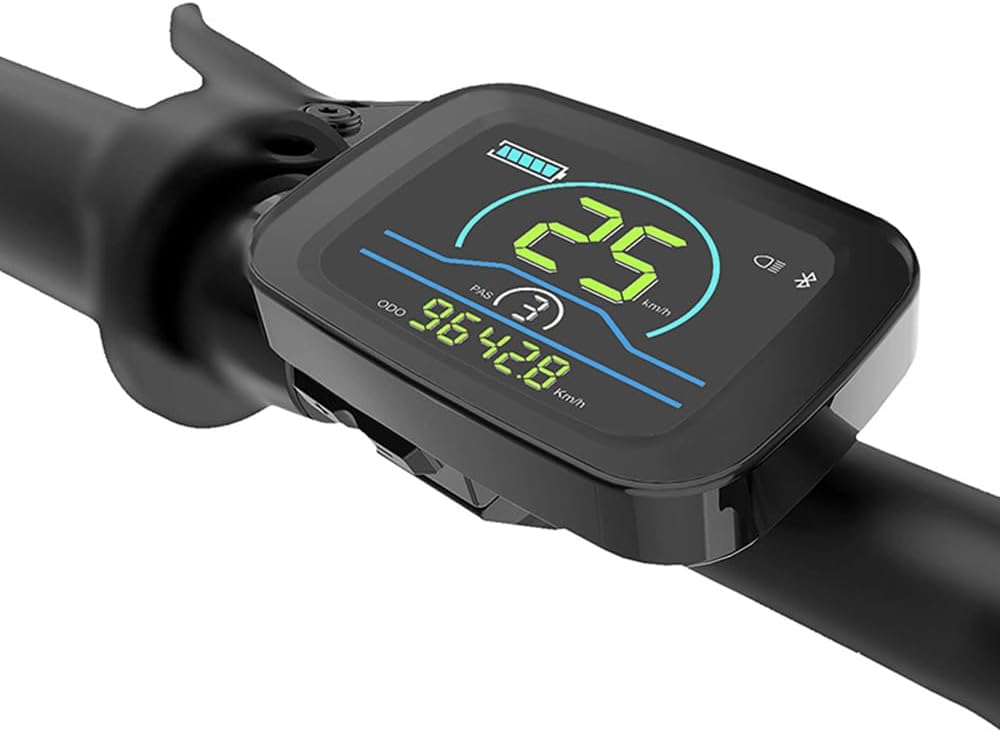
Figur 7: The YL81C display in operation, showing real-time data such as speed (25 km/h), pedal assist level (PAS 3), and total mileage (ODO 9642.8 km).
Knap funktioner
- Tænd/sluk-knap (øverst):
- Hold for 2 seconds: Switches the display on or off.
- Press briefly: Transitions between menu screens or display modes.
- Plus Button (+) (Bottom Left):
- Hold for 2 seconds: Switches the e-bike's headlight on or off.
- Press briefly: Increases values or navigates up in menus (e.g., increases pedal assist level).
- Minus Button (-) (Bottom Right):
- Press briefly: Decreases values or navigates down in menus (e.g., decreases pedal assist level).
Displayfunktioner
- Power Display: Viser det aktuelle batteriniveau.
- Power Gear Adjustment and Display: Allows selection and shows the current pedal assist level.
- Forlygteindikator: Illuminates when the e-bike's headlight is active.
- Hastighedsvisning:
- Hastighed i realtid
- Maximum Speed (MAXS)
- Gennemsnitshastighed (AVG)
- Kilometervisning:
- Total Mileage (ODO)
- Single Mileage (Trip)
- Visning af fejlkode: Angiver systemfejl med specifikke koder.
- Parameter Setting Function: Allows modification of key bike parameters such as wheel diameter and speed limit.
- Bluetooth Connection Indication (Reserved): The display is pre-wired for a Bluetooth module; if installed, this indicator will show connection status.
Vedligeholdelse og pleje
Proper maintenance ensures the longevity and optimal performance of your YL81C display.
- Rensning: Brug en blød, damp cloth to wipe the display screen and housing. Avoid abrasive cleaners, solvents, or harsh chemicals, as these can damage the LCD or housing material.
- Vandtæthed: The display has an International Protection Rating of IPX65, meaning it is protected against low-pressure water jets from any direction. While it is waterproof for typical riding conditions, avoid submerging the display in water or exposing it to high-pressure water sprays.
- Materiale holdbarhed: The YL81C display is constructed with rugged ABS and LCD housing, a tempered glass screen, and a nylon bracket. These materials are chosen for superior durability and performance, designed to withstand harsh terrain and weather conditions.
- Opbevaring: When not in use for extended periods, store the e-bike and display in a cool, dry place away from direct sunlight and extreme temperatures.
Fejlfinding
If you encounter issues with your YL81C display, refer to the following common solutions. For persistent problems or error codes not listed, please contact customer support.
- Skærmen tændes ikke:
- Ensure the e-bike battery is charged and properly connected.
- Verify that the 5-hole waterproof connector between the display and the e-bike is securely seated.
- Confirm you are holding the power button for at least 2 seconds to turn on the display.
- Forkerte aflæsninger (hastighed, kilometertal):
- Check the wheel diameter setting in the display's parameter settings. An incorrect setting will lead to inaccurate readings.
- Ensure the speed sensor on your e-bike is clean and properly aligned.
- Viste fejlkoder:
- The display can show specific error codes. Consult your e-bike's main controller manual or contact customer service with the error code for diagnosis.
- Compatibility Issues (New Installation):
- As the YL81C display supports various communication protocols, it is crucial to ensure compatibility with your e-bike's controller. If you did not provide your old monitor's serial number upon purchase, contact customer service immediately with this information to verify compatibility and receive guidance.
- Bluetooth Module Not Functioning (if applicable):
- If you customized your display with a Bluetooth module and it's not working, ensure it was properly installed and configured. Contact customer service for assistance.
Specifikationer
| Feature | Specifikation |
|---|---|
| Modelnavn | YL81C EBIKE DISPLAY |
| Mærke | Generisk |
| Display Type | LCD |
| Materiale | ABS, LCD-skærm |
| Farve | Sort |
| Varens vægt | 87 gram |
| Forbindelsesteknologi | 5-Hole Female Connector |
| International Protection Rating | IPX65 |
| Monteringstype | Styrmontering |
| Human Interface Input | Knapper |
| Kompatibel Voltages | 24V, 36V, 48V, 60V |
| Styrtilpasning | 22.2 mm, 25.4 mm, 31.8 mm |
| Fabrikant | YOLIN |
Garantioplysninger
The YL81C E-bike LCD Display comes with a 1 års fabriksgaranti from the date of purchase. This warranty covers defects in materials and workmanship under normal use. Please retain your proof of purchase for warranty claims. For detailed warranty terms and conditions, or to initiate a claim, please contact the manufacturer or seller.
Kundesupport
For any questions, technical assistance, or support regarding your YL81C E-bike LCD Display, please contact our online customer service. It is especially important to reach out for:
- Verifying communication protocol compatibility by providing the serial number of your old monitor.
- Customizing production for a Bluetooth module (if required).
- Troubleshooting specific error codes or operational issues.
- General inquiries about product features or usage.
We are committed to ensuring you have the best possible experience with your new display.


