
1. Introduktion
Tak for købetasing the Sharp 4T-C65FL6EX 65-inch 4K Frameless Smart TV. This manual provides essential information for the safe and efficient use of your new television. Please read these instructions thoroughly before operating the TV and retain them for future reference.
Vigtige sikkerhedsoplysninger
Always follow basic safety precautions when using this product to reduce the risk of fire, electric shock, and injury. Do not expose the TV to rain or moisture. Do not open the cabinet; refer all servicing to qualified personnel. Ensure proper ventilation and avoid placing the TV near heat sources.
2. Produktet er slutview
The Sharp 4T-C65FL6EX is a 65-inch 4K UHD Smart LED TV designed to deliver an immersive viewing experience. It features a frameless design, Google TV operating system, and a built-in digital receiver.
Nøglefunktioner
- 65-inch 4K UHD Display: Enjoy stunning visuals with a resolution of 3840 x 2160 pixels.
- Rammeløst design: Maksimerer skærmpladsen for en ekspansiv view.
- Google TV-operativsystem: Access a wide range of apps, movies, and shows.
- Built-in Digital Receiver: Supports DVB-S/S2/T/T2/C broadcast types.
- Dolby Atmos & DTS Studio Sound: Delivers rich, immersive audio.
- Dolby Vision og HDR10: Forbedret kontrast og farve for kompatibelt indhold.
- Integreret Chromecast: Easily cast content from your mobile devices.
- Far-field Voice Control & Google Assistant: Control your TV with voice commands.
- Forbindelse: Wi-Fi, Bluetooth v5.1, 3 HDMI 2.0 ports, 2 USB ports, LAN.
Pakkens indhold
- Sharp 4T-C65FL6EX 65-inch 4K Smart TV
- Fjernbetjening
- Strømkabel
- TV-bord (2 stk.)
- Skruer til montering af stativ
- Brugervejledning (dette dokument)

Figur 2.1: Forside view of the Sharp 4T-C65FL6EX Smart TV.
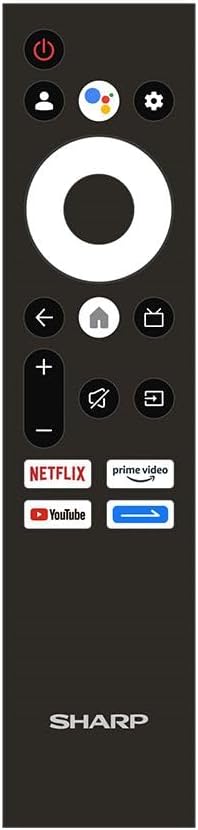
Figure 2.2: The included remote control for the Sharp Smart TV.
3. Opsætning
3.1 Udpakning og placering
- Tag forsigtigt tv'et ud af emballagen. Det anbefales at være to personer til dette.
- Place the TV on a stable, flat surface or prepare for wall mounting. Ensure adequate space around the TV for ventilation.
3.2 Montering af stativ
Hvis du ikke vægmonterer tv'et, skal du montere den medfølgende stander:
- Lay the TV screen-down on a soft, clean cloth to prevent scratches.
- Juster hvert stativstykke med de tilsvarende riller i bunden af tv'et.
- Fastgør stativerne med de medfølgende skruer. Sørg for, at de er spændt godt fast.
3.3 Vægmontering (valgfrit)
This TV is compatible with VESA standard wall mounts. Consult a professional for wall mounting to ensure proper installation and safety. Remove the stand before wall mounting.
3.4 Tilslutning af enheder
Tilslut dine eksterne enheder til tv'et ved hjælp af de relevante porte:
- HDMI: For Blu-ray players, game consoles, cable/satellite boxes. The TV has 3 HDMI 2.0 ports.
- USB: For USB drives to play media (video, photos, music). The TV has 2 USB ports.
- Antenna/Satellite (RF Input): Connect your antenna or satellite dish cable to the RF input for digital broadcasting.
- LAN: Til en kablet internetforbindelse.
Figur 3.1: Bagside view of the TV illustrating various input/output ports.
3.5 Tænd og førstegangsopsætning
- Tilslut strømkablet til tv'et og derefter til en stikkontakt.
- Tryk på tænd/sluk-knappen på fjernbetjeningen eller på tv'et.
- Follow the on-screen instructions to complete the initial setup, which includes selecting language, connecting to Wi-Fi, and signing in with your Google account.
4. Betjeningsvejledning
4.1 Fjernbetjeningsfunktioner
Fjernbetjeningen giver dig mulighed for at navigere i tv'ets funktioner. Nøgleknapperne inkluderer:
- Power knap: Tænder eller slukker for tv'et.
- Google Assistent-knap: Aktiverer stemmestyring.
- Navigationsblok (cirkel): Navigerer gennem menuer og vælger elementer.
- Hjemknappen: Vender tilbage til Google TV-startskærmen.
- Tilbage knap: Vender tilbage til den forrige skærm.
- Lydstyrke op/ned: Justerer lydstyrken.
- Mute-knap: Slår lyden fra eller til.
- Input knap: Vælger inputkilder (HDMI, AV osv.).
- App-genvejsknapper: Direkte adgang til Netflix, Prime Video og YouTube.
4.2 Google TV-grænseflade
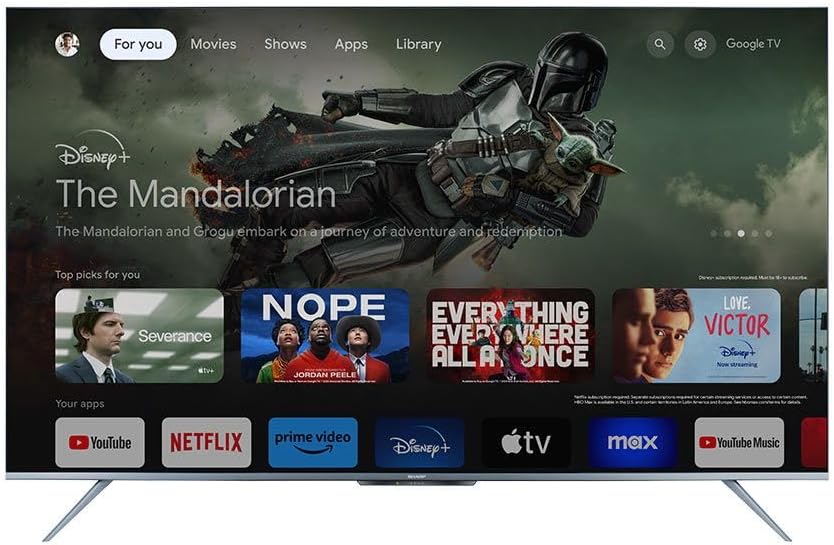
The Google TV interface organizes your content from various streaming services and apps into one personalized screen. You can browse recommendations, access your library, and discover new content.
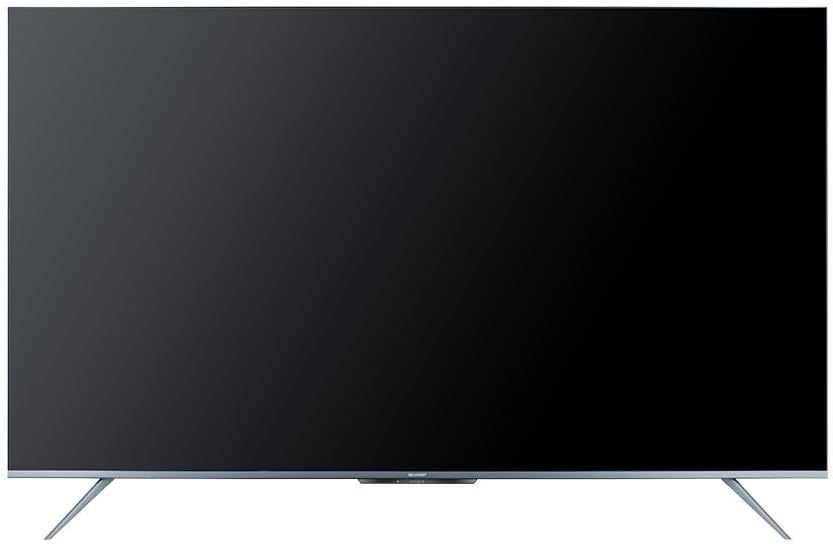
Figure 4.1: The Google TV home screen interface.
4.3 Brug af smarte funktioner
- Streaming apps: Navigate to the 'Apps' section or use the dedicated remote buttons to launch Netflix, Prime Video, YouTube, and other installed applications.
- Stemmesøgning: Press the Google Assistant button on your remote and speak into the microphone to search for content, control playback, or ask questions.
- Chromecast indbygget: Use the Chromecast feature to cast videos, photos, and music from your compatible smartphone, tablet, or computer directly to the TV.
- Web Browser: Få adgang til internettet ved hjælp af den indbyggede web browser.
- Google Play Butik: Download and install additional apps and games from the Google Play Store.
4.4 Valg af indgangskilde
To switch between connected devices (e.g., HDMI 1, HDMI 2, TV tuner), press the Input button on your remote control and select the desired source from the on-screen menu.
5. Vedligeholdelse
5.1 Rengøring af tv'et
- Skærm: Tør forsigtigt skærmen af med en blød, fnugfri klud. Brug en skærmrengøringsopløsning, der er specielt designet til tv'er, til genstridige pletter, og påfør den på kluden, ikke direkte på skærmen.
- Skab: Tør tv-kabinettet af med en blød, tør klud. Brug ikke slibende rengøringsmidler, voks eller opløsningsmidler.
- Tag altid stikket ud af stikkontakten før rengøring.
5.2 Softwareopdateringer
Your Sharp Smart TV may receive software updates periodically to improve performance and add new features. Ensure your TV is connected to the internet to receive these updates. You can usually check for updates in the TV's settings menu.
6. Fejlfinding
Før du kontakter kundesupport, kan du prøve følgende løsninger på almindelige problemer:
| Problem | Mulig løsning |
|---|---|
| Ingen strøm | Check if the power cable is securely connected to the TV and the power outlet. Ensure the outlet is working. Try pressing the power button on the TV itself. |
| Intet billede, men der er lyd | Ensure the correct input source is selected. Check HDMI or other video cables for secure connections. |
| Ingen lyd, men der er billede | Kontroller lydstyrken, og sørg for, at tv'et ikke er slået fra. Kontroller lydkabelforbindelserne, hvis du bruger eksterne højttalere. Kontroller lydudgangsindstillingerne i tv-menuen. |
| Fjernbetjening virker ikke | Udskift batterierne i fjernbetjeningen. Sørg for, at der ikke er nogen forhindringer mellem fjernbetjeningen og tv'ets IR-sensor. |
| Kan ikke oprette forbindelse til Wi-Fi | Sørg for, at din Wi-Fi-router er tændt og fungerer. Indtast Wi-Fi-adgangskoden omhyggeligt igen. Prøv at genstarte din router og tv'et. |
| Smart features are slow or unresponsive | Restart the TV. Ensure a stable internet connection. Close unused applications running in the background. |
7. Specifikationer
| Feature | Detalje |
|---|---|
| Modelnummer | 4T-C65FL6EX |
| Skærmstørrelse | 65 tommer |
| Displayteknologi | LED |
| Opløsning | 3840 x 2160 (4K UHD) |
| Aspektforhold | 16:9 |
| Viewi vinkel | 178 grader |
| Opdateringshastighed | 60 Hz |
| Operativsystem | Google TV |
| Intern hukommelse | 32 GB |
| Udsendelsestype | Digital (DVB-S/S2/T/T2/C) |
| Lydteknologi | Dolby Atmos, DTS Studio Sound |
| Videoteknologi | HLG, Dolby Vision, HDR10 |
| Forbindelse | Wi-Fi, Bluetooth v5.1 |
| HDMI porte | 3 (HDMI 2.0) |
| USB-porte | 2 |
| LAN-port | 1 |
| Lydudgangseffekt | 12 Watt x 2 |
| Strømforbrug (drift) | 200 watt |
| Strømforbrug (standby) | <0.5 watt |
| Mål (B x H x D) uden stativ | 1447.7 x 837 x 81.3 mm |
| Mål (B x H x D) med stativ | 1447.7 x 922.6 x 280.2 mm |
| Nettovægt | 17.9 kg |
| Oprindelsesland | Egypten |
8. Garanti og support
8.1 Produktgaranti
This Sharp 4T-C65FL6EX Smart TV comes with a 3-year full free warranty. Please retain your proof of purchase for warranty claims. The warranty covers manufacturing defects and malfunctions under normal use conditions. It typically does not cover damage caused by misuse, accidents, unauthorized repairs, or natural disasters.
8.2 Kundesupport
For technical assistance, service requests, or further inquiries regarding your Sharp TV, please contact Sharp customer support. Refer to the warranty card or Sharp's official webwebsted for kontaktoplysninger, der er specifikke for din region.