
1. Introduktion
This manual provides essential instructions for the safe and efficient operation of your EPEVER Tracer4210ANG3 MPPT Solar Charge Controller. This device is designed to manage power flow from your solar panels to your battery bank, ensuring optimal charging and extending battery life. Please read this manual thoroughly before installation and use.
2. Sikkerhedsoplysninger
Overhold venligst følgende sikkerhedsforanstaltninger under installation og drift:
- Sørg for, at alle ledninger er korrekt polariseret og sikkert tilsluttet for at forhindre beskadigelse af controlleren eller andre komponenter.
- Tilslut altid batteriet først, derefter solpanelet og til sidst belastningen. Frakobl i omvendt rækkefølge.
- Forsøg ikke selv at adskille eller reparere controlleren. Kontakt kvalificeret personale for service.
- Installer styreenheden i et godt ventileret område, væk fra brandfarlige materialer og direkte sollys.
- Brug passende afbrydere eller sikringer til alle tilslutninger for at beskytte mod overstrøm.
- Brug øjenbeskyttelse, når du arbejder med batterier.
3. Produktet er slutview
The EPEVER Tracer4210ANG3 is an advanced Maximum Power Point Tracking (MPPT) solar charge controller designed for off-grid solar systems. It automatically identifies 12V or 24V system voltages and supports various battery types, including Lithium. Key features include high tracking and conversion efficiency, and comprehensive electronic protections.
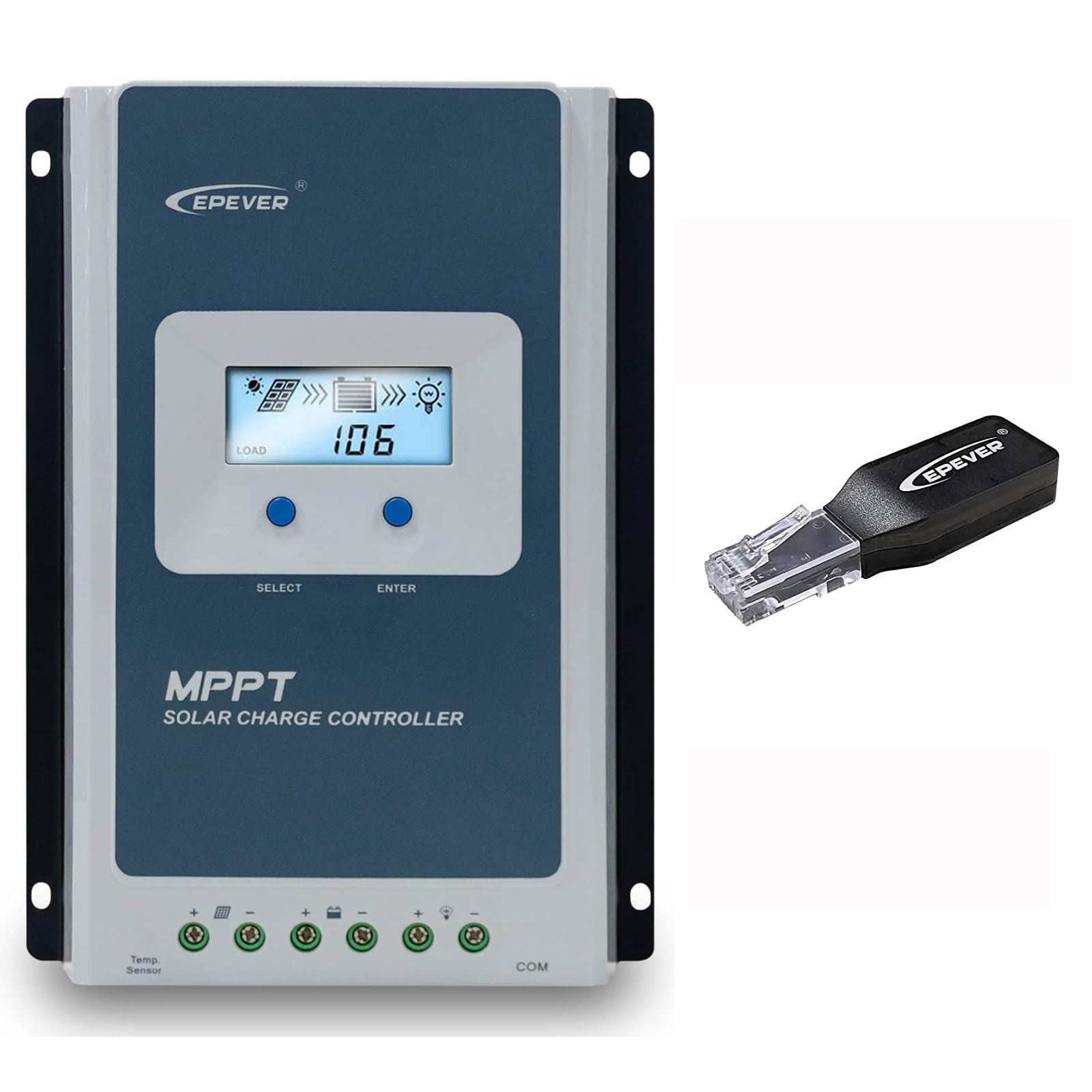
Figure 3.1: EPEVER Tracer4210ANG3 MPPT Solar Charge Controller with LCD display and connection terminals.
3.1 Nøglefunktioner
- Automatisk 12V/24V systemvolumentage identifikation.
- Advanced MPPT technology with tracking efficiency above 99.5% and conversion efficiency up to 98%.
- Fire-stage charging (Bulk, Boost, Float, Equalization) to optimize battery health and lifespan.
- Supports various battery types including Sealed, Gel, Flooded, and Lithium.
- Comprehensive electronic protection functions: PV over current, short-circuit, reverse polarity, night reverse charging, battery reverse, over voltage, over-discharging, overheating, Lithium battery low temperature, load short circuit/overload, device overheating, and TVS high voltage transients protection.
- Remote control and monitoring capabilities via BLE (Bluetooth Low Energy) module (included with this model).

Figure 3.2: The Tracer4210ANG3 controller is compatible with multiple battery types, including Lithium (LI), Sealed (SLD), Flooded (FLD), Gel, and AGM, automatically identifying 12V/24V battery voltage.

Figure 3.3: System diagram illustrating the high tracking efficiency (above 99.5%) and conversion efficiency (98%) of the MPPT solar charge controller within a typical solar power setup for a home.

Figure 3.4: The controller offers real-time monitoring via a mobile application using BLE (Bluetooth Low Energy) or an optional MT50 remote meter. Note: BLE module is included with this model, while MT50 or WiFi modules are sold separately.
4. Opsætning og installation
4.1 Montering af controlleren
- Vælg et tørt, godt ventileret sted, beskyttet mod direkte sollys, høje temperaturer og fugt.
- Sørg for tilstrækkelig plads omkring controlleren til varmeafledning.
- Mount the controller vertically on a wall or suitable surface using appropriate fasteners.
4.2 Ledningsforbindelser
Vigtig: Always connect in the following order: Battery → Solar Panel → Load. Disconnect in the reverse order.
- Tilslut batteriet: Tilslut batteriets positive og negative terminaler til de tilsvarende batteriterminaler på controlleren. Sørg for korrekt polaritet. Controlleren vil automatisk registrere systemets voluminiumsstyrke.tage (12V eller 24V).
- Tilslut solpanelet: Connect the positive and negative terminals of the solar panel array to the corresponding PV terminals on the controller. Ensure correct polarity.
- Tilslut belastningen: Connect the positive and negative terminals of the DC load to the corresponding load terminals on the controller.
After all connections are made, the controller's LCD display should illuminate, indicating proper power-up.
5. Betjeningsvejledning
5.1 LCD-skærm og knapper
The controller features an LCD display for real-time system status and parameters, along with buttons for navigation and settings adjustment.
- SELECT -knap: Used to cycle through display screens and menu options.
- ENTER knap: Used to confirm selections or enter parameter editing mode.
Refer to the detailed user manual (available for download from the manufacturer's website) for a complete guide on LCD navigation and parameter settings.
5.2 Valg af batteritype
It is crucial to select the correct battery type in the controller's settings to ensure proper charging algorithms and prevent battery damage. The Tracer4210ANG3 supports various battery types, including:
- Forseglet (SLD)
- Gel
- Oversvømmet (FLD)
- Litium (LI)
- User-defined (for custom parameters)
Access the battery settings via the LCD menu and select the type that matches your connected battery bank. For Lithium batteries, ensure the correct voltage and charging parameters are set, especially if using user-defined settings.
5.3 Remote Monitoring (BLE)
This model includes a Bluetooth Low Energy (BLE) module, allowing you to monitor and configure the controller wirelessly via a smartphone application. Download the official EPEVER app from your device's app store, connect to the controller via Bluetooth, and follow the in-app instructions for monitoring system data and adjusting parameters.
6. Vedligeholdelse
Regelmæssig vedligeholdelse sikrer optimal ydeevne og levetid for din solcelleladeregulator:
- Tjek forbindelser: Kontrollér regelmæssigt alle ledningsforbindelser for tæthed og korrosion. Spænd eventuelle løse forbindelser.
- Rengør controlleren: Keep the controller clean and free of dust and debris. Use a dry cloth for cleaning. Do not use liquids.
- Ventilation: Sørg for, at ventilationsåbningerne ikke er blokerede, så varmen kan afledes korrekt.
- Batteriinspektion: Regularly check your battery bank for signs of damage, corrosion, or electrolyte levels (for flooded batteries).
7. Fejlfinding
If you encounter issues with your Tracer4210ANG3 controller, refer to the following common problems and solutions:
| Problem | Mulig årsag | Løsning |
|---|---|---|
| Controllerens display er slukket. | No power from battery or solar panel; reversed battery polarity. | Kontroller batteriforbindelser og voltage. Ensure solar panels are receiving sunlight. Verify battery polarity. |
| Batteriet oplades ikke. | Solar panel not connected; low solar input; incorrect battery type setting; faulty wiring. | Check solar panel connections and ensure sufficient sunlight. Verify battery type setting. Inspect all wiring. |
| Indlæsningen virker ikke. | Load disconnected; battery voltage too low; load overcurrent protection activated. | Check load connections. Allow battery to charge. Reduce load or check for short circuits. |
| Advarsel om overophedning. | Dårlig ventilation; for høj omgivelsestemperatur; overbelastet system. | Ensure adequate airflow around the controller. Reduce load if possible. Relocate to a cooler environment. |
For more complex issues, please contact EPEVER customer support.
8. Specifikationer
| Parameter | Værdi |
|---|---|
| System Nominel Voltage | 12V / 24V Auto Identify |
| Nominel ladestrøm | 40A |
| Maks. PV Input Voltage | 100V |
| Maks. PV-indgangseffekt | 520W (12V-system) / 1040W (24V-system) |
| MPPT-sporingseffektivitet | >99.5 % |
| Charge Conversion Efficiency | Op til 98 % |
| Understøttede batterityper | Sealed, Gel, Flooded, Lithium, User-defined |
| Oplader Stages | Bulk, Boost, Float, Equalization |
| Kommunikationsport | RS485 (for BLE module, MT50, or PC connection) |
| Inkluderede komponenter | MPPT Solar Controller, BLE Module |
9. Garanti og support
EPEVER products are designed for reliability and performance. For warranty information, please refer to the warranty card included with your product or visit the official EPEVER website. If you have any questions, require technical assistance, or need to report an issue, please contact EPEVER customer support directly. Contact details can typically be found on the manufacturer's webwebsted eller i produktemballagen.
Du kan også besøge EPEVER-butik på Amazon for yderligere produktinformation og supportressourcer.