
1. Introduktion
The TYLT Crest is a versatile 15W fast wireless charger designed for both home and office environments. This device features a convertible design, allowing it to function as a flat charging pad or an upright stand. It is compatible with various wireless charging enabled devices, including smartphones and wireless headphones, providing efficient power delivery.
2. Sikkerhedsoplysninger
- Udsæt ikke enheden for væsker, fugt eller ekstreme temperaturer.
- Undgå at tabe enheden eller udsætte den for kraftige stød.
- Forsøg ikke at adskille, reparere eller modificere opladeren. Dette kan ugyldiggøre garantien og udgøre en sikkerhedsrisiko.
- Use only certified power adapters and cables with the device.
- Opbevares utilgængeligt for børn.
- Sørg for korrekt ventilation under brug for at forhindre overophedning.
3. Pakkens indhold
Bekræft at alle varer er til stede i pakken:
- TYLT Crest 15W Wireless Charging Convertible Stand
- 1 USB Type-C to USB Type-C cable (power adapter not included)
4. Opsætning
- Connect one end of the provided USB Type-C cable to the USB-C port on the TYLT Crest charger.
- Connect the other end of the USB Type-C cable to a compatible USB power adapter (not included). For optimal 15W charging, use a power adapter that supports Power Delivery (PD) with at least 15W output.
- Sæt strømadapteren i en stikkontakt. Opladeren er nu klar til brug.
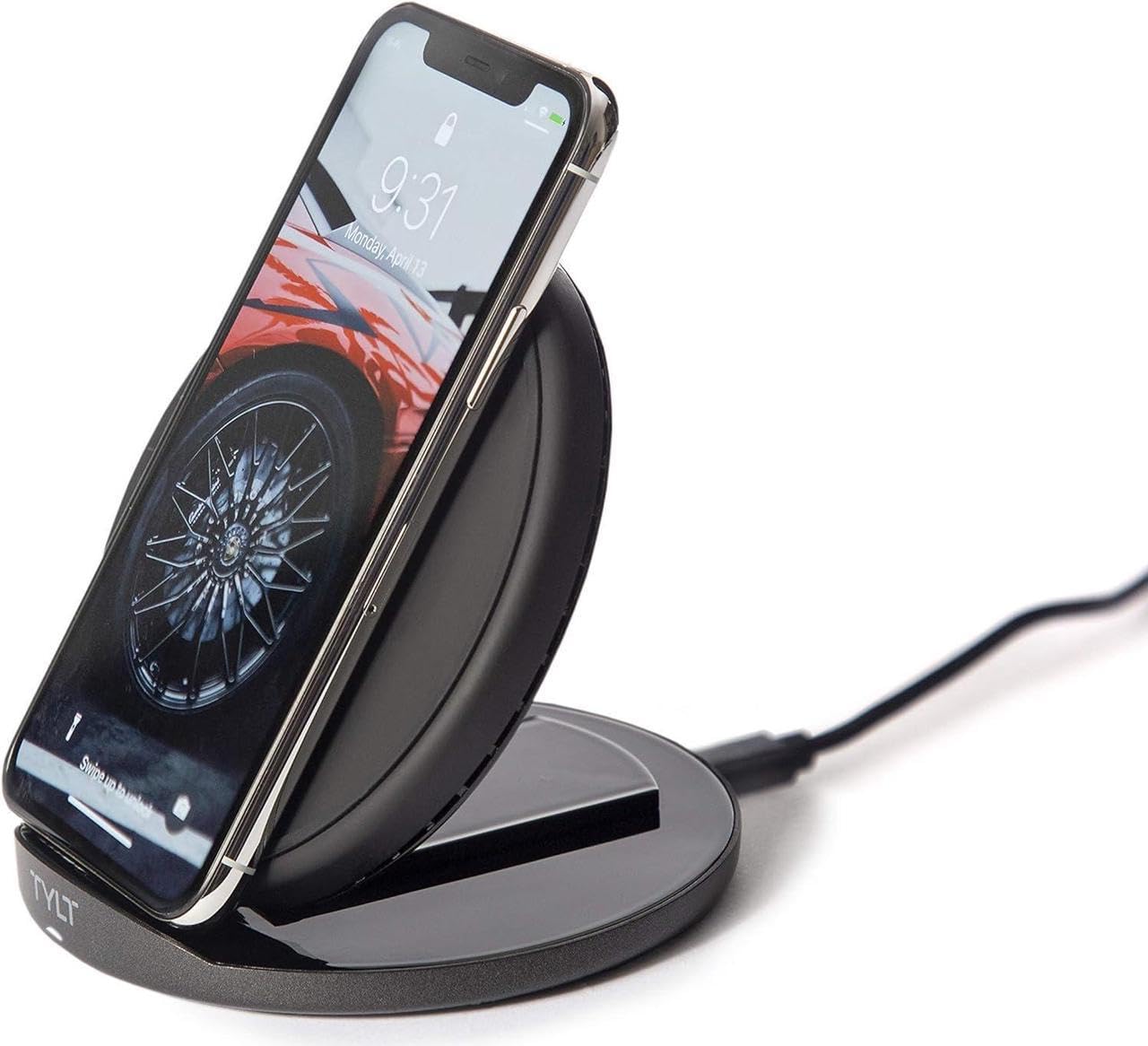
Image: The TYLT Crest charger shown in its upright stand configuration, actively charging a smartphone. This illustrates the device's primary function as a phone stand and charger.
5. Betjeningsvejledning
5.1. Charging in Stand Mode
- Ensure the TYLT Crest is in its upright stand configuration.
- Place your wireless charging compatible smartphone onto the stand. Align the center of your phone with the charging coil area on the stand.
- The charging indicator on your phone should activate, confirming that charging has begun.
5.2. Charging in Flat Pad Mode
- Gently convert the TYLT Crest from stand mode to its flat pad configuration.
- Place your wireless charging compatible device, such as wireless headphones or a smaller smartphone, onto the flat charging surface. Ensure the device is centered on the pad.
- Enhedens opladningsindikator bør aktiveres, hvilket bekræfter, at opladningen er begyndt.
Note: For optimal 15W fast wireless charging, ensure your device supports 15W wireless charging and is properly aligned with the charging coil.
6. Vedligeholdelse
- To clean the charger, disconnect it from the power source.
- Tør overfladen af med en blød, tør eller let fugtet kludamp klæde.
- Brug ikke skrappe kemikalier, slibende rengøringsmidler eller opløsningsmidler.
- Ensure the charger is completely dry before reconnecting it to power.
7. Fejlfinding
| Problem | Mulig årsag | Løsning |
|---|---|---|
| Enheden oplader ikke | Not connected to power; device not wireless charging compatible; improper alignment; phone case too thick. | Ensure charger is plugged in; verify device compatibility; reposition device on charger; remove thick phone case. |
| Langsom opladning | Incompatible power adapter; background apps running; device overheating. | Use a 15W PD compatible power adapter; close unnecessary apps; ensure proper ventilation. |
| Opladerindikatoren lyser ikke | No power; faulty cable/adapter. | Check power connection; try a different USB-C cable or power adapter. |
8. Specifikationer
- Model: Crest
- Mærke: TYLT
- Wattage: 15 watt
- Udgangsstrøm: 3 Amps
- Udgang Voltage: 5 volt
- Connector Type: USB Type C
- Kompatible enheder: Mobiltelefoner, hovedtelefoner
- Kompatible telefonmodeller: Most modern smartphones with USB-C and wireless charging capabilities
- Inkluderede komponenter: 1 adapter (USB Type-C cable)
- Farve: Sort
- Varens vægt: 12.8 ounce
- Pakkedimensioner: 7 x 5 x 1.5 tommer
9. Garanti og support
TYLT products are designed for reliability and performance. For specific warranty details, please refer to the warranty card included with your purchase or visit the official TYLT website. For technical support, product inquiries, or assistance, please contact TYLT customer service through their official webwebstedet eller kontaktoplysningerne på din produktemballage.
Official TYLT Webwebsted: www.tylt.com