
Indledning
This manual provides instructions for setting up and using your ECONTROLLY BN59-01385B Voice Remote Control. This replacement remote is designed to be compatible with various Samsung Smart TV models, offering voice control functionality and direct access buttons for popular streaming services.

Front view of the ECONTROLLY BN59-01385B Voice Remote Control.
Opsætningsvejledning
1. Installation af batterier
Fjernbetjeningen kræver to AAA alkaline-batterier (medfølger ikke).
- Åbn dækslet til batterirummet på bagsiden af fjernbetjeningen.
- Isæt to AAA-batterier, og sørg for, at de positive (+) og negative (-) poler er justeret korrekt med indikatorerne i batterirummet.
- Luk batterirummets dæksel forsvarligt.
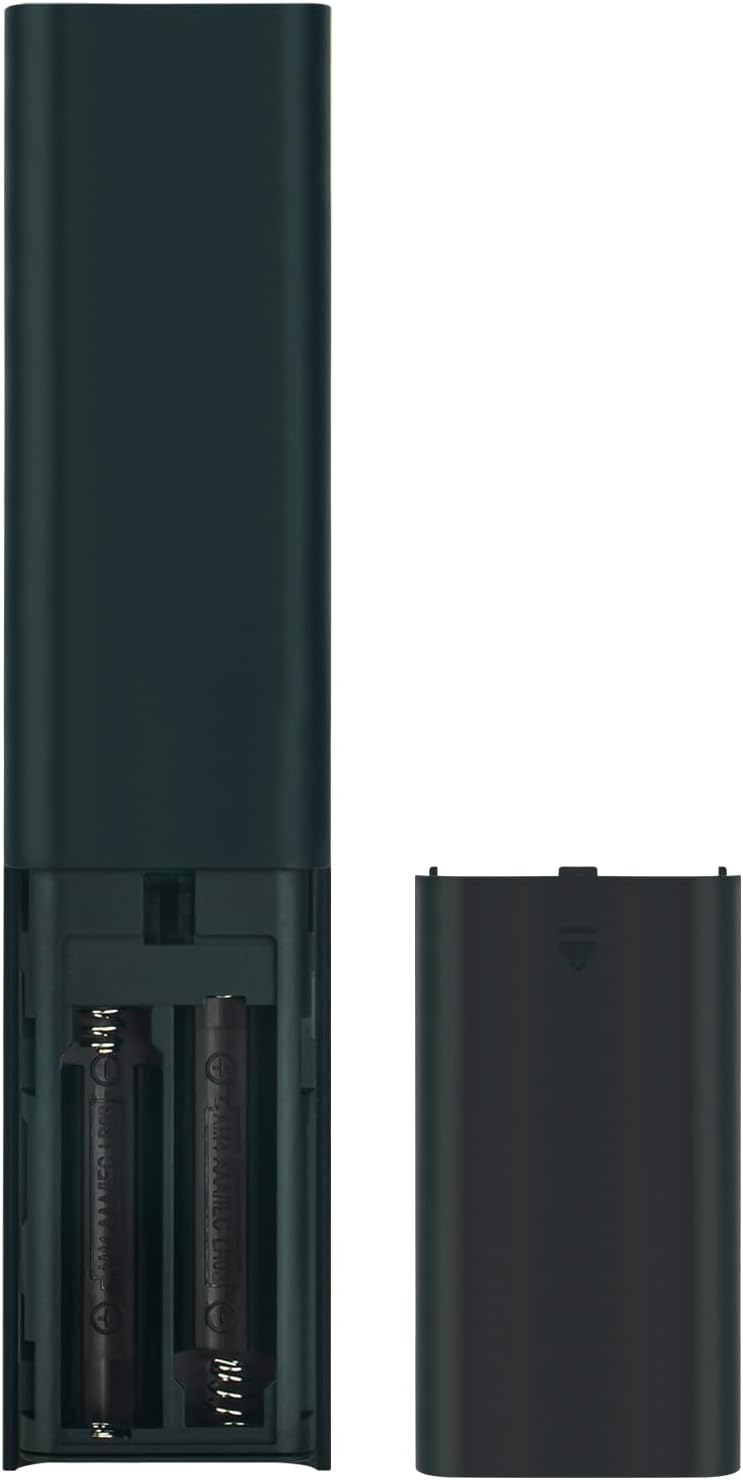
Image showing the battery compartment for AAA batteries.
2. Parring af fjernbetjeningen med dit tv
This remote control uses Bluetooth connectivity and requires pairing with your Samsung TV before use. Follow these steps to pair:
- Sørg for, at dit Samsung TV er tændt.
- Ret fjernbetjeningen mod dit tv.
- Tryk på og hold samtidigt nede Retur knappen (buet pil) og Afspil/pause i 3 sekunder eller mere.
- A pairing message should appear on your TV screen, indicating successful pairing.
If pairing is unsuccessful, ensure the batteries are correctly installed and try again. Move closer to the TV if necessary.
Betjeningsvejledning
The ECONTROLLY BN59-01385B remote control provides intuitive navigation and voice command capabilities.
Nøglefunktioner:
- Power knap: Located at the top right, typically marked with a circle and a vertical line. Turns the TV on or off.
- Stemmekontrolknap (
 ): Located near the top, marked with a microphone icon. Press and hold to activate voice commands for searching content, changing settings, or controlling smart home devices.
 - Navigation Pad (Directional Buttons & Enter): The large circular pad in the center. Use to navigate menus and select items.
- Returknap: Located below the navigation pad, marked with a curved arrow. Returns to the previous screen or menu.
- Hjem-knap: Located below the navigation pad, marked with a house icon. Accesses the Smart Hub or home screen.
- Afspil/pause knap: Located below the navigation pad, marked with a play/pause icon. Controls media playback.
- Lydstyrke op/ned -knapper (+/-): Adjusts the TV volume.
- Kanal op/ned knapper (up/down arrows): Changes TV channels.
- Hurtig adgangsknapper: Dedicated buttons for Netflix, Samsung TV Plus, Prime Video, and Disney+ for direct app launch.
The microphone button activates voice control for your Samsung TV.
Vedligeholdelse og pleje
- Keep the remote control dry. Moisture can damage the internal circuits.
- Undgå at udsætte fjernbetjeningen for ekstreme temperaturer.
- Rengør fjernbetjeningen med en blød, tør klud. Brug ikke slibende rengøringsmidler eller opløsningsmidler.
- Hvis fjernbetjeningen ikke skal bruges i længere tid, skal du fjerne batterierne for at forhindre lækage.
- Handle the remote with care to prevent drops or impacts.
Fejlfinding
| Problem | Løsning |
|---|---|
| Fjernbetjeningen svarer ikke. |
|
| Stemmestyringen virker ikke. |
|
| Knapperne sidder fast eller reagerer ikke. |
|
Specifikationer
- Modelnummer: PT-BN59-01385B
- Mærke: EKONTROLLIGT
- Forbindelse: Bluetooth
- Controller type: Stemmekontrol
- Særlige funktioner: Voice Search, Quick Access Buttons
- Kompatible enheder: Samsung-fjernsyn
- Strømkilde: 2 x AAA alkaliske batterier (medfølger ikke)
- Maksimal rækkevidde: 10 meter (33 fod)
- Materiale: ABS
- Farve: Sort
- Dimensioner (L x B): Approximately 16.1 cm (6.33 in) x 3.5 cm (1.37 in)
- Vægt: Cirka 2 ounces (56.7 gram)

Fjernbetjeningens fysiske dimensioner.
Kompatible tv-modeller
This remote control is compatible with various Samsung Smart TV models, including but not limited to:
- QN85B-serien: QA55QN85BA, QA65QN85BA, QA75QN85BA, QA85QN85BA, QA65QN85BAW, QA75QN85BAW, QA85QN85BAW, QA55QN85BAWXXY, QA65QN85BAWXXY, QA75QN85BAWXXY
- Q60B Series: QA55Q60BA, QA65Q60BA, QA75Q60BA, QA85Q60BA, QA55Q60BAW, QA65Q60BAW, QA75Q60BAW, QA85Q60BAW, QA55Q60BAWXXY, QA65Q60BAWXXY, QA75Q60BAWXXY, QA85Q60BAWXXY
- Q70B Series: QA55Q70BA, QA65Q70BA, QA75Q70BA, QA85Q70BA, QA55Q70BAW, QA65Q70BAW, QA75Q70BAW, QA85Q70BAW, QA55Q70BAWXXY, QA65Q70BAWXXY, QA75Q70BAWXXY, QA85Q70BAWXXY
- Q80B Series: QA55Q80BA, QA65Q80BA, QA75Q80BA, QA85Q80BA, QA55Q80BAW, QA65Q80BAW, QA75Q80BAW, QA85Q80BAW, QA55Q80BAWXXY, QA65Q80BAWXXY, QA75Q80BAWXXY, QA85Q80BAWXXY
- QN90B-serien: QA43QN90BA, QA50QN90BA, QA55QN90BA, QA65QN90BA, QA75QN90BA, QA85QN90BA, QA43QN90BAW, QA50QN90BAW, QA55QN90BAW, QA65QN90BAW, QA75QN90BAW, QA85QN90BAW, QA43QN90BAWXXY, QA50QN90BAWXXY, QA55QN90BAWXXY
This list is not exhaustive. If your TV model is not listed, please refer to your TV's user manual or contact ECONTROLLY support for compatibility information.

Visual comparison of the replacement remote with an original remote.
Support og kontakt
For further assistance or inquiries, please refer to the product listing on Amazon or contact ECONTROLLY customer support.