
Symcode Desktop QR Omnidirectional Barcode Scanner
Symcode Desktop QR Omnidirektionel Stregkodescanner Brugermanual
Model: Desktop QR Omnidirectional Barcode Scanner
1. Produktet er slutview
The Symcode Desktop QR Omnidirectional Barcode Scanner is designed for efficient and hands-free scanning of various barcode types. This device is suitable for environments requiring quick and accurate data capture, such as retail stores, libraries, and inventory management systems. It supports both 1D and 2D barcodes, including QR codes, and features automatic sensing for ease of use.

Billede: Forside view of the Symcode Desktop QR Omnidirectional Barcode Scanner, showing its compact design and scan window.
Nøglekomponenter:
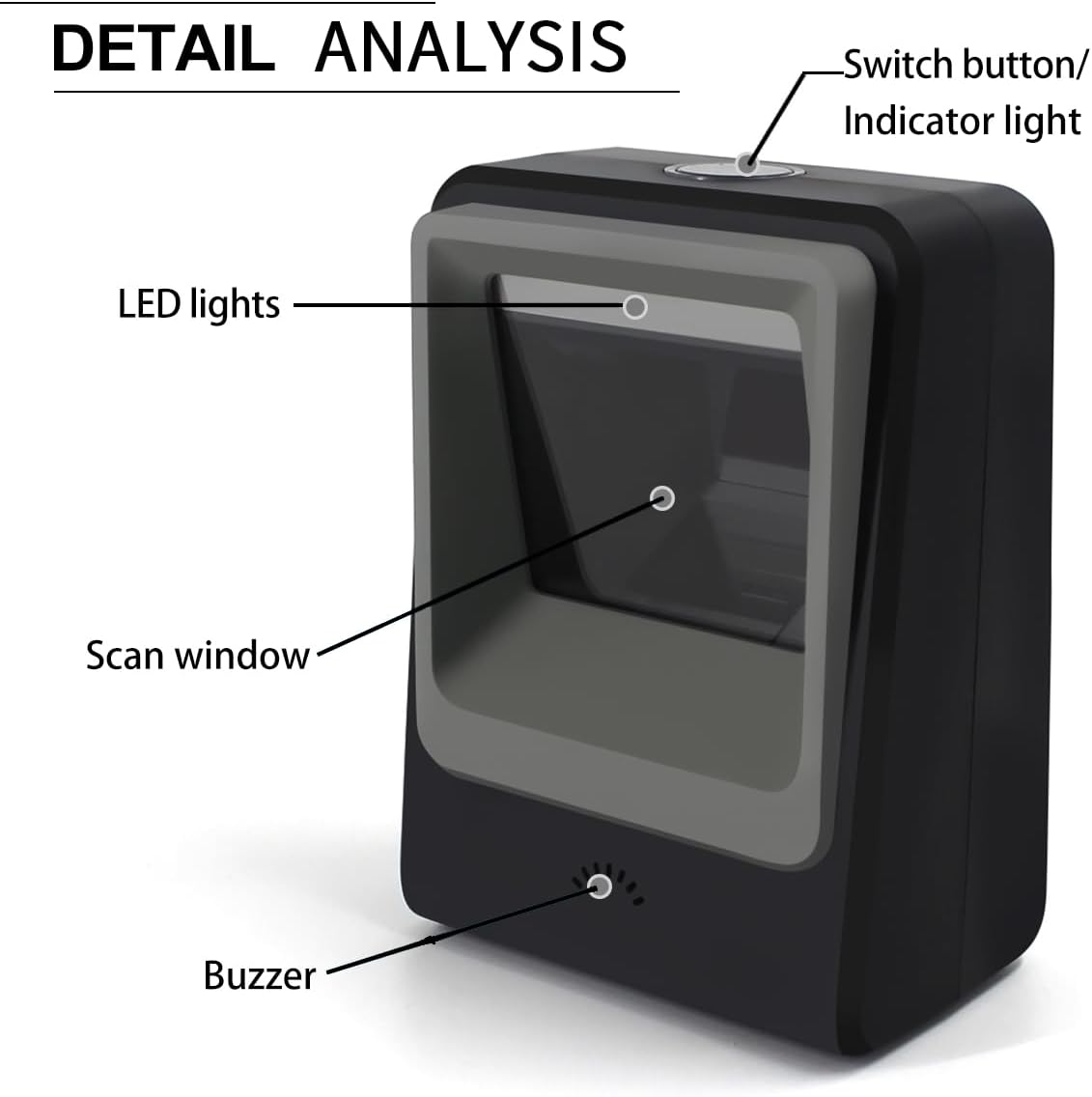
Image: Detailed diagram highlighting the scanner's components: Switch button/Indicator light, LED lights, Scan window, and Buzzer.
- Switch Button/Indicator Light: Styrer strømforsyningen og angiver driftsstatus.
- LED lys: Illuminates the scanning area.
- Scanningsvindue: The area through which barcodes are read.
- Summer: Provides audible feedback for successful scans or errors.
2. Funktioner
- Alsidig scanning: Capable of reading 1D, 2D, and QR barcodes, including damaged or distorted codes.

Image: The scanner demonstrating its ability to read both 1D and 2D barcodes, including QR codes, from digital displays and printed labels.
- Håndfri betjening: Features an infrared auto-sensing sensor that automatically activates the scanner when a barcode is presented, and enters sleep mode when inactive.

Image: Illustration of the scanner's automatic sleep and wake-up function, activating when an item is placed in front of it.
- Plug and Play-opsætning: Requires no software installation; simply connect via USB to a compatible device.
- Bred kompatibilitet: Works with Windows XP/7/8/10, Mac OS, and Linux operating systems.

Image: The scanner connected to a laptop, illustrating its plug-and-play functionality and compatibility with multiple operating systems and devices.
- Holdbar konstruktion: Designed with an anti-slip base for stability and constructed from ABS engineering plastics for enhanced durability, capable of withstanding drops from up to 1.5 meters (approximately 5 feet).

Image: Visual representation of the scanner's anti-shock design, demonstrating its resilience to drops from a height of 1.5 meters.
- Flere tilslutningsmuligheder: Supports USB, Serial, and TTL transmission for flexible integration into various systems.

Image: Diagram illustrating the scanner's support for USB, Serial, and TTL transmission methods, connecting to a computer display.
3. Opsætningsvejledning
- Pak scanneren ud: Tag forsigtigt scanneren ud af emballagen.
- Tilslut til strøm/data: Insert the USB cable into the scanner's port and connect the other end to an available USB port on your computer or host device.
- Systemgenkendelse: The operating system (Windows, Mac OS, Linux) should automatically detect and configure the scanner as a standard HID keyboard device. No additional drivers or software are typically required.
- Test funktionalitet: Open a text editor (e.g., Notepad, Word) or a compatible application. Place a known barcode in front of the scanner's window. The scanner should emit a light, scan the barcode, and the data should appear in your open application. A successful scan is usually indicated by a beep from the buzzer.
If the scanner does not function immediately, ensure the USB cable is securely connected and try a different USB port. For specific configuration settings, refer to the programming guide (if provided separately) or contact support.
4. Betjeningsvejledning
The Symcode Desktop QR Omnidirectional Barcode Scanner is designed for hands-free, automatic operation.
- Automatisk scanning: The scanner utilizes an infrared auto-sensing sensor. When an object with a barcode is placed within its scanning field, the scanner will automatically activate its light and attempt to read the barcode.
- Positioning Barcodes: For optimal performance, present the barcode to the scanner's window. The omnidirectional design allows for scanning from various angles without precise alignment.
- Scan Confirmation: Upon a successful scan, the scanner will typically emit a short beep and the indicator light may flash. The scanned data will be transmitted to your connected device as if typed from a keyboard.
- Sove mode: When no barcode is detected for a period, the scanner will automatically enter a low-power sleep mode, turning off its scanning light. It will reactivate instantly when a barcode is presented again.
5. Vedligeholdelse
Korrekt vedligeholdelse sikrer din stregkodescanners lange levetid og optimale ydeevne.
- Rengøring af scanningsvinduet: Regularly clean the scan window with a soft, lint-free cloth. If necessary, dampen the cloth slightly with water or a mild, non-abrasive cleaner. Avoid harsh chemicals or abrasive materials that could scratch the window.
- Generel rengøring: Wipe the exterior of the scanner with a soft, dry cloth. Do not immerse the scanner in water or any cleaning solutions.
- Kabelpleje: Ensure the USB cable is not kinked, twisted, or subjected to excessive strain. Damaged cables can affect connectivity.
- Opbevaring: Store the scanner in a clean, dry environment away from extreme temperatures and direct sunlight when not in use.
6. Fejlfinding
| Problem | Mulig årsag | Løsning |
|---|---|---|
| Scanneren tænder ikke eller reagerer ikke. | USB cable not connected properly or faulty USB port. | Ensure the USB cable is securely plugged into both the scanner and the host device. Try a different USB port on your computer. |
| Scanner powers on but does not scan. | Barcode is damaged, poorly printed, or not within the scanning range/angle. Scanner is in sleep mode. | Ensure the barcode is clear and flat. Adjust the distance and angle. The scanner should wake up automatically when a barcode is presented. If not, check for obstructions on the sensor. |
| De scannede data er forkerte eller ufuldstændige. | Partial scan, incorrect barcode symbology settings (unlikely for default setup), or interference. | Rescan the barcode, ensuring it is fully within the scan window. If issues persist, consult the product's advanced configuration guide (if available) for symbology settings. |
| No data appears in the application after scanning. | Application not in focus, or scanner not recognized as a keyboard input device. | Ensure the target application (e.g., text editor, POS software) is active and ready to receive input. Verify the scanner is recognized by your operating system (check Device Manager on Windows). |
7. Specifikationer
| Feature | Detalje |
|---|---|
| Produktdimensioner | 10.8 cm D x 7 cm B x 15.2 cm H (4.25 cm D x 2.75 cm B x 6 cm H) Image: Dimensional drawing of the scanner, indicating its depth, width, and height measurements. |
| Varens vægt | 7.1 ounce (ca. 201 gram) |
| Forbindelsesteknologi | USB Cable (also supports Serial, TTL) |
| Strømkilde | USB Barcode Reader (Bus-powered) |
| Kompatible enheder | Laptop, PC, iPad, Phone (with appropriate adapters/OTG support) |
| Operativsystemer | Windows XP/7/8/10, Mac OS, Linux, Android |
| Understøttede stregkodetyper | 1D: UPC/EAN, UPC-A, UPC-E, Code39, ISBN, Interleaved 2 of 5, Code93, Code 128, Codabar, EAN-8, EAN-13, GS1 Databar, Industrial 2 of 5, MSI. 2D: PDF417, Data Matrix, QR Code, Aztec, Maxicode, Hanxin. |
| Fabrikant | symbolkode |
8. Garanti og support
For information regarding the product warranty, please refer to the documentation included with your purchase or contact Symcode customer support directly. Support contact details are typically available on the manufacturer's official webwebsted eller produktemballage.
Fabrikant: symbolkode
Relaterede dokumenter - Desktop QR Omnidirectional Barcode Scanner
 |
Brugermanual til 2D-stregkodescanner på skrivebordet - Symcode Omfattende brugermanual til Symcode 2D Desktop-stregkodescanneren (model MJ-9120), der beskriver funktioner, parametre, grænseflader, indstillinger og fejlfinding for effektiv stregkodescanning. |
 |
Brugermanual til trådløs Bluetooth/2.4G stregkodescanner Omfattende brugermanual til den trådløse Bluetooth/2.4G-stregkodescanner, der dækker funktioner, opsætningsprocedurer, driftstilstande, fejlfinding og forklaringer af indikatorer. |
 |
Brugervejledning til 2.4G trådløs stregkodescanner | Symcode Omfattende brugervejledning til Symcode 2.4G trådløs stregkodescanner, med detaljerede oplysninger om funktioner, ydeevneparametre, driftstilstande, opsætningsmuligheder og specifikationer. |
 |
Symcode MJ-340 2D stregkodescanner brugermanual Omfattende brugermanual til Symcode MJ-340 2D-stregkodescanneren, der dækker opsætning, ydeevnespecifikationer, kommunikationstilstande og konfigurationsmuligheder. |
 |
Konfiguration af Symcode-stregkodescanner: Kontinuerlig og triggertilstand Instruktioner til konfiguration af Symcode-stregkodescannere ved hjælp af kontinuerlig og triggertilstande ved at udskrive og scanne indstillingskoder. Inkluderer visuelt eksempel.ampfærre stregkoder for hver tilstand. |
 |
Brugermanual til BT 433 trådløs stregkodescanner - Symcode Comprehensive user manual for the Symcode BT 433 Wireless Barcode Scanner. Discover its 433MHz and Bluetooth connectivity, advanced features, setup instructions, and operational guides for efficient data capture in various environments. |
Ask a question about this manual
Ask about setup, troubleshooting, compatibility, parts, safety, or missing instructions. Manuals+ will review the question and use this page’s manual context to help answer it.