
1. Introduktion
This manual provides essential instructions for the proper setup, operation, and maintenance of your OnePlus Nord N30 5G smartphone. Please read this guide thoroughly before using your device to ensure optimal performance and longevity.
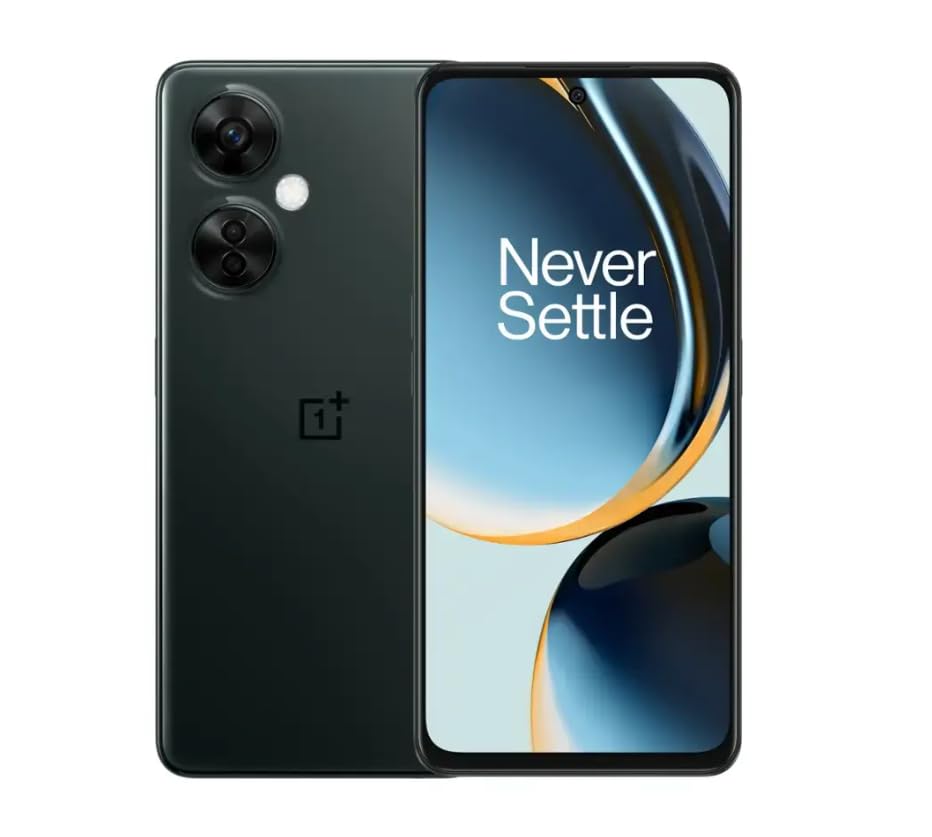
Image 1.1: OnePlus Nord N30 5G smartphone. This image displays the overall design of the device, highlighting its screen and camera module.
2. Hvad er der i æsken
Bekræft at alle varer er til stede i pakken:
- OnePlus Nord N30 5G Smartphone
- Strømadapter
- USB kabel
Bemærk: Tilbehør kan variere efter region.
3. Opsætning
3.1. Isætning af SIM-kortet
- Find SIM-kortbakken på siden af enheden.
- Insert the SIM ejector tool (not included, use a paperclip if necessary) into the small hole next to the tray to open it.
- Place your Nano-SIM card(s) into the tray with the gold contacts facing down. The device supports a single SIM card and a microSDXC card for expandable storage.
- Skub forsigtigt bakken tilbage i åbningen, indtil den flugter med telefonens kabinet.
3.2. Første opladning og tænding
Før første brug anbefales det at oplade enheden helt.
- Tilslut USB-kablet til strømadapteren og derefter til telefonens USB-C-port.
- Plug the power adapter into a wall outlet. The device supports 50W SUPERVOOC fast charging.
- Once sufficiently charged, press and hold the Power button (located on the side) until the OnePlus logo appears.
3.3. Indledende enhedskonfiguration
Følg vejledningen på skærmen for at fuldføre den indledende opsætning:
- Vælg dit foretrukne sprog.
- Opret forbindelse til et Wi-Fi-netværk.
- Review og accepterer vilkårene og betingelserne.
- Log ind med din Google-konto, eller opret en ny.
- Set up security features such as fingerprint unlock or face unlock.
4. Betjeningsvejledning
4.1. Display og navigation
The OnePlus Nord N30 5G features a 6.72-inch LCD display with a 120Hz refresh rate for smooth visuals. Navigate the OxygenOS interface using gestures or traditional navigation buttons.
- Stryg op: Få adgang til app-skuffen.
- Stryg ned: Få adgang til notifikationer og hurtigindstillinger.
- Tryk på: Vælg elementer.
- At klemme: Zoom ind eller ud.
4.2. Kamerabrug
The device is equipped with a triple rear camera system and a front camera.
- Hovedkamera: 108 MP, f/1.7 (wide) for high-resolution photos.
- Makro kamera: 2 MP, f/2.4 for close-up shots.
- Dybdekamera: 2 MP, f/2.4 for portrait mode effects.
- Forreste kamera: 16 MP, f/2.4 for selfies and video calls.
Open the Camera app and select your desired mode (Photo, Video, Portrait, Macro, etc.) from the interface. Tap the shutter button to capture images or start/stop video recording.
4.3. Lagerstyring
The phone comes with 128GB of internal storage. You can expand this up to 1TB using a microSDXC card inserted into the SIM tray.
- Sådan tjekker du lagerforbruget: Gå til Indstillinger > Opbevaring.
- At flytte files to microSD: Use the File Manager app.
4.4. Forbindelse
The device supports 5G cellular technology, Wi-Fi, and Bluetooth 5.1.
- 5G: Ensure your SIM card and plan support 5G for faster mobile data speeds.
- Wi-Fi: Opret forbindelse til trådløse netværk via Indstillinger > Wi-Fi.
- Bluetooth: Pair with wireless headphones or other devices via Indstillinger > Bluetooth.
4.5. Sikkerhedsfunktioner
Secure your device using the side-mounted fingerprint sensor or face unlock.
- To set up fingerprint unlock: Go to Indstillinger > Sikkerhed og privatliv > Lås op med fingeraftryk.
- To set up face unlock: Go to Indstillinger > Sikkerhed og privatliv > Ansigtslås.
4.6. Lyd
The device features dual stereo speakers for enhanced audio experience. It also includes a 3.5 mm audio jack for wired headphones.
5. Vedligeholdelse
5.1. Batteripleje
5000mAh-batteriet giver længere tids brug. For at forlænge batterilevetiden:
- Undgå ekstreme temperaturer.
- Use the provided 50W SUPERVOOC charger for optimal charging speed and battery health.
- Undgå at aflade batteriet helt ofte.
5.2. Softwareopdateringer
Keep your OxygenOS (based on Android 13) updated to ensure optimal performance, security, and access to new features.
- Sådan tjekker du for opdateringer: Gå til Indstillinger > Om enheden > OxygenOS version.
5.3. Rengøring af enheden
Brug en blød, fnugfri klud til at rengøre telefonens skærm og kabinet. Undgå at bruge skrappe kemikalier eller slibende materialer.
6. Fejlfinding
Dette afsnit omhandler almindelige problemer, du kan støde på.
6.1. Enheden tændes ikke
- Sørg for, at batteriet er opladet. Tilslut enheden til opladeren i mindst 15 minutter.
- Tryk og hold tænd/sluk-knappen nede i 10-15 sekunder for at fremtvinge en genstart.
6.2. Problemer med netværksforbindelse
- Kontroller, om SIM-kortet er korrekt isat.
- Bekræft at mobildata er aktiveret i Indstillinger > Mobilt netværk.
- Genstart enheden.
- Contact your carrier (T-Mobile) to confirm service availability in your area.
6.3. Apps der går ned eller fryser
- Luk og åbn appen igen.
- Ryd appens cache: Indstillinger > Apps > [Appnavn] > Lagringsforbrug > Ryd cache.
- Ensure the app and OxygenOS are updated to the latest versions.
6.4. Hurtig batteridræning
- Reducer skærmens lysstyrke.
- Disable unused features like Bluetooth, GPS, or Wi-Fi when not needed.
- Tjek batteriforbruget i Indstillinger > Batteri at identificere strømkrævende apps.
- Ensure background app refresh is limited for non-essential apps.
7. Specifikationer
| Modelnavn | OnePlus Nord N30 5G |
| Operativsystem | OxygenOS (based on Android 13) |
| Processor | Qualcomm Snapdragon 695 Octa-core |
| VÆDDER | 8 GB |
| Intern opbevaring | 128GB (Expandable up to 1TB via microSDXC) |
| Vise | 6.72 inches LCD, 2400 x 1080 resolution, 120Hz Refresh Rate |
| Bagkamera | 108 MP (vidvinkel), 2 MP (makro), 2 MP (dybde) |
| Forreste kamera | 16 MP |
| Batterikapacitet | 5000 mAh |
| Opladning | 50W SUPERVOOC hurtigopladning (ca. 47 minutter for fuld opladning) |
| Forbindelse | 5G, Wi-Fi, Bluetooth 5.1, USB-C |
| Lydstik | 3.5 mm |
| Dimensioner | 6 x 4 x 4 tommer |
| Vægt | 10.8 ounce |
| Særlige funktioner | Dual SIM, Side-mounted Fingerprint Sensor, Face Unlock, Dual Stereo Speakers |
8. Fornyede produktoplysninger
This OnePlus Nord N30 5G is an Amazon Renewed product. Renewed products are pre-owned and professionally inspected, tested, and cleaned to work like new. They come with generic or original accessories and packaging.
8.1. Amazons fornyede betingelser
Amazon Renewed products are categorized based on their cosmetic condition and battery life. All renewed products are fully functional and have a battery life greater than 80% of a new equivalent.

Image 8.1: Amazon Renewed conditions overview. This image illustrates the criteria for Excellent, Good, and Acceptable cosmetic conditions for renewed products.

Billede 8.2: Visuelt eksempelamples of renewed product cosmetic conditions. This image provides visual examples of what 'Excellent', 'Good', and 'Acceptable' cosmetic conditions might look like on a phone's back.

Image 8.3: Customer feedback on Amazon Renewed. This image presents testimonials from customers regarding their positive experiences with Amazon Renewed products.
9. Garanti og support
9.1. Garantioplysninger
As an Amazon Renewed product, this device is backed by the Amazon Renewed Guarantee. Please refer to the Amazon Renewed program terms and conditions for specific warranty details and coverage. This typically includes a limited warranty for a specified period from the date of purchase, covering defects in materials and workmanship.
9.2. Kundesupport
For technical assistance, troubleshooting, or warranty claims, please contact Amazon Customer Service or refer to the official OnePlus support webwebsted for yderligere ressourcer og ofte stillede spørgsmål.
- Amazon kundeservice: Besøg amazon.com/kontakt-os
- OnePlus-support: Visit the official OnePlus support webwebsted for din region.