
1. Sikkerhedsinstruktioner
Læs venligst alle instruktioner omhyggeligt inden montering og brug. Gem denne manual til senere brug.
- Sørg altid for, at skrivebordet er korrekt forankret i gulvet for at forhindre, at det vælter.
- Overskrid ikke den anbefalede maksimale vægt på 80 kg.
- This desk is designed for home office use. It may not be suitable for commercial environments without proper installation and adherence to local regulations.
- Hold børn og kæledyr væk fra skrivebordet under brug for at forhindre skader.
- Ensure all cables are properly managed and secured to avoid entanglement or damage during height adjustments.
- Do not place liquids directly on the control panel or near electrical components.
2. Produktet er slutview & Funktioner
The COMHOMA Electric Standing Desk is designed to provide a versatile and ergonomic workspace, allowing seamless transitions between sitting and standing positions.
Nøglefunktioner:
- Electric Height Adjustable Lift System: Effortlessly customize desk height from 28.3" to 48" (72 cm to 122 cm). Operates quietly at less than 55dB.
- Customizable LED Control Panel: Features an LED display for current height and three memory presets for quick adjustments.
- Ergonomisk design: Includes an adjustable monitor shelf and a foldable laptop stand to reduce neck and back strain.
- AmpOpbevaringsplads: A convenient pull-out drawer, top shelves, and two versatile hooks for bags or accessories help keep your workspace organized.
- Superior Strength and Stability: Supported by a T-shaped alloy steel frame, capable of holding up to 176 lbs (80 kg).
- FSC-Certified Tabletop: Constructed with environmentally responsible materials.
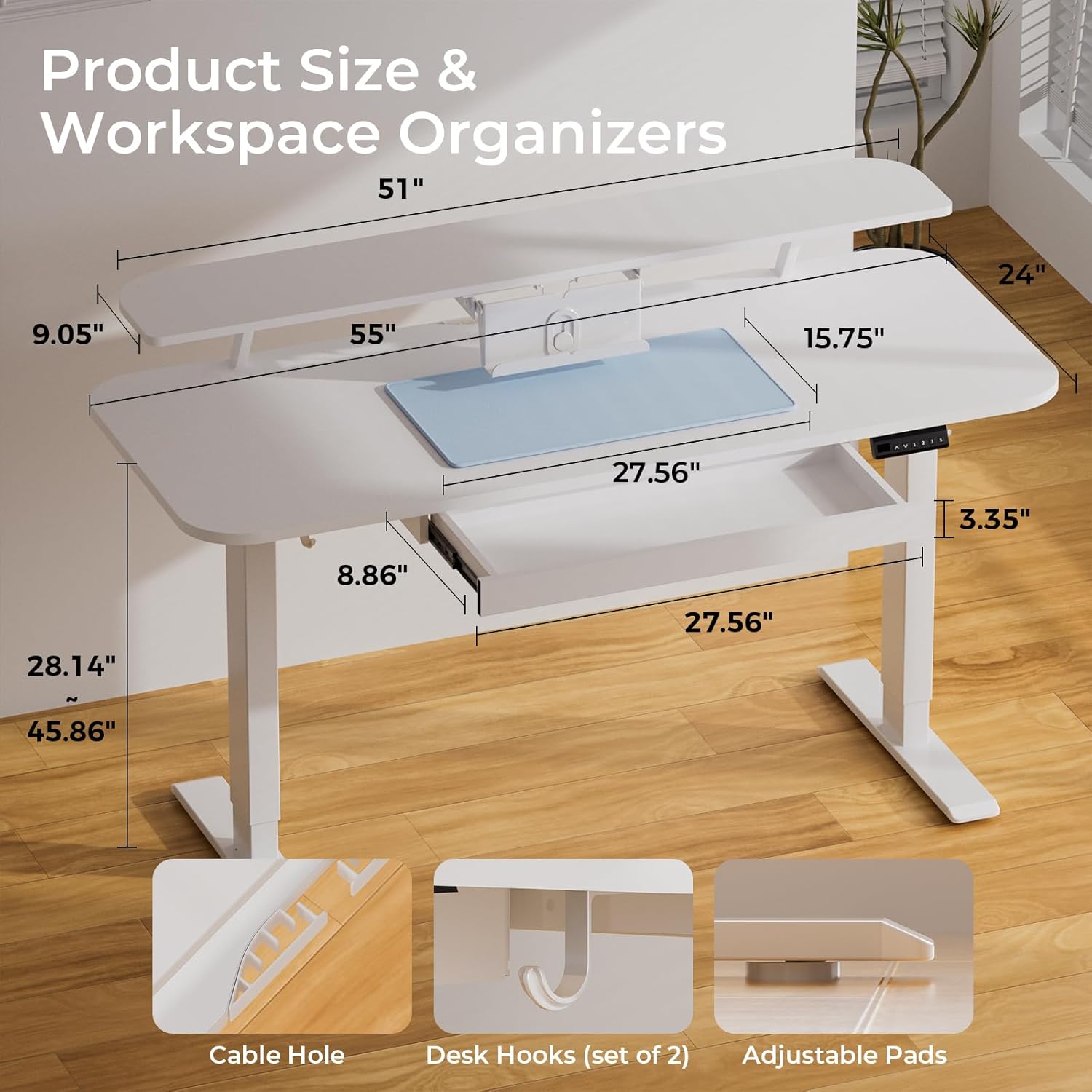
Figure 2.1: Product dimensions and integrated workspace organizers including cable holes, desk hooks, and adjustable pads.

Figure 2.2: The desk's wide height range, adjustable from 28.3" to 48", suitable for both sitting and standing work.
3. Monteringsvejledning
Assembly tools and detailed instructions are included in the package. For a visual guide, please refer to the official installation video below.
Video 3.1: Official installation guide for the COMHOMA Electric Standing Desk with Drawers. This video provides step-by-step instructions for assembling the desk components.
Vigtige monteringstrin (se videoen for detaljer):
- Install the desk boards (L) and (G) using the provided connectors.
- Install the motor on the lift column with screws (14) and (F).
- Install the center rail on the lift columns with screws (B).
- Install the side brackets on the lift columns with screws (C).
- Install the stabilizing rods.
- Install the side brackets on the desk boards with screws (G).
- Install the corner brace on the connecting rod and desk board with screws (C) and (G).
- Install the crossbar (4) into the lift column (2) and then secure the crossbar to the motor rod (13).
- Install the bases on the lift columns with screws (A) and the pads on the bases.
- Install the Hand Controller (9), Pothook (30), and Threadholder (28) on the desk boards with screws (E).
- Connect and organize the cables.
- Install the cam bolts (I) on the desk board and insert the wood pins (M) on the desk board.
- Separate the drawer slides and install the drawer slides on the Side Panel.
- Attach the side panels to the desk board (12).
- Install the drawer slides on the drawer side panels and attach the drawer side panels to the drawer front panel.
- Install the cam locks on the drawer front panel (22) and install the back panel.
- Install the support braces and book stand on the top board.
- Attach the drawer to the desk.
- Attach the support braces to the desk and then put on the mouse pad. Complete.
4. Betjeningsvejledning
4.1 Højdejustering
Use the up (∧) and down (∨) arrow buttons on the LED control panel to adjust the desk to your desired height. The current height will be displayed on the LED screen.

Figure 4.1: The multifunction control panel features up/down height adjustment, three memory preset buttons, an LED display, and a set/lock button.
4.2 Hukommelsesforudindstillinger
The control panel allows you to save three preferred height settings for quick recall.
- Adjust the desk to your desired height using the up (∧) or down (∨) buttons.
- Press the 'S' (Set) button. The LED display will flash.
- Press one of the number buttons (1, 2, or 3) within 5 seconds to save the current height to that preset. The display will show 'S-' followed by the number to confirm.
- To recall a saved height, simply press the corresponding number button (1, 2, or 3). The desk will automatically move to the saved position.
4.3 Integreret lagring
Utilize the pull-out drawer for seamless storage of office supplies. The top shelves provide additional space for monitors, books, and other items. Two hooks are available for hanging headphones, bags, or other accessories.

Figure 4.2: The spacious pull-out drawer provides convenient storage for desktop essentials, keeping your workspace tidy.
4.4 Monitor and Laptop Stand Usage
The adjustable monitor shelf helps achieve eye-level alignment, preventing head tilting and hunching. The integrated laptop stand can be adjusted to suit your workflow, further enhancing ergonomic comfort.
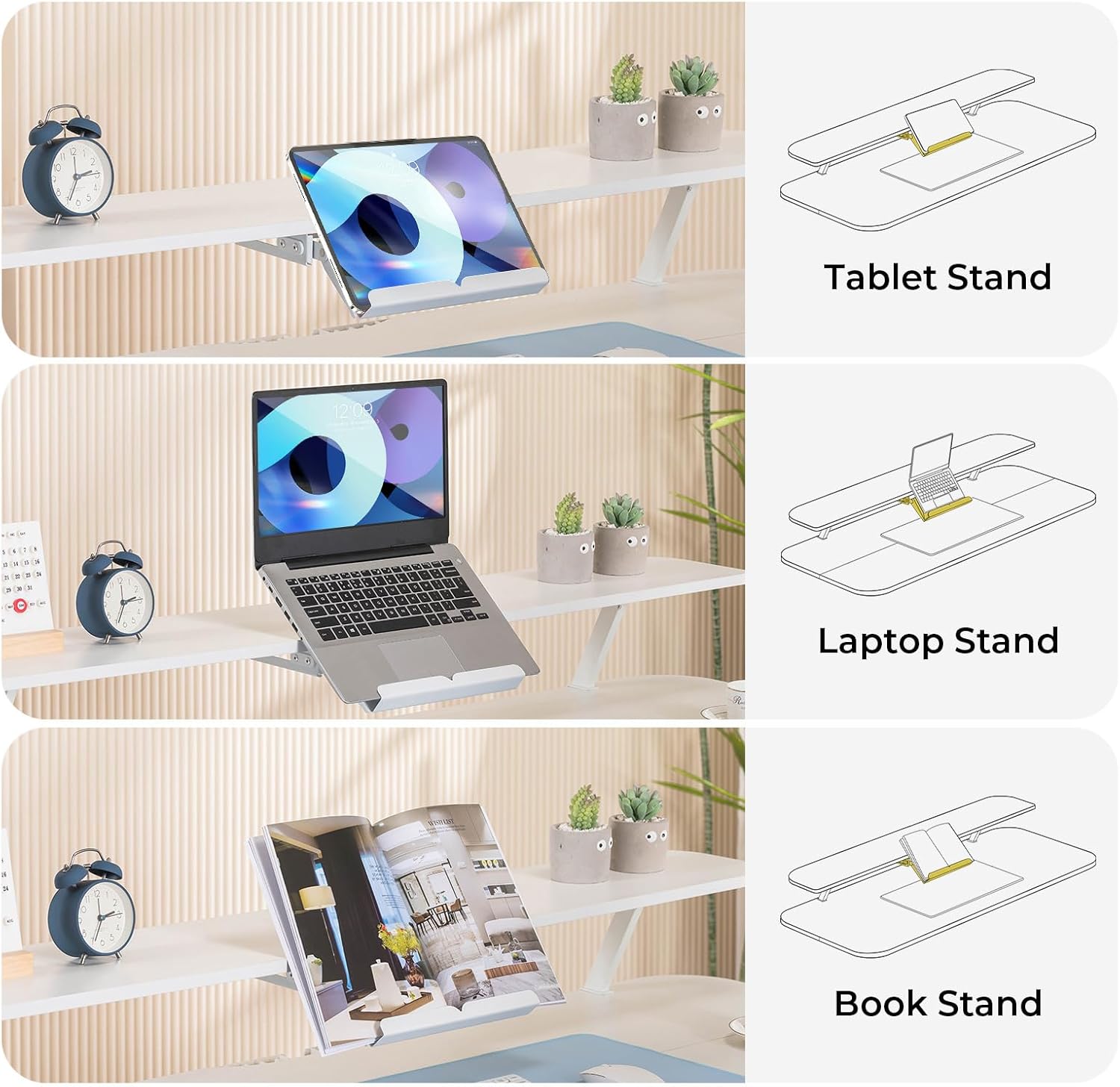
Figure 4.3: The versatile integrated stand can securely hold a tablet, laptop, or book, adapting to various work needs.

Figure 4.4: Instructions for using the integrated laptop stand: pull out, rotate to desired position, and easily retract when not in use.
5. Vedligeholdelse
- Clean the desk surface with a soft, damp klud. Undgå skrappe kemikalier eller slibende rengøringsmidler.
- Regularly check all screws and connections to ensure they are tight. Tighten if necessary.
- Hold motoren og de elektriske komponenter fri for støv og fugt.
6. Fejlfinding
6.1 Desk Not Moving or Uneven Movement
- Check all power connections. Ensure the power cord is securely plugged into both the desk and a working wall outlet.
- Verify that no objects are obstructing the desk's movement.
- If the desk moves unevenly, perform a reset: Press and hold the 'S' button for 5-10 seconds until the desk moves to its lowest position and then slightly rises, indicating a successful reset.
6.2 Kontrolpanelet reagerer ikke
- Ensure the control panel cable is securely connected to the motor unit.
- Unplug the desk from the power outlet for 10 minutes, then plug it back in to perform a hard reset.
7. Specifikationer
| Mærke | KOMHOMA |
| Modelnummer | AADTS118-3A |
| Produktdimensioner | 55"W x 24"D x 28.3"-48"H (139.7cm W x 60.96cm D x 71.9cm-121.9cm H) |
| Minimum højde | 28.3 tommer (71.9 cm) |
| Maksimal højde | 48 tommer (121.9 cm) |
| Vægt kapacitet | 176 pund (80 kg) |
| Løftemekanisme | Elektrisk |
| Motorstøjniveau | Mindre end 55dB |
| Materiale Type | Wood (FSC-Certified tabletop), Alloy Steel (Base) |
| Antal skuffer | 1 |
| Antal hylder | 1 (Monitor Stand) |
| Særlige funktioner | Adjustable Height, Ergonomic, Monitor Stand, Scratch Resistant |
| Påkrævet samling | Ja |
8. Garanti og support
8.1 Garantioplysninger
This COMHOMA Electric Standing Desk comes with a Limited Warranty. Please refer to the warranty card included in your product packaging for specific terms and conditions regarding coverage and duration.
8.2 Kundesupport
For any questions, technical assistance, or warranty claims, please contact COMHOMA customer support through the retailer where the product was purchased or visit the official COMHOMA webwebsted for kontaktoplysninger.