
Indledning
The Kipcush K8 White Noise Machine is designed to create a calming environment for improved sleep and relaxation. It features a variety of soothing sounds, a soft night light, and customizable settings to suit individual preferences. This manual provides detailed instructions for the safe and effective use of your device.
Sikkerhedsoplysninger
- Do not use near water to prevent electric shock.
- Undgå høje lydstyrkeniveauer for at beskytte hørelsen.
- Ikke beregnet til brug af børn uden opsyn af voksne.
- Use only with a compatible 5V power adapter and the provided USB-A to coaxial connector cable.
Pakkens indhold
Tjek venligst pakken for følgende varer:
- Kipcush K8 Hvid Støj Maskine
- USB-A to Coaxial Connector Cable
- Brugermanual
Note: A power adapter is not included and must be supplied by the user (5V recommended).
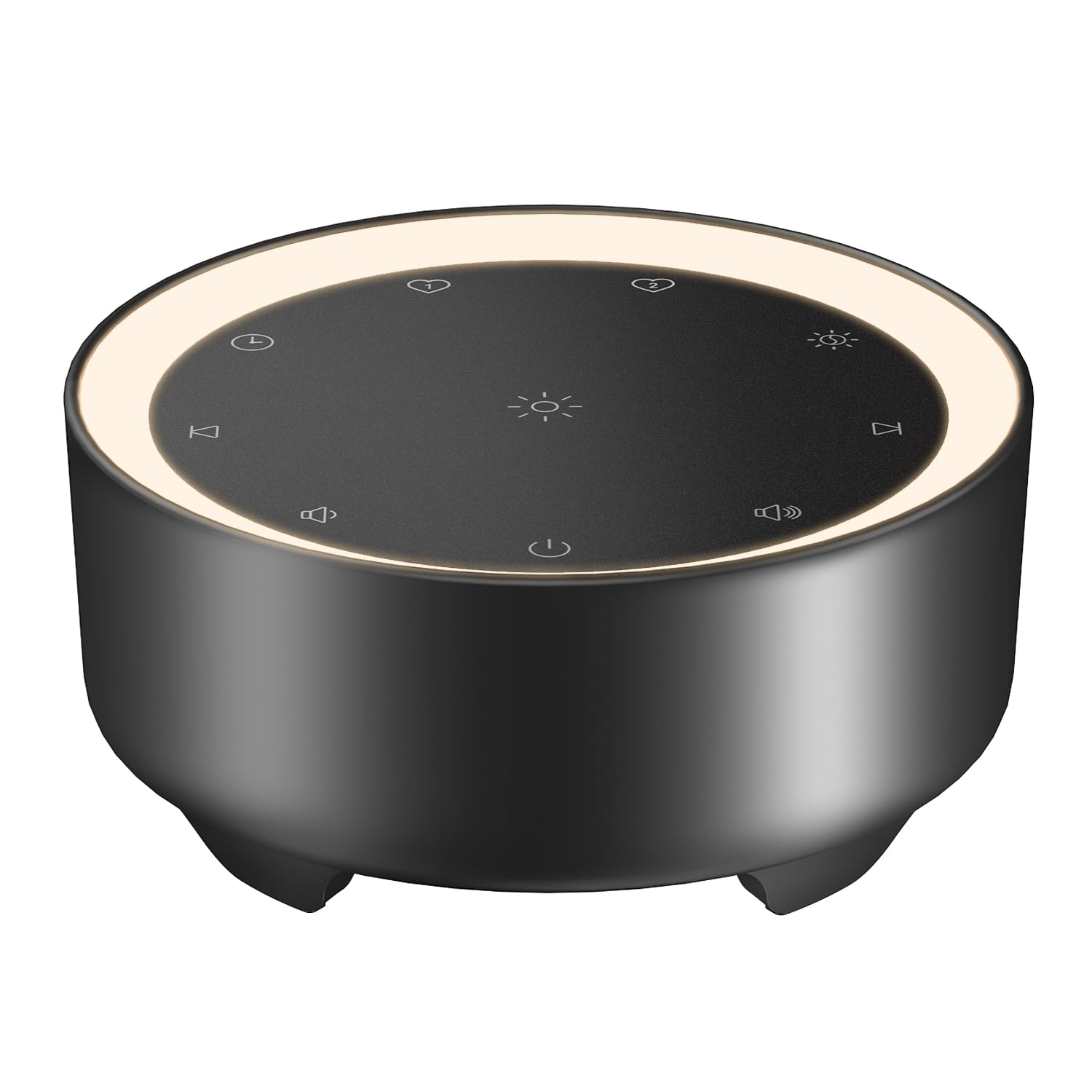
Image: Kipcush K8 White Noise Machine with its USB cable, illustrating the compact design and power connection.
Produktegenskaber
- 20 beroligende lyde: Includes white noise, fan sounds, nature recordings, and lullabies.
- 2 Customizable Shortcuts: Save your favorite sounds for instant playback.
- Natlampe med blød glød: Three adjustable brightness levels for a calm environment.
- Flere timerindstillinger: 15, 30, 60, 90, 120 minutes, or continuous 8-hour playback.
- Hukommelsesfunktion: Automatically saves last sound, volume, and light settings.
- USB-drevet: Flexible use with power banks, laptops, wall chargers, or car USB ports.
- Kompakt og bærbar: Small size for easy travel and placement.

Image: A visual representation of the 20 distinct sound options, including various white noises, fan sounds, nature sounds like rain and ocean, and lullabies.

Image: The device highlighting its timer functions, offering various durations from 15 minutes to 8 hours for automatic shut-off.
Opsætning
- Strømtilslutning: Connect the provided USB-A to coaxial connector cable to the device. Plug the USB-A end into a compatible 5V power adapter (not included), power bank, laptop, or car USB port.
- Placering: Place the device on a stable, flat surface away from water or excessive heat.
Video: An official Kipcush video demonstrating the white noise sound machine in various usage scenarios, including setup and operation.
Betjeningsvejledning

Billede: Detaljeret view of the touch-sensitive control panel with labels for each function.
- Tænd/sluk: Tryk på Power knap (circle with vertical line) to turn the device on or off.
- Lydvalg: Tryk på Næste spor (right arrow) or Forrige spor (left arrow) buttons to cycle through the 20 available sounds.
- Lydstyrkejustering: Tryk på Volumen + (speaker with plus) or Volumen - (speaker with minus) buttons to adjust the sound level.
- Natlysstyring: Tryk på Natlys (sun icon) button to turn the light on/off and cycle through three brightness levels.
- Timerindstilling: Tryk på Timer (clock icon) button to select a desired duration (15, 30, 60, 90, 120 minutes, or 8 hours continuous play). The device will automatically turn off after the selected time.
- Customizable Shortcuts (Favorite Sounds):
- To save a favorite sound: While a sound is playing, long-press either Favorit 1 (heart icon 1) or Favorit 2 (heart icon 2) button until you hear a confirmation tone.
- To play a favorite sound: Tap the corresponding Favorit 1 or Favorit 2 button for instant playback.
- Hukommelsesfunktion: The device automatically remembers your last sound, volume, and light settings when powered off and will resume these settings upon restart.

Billede: Enheden visesasing the unique Favorite Button feature for quick sound recall.
Opretholdelse
- Rensning: Tør enheden af med en blød, tør klud. Brug ikke flydende rengøringsmidler eller slibende materialer.
- Opbevaring: Opbevar enheden på et køligt, tørt sted, når det ikke er i brug.
- Kabelpleje: Avoid bending or twisting the power cable excessively to prevent damage.
Fejlfinding
| Problem | Mulig årsag | Løsning |
|---|---|---|
| Enheden tænder ikke. | Ingen strøm eller løs forbindelse. | Ensure the USB cable is securely connected to both the device and a working 5V power source. Try a different power adapter or USB port. |
| Ingen lyd. | Lydstyrken er for lav eller slået fra. | Increase the volume using the Volume + button. Ensure a sound is selected. |
| Natlyset virker ikke. | Light is off or at lowest setting. | Tap the Night Light button to cycle through brightness levels or turn it on. |
| Enheden slukker uventet. | Timer activated. | Check the timer setting. If continuous play is desired, ensure the 8-hour option is selected or no timer is set. |
Specifikationer
- Modelnavn: K8
- Mærke: Kipcush
- Strømkilde: Corded Electric (USB-powered, 5V)
- Materiale: Plast
- Farve: Sort (i henhold til produktvariant)
- Pakkedimensioner: 4.37 x 4.29 x 2.99 tommer
- Varens vægt: 9.14 ounce
- Lydmuligheder: 20 (White Noise, Fan, Nature, Lullabies)
- Timerindstillinger: 15, 30, 60, 90, 120 minutes, 8 hours continuous
- Natlys: 3 justerbare lysstyrkeniveauer
Garanti og support
The Kipcush K8 White Noise Machine comes with a 24 måneders garanti from the date of purchase. This warranty covers manufacturing defects and ensures long-term reliability.
For professional customer support, please contact Kipcush directly through their official channels. Refer to the product packaging or the Kipcush webwebsted for kontaktoplysninger.