
Acekool B0DQ82XW63
Acekool Kids Ride on Tractor with Remote Control User Manual
Model: B0DQ82XW63
Indledning
This manual provides essential instructions for the safe assembly, operation, and maintenance of your Acekool 12V Battery Powered Electric Tractor. Please read this manual thoroughly before use and retain it for future reference.

Image: The Acekool Kids Ride on Tractor in red with a yellow seat and trailer, accompanied by its remote control.
Vigtige sikkerhedsoplysninger
WARNING: To reduce the risk of injury, adult supervision is required. Never use in roadways, near motor vehicles, on or near steep inclines or steps, swimming pools or other bodies of water. Always wear shoes. Never allow more than one rider.
- Aldersanbefaling: Velegnet til børn 3 år og ældre.
- Vægt kapacitet: Maximum load of 66 lbs (30 kg).
- Voksensamling påkrævet: This product contains small parts and sharp edges in its unassembled state.
- Opladning: Only use the provided charger. Do not overcharge.
- Miljø: Operate on flat, dry surfaces. Avoid wet conditions, sand, or loose gravel.
- Sikkerhedssele: Always ensure the child is securely fastened with the safety belt before operation.
- Fjernbetjening: Parents can use the remote control to override manual operation for added safety.
Hvad er der i æsken
Når du åbner pakken, skal du kontrollere, at alle komponenter er til stede og ubeskadigede:
- 1 x Acekool Kids Ride on Tractor
- 1 x Detachable Trailer
- 1 x fjernbetjening
- 1 x 12V 7AH Rechargeable Battery (pre-installed or separate)
- 1 x 12V DC900MA Charger
- 1 x Brugermanual (dette dokument)
- Monteringshardware (skruer, møtrikker osv.)
Opsætning og første opladning
1. Montering
Follow the detailed assembly instructions provided in the separate assembly guide (if applicable) or diagrams. Ensure all parts are securely fastened before proceeding.

Billede: Detaljeret view of the tractor's steering wheel, 3-gear shift knob, safety belt on the seat, and wear-resistant wheels.
2. Batteritilslutning
Locate the battery compartment, typically under the seat. Connect the battery terminals according to the markings (+ to + and - to -). Ensure connections are firm.
3. Første opladning
Before first use, fully charge the battery for 8-12 hours. Connect the charger to the charging port on the tractor and then plug it into a standard wall outlet. Do not charge for more than 12 hours to prevent battery damage.
Betjeningsvejledning
1. Starting the Tractor
Press the power button (usually red) on the control panel to turn on the tractor.

Image: The tractor's control panel showing the power button, USB port, digital display, and gear shift lever.
2. Driving the Tractor (Child Operation)
- Ensure the child is seated properly and the safety belt is fastened.
- Use the 3-gear shift knob to select desired speed:
- Forward (Low Speed): For younger children or initial learning.
- Forward (High Speed): For experienced riders.
- Bagside: To move backward.
- Tryk på fodpedalen for at accelerere. Slip pedalen for at bremse.
- Styr ved hjælp af rattet.

Image: A close-up of the tractor's foot pedal, used for acceleration and braking.
3. Remote Control Operation (Parental Control)
The remote control allows parents to safely guide the tractor. It can override child operation for immediate control.
- Parring: Refer to the remote control's specific instructions for initial pairing with the tractor.
- Funktioner: Typically includes forward, backward, left, right, and speed selection.
- Nødstop: The remote control often has an emergency stop button for immediate halting of the vehicle.

Image: A child operating the Acekool tractor while an adult supervises and uses the remote control for safety.
4. Musik og underholdning
The tractor features Bluetooth connectivity and a USB port for music playback.
- Bluetooth: Turn on the tractor, activate Bluetooth on your device, and connect to the tractor's Bluetooth name (e.g., "Acekool Tractor").
- USB: Indsæt et USB-drev med MP3-lyd files into the USB port. Use the control panel buttons to play, pause, and skip tracks.
- Horn: Press the horn button on the steering wheel for sound effects.
5. Detachable Trailer
The included trailer can be attached to the rear of the tractor. It is suitable for carrying light items such as small toys or garden supplies. Do not exceed the trailer's weight capacity.
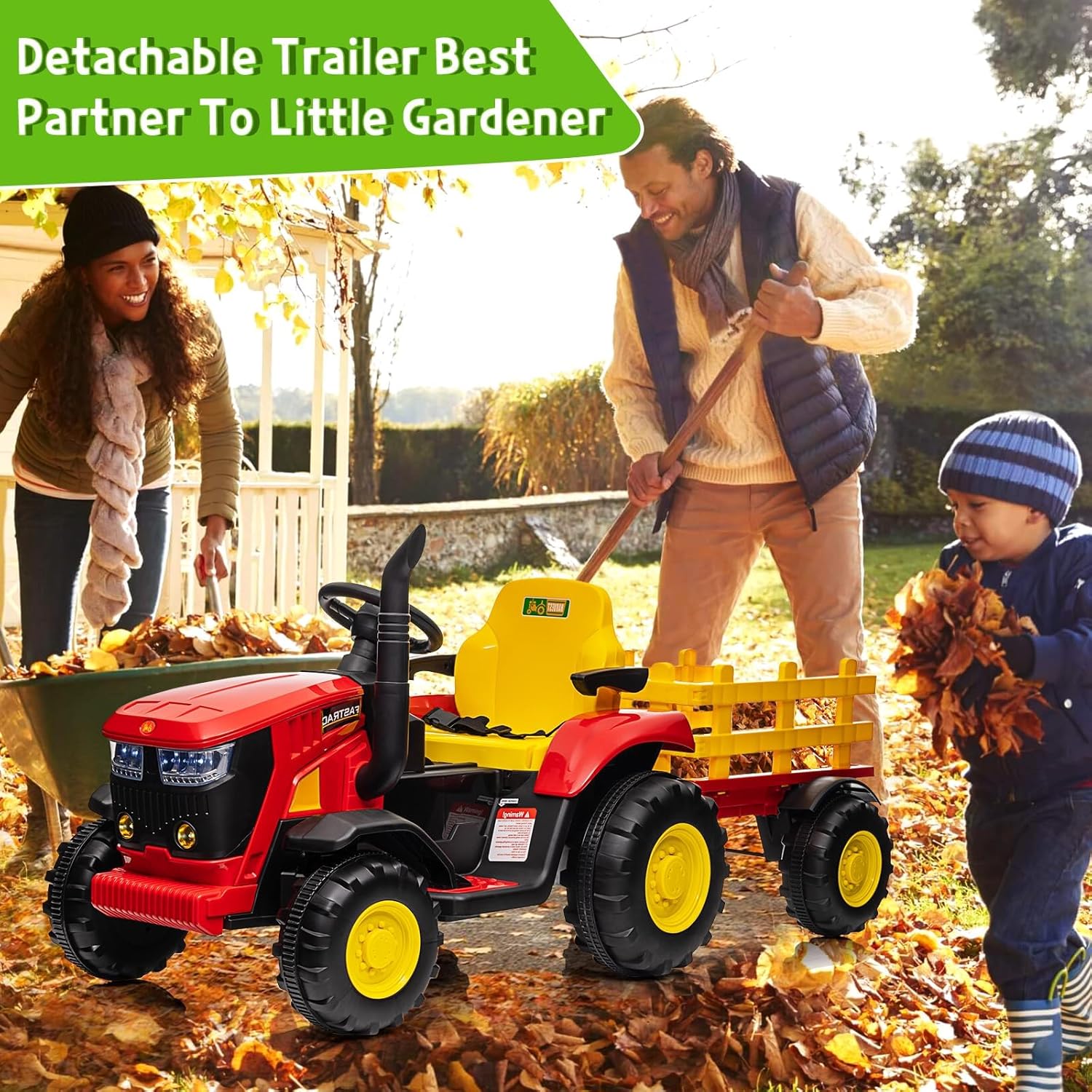
Image: A child driving the Acekool tractor with its detachable trailer, assisting adults with gardening tasks like collecting leaves.
Opretholdelse
1. Opladning af batteriet
- Oplad batteriet efter hver brug.
- Charging time is typically 8-12 hours. Do not exceed 12 hours.
- If the tractor will not be used for an extended period, charge the battery once a month to prolong its lifespan.
2. Rensning
Wipe the tractor with a soft, damp klud. Brug ikke slibende rengøringsmidler eller opløsningsmidler. Undgå at sprøjte vand direkte på elektriske komponenter.
3. Opbevaring
Store the tractor in a dry, cool place away from direct sunlight and moisture. Protect it from extreme temperatures.
Fejlfinding
| Problem | Mulig årsag | Løsning |
|---|---|---|
| Traktoren bevæger sig ikke | Batteriet er lavt eller afbrudt; Strømafbryderen er slukket; Motorproblem. | Charge the battery; Check battery connections; Ensure power switch is ON; Contact customer support if motor is suspected. |
| Traktoren kører langsomt | Low battery charge; Overload (exceeding weight capacity); Operating on unsuitable terrain. | Recharge battery; Reduce load; Operate on flat, firm surfaces. |
| Fjernbetjening virker ikke | Fjernbetjeningens batterier er døde; Fjernbetjeningen er ikke parret; Interferens. | Replace remote batteries; Re-pair remote control (refer to remote manual); Move to an area with less interference. |
| Music system not playing | Bluetooth not connected; USB drive not formatted correctly or no MP3 files. | Ensure Bluetooth is paired; Check USB drive for MP3 files and correct formatting. |
Specifikationer
| Feature | Detalje |
|---|---|
| Modelnummer | B0DQ82XW63 |
| Materiale | PP (Polypropylene) + Iron |
| Nettovægt | 39.6 lbs (18 kg) |
| Vægt kapacitet | 66 lbs (30 kg) |
| Batteri | 12V 7AH genopladelig |
| Oplader | 12V DC 900MA |
| Opladningstid | 8-12 timer |
| Hastighed | 3-8 km/h (approx. 1.8-5 mph) |
| Motorer | Dobbelte 35W motorer |
| Produktdimensioner | 37.8 x 22.44 x 17.72 tommer (L x B x H) |
| Anbefalet alder | 3+ år |
| Certificeringer | ASTM & CPSIA |
| Funktioner | Remote Control, 3-Gear Shift, Safety Belt, Detachable Trailer, Bluetooth Music, USB Port, 7-LED Lights, Air Pressure Horn |
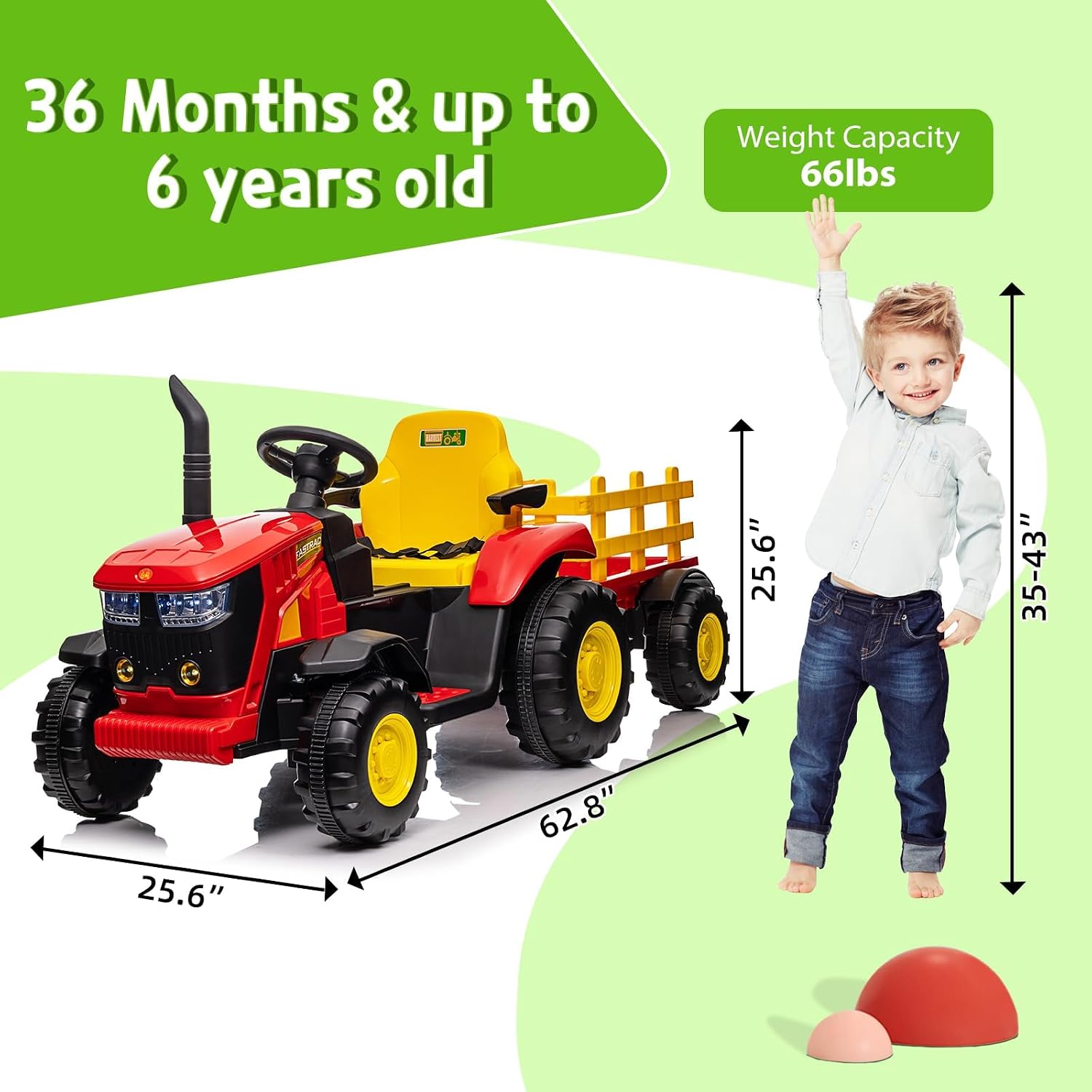
Image: A diagram illustrating the dimensions (length, width, height) of the tractor and its trailer, along with the recommended age range and weight capacity.
Garanti og kundesupport
Acekool products are manufactured to high-quality standards. While specific warranty details are not provided in this manual, please retain your proof of purchase for any warranty claims.
For technical assistance, missing parts, or any questions regarding your Acekool Kids Ride on Tractor, please contact Acekool customer support through the retailer where the product was purchased or visit the official Acekool webwebsted.
Acekool Store Link: Visit the Acekool Store on Amazon
Ask a question about this manual
Ask about setup, troubleshooting, compatibility, parts, safety, or missing instructions. Manuals+ will review the question and use this page’s manual context to help answer it.