
1. Introduktion
This manual provides detailed instructions for the installation, operation, and maintenance of your Electrosmart 10.1" Android 13 Car Radio Head Unit. This unit is specifically designed for Jeep Liberty models manufactured between 2008 and 2012. It integrates advanced features such as wireless CarPlay, Android Auto, GPS navigation, and a backup camera to enhance your driving experience.
Please read this manual thoroughly before installation and use to ensure proper functionality and to prevent damage to the unit or your vehicle.

Image: Electrosmart 10.1" Car Radio Head Unit installed in a Jeep Liberty dashboard.
2. Hvad er der i æsken
Bekræft, at alle komponenterne nedenfor er inkluderet i din pakke:
- 10.1" Android 13 Car Radio Head Unit
- Strømkabelledning
- RCA-kabelsæt
- USB-kabler (2)
- Radio kabel
- GPS antenne
- Omvendt indgangskabel
- Backup kamera
- Ekstern mikrofon
- Installationsvejledning (dette dokument)
- Trimværktøj
- Monteringsbeslag og skruer
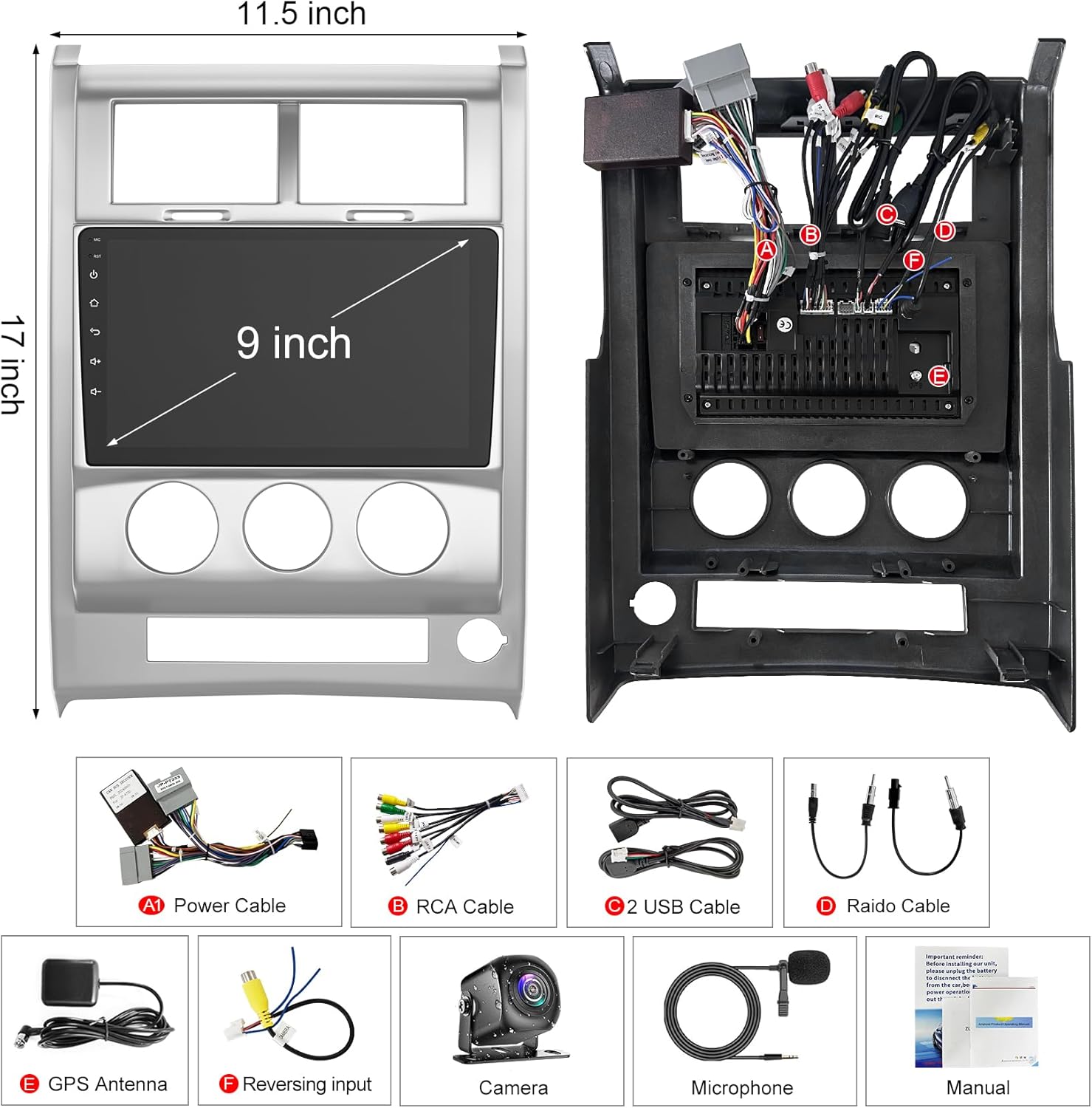
Image: All components included in the Electrosmart Car Radio package.
3. Produktet er slutview
The Electrosmart 10.1" Car Radio features a user-friendly interface and robust connectivity options. Below is an overview of the unit's physical features and connections.
Frontpanelets kontroller og porte
- IR -sensor: Til fjernbetjening.
- Built-in Noise Canceling Mic: For klar håndfri kommunikation.
- BT knap: Activates Bluetooth interface.
- Menu/Back Buttons: Navigates through the system interface.
- Next/Forward Track Buttons: Styrer medieafspilning.
- Tænd/sluk og lydstyrkeknap: Powers the unit and adjusts audio levels.
- Previous/Back Track Buttons: Styrer medieafspilning.
- USB-port: For media playback and smartphone connectivity.
- Nulstil knap: Restores the unit to default settings if needed.
- Aux input: Til tilslutning af eksterne lydenheder.
- Hukommelseskortslot: For additional storage or media playback.
Bagpaneltilslutninger
The rear panel provides various ports for power, audio/video input/output, and peripheral connections:
- 15 Amp Sikring: For electrical protection.
- Wiring Harness Connectors: For vehicle power and speaker connections.
- RCA-stik: Til lyd/video-input og -output (f.eks. ekstern amplifiers, headrest monitors).
- Antenneindgang: Til radiomodtagelse.
- Ekstern mikrofonindgang: For improved voice clarity during calls.
4. Opsætning og installation
The Electrosmart head unit features a plug-and-play design for Jeep Liberty 2008-2012, simplifying installation. All necessary wiring harnesses are included. Professional installation is recommended if you are unfamiliar with car audio systems.
Generelle installationstrin:
- Afbryd batteriet: Frakobl altid bilens negative batteripol, inden du påbegynder elektrisk arbejde.
- Fjern den gamle hovedenhed: Carefully remove the existing car radio using appropriate trim tools to avoid damage.
- Tilslut ledningsnet: Connect the provided power and speaker harnesses to the vehicle's wiring. Ensure all connections are secure.
- Tilslut ydre enheder: Connect the GPS antenna, backup camera, external microphone, and any other accessories as needed.
- Monter enheden: Secure the new head unit into the dashboard using the provided mounting brackets and screws.
- Gentilslut batteri: Tilslut køretøjets negative batteripol igen.
- Test funktionalitet: Power on the unit and test all functions (radio, Bluetooth, CarPlay/Android Auto, camera, etc.) before fully reassembling the dashboard.
5. Betjeningsvejledning
5.1 Tænd/sluk
Press the volume knob to power the unit on or off. Rotate the knob to adjust the volume.
5.2 Trådløs CarPlay og Android Auto
Connect your iPhone or Android phone wirelessly via Bluetooth or USB cable to access CarPlay or Android Auto features. This allows for navigation, calls, messages, and music playback through the head unit's display.
- Til CarPlay: Enable Bluetooth on your iPhone and pair it with the car radio. Open the 'Zlink5' application on the head unit.
- Til Android Auto: Ensure the Android Auto app is installed on your phone. Connect your phone to the radio via Bluetooth or a USB cable. Open the 'Zlink5' application on the head unit.

Billede: Trådløs CarPlay og Android Auto-funktionalitet.

Image: Connection methods for Wireless CarPlay and Android Auto.
5.3 GPS-navigation
The unit includes a built-in GPS navigation module. You can download offline navigation apps from the Play Store or use online maps when connected to Wi-Fi.
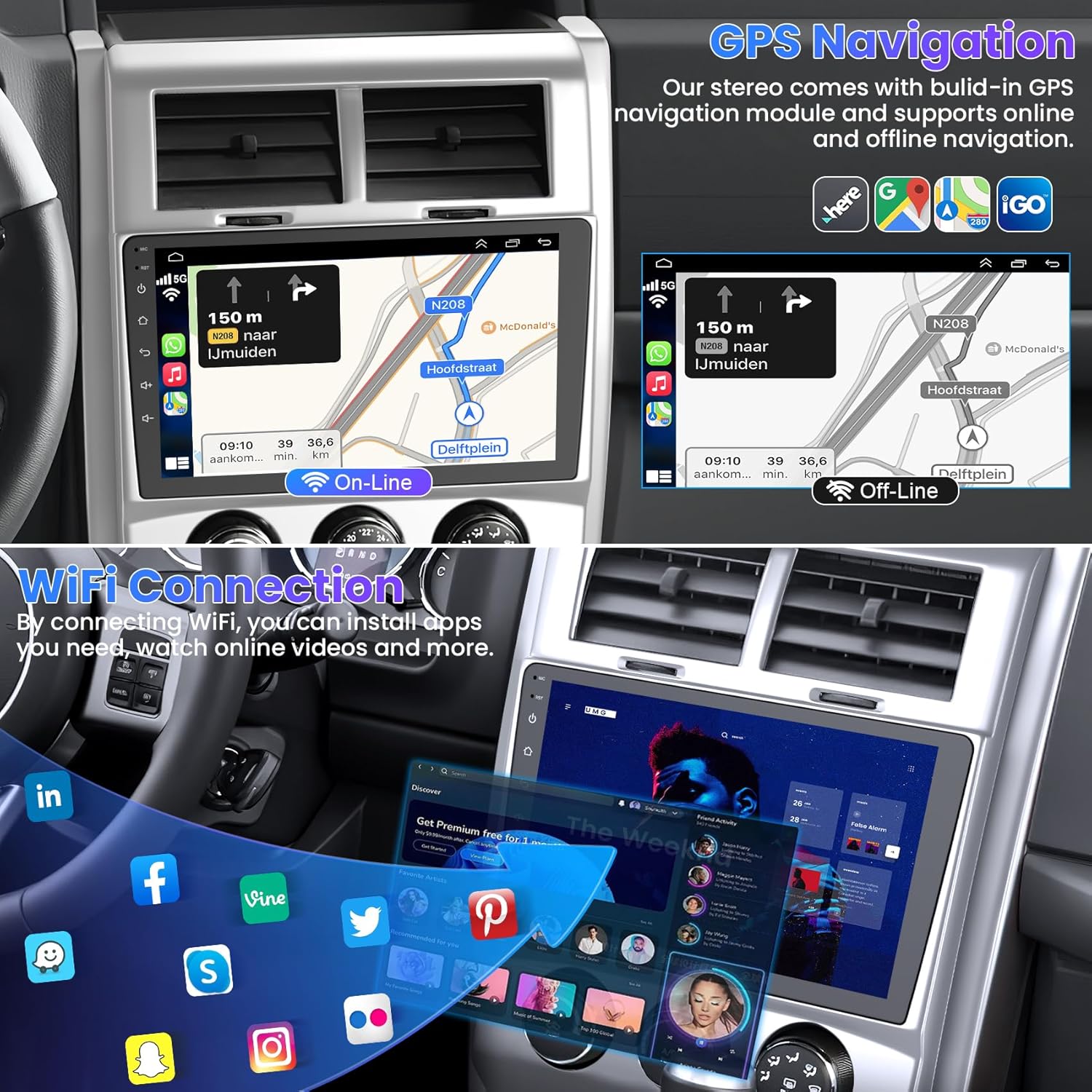
Image: GPS Navigation with online and offline map options.
5.4 WIFI-forbindelse
Connect the head unit to a Wi-Fi network to download applications, stream online music, and watch videos (e.g., YouTube).

Image: Wi-Fi Connectivity Icon.
5.5 Bluetooth 5.2
Bluetooth 5.2 enables hands-free calling, phonebook synchronization, and wireless music playback. Pair your smartphone with the unit via Bluetooth settings.

Image: Bluetooth 5.2 for hands-free calls and music.
5.6 FM radio
Access the FM radio function to listen to local broadcasts. The unit supports saving preset stations.
Billede: FM-radiogrænseflade.
5.7 Ratbetjening (SWC)
The unit supports steering wheel controls, allowing you to manage functions without taking your hands off the wheel. Refer to the system settings for SWC configuration.

Image: Steering Wheel Control setup interface.
5.8 Bakkamera
The included backup camera automatically displays a reverse image on the screen when the vehicle is shifted into reverse. It features a 170° wide view, night vision, and waterproof design.
Image: Backup Camera view med parkeringsregler.
5.9 Audio Settings (DSP/EQ)
Customize your audio experience with the built-in Digital Sound Processor (DSP) and Equalizer (EQ) settings. Choose from various presets (Pop, Rock, Classic, Jazz) or create custom sound profiles.

Image: DSP/EQ Settings for audio customization.
5.10 Full RCA Output & Split Screen
The unit supports full RCA video output, allowing you to connect external displays like headrest monitors for rear-seat entertainment. The split-screen function enables simultaneous display of two different applications on the main screen.
6. Vedligeholdelse
For at sikre din bilradios levetid og optimale ydeevne skal du følge disse vedligeholdelsesretningslinjer:
- Rengøring af skærm: Use a soft, lint-free cloth to gently wipe the touch screen. Avoid abrasive cleaners or harsh chemicals.
- Softwareopdateringer: Tjek regelmæssigt for og installer softwareopdateringer for at sikre, at systemet kører effektivt og har de nyeste funktioner.
- Undgå ekstreme temperaturer: Udsæt ikke enheden for ekstrem varme eller kulde i længere perioder.
- Sikre forbindelser: Kontrollér regelmæssigt alle ledningsforbindelser for at sikre, at de er fastgjorte og fri for korrosion.
7. Fejlfinding
If you encounter issues with your Electrosmart car radio, refer to the following common troubleshooting steps:
- Ingen strøm: Check the vehicle's fuse box and the unit's 15 Amp fuse. Ensure all power connections are correctly made.
- Ingen lyd: Kontroller højttalertilslutninger. Kontroller lydstyrkeniveauer og EQ-indstillinger. Sørg for, at mute-funktionen ikke er aktiv.
- Berøringsskærm reagerer ikke: Try performing a system reset using the reset button.
- Problemer med Bluetooth-forbindelse: Sørg for, at Bluetooth er aktiveret på både hovedenheden og din smartphone. Prøv at ophæve parringen og parre enhederne igen.
- GPS'en virker ikke: Sørg for, at GPS-antennen er korrekt tilsluttet og har en klar view af himlen. Tjek GPS-indstillingerne i systemmenuen.
- Bakkamera viser ikke: Verify the camera's power and video connections. Ensure the vehicle is in reverse.
Hvis problemerne fortsætter efter at have forsøgt disse trin, bedes du kontakte kundesupport for yderligere assistance.
8. Specifikationer
| Feature | Specifikation |
|---|---|
| Skærmstørrelse | 10.1 tommer |
| Operativsystem | Android 13 |
| CPU | Quad Core |
| VÆDDER | 4 GB |
| ROM | 64 GB |
| Forbindelsesteknologi | Bluetooth 5.2, Wi-Fi |
| Særlige funktioner | Wireless CarPlay, Android Auto, GPS Navigation, FM Radio, EQ Settings, Backup Camera, USB, 1080p Video Player, Video/Audio Output, AUX Audio/Video Input, External Microphone, Steering Wheel Control, Split Screen |
| Type køretøjstjeneste | Car (Jeep Liberty 2008-2012) |
| Monteringstype | Dashboard montering |
| Varens vægt | 4.95 pund |
| Produktdimensioner | 10.1 x 10.1 x 10.1 tommer |
| Korttype | Nordamerika |
9. Garanti og support
This Electrosmart Car Radio Head Unit comes with a 1-års garanti fra købsdatoen. Denne garanti dækker fabrikationsfejl og funktionsfejl under normal brug.
For warranty claims, technical support, or any inquiries regarding your product, please contact Electrosmart customer service through the retailer where the product was purchased. Please have your purchase receipt and product model information ready when contacting support.