
1. Introduktion
This manual provides detailed instructions for the setup, operation, maintenance, and troubleshooting of your OUMAX Dual LAN Mini PC N150. Please read this manual thoroughly before using the device to ensure proper functionality and to maximize your user experience.
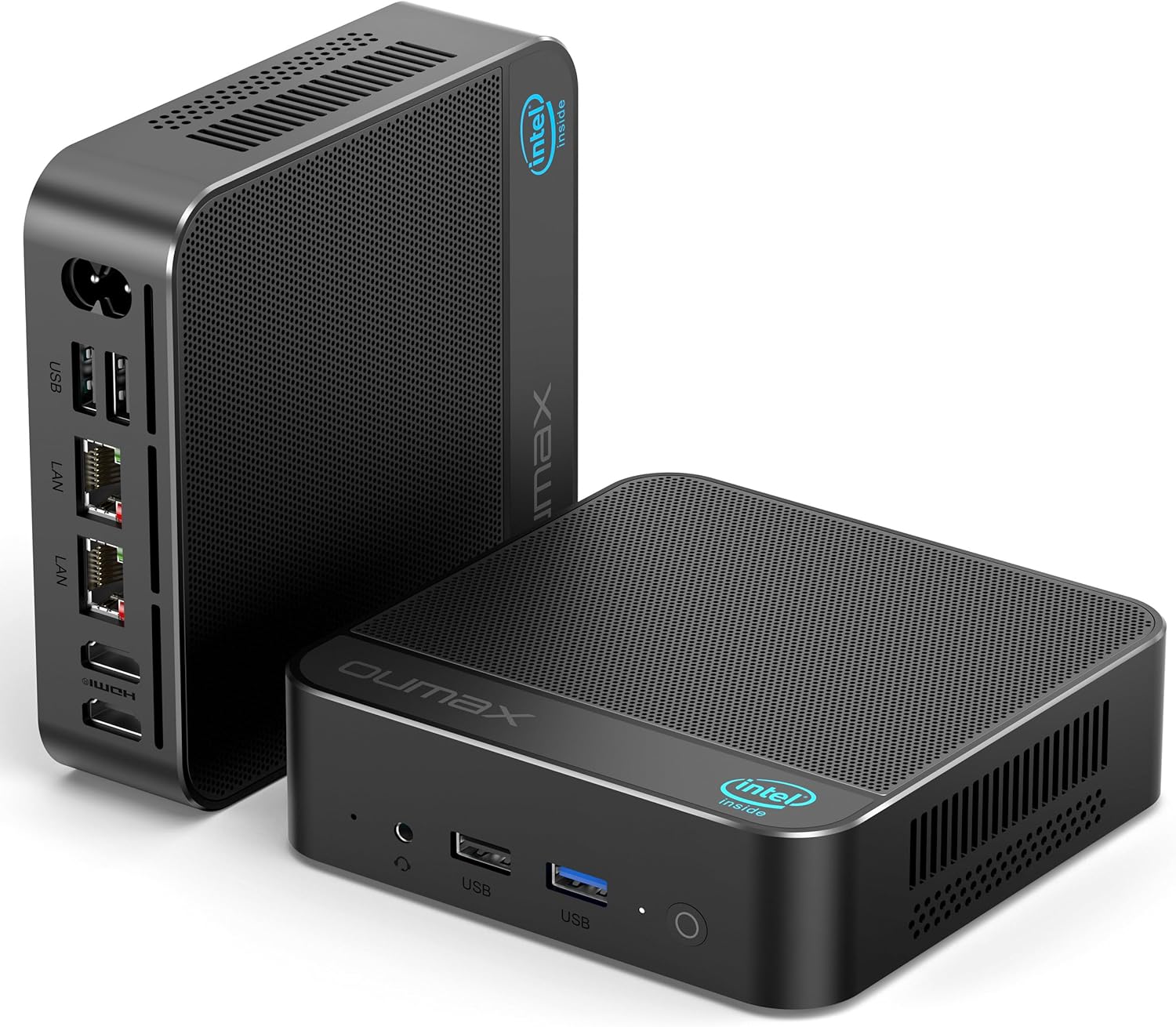
Figure 1.1: The OUMAX Dual LAN Mini PC N150 from front and rear perspectives, showcasing dens kompakte design og portlayout.
2. Hvad er der i æsken
Bekræft at alle varer er til stede i pakken:
- 1 x OUMAX N150 Mini PC
- 1 x strømadapter
- 1 x brugermanual
- 1 x HDMI-kabel (100 cm)
- 1 x HDMI-kabel (20 cm)
- 1 x AC Cable (150CM)
3. Produktet er slutview
3.1. Nøglefunktioner
- Processor: Intel Twin Lake N150 (4C/4T, 6M Cache, up to 3.6GHz)
- Grafik: Intel UHD Graphics (24EUs 1000MHz)
- Hukommelse: 16GB DDR4 (up to 3200 MHz)
- Opbevaring: 500GB M.2 SSD (expandable up to 4TB with dual M.2 SSD slots)
- Netværk: Dual Gigabit Ethernet (1000Mbps), Wi-Fi 5 (802.11ac), Bluetooth 5.0
- Display output: 2 x HDMI ports supporting 4K@60Hz dual display
- Strømforsyning: Indbygget 45W
- Køling: Efficient thermal management system with low RPM fan (approx. 32dB)

Figure 3.1: An infographic detailing the OUMAX Mini PC's cooling system, quiet operation, storage, memory, wireless connectivity, dual 4K display support, and compact power supply.
3.2. Havnelayout
The OUMAX Mini PC features a comprehensive set of ports for versatile connectivity:
- 3 x USB 3.2 Gen2 (10 Gbps)
- 1 x USB 2.0 (480 Mbps)
- 2 x 1000M LAN (Gigabit Ethernet)
- 2 x HDMI (maks. 4K 60Hz)
- 1 x AC Power Jack
- 1 x 3.5 mm lydstik
- 1 x Power knap

Figur 3.2: Et nærbillede view of the OUMAX Mini PC's various ports, illustrating its extensive connectivity options.
3.3. Interne komponenter
The Mini PC is designed for easy storage expansion:
- Single channel DDR4 memory slot.
- Dual M.2 SSD slots for storage expansion up to 4TB.
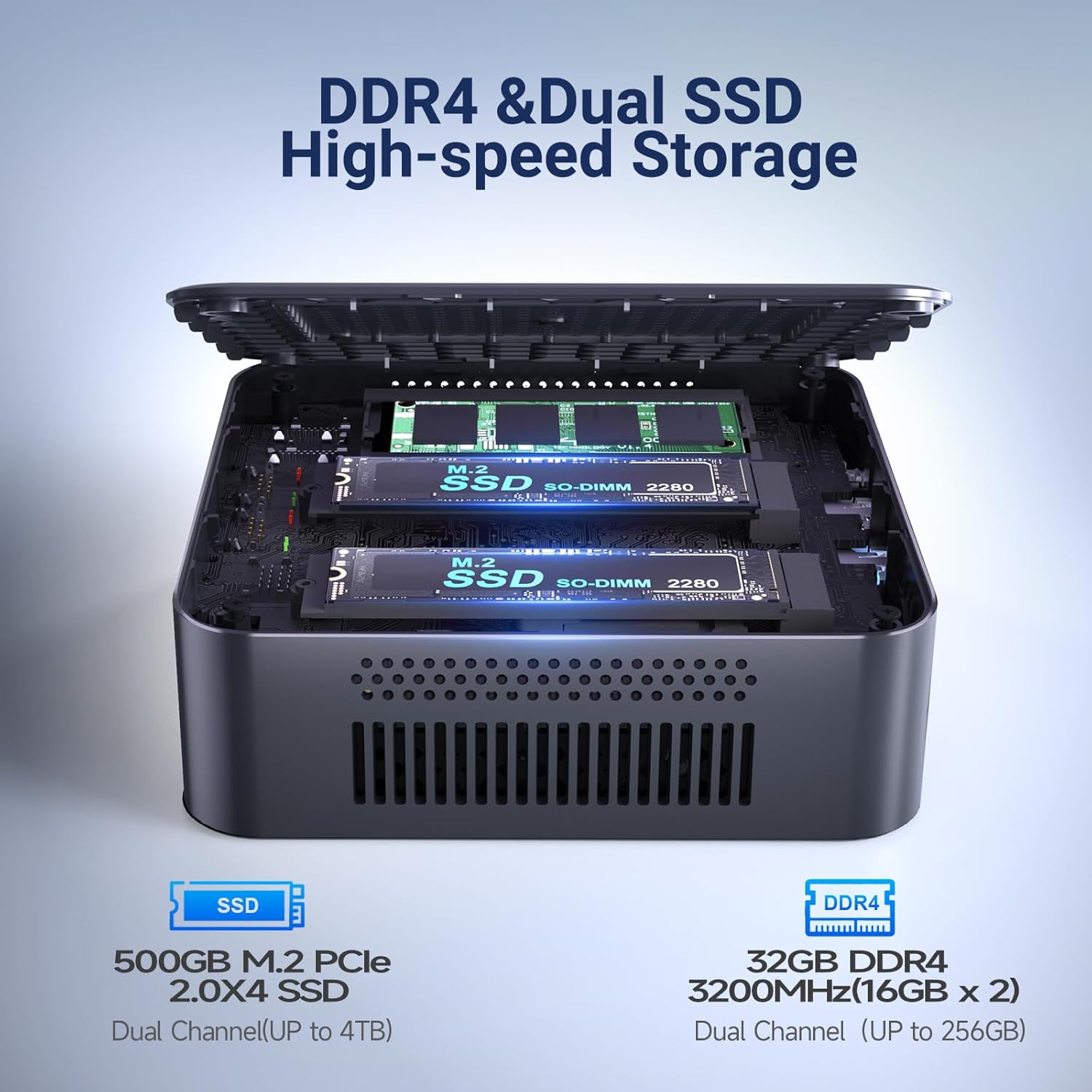
Figur 3.3: En intern view of the OUMAX Mini PC, showing the DDR4 memory slot and dual M.2 SSD slots for storage upgrades.
4. Opsætningsvejledning
Follow these steps to set up your OUMAX Mini PC:
- Tilslut skærm: Connect your monitor(s) to the HDMI ports on the back of the Mini PC using the provided HDMI cables. The device supports dual 4K displays.
- Tilslut ydre enheder: Tilslut dit tastatur, din mus og andre USB-enheder til de tilgængelige USB-porte.
- Tilslut netværk (valgfrit): For a wired connection, connect an Ethernet cable from your router or modem to one of the LAN ports on the Mini PC. For wireless, ensure Wi-Fi is enabled during operating system setup.
- Tilslut strøm: Connect the AC cable to the power adapter, then plug the power adapter into the AC power jack on the Mini PC. Finally, plug the AC cable into a wall outlet.
- Tænd: Tryk på tænd/sluk-knappen på forsiden af Mini PC'en. Systemet starter op.

Figure 4.1: The OUMAX Mini PC connected to a monitor and power source, demonstrating its integrated 45W power supply for simplified setup.
5. Betjeningsvejledning
5.1. Tænd/sluk
- For at tænde: Tryk én gang på tænd/sluk-knappen.
- For at slukke: Access the operating system's shutdown menu or press and hold the power button for 5 seconds for a forced shutdown (not recommended for regular use).
5.2. Netværksforbindelse
- Kablet netværk: Connect an Ethernet cable to either of the two Gigabit LAN ports. The system should automatically detect the connection.
- Trådløst netværk: The Mini PC supports Wi-Fi 5. Access your operating system's network settings to connect to an available Wi-Fi network.
- Bluetooth: The device includes Bluetooth 5.0 for connecting wireless peripherals such as keyboards, mice, or audio devices. Pair devices through your operating system's Bluetooth settings.
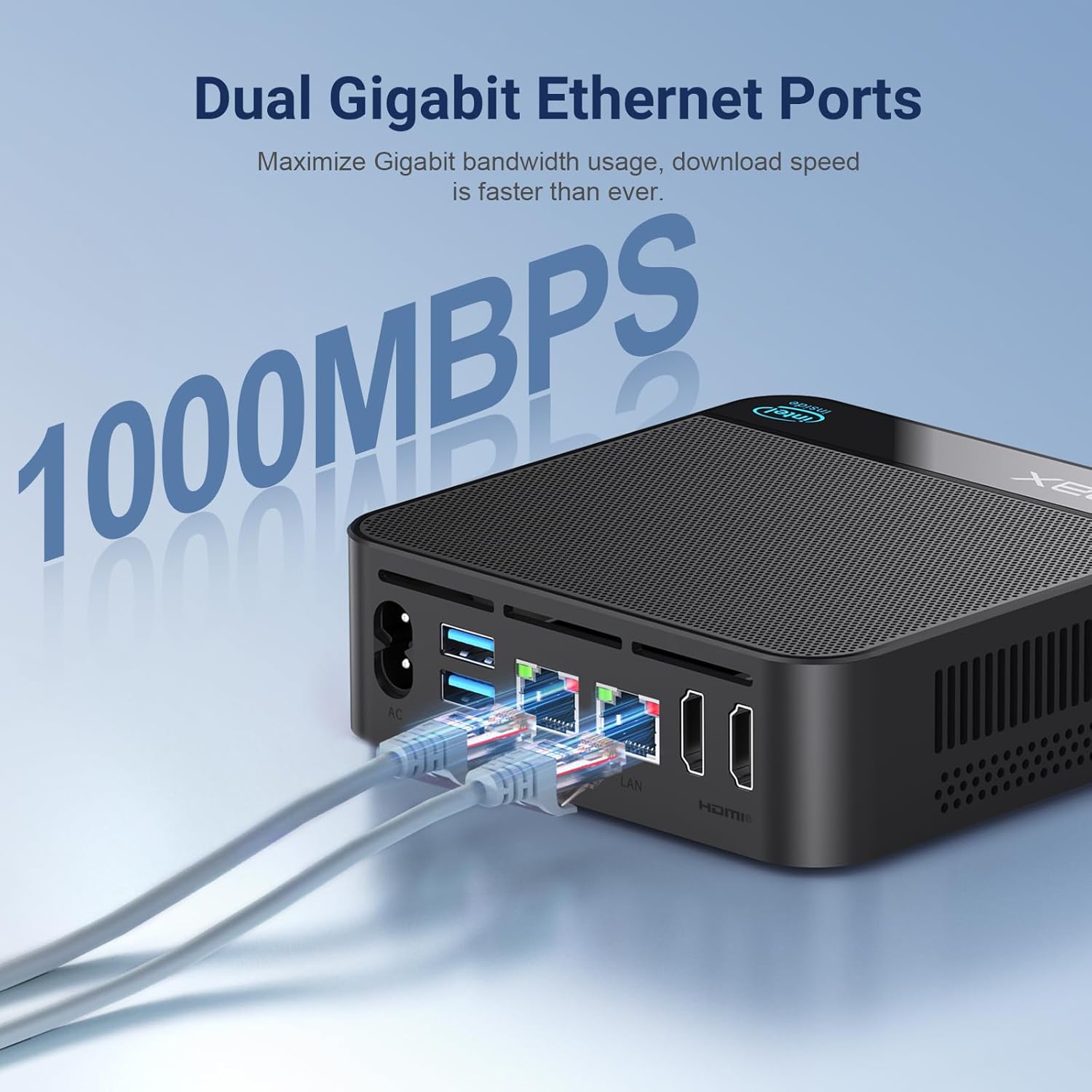
Figure 5.1: The OUMAX Mini PC connected to a network via its dual Gigabit LAN ports, demonstrating wired connectivity.
5.3. Opsætning af dobbelt skærm
The OUMAX Mini PC supports connecting two monitors simultaneously at up to 4K resolution (60Hz) via its two HDMI ports. To set up dual displays:
- Tilslut begge skærme til HDMI-portene på mini-pc'en.
- Power on the Mini PC and both monitors.
- Access your operating system's display settings to configure display modes (e.g., extend, duplicate) and resolutions.

Figure 5.2: The OUMAX Mini PC connected to two monitors, demonstrating its capability to support dual 4K displays for enhanced productivity.
6. Vedligeholdelse
For at sikre din mini-pc's levetid og optimale ydeevne skal du følge disse vedligeholdelsesretningslinjer:
- Rensning: Regularly clean the exterior of the Mini PC with a soft, dry cloth. Use compressed air to gently clear dust from ventilation openings. Do not use liquid cleaners directly on the device.
- Ventilation: Ensure the Mini PC is placed in a well-ventilated area. Avoid blocking the air vents to prevent overheating.
- Miljøforhold: Operate the Mini PC in a stable environment, away from extreme temperatures, direct sunlight, and high humidity.
- Softwareopdateringer: Hold dit operativsystem og dine drivere opdaterede for at sikre sikkerhed og ydeevne.

Figure 6.1: The OUMAX Mini PC operating quietly on a desk, highlighting its efficient and silent thermal management system.
7. Fejlfinding
If you encounter issues with your OUMAX Mini PC, refer to the following common problems and solutions:
- Ingen visning:
- Ensure the monitor is powered on and correctly connected to the HDMI port.
- Prøv et andet HDMI-kabel eller en anden skærm.
- Verify the Mini PC is powered on (power indicator light should be active).
- Ingen strøm:
- Check if the power adapter is securely connected to both the Mini PC and the wall outlet.
- Sørg for, at stikkontakten er funktionel.
- Problemer med netværksforbindelse:
- Ved kabelbaserede forbindelser skal du kontrollere Ethernet-kablet og routerens/modemets status.
- For Wi-Fi, ensure Wi-Fi is enabled in the operating system and you are connected to the correct network with the correct password.
- Genstart din router/modem og mini-pc'en.
- Langsom ydeevne:
- Luk unødvendige programmer, der kører i baggrunden.
- Sørg for, at der er tilstrækkelig ledig plads på SSD'en.
- Søg efter og installer alle tilgængelige opdateringer til operativsystemet.
8. Specifikationer
Detailed technical specifications for the OUMAX Dual LAN Mini PC N150:
| Feature | Specifikation |
|---|---|
| Processor | Intel Twin Lake N150 (4C/4T, 6M Cache, up to 3.6GHz) |
| Grafik coprocessor | Intel Graphics 24EUs 1000MHz |
| VÆDDER | 16 GB DDR4 (3200 MHz) |
| Harddisk | 500 GB M.2 SSD |
| Max Storage Expansion | Up to 4 TB (Dual M.2 SSD slots) |
| Skærmopløsning | 3840 x 2160 (4K) |
| HDMI porte | 2 (Max 4K 60Hz) |
| USB 3.2 porte | 3 |
| USB 2.0 porte | 1 |
| LAN-porte | 2 (1000Mbps Gigabit Ethernet) |
| Trådløs type | 802.11ac (Wi-Fi 5) |
| Bluetooth | 5.0 |
| Operativsystem | OS (Pre-installed) |
| Varens vægt | 1.46 pund (ca. 662 g) |
| Produktmål (LxBxH) | 4.75 x 4.75 x 1.49 tommer (ca. 120.6 x 120.6 x 37.9 mm) |
| Strømforsyning | Indbygget 45W |

Figure 8.1: A visual representation of the Intel Twin Lake N150 processor and its performance relative to other Intel N-series processors.
9. Garanti og support
OUMAX provides the following support for your Mini PC:
- Garanti: 12 Months Return and Exchange.
- Kundesupport: Quick reply within 24 hours.
- Livsvarig support: Lifetime return and exchange support is offered.
For further assistance or inquiries, please refer to the official OUMAX store or contact customer service.
Official OUMAX Store: OUMAX Store on Amazon