1. Introduktion
Welcome to the user manual for your new T100 Car Stereo Android 14 system. This advanced multimedia system is designed to provide a superior in-car entertainment and navigation experience. Featuring a 9-inch high-definition touchscreen, a powerful quad-core processor, and extensive connectivity options, it transforms your driving experience. Please read this manual thoroughly before installation and operation to ensure proper use and to maximize the features of your device.
2. Sikkerhedsoplysninger
Always prioritize safety. Improper installation or operation can lead to serious injury or damage.
- Do not attempt to operate the unit or view videos while driving. Distracted driving is dangerous and illegal.
- Ensure professional installation to avoid electrical shorts or damage to your vehicle's electrical system.
- Hold enheden væk fra vand og overdreven fugt.
- Do not disassemble or modify the unit. This will void the warranty and may cause damage.
- Brug kun de specificerede strømkabler og tilbehør.
3. Pakkens indhold
Markér venligst feltet for følgende elementer:
- T100 Car Stereo Android 14 Unit (9-inch screen)
- 2 x USB Flash Drive Cables
- RC Cables (RCA audio/video cables)
- Camera Support Cable
- Hovedstrømstik
- GPS antenne

Image: The retail packaging of the T100 Car Stereo, showing the unit and its key features.
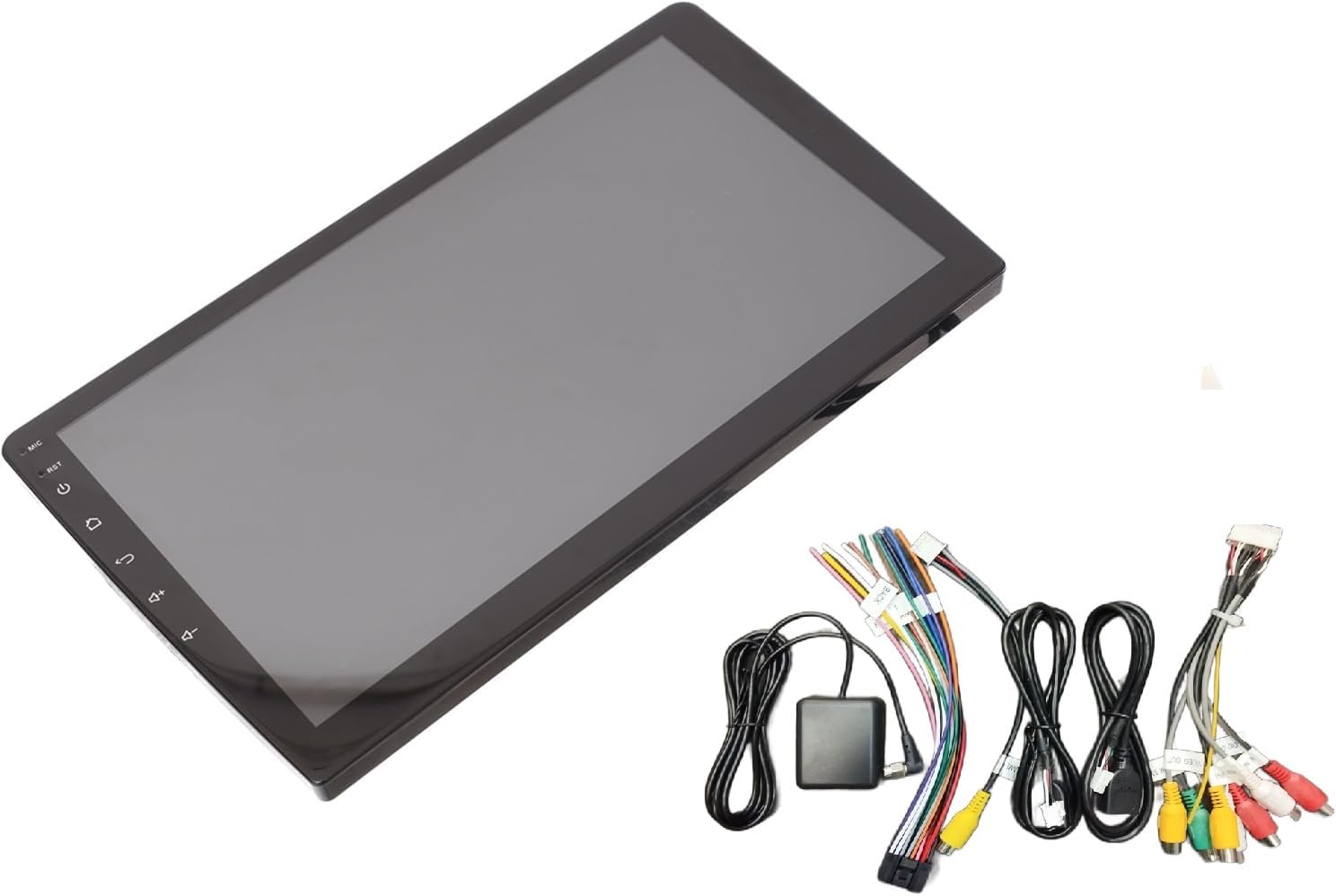
Image: The T100 Car Stereo unit displayed alongside its various connection cables and GPS antenna.
4. Opsætning og installation
Installation of the T100 Car Stereo requires technical knowledge and should ideally be performed by a qualified professional. Incorrect wiring can damage the unit or your vehicle.
4.1 Tjekliste før installation
- Sørg for, at dit køretøjs batteri er frakoblet, før du starter installationen.
- Verify compatibility with your vehicle's dashboard and wiring harness.
- Gather necessary tools (wire strippers, crimpers, screwdrivers, electrical tape).
4.2 Ledningsdiagram (generelt)
Se ledningsdiagrammet, der følger med din enhed, for specifikke tilslutninger. Almindelige tilslutninger omfatter:
- Magt: ACC (ignition), B+ (constant 12V), GND (ground).
- Højttalere: Connect to appropriate speaker outputs (Front L/R, Rear L/R).
- Antenne: Connect FM antenna.
- GPS-antenne: Connect the GPS antenna and mount it in a location with clear sky view.
- USB-porte: Connect the provided USB cables for external devices.
- Kamera input: Tilslut bagsiden view or 360-degree camera input.
- Ratstyring: Connect SWC wires if your vehicle supports it.

Image: The back of the T100 Car Stereo, showing various input and output ports for power, speakers, USB, and other accessories.

Image: A collection of cables included with the T100 Car Stereo, such as USB cables, RCA cables, and the GPS antenna.
4.3 Montering af enheden
Securely mount the T100 unit into your vehicle's dashboard using the appropriate mounting brackets. Ensure it is firmly in place to prevent vibration and damage.
5. Betjeningsvejledning
The T100 Car Stereo runs on Android 14, offering a familiar and intuitive user interface.
5.1 Grundlæggende betjening
- Tænd/sluk: Press and hold the power button (usually on the left side of the screen) to turn the unit on or off. A short press typically mutes/unmutes or puts the screen to sleep.
- Lydstyrkekontrol: Use the on-screen volume controls or integrated steering wheel controls.
- Hjemknappen: Vender tilbage til Android-startskærmen.
- Tilbage knap: Navigerer tilbage til den forrige skærm eller menu.
- Nulstil knap: A small pinhole reset button (RST) is available for system reboots if needed. Use a thin object to press it.

Billede: Forsiden view of the T100 Car Stereo, highlighting its large 9-inch touchscreen and side control buttons.
5.2 Forbindelse
- Bluetooth: Go to Settings > Bluetooth to pair with your smartphone for hands-free calling and audio streaming.
- Wi-Fi: Connect to a Wi-Fi hotspot (e.g., from your phone) via Settings > Wi-Fi to access online features like Google Maps, YouTube, and the Play Store.
- CarPlay / Android Auto: Connect your smartphone via USB for wired connection, or wirelessly if supported by your phone and the unit. Follow on-screen prompts for setup.
5.3 Multimedieafspilning
- USB-afspilning: Insert a USB flash drive into one of the USB ports to play audio or video files.
- FM-radio: Access the FM Radio application to scan for and save radio stations.
- Online streaming: Use pre-installed apps like YouTube or download others from the Play Store for online content.
5.4 Navigation
The unit comes with built-in GPS and supports various navigation applications. Connect to Wi-Fi to download maps or use online navigation services like Google Maps.
5.5 kamerastøtte
Hvis en bagside view or 360-degree camera is connected, the display will automatically switch to the camera view when reversing or when the camera app is opened.
5.6 OBD2 Dongle Support
Connect a compatible OBD2 dongle (sold separately) via Bluetooth to monitor vehicle diagnostics and performance data through dedicated apps.
6. Funktioner overview
- 9-tommer HD-berøringsskærm: Giver klare billeder og responsiv berøringskontrol.
- Android 14 OS: Access to a wide range of Android applications via the Google Play Store.
- Quad-core-processor: Ensures smooth performance and fast app loading.
- 2GB RAM / 32GB ROM: Sufficient memory for multitasking and storing apps/media.
- High-Power Audio Output with Tosheba IC: Delivers clear and powerful sound quality.
- Integration af ratbetjening: Allows safe control of media and calls without taking hands off the wheel.
- Wired & Wireless CarPlay / Android Auto: Problemfri smartphone-integration til navigation, musik og kommunikation.
- Indbygget Wi-Fi og Bluetooth: For internet connectivity, hands-free calls, and audio streaming.
- 360-degree Camera Support: Enhances parking and driving safety with comprehensive views.
- Dual USB-porte: Til tilslutning af USB-enheder og opladning.
- FM Radio & GPS Navigation: Standard features for entertainment and guidance.
- Motherboard Protection Circuits: Ensures reliable and durable performance.
- Tilpassede temaer: 12 unique themes to personalize your user interface.
- Indbygget mikrofon: For clear hands-free calls and voice commands.
7. Vedligeholdelse
- Rensning: Brug en blød, tør klud til at rengøre skærmen og enheden. Brug ikke slibende rengøringsmidler eller opløsningsmidler.
- Softwareopdateringer: Periodically check for system updates via Wi-Fi in the settings menu to ensure optimal performance and access to new features.
- Undgå ekstreme temperaturer: Udsæt ikke enheden for ekstrem varme eller kulde, da dette kan påvirke dens ydeevne og levetid.
8. Fejlfinding
| Problem | Mulig årsag | Løsning |
|---|---|---|
| Enheden tænder ikke. | Ingen strømforbindelse; Sprunget sikring; Forkert ledningsføring. | Check power cables and fuse. Verify wiring connections. |
| Ingen lyd. | Volume too low; Mute activated; Speaker wires disconnected. | Øg lydstyrken. Kontroller lydløs status. Bekræft højttalerforbindelser. |
| Bluetooth/Wi-Fi not connecting. | Device not in pairing mode; Incorrect password; Signal interference. | Ensure device is discoverable. Re-enter password. Move closer to hotspot. |
| Touchscreen reagerer ikke. | Systemfrysning. | Press the RST (reset) button with a thin object. |
| GPS-signalet er svagt eller mistet. | GPS-antennen er blokeret eller forkert placeret. | Sørg for, at GPS-antennen har en fri view af himlen. Kontroller antenneforbindelsen. |
If problems persist, please contact customer support or a qualified technician.
9. Specifikationer
- Fabrikant: SHS
- Model: T100 CAR ANDROID-14
- Operativsystem: Android 14
- Skærmstørrelse: 9 tommer
- Skærmopløsning: HD
- Processor: Quad-Core
- VÆDDER: 2 GB
- Intern lagring (ROM): 32 GB
- Lydudgangstilstand: Stereoanlæg
- Forbindelse: Bluetooth, Wi-Fi, USB
- Særlige funktioner: CarPlay, Android Auto, GPS Navigation, FM Radio, 360-degree Camera Support, OBD2 Dongle Support, Steering Wheel Control, Built-in Microphone, Motherboard Protection Circuits, Customizable Themes.
- Monteringstype: Dashboard montering
- Varens vægt: 1 kilo
- Forsendelsesdimensioner: 29 x 19 x 10 cm
- Oprindelsesland: Kina
10. Garanti og support
This product comes with a standard manufacturer's warranty against defects in materials and workmanship. The warranty period typically begins from the date of purchase. Please retain your proof of purchase for warranty claims.
For technical support, troubleshooting assistance, or warranty inquiries, please contact the seller or the manufacturer directly. Refer to your purchase documentation for specific contact information.
Extended warranty options may be available from third-party providers. Please check with your retailer for details.


