
1. Introduktion
Tak for købetasing the Generic L018 Projector. This portable projector is designed to deliver a high-quality home theater experience with its Native 1080P resolution, 650 ANSI Lumens brightness, and 4K support. Featuring Android 11, Wi-Fi 6, Bluetooth 5.2, and automatic keystone correction and focus, it offers versatile entertainment options for various environments, including bedrooms, home theaters, outdoor settings, and gaming.

Figure 1.1: The L018 Projector, showcasing its compact design and included remote control. The projected image highlights its visual capabilities.

Figure 1.2: Versatile applications of the L018 Projector, suitable for gaming, bedroom viewing, dedicated home theaters, and outdoor movie nights.
2. Vigtige sikkerhedsoplysninger
Læs venligst alle sikkerhedsinstruktioner omhyggeligt, inden du bruger projektoren. Gem denne manual til senere brug.
- Se ikke direkte ind i projektorlinsen, når lamp er tændt. Det skarpe lys kan forårsage øjenskader.
- Sørg for tilstrækkelig ventilation. Bloker ikke ventilationsåbningerne.
- Udsæt ikke projektoren for regn eller fugt for at forhindre brand eller elektrisk stød.
- Brug kun tilbehør/tilbehør specificeret af producenten.
- Tag stikket ud af projektoren under tordenvejr eller når den ikke bruges i længere perioder.
- Overlad al service til kvalificeret servicepersonale.
3. Pakkens indhold
Bekræft at alle varer er til stede i din pakke:
- Generic L018 Projector
- Fjernbetjening
- Strømadapter (ikke eksplicit angivet, men underforstået til drift)
- Brugervejledning (dette dokument)
4. Produktet er slutview
Familiarize yourself with the components of your L018 Projector.

Figure 4.1: Key features and components of the L018 Projector, highlighting its advanced capabilities.
4.1. Grænseflader
The projector includes various ports for connectivity:
- USB-port: Til tilslutning af USB-lagerenheder.
- HDMI-port: Til tilslutning af eksterne videokilder som bærbare computere, spillekonsoller eller Blu-ray-afspillere.
- Lydudgang: Til tilslutning af eksterne højttalere eller hovedtelefoner.
- Strømindgang: Til tilslutning af strømadapteren.
5. Opsætning
5.1. Placering
The L018 Projector features a 360° removable adjustable stand, allowing for flexible placement and projection angles. You can easily rotate and tilt the projector to achieve the perfect viewing angle on a wall, ceiling, or screen.
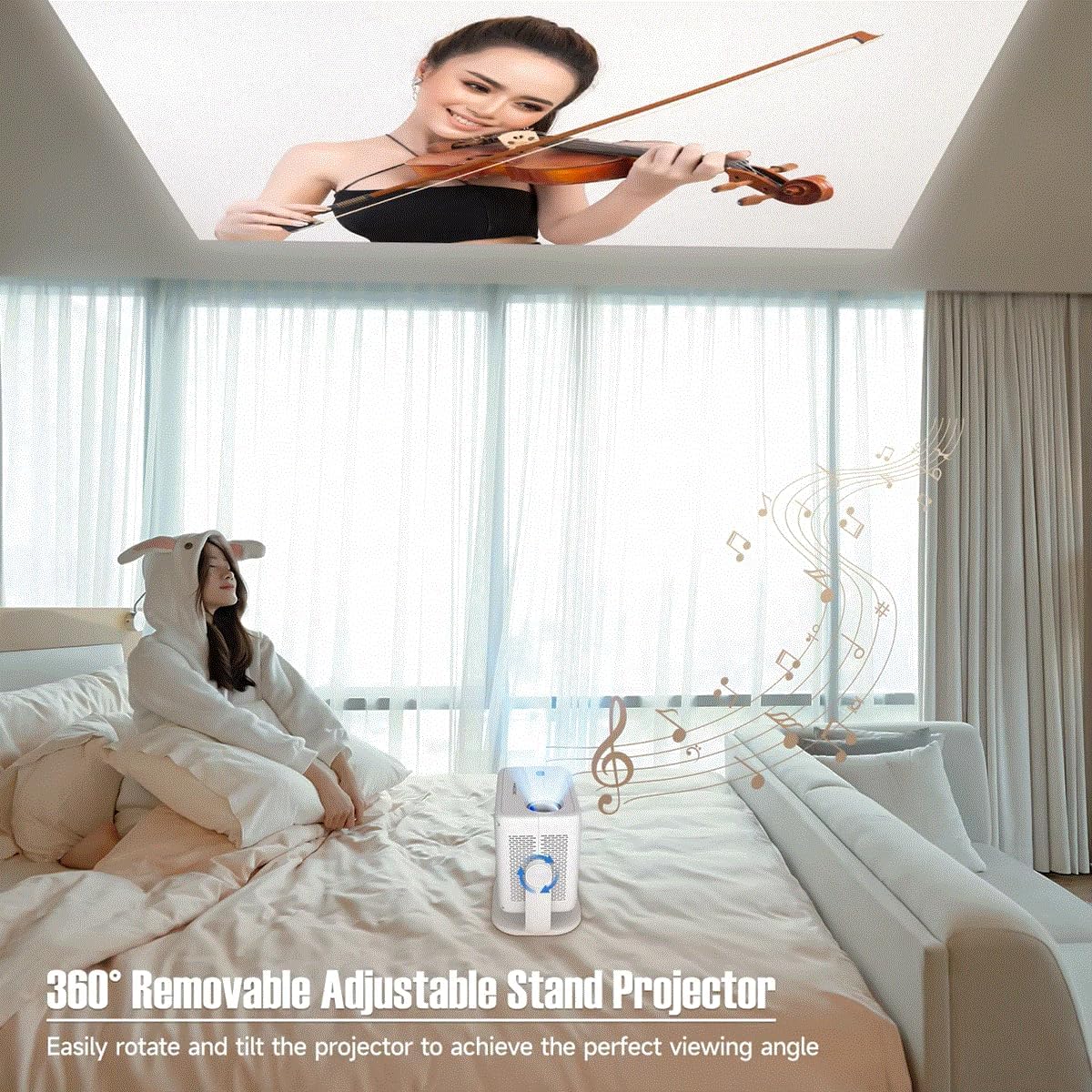
Figure 5.1: The projector's adjustable stand enables projection onto various surfaces, including ceilings, for comfortable viewing.
5.2. Strømtilslutning
- Tilslut strømadapteren til projektorens strømindgang.
- Sæt strømadapteren i en passende stikkontakt.
5.3. Første opstart
Press the power button on the projector or the remote control to turn on the device. The projector will automatically perform keystone correction and focus.
6. Betjeningsvejledning
Video 6.1: This video demonstrates key features of the L018 Projector, including its 360° adjustable stand, automatic focus and keystone correction, projection throw distance capabilities, integrated Bluetooth 5.2 Hi-Fi stereo speaker, 1080P native resolution with 4K support, and wireless screen mirroring functionality.
6.1. Auto Keystone Correction & Focus
The L018 Projector features automatic keystone correction and focus. This means the image will automatically adjust to be rectangular and sharp, even if the projector is placed at an angle. This process typically takes only 2 seconds.
Figure 6.1: The projector automatically corrects image distortion and focuses for a clear picture.
6.2. Image Adjustment (Zoom In & Zoom Out)
You can easily adjust the image size from 50% to 100% without physically moving the projector. After using this function, it may be necessary to slightly move the projector for the auto-focus and keystone correction to re-engage and optimize the image.
6.3. Trådløs skærmspejling
Seamlessly cast content from your phone, tablet, or laptop to the projector. The built-in Android 11 system and high-performing Allwinner H713 Chip ensure a smooth mirroring experience.

Figure 6.2: The projector delivers sharp and detailed images with high brightness and contrast.
6.4. Forbindelse
- Dual-band WiFi 6 (2.4G+5G): Provides ultra-fast and stable connection for streaming and online content without delay.
- Bluetooth 5.2: Tilslut eksterne Bluetooth-højttalere eller hovedtelefoner for en forbedret lydoplevelse.
- HDMI & USB: Wired connectivity options for various devices.

Figure 6.3: The benefits of Dual-band WiFi 6 for fast and stable streaming.
6.5. Sund
The projector is equipped with a built-in Hi-Fi Stereo Speaker, allowing you to enjoy an immersive sound experience directly from the device. For private listening or enhanced audio, connect external speakers or headphones via Bluetooth 5.2 or the audio output port.
6.6. Projektionstilstande
Projektoren tilbyder tre forskellige projektionstilstande, der passer til dine behov. viewbehov:
- Standardtilstand: Balancerede indstillinger for generelle viewing.
- Fremhævningstilstand: Increases brightness for clearer visibility in brighter environments.
- Energisparetilstand: Reduces power consumption, ideal for extended viewing or when battery life is a concern.
7. Vedligeholdelse
Regelmæssig vedligeholdelse er med til at sikre projektorens levetid og optimale ydeevne.
- Rengøring af linser: Brug en blød, fnugfri klud, der er specielt designet til optiske linser. Brug ikke slibende rengøringsmidler eller opløsningsmidler.
- Ventilationsporte: Periodically check and clean the ventilation openings to prevent dust buildup, which can lead to overheating. Use a soft brush or compressed air.
- Udvendig rengøring: Tør projektorens yderside af med en blød, tør klud. Ved genstridige mærker kan du bruge en let tør klud.amp en klud kan bruges, efterfulgt af en tør aftørring.
- Opbevaring: Når projektoren ikke er i brug i længere perioder, skal den opbevares køligt og tørt, væk fra direkte sollys og ekstreme temperaturer.
8. Fejlfinding
Hvis du støder på problemer med din projektor, kan du se følgende almindelige problemer og løsninger:
| Problem | Mulig årsag | Løsning |
|---|---|---|
| Ingen strøm | Strømkabel ikke tilsluttet; Problem med stikkontakten. | Sørg for, at strømkablet er korrekt tilsluttet. Prøv en anden stikkontakt. |
| Intet billede | Input source not selected; Cable connection issue; Lens cap on. | Select correct input source. Check HDMI/USB cable connections. Remove lens cap. |
| Sløret billede | Ude af fokus; Projektoren blev flyttet efter zoomjustering. | Allow auto-focus to re-engage (slight movement may help). Ensure projector is within optimal throw distance. |
| Distorted Image (Trapezoid) | Projektoren er ikke vinkelret på skærmen. | Auto keystone correction should fix this. If not, slightly adjust projector position. |
| Ingen lyd | Lydstyrken er for lav; Slået fra; Ekstern lydenhed er ikke tilsluttet/valgt. | Increase volume. Unmute. Check Bluetooth connection or external audio cable. |
| Wireless Mirroring Issues | Network instability; Device compatibility. | Ensure both devices are on the same Wi-Fi network. Restart both devices. Check device compatibility. |
9. Specifikationer
| Feature | Beskrivelse |
|---|---|
| Mærkenavn | Generisk |
| Varemodelnummer | L018 projektor |
| Farve Navn | Hvid |
| Særlige funktioner | 360° Removable Adjustable Stand Projector, BT5.2 & Hl-Fl Stereo Speaker, Ultra-fast connection Dual-band WiFi6 (2.4G+5G), High-Performing Processor Allwinner H713 Chip |
| Anbefalede anvendelser | Uddannelse, hjemmebiograf, spil, business |
| Forbindelsesteknologi | Bluetooth, Wi-Fi, USB, HDMI |
| Skærmopløsning | 1920 x 1080 (oprindelig 1080P, 4K understøttet) |
| ANSI Lumens | 650 ANSI |
| Projiceret dimension | 30-300 tommer |
| Lyskilde | LED |
| Skærmskala | 16:09 |
| Kontrastforhold | 10,001-1 |
| Keystone korrektion | Autokorrektion |
| Operativsystem | Android 11 |
| Processor | Allwinner H713 Chip |
| Bluetooth | BT5.2 |
| Indbygget højttaler | Ja |
| Fjernbetjening | Ja |
| Projektionskastforhold | 1.2:1 |
10. Garanti og support
For warranty information and customer support, please refer to the documentation provided at the time of purchase or contact the manufacturer directly. Keep your purchase receipt as proof of purchase.
For technical assistance or further inquiries, please visit the official Generic brand webwebsted eller kontakt deres kundeservice.