
Vanzon WN02
Vanzon WN02 Smart Sound Machine User Manual
Model: WN02 | Brand: Vanzon
1. Introduktion
The Vanzon WN02 Smart Sound Machine is designed to create a peaceful and conducive environment for sleep and relaxation. Featuring a wide array of soothing sounds, customizable RGB night light options, and smart app control, this device offers versatile functionality for users of all ages. It also doubles as a Bluetooth speaker, allowing you to enjoy your favorite audio content.
2. Sikkerhedsoplysninger
For safe use of this product, please follow these guidelines:
- Batteries should be handled with care and kept out of reach of children.
- This product is intended for supervised use by babies.
- If the product contains small parts, keep it out of reach of children under 3 years old.
- Always use the correct type of batteries as indicated in the product manual.
3. Pakkens indhold
Kontroller venligst, at alle varer er inkluderet i din pakke:
- Vanzon WN02 Smart Sound Machine
- Strømkabel (USB-C)
- Strømforsyning (adapter)
- Brugermanual

Figure 3.1: Package Contents of the Vanzon WN02 Smart Sound Machine.
4. Produktet er slutview
The Vanzon WN02 features an intuitive design with accessible controls and a soft night light dome. The device combines sound generation, lighting, and Bluetooth connectivity in a compact form factor.

Figur 4.1: Forside view of the Vanzon WN02 Smart Sound Machine.
Nøglefunktioner:
- 54 beroligende lyde: Includes 8 white noises, 19 nature sounds, 7 baby sounds, 14 animal sounds, and 6 life sounds.
- 15 RGB Night Light Modes: Adjustable brightness and color options.
- Smart App Control: Remote adjustment of volume, lighting, and timer via Bluetooth.
- Auto-sluk-timer: Set to 30/60/90 minutes via device buttons or 0-8 hours via app.
- Bluetooth-højttaler: Connect your phone or tablet to play personal music.
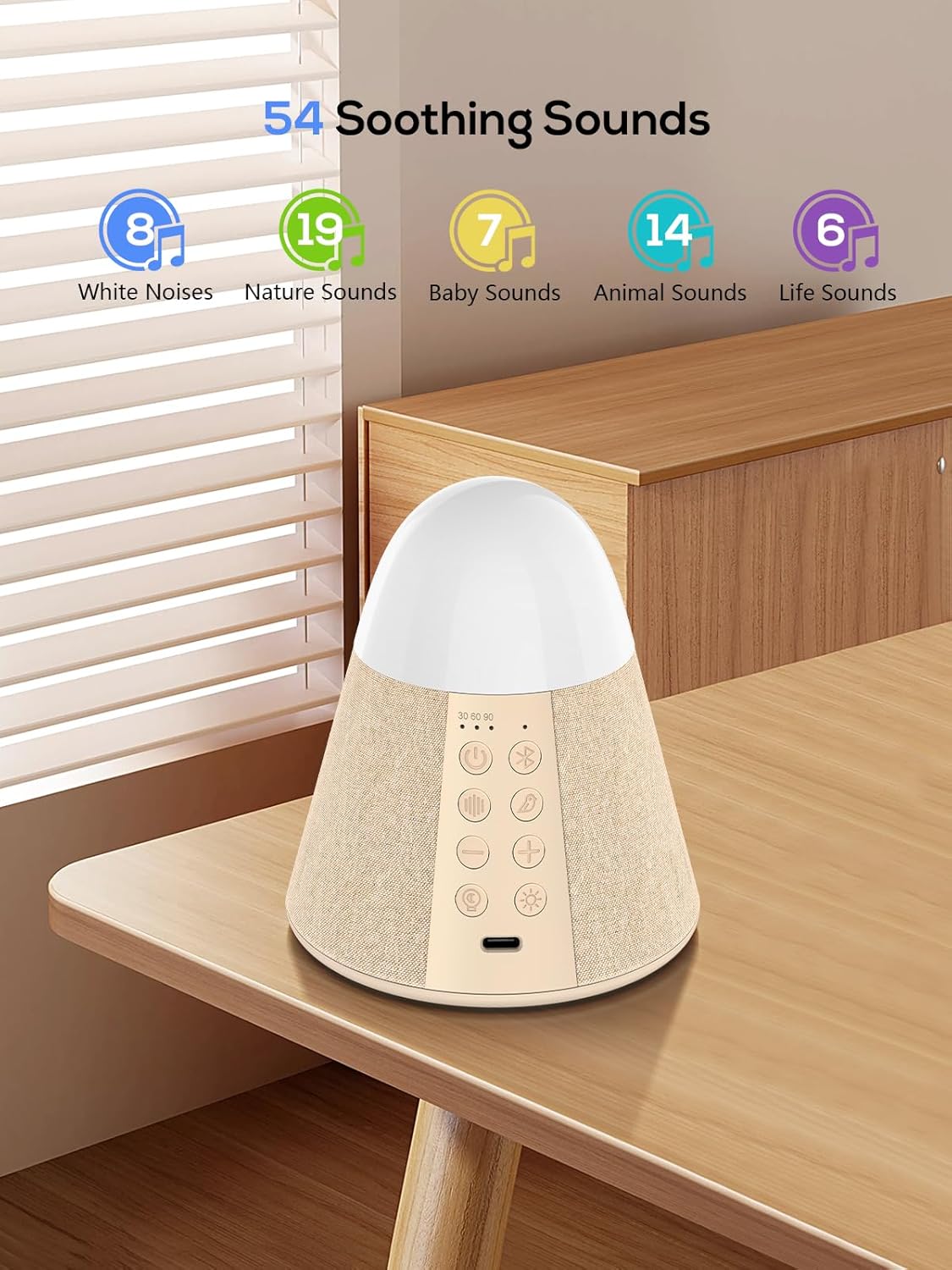
Figur 4.2: Overview of 54 Soothing Sounds.

Figure 4.3: 15 RGB Night Light Modes.
5. Opsætning
Follow these steps to set up your Vanzon WN02 Smart Sound Machine:
- Tænd: Connect the device to a power source using the provided USB-C cable and adapter. The device is battery-powered and can be used wirelessly once charged. Press the power button on the device to turn it on.
- Bluetooth-forbindelse: Aktiver Bluetooth på din smartphone eller tablet. Søg efter the device named "Sound Machine" in your Bluetooth settings and connect to it.
- Appinstallation (valgfrit men anbefalet): Download the Vanzon Smart App from your device's app store (e.g., Apple App Store, Google Play Store). This app allows for advanced control and customization.
- Indledende indstillinger: Once connected, open the app to select and adjust sound settings, including sound type and volume. You can also adjust the RGB night light settings and set the auto-off timer through the app.
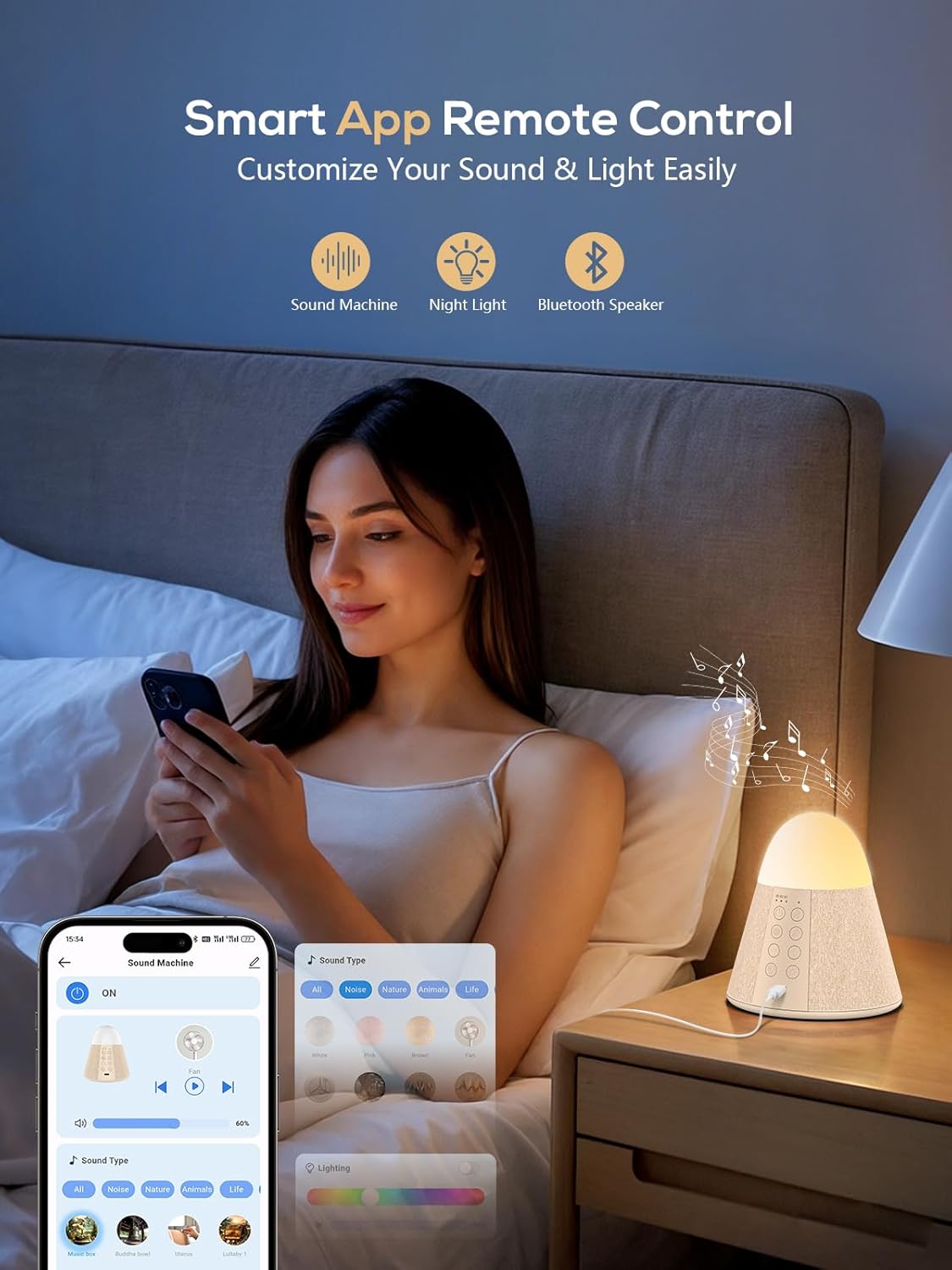
Figure 5.1: Smart App Remote Control for customized sound and light settings.
6. Betjeningsvejledning
6.1 Tænd/sluk
Tryk på Power knap (⏻) on the device to turn it on or off. A short press will toggle the power state.
6.2 Lydvalg
The device offers 54 high-quality soothing sounds. Use the dedicated sound selection buttons on the device or the Vanzon Smart App to browse and select your preferred sound category (White Noise, Nature, Baby, Animal, Life Sounds). Press the Sound Type Button (represented by sound wave icon) to cycle through sound categories.
6.3 Lydstyrkejustering
Juster lydstyrken ved hjælp af Lydstyrke op (+) og Lydstyrke ned (-) buttons on the device. For stepless volume adjustment, use the slider within the Vanzon Smart App.
6.4 natlystilstande
The device features 15 different RGB light colors. Press the Lystilstandsknap (represented by light bulb icon) to cycle through the colors. Brightness levels can be adjusted through the Vanzon Smart App for optimal ambiance.
6.5 Automatisk sluk-timer
Set a timer for automatic shut-off:
- Enhedsknapper: Tryk på Timer knap (represented by clock icon) to set the timer to 30, 60, or 90 minutes.
- Smart app: Use the Vanzon Smart App to set a custom timer from 0 to 8 hours. The device will automatically stop running at the predetermined time.
6.6 Bluetooth-højttalerens funktionalitet
To use the device as a Bluetooth speaker:
- Sørg for, at enheden er tændt.
- Aktivér Bluetooth på din telefon eller tablet.
- Find "Sound Machine" in your device's Bluetooth list and connect.
- Once connected, you can play your own music through the sound machine.
6.7 Smart App Control
The Vanzon Smart App provides comprehensive control over your sound machine. After connecting via Bluetooth, you can:
- Adjust volume with stepless precision.
- Switch between all 54 sound options.
- Control the 15 RGB light colors and brightness.
- Set a custom auto-off timer (0-8 hours).
7. Vedligeholdelse
To ensure the longevity and optimal performance of your Vanzon WN02 Smart Sound Machine, follow these maintenance guidelines:
- Rensning: Wipe the device with a soft, dry cloth. Do not use abrasive cleaners, waxes, or solvents as they may damage the finish.
- Opbevaring: Når enheden ikke er i brug i længere perioder, skal den opbevares køligt og tørt, væk fra direkte sollys og ekstreme temperaturer.
- Håndtering: Undgå at tabe enheden eller udsætte den for kraftige stød, da dette kan beskadige de interne komponenter.
8. Fejlfinding
If you encounter any issues with your Vanzon WN02 Smart Sound Machine, please refer to the following common problems and solutions:
| Problem | Mulig årsag | Løsning |
|---|---|---|
| Enheden tændes ikke. | Lavt batteri eller ingen strømforbindelse. | Ensure the device is properly connected to a power source or fully charged. |
| Ingen lydudgang. | Volume too low; incorrect sound selected; Bluetooth not connected. | Increase volume. Select a different sound. Reconnect Bluetooth if using as a speaker. |
| Problemer med Bluetooth-forbindelse. | Enheden er ikke i parringstilstand; for langt fra kilden; interferens. | Ensure the sound machine is in Bluetooth pairing mode. Move closer to the device. Avoid strong electromagnetic interference. |
| Night light not working or incorrect color. | Light mode not activated; app settings incorrect. | Press the Light Mode button. Check light settings in the Vanzon Smart App. |
| Auto-off timer not functioning. | Timeren er ikke indstillet korrekt. | Verify timer settings on the device or within the Vanzon Smart App. |
9. Specifikationer
| Feature | Specifikation |
|---|---|
| Produktdimensioner | 4.06 x 4.25 x 4.44 tommer |
| Varens vægt | 6.3 ounce |
| Fabrikant | Vanzon Sounds |
| Varemodelnummer | WN02 |
| Batterier påkrævet | Nej (internt genopladeligt batteri) |
| Farve | Hvede |
| Mærke | Vanzon |
| Materiale | Plast |
| Strømkilde | Battery Powered (USB-C charging) |
| Genstandsdybde | 4.06 tommer |
10. Garanti og support
Vanzon stands behind the quality of its products. For warranty information, technical support, or any inquiries regarding your WN02 Smart Sound Machine, please refer to the contact information provided on the product packaging or visit the official Vanzon webwebsted. Behold din købskvittering som købsbevis i tilfælde af garantikrav.