
1. Introduktion
This manual provides detailed instructions for the safe and efficient operation of your FRIENGOOD LS4 Plus Portable Karaoke Party Speaker. Please read this manual thoroughly before use and retain it for future reference.
2. Hvad er der i æsken
Kontroller, at alle genstande er til stede ved udpakning:
- 1 x FRIENGOOD LS4 Plus Portable Karaoke Party Speaker
- 2 x Rechargeable Wireless Microphones
- 1 x fjernbetjening
- 1 x USB Charging Cable (Type-C 5V=3A)
- 1 x Backpacking Strap

Figure 2.1: Package Contents. This image displays the FRIENGOOD LS4 Plus speaker, two wireless microphones, a remote control, a USB-C charging cable, and a shoulder strap, illustrating all items included in the product box.
3. Produktet er slutview
3.1 Højttalerkomponenter
The LS4 Plus speaker features a robust design with integrated audio components and controls.

Figur 3.1: Forside view of the FRIENGOOD LS4 Plus speaker, showcasing its main body, integrated handle, shoulder strap, two wireless microphones, and remote control.
3.2 Lydsystem
The speaker is equipped with a 160W audio system for clear and powerful sound reproduction.
- Dual 50W Bass Horns: Provide deep and resonant low frequencies.
- Dual 30W Tweeter Horns: Deliver crisp and clear high frequencies.
- Bass Up 3.0 Technology: Enhances bass performance in real-time.

Figur 3.2: Eksploderet view of the speaker's internal components, highlighting the dual 50W woofers and dual 30W silk tweeters, along with a vibrating membrane for light flashing.
3.3 trådløse mikrofoner
Two rechargeable wireless microphones are included for karaoke functionality.
- U-band Connection: Ensures instant, delay-free pairing with the speaker.
- Batterilevetid: Up to 20 hours of use, 100 hours standby (2000mAh lithium battery).
- Konstruktion: High-quality aviation aluminum with an LED digital display.

Figur 3.3: Nærbillede view of the two wireless microphones, showing their digital displays and power buttons.
3.4 Fjernbetjening
A remote control is provided for convenient operation of the speaker's functions.

Figure 3.4: The remote control for the speaker, displaying buttons for power, mute, volume, microphone controls, bass/treble adjustments, mode selection, and sound effects.
3.5 LED-lysshow
The speaker features dynamic RGB seven-color LED lights that synchronize with music.
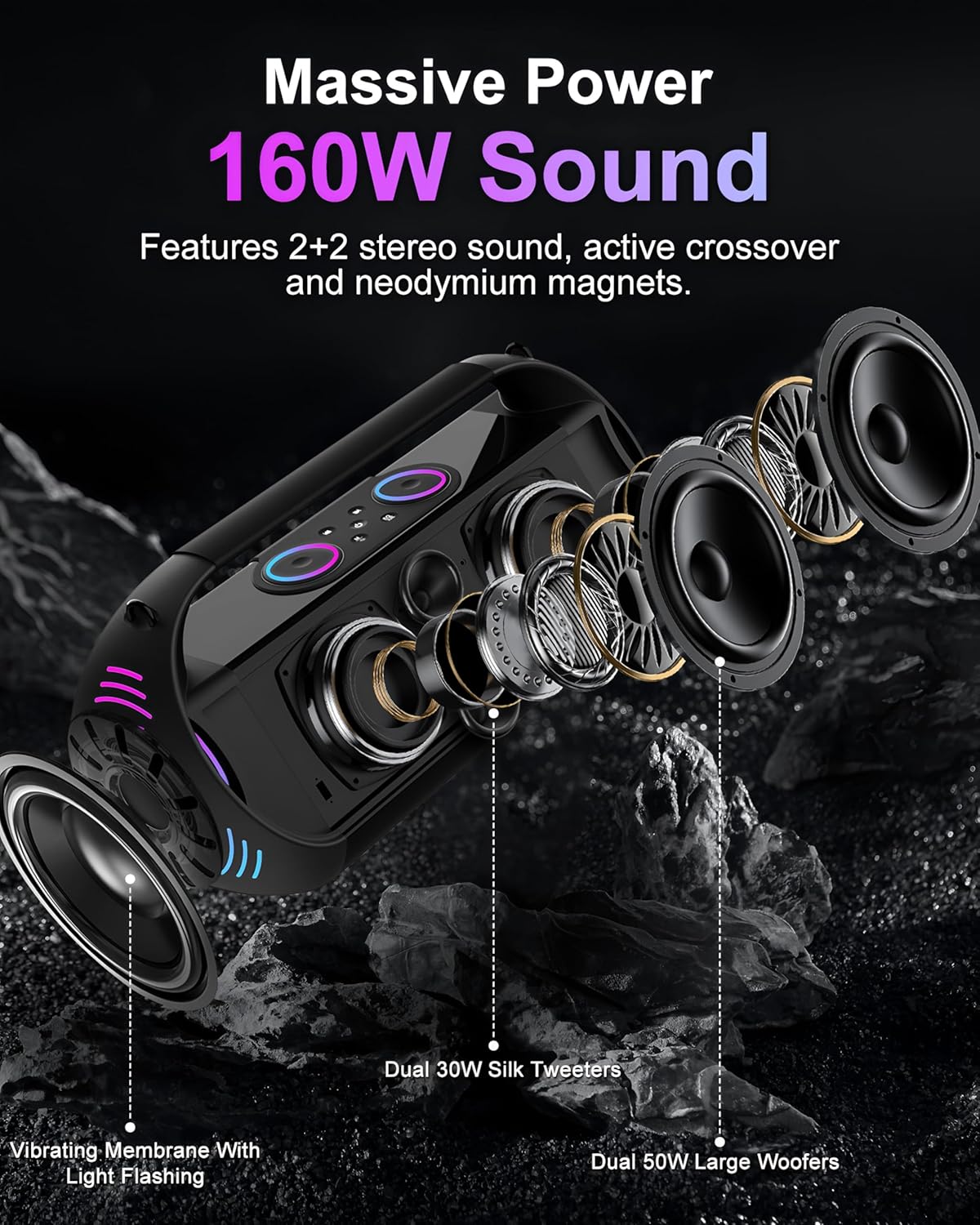
Figure 3.5: The speaker with its RGB LED lights illuminated, showing various color patterns.
4. Opsætning
4.1 Opladning af højttaleren
- Tilslut det medfølgende USB Type-C-opladerkabel til højttalerens opladningsport.
- Tilslut den anden ende af kablet til en kompatibel 5V/3A USB-strømadapter (medfølger ikke).
- Opladningsindikatoren lyser. En fuld opladning tager typisk flere timer.
- Once fully charged, disconnect the charging cable. The speaker provides up to 20 hours of playback.
4.2 Charging the Wireless Microphones
- Each microphone has a built-in rechargeable battery. Use a suitable charging method (e.g., USB-C cable, if provided, or specific charging dock if applicable).
- Refer to the microphone's LED display for charging status.
- En fuld opladning giver op til 20 timers brug.
4.3 Attaching the Backpacking Strap
- Locate the attachment points on the speaker.
- Securely fasten the clips of the backpacking strap to these points.
- Ensure the strap is properly attached before carrying the speaker.
5. Betjeningsvejledning
5.1 Tænd/sluk
- For at tænde: Press and hold the power button on the speaker.
- For at slukke: Tryk på tænd/sluk-knappen igen, og hold den nede.
5.2 Bluetooth-forbindelse
- Power on the speaker. It will automatically enter Bluetooth pairing mode.
- Aktiver Bluetooth på din enhed (smartphone, tablet osv.) og søg efter tilgængelige enheder.
- Select "FRIENGOOD LS4 Plus" from the list to connect.
- A confirmation sound will indicate a successful connection.
5.3 Flere afspilningstilstande
The speaker supports various input sources:
- AUX-indgang: Connect an external audio device using a 3.5mm AUX cable (not included). The speaker will automatically switch to AUX mode.
- USB-diskafspilning: Indsæt et USB-flashdrev med lyd files i USB-porten. Højttaleren vil automatisk registrere og afspille files.
- TF-kortafspilning: Insert a TF (Micro SD) memory card containing audio files i TF-kortstikket. Højttaleren vil automatisk registrere og afspille files.

Figure 5.1: Illustration of the speaker's connectivity options, including Bluetooth 5.3, AUX in, Micro SD card slot, and USB flash drive port.
5.4 Brug af de trådløse mikrofoner
- Tænd for højttaleren.
- Power on the wireless microphones. They will automatically connect to the speaker via U-band technology.
- Adjust microphone volume using the "Mike +" and "Mike -" buttons on the remote control or speaker controls.
- Utilize the "Reverb +" and "Reverb -" buttons for echo effects.
- The "Delay +" and "Delay -" buttons adjust the delay effect.
5.5 Fjernbetjeningsfunktioner
The remote control provides comprehensive command over the speaker. Refer to the diagram for button layout.
| Knap | Fungere |
|---|---|
| SLUKKET | Sluk |
| Stum | Slå lyd fra/til |
| Reverb+ / Reverb- | Reverb Boost / Reverb Decrease |
| Mike+ / Mike- | Microphone Volume up / down |
| Delay+ / Delay- | Extension Increase / Decrease (Delay effect) |
| Bass+ / Bass- | Bass Boost / Bass Reduction |
| High+ / High- | Treble Boost / Treble Reduction |
| Lydstyrke+ / Lydstyrke- | Master Volume up / down |
| FORR | Forrige sang |
| NÆSTE | Næste sang |
| Takke | "Thanks" sound effect |
| Opmuntre | "Cheer" sound effect |
| Bifald | "Acclamation" sound effect |
| Grine | "Laugh happily" sound effect |
| Varm | "Warm up the stage" sound effect |
| Umlaut | Change the sound (voice changer) |
| Hilsen | "Respect" sound effect |
| Mode | Mode Switching (Bluetooth, AUX, USB, TF) |
| Ledsage | Backup Singing On/Off |
| Effekter | Sound Effects Switch |
| Cyklus | Loop Play |
5.6 LED-lysstyring
The LED lights can be controlled via the speaker's interface or remote control. Different modes include breathing, circling, and flickering, synchronizing with the music rhythm.
Figure 5.2: The speaker displaying its RGB colorful lights, with icons indicating various light modes such as breathing, circling, and flickering.
5.7 Real-time OTG Recording Function
This function allows for real-time recording, typically used for live broadcasting or conference recording. Connect a wired microphone or wired headset to utilize this feature.
6. Vedligeholdelse
6.1 Rengøring
- Sørg for, at højttaleren er slukket og frakoblet enhver strømkilde, før den rengøres.
- Brug en blød, tør klud til at tørre de udvendige overflader af.
- Brug ikke slibende rengøringsmidler, alkohol, benzen eller andre kemiske opløsningsmidler, da disse kan beskadige overfladen.
- For the microphone grilles, use a soft brush to gently remove dust.
6.2 Opbevaring
- Store the speaker and accessories in a cool, dry place away from direct sunlight and extreme temperatures.
- If storing for an extended period, charge the speaker and microphones periodically (e.g., every 3 months) to maintain battery health.
6.3 Vandtæthed
The speaker is IPX5 life waterproof and splash-proof. This means it is resistant to water splashes and light rain but should not be immersed in water.

Figure 6.1: The speaker positioned near a swimming pool, demonstrating its IPX5 daily waterproof rating, indicating resistance to splashes and light rain.
7. Fejlfinding
| Problem | Mulig årsag | Løsning |
|---|---|---|
| Højttaleren tændes ikke | Lavt batteri; Tænd/sluk-knappen er ikke trykket korrekt ind | Charge the speaker fully. Press and hold the power button for a few seconds. |
| Ingen lyd fra højttaleren | Lydstyrken er for lav; Forkert inputtilstand; Enheden er ikke tilsluttet | Increase volume on speaker and connected device. Ensure correct input mode (Bluetooth, AUX, USB, TF). Reconnect Bluetooth device. |
| Microphones not connecting | Microphone battery low; Microphone not powered on; Interference | Charge microphones. Ensure microphones are powered on. Move closer to the speaker. |
| Bluetooth-forbindelsen er ustabil | Enhed for langt væk; Forhindringer; Interferens | Move the connected device closer to the speaker. Remove any obstructions. Avoid strong electromagnetic interference. |
| Fjernbetjening virker ikke | Remote battery low; Obstruction between remote and speaker | Replace remote control batteries. Ensure clear line of sight to the speaker's IR receiver. |
8. Specifikationer
| Feature | Detalje |
|---|---|
| Modelnummer | LS4 Plus |
| Output Wattage | 160 watt |
| Højttalerkonfiguration | Dual 50W Woofers, Dual 30W Tweeters (4 channels) |
| Frekvensrespons | 20 Hz - 20 kHz |
| Støjniveau | 100 dB |
| Forbindelsesteknologi | Bluetooth 5.3, AUX, USB, TF Card, Remote |
| Bluetooth version | 5.3 |
| Battery Capacity (Speaker) | 30000mAh Lithium Polymer |
| Afspilningstid | Op til 20 timer |
| Opladningsindgang | USB Type-C 5V/3A |
| Mikrofonens batterikapacitet | 2000mAh Lithium Battery (each) |
| Mikrofonforbindelse | U-band Wireless |
| Vandmodstand | IPX5 (stænksikker) |
| Materiale | ABS plast |
| Produktmål (L x B x H) | 8.07 x 17.8 x 8.35 tommer |
| Varens vægt | 10.51 pund |
| Fabrikant | Shenzhen Penghexing Electronic Technology Co., Ltd |
9. Garanti og support
9.1 Garantioplysninger
FRIENGOOD products are designed and manufactured to the highest quality standards. For specific warranty details, please refer to the warranty card included with your product or contact customer support.
9.2 Kundesupport
If you encounter any issues or have questions regarding your FRIENGOOD LS4 Plus speaker, please contact our customer support team. Contact information can typically be found on the product packaging or the official FRIENGOOD webwebsted.