
1. Introduktion
Tak, fordi du har valgt det håndholdte endoskop Inskam 451. Denne enhed er designet til visuel inspektion på svært tilgængelige steder og giver klar billeddannelse samt er nem at bruge. Læs venligst denne manual omhyggeligt, inden du bruger enheden, for at sikre korrekt brug og maksimere dens levetid.
Nøglefunktioner:
- 4.5-tommer IPS-skærm: Giver øjeblikkelig HD-opløsning viewaf billeder og videoer.
- 720p kamera: Optager klare billeder til detaljeret inspektion.
- 5 meter stivt kabel: Giver adgang til dybe eller fjerne områder.
- IP67 Vandtæt Kamera: Velegnet til brug i våde eller nedsænkede miljøer.
- 6 justerbare LED-lys: Oplyser mørke inspektionsområder.
- 2000mAh batteri: Tilbyder forlænget driftstid.
- Integreret stativ: Frigør dine hænder for nemmere betjening.
2. Produktet er slutview og pakkeindhold
Gør dig bekendt med komponenterne i dit Inskam 451 endoskop.

Figur 2.1: Inskam 451 håndholdt endoskop, der viser hoveddisplayenheden og det tilsluttede fleksible kamerakabel med dets LED-udstyrede linse.
Pakkeindhold:
- 1 x Inskam 451 håndholdt endoskopenhed
- 1 x Objektivkabel (5 meter stift kabel)
- 1 x USB Type-C opladningskabel
3. Opsætning
3.1 Opladning af enheden
Oplad endoskopet helt før første brug. Tilslut det medfølgende USB Type-C-opladerkabel til enhedens opladningsport og en passende USB-strømadapter (medfølger ikke).

Figur 3.1: Endoskopet har et 2000 mAh batteri, der giver cirka 3 timers brug på en fuld opladning, med en opladningstid på cirka 2 timer.
3.2 Indsættelse af TF-kort (valgfrit)
For at gemme billeder og videoer skal du indsætte et Micro SD-kort (TF) (op til 32 GB, medfølger ikke) i det dertil indrettede TF-kortstik på siden af enheden. Sørg for, at enheden er slukket, før du indsætter eller fjerner kortet.

Figur 3.2: Detalje, der viser USB Type-C-opladningsporten og det skjulte TF-kortslot, dækket af en silikoneklap for beskyttelse.
3.3 Montering af objektivkablet
Tilslut det stive objektivkabel til hovedenheden. Sørg for, at det klikker sikkert på plads. Kablet er aftageligt for nem opbevaring og udskiftning.
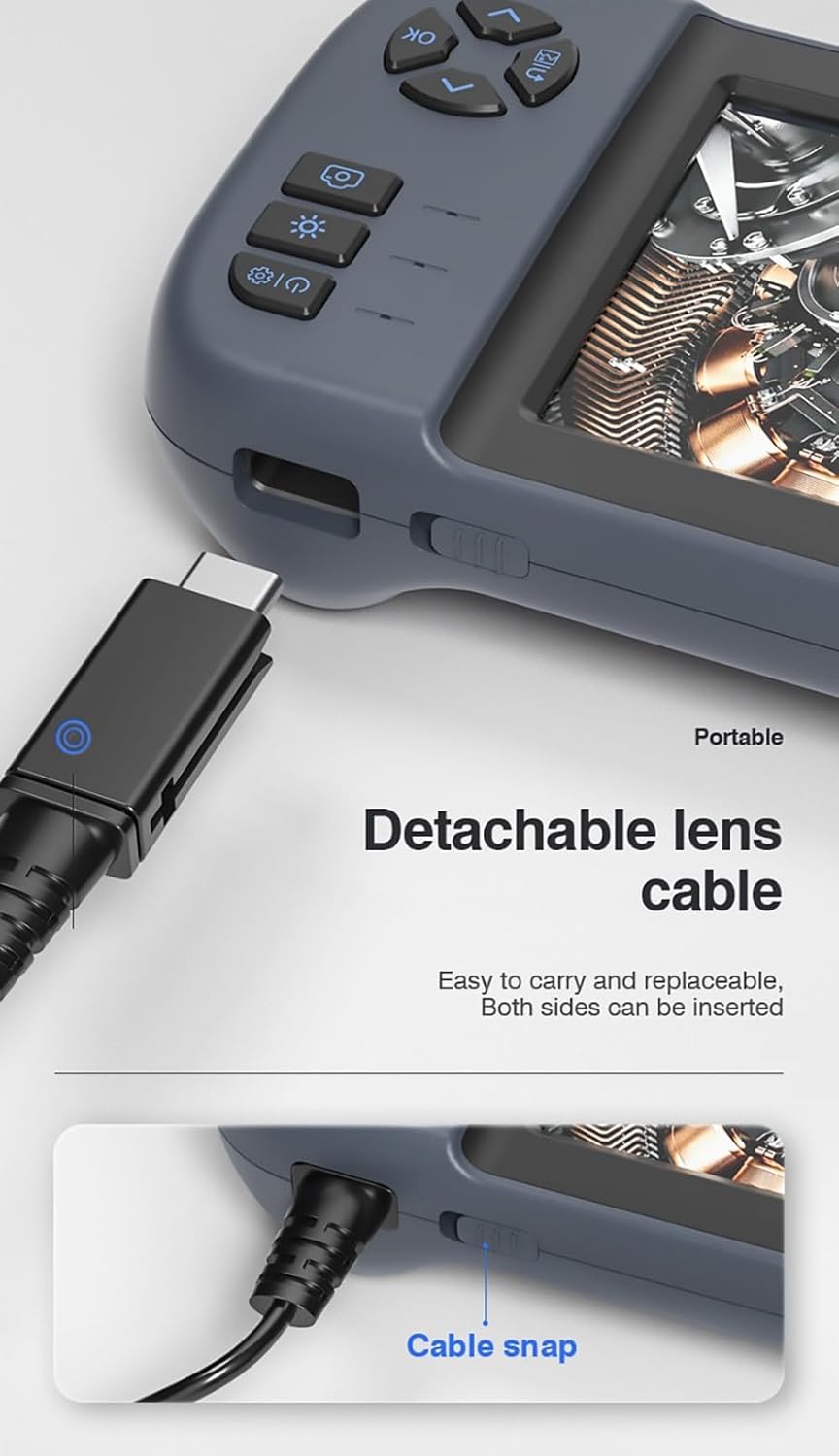
Figur 3.3: Det aftagelige objektivkabel er designet til nem tilslutning og fjernelse. Begge sider af stikket kan sættes i.
3.4 Brug af den integrerede stander
Inskam 451 har en indbygget beslag på bagsiden, så den kan stå oprejst på en plan overflade. Dette frigør dine hænder under inspektionsopgaver.

Figur 3.4: Det integrerede beslag på bagsiden af enheden, som kan forlænges, så endoskopet kan stå på et skrivebord.
4. Betjeningsvejledning
4.1 Tænd/sluk
Tryk og hold tænd/sluk-knappen nede (normalt markeret med ⑂) for at tænde eller slukke enheden. IPS-skærmen lyser op ved opstart.

Figur 4.1: Den 4.5-tommer IPS HD-skærm giver levende farver og et bredt viewvinkel for tydelig inspektion.
4.2 Justering af LED-lysstyrke
Kamerahovedet er udstyret med 6 justerbare LED-lys. Brug den dedikerede lysstyrkekontrolknap (ofte markeret med en stjerne eller et lysikon) til at skifte mellem forskellige lysstyrkeniveauer eller slukke lysene.

Figur 4.2: Det IP67 vandtætte kamerahoved med 6 justerbare LED-lys er velegnet til barske miljøer, herunder under vand.
4.3 Optagelse af billeder og videooptagelse
Når enheden er tændt, og kameraet er placeret, skal du bruge de dedikerede knapper til at optage stillbilleder eller starte/stoppe videooptagelse. Se ikonerne på skærmen for den aktuelle tilstand (foto/video).
4.4 Viewi medier
Naviger til afspilningstilstanden ved hjælp af menuknapperne for atview optagne billeder og videoer gemt på TF-kortet. Du kan rulle gennem fileog afspil videoer direkte på skærmen.
5. Vedligeholdelse
5.1 Rengøring af linse og skærm
Tør forsigtigt kameralinsen og IPS-skærmen af med en blød, fnugfri klud. Ved genstridige pletter kan en lille mængde linserengøringsmiddel påføres kluden (ikke direkte på linsen/skærmen).
5.2 Pleje af batterier
For at forlænge batteriets levetid bør du undgå at aflade batteriet helt ofte. Oplad enheden regelmæssigt, selvom den ikke er i brug i længere perioder (f.eks. hver 3. måned).
5.3 Opbevaring
Opbevar endoskopet et køligt og tørt sted, væk fra direkte sollys og ekstreme temperaturer. Sørg for, at linsekablet er pænt viklet uden skarpe bøjninger.
5.4 Forholdsregler vedrørende vandtæthed
Selvom kamerahovedet er vandtæt i henhold til IP67, er hovedenheden det ikke. Hovedenheden må ikke nedsænkes i vand eller udsættes for kraftig regn. Sørg for, at USB- og TF-kortportene er korrekt forseglet med deres silikonedæksler, når de ikke er i brug, især i damp miljøer.
6. Fejlfinding
| Problem | Mulig årsag | Løsning |
|---|---|---|
| Enheden tændes ikke | Lavt batteri; Tænd/sluk-knappen er ikke trykket længe nok ned | Oplad enheden; Tryk på tænd/sluk-knappen og hold den nede i 3-5 sekunder |
| Intet billede på skærmen | Objektivkabel ikke tilsluttet korrekt; Kameraobjektivet blokeret | Sørg for, at objektivkablet er korrekt tilsluttet; Rengør kameralinsen |
| Kan ikke gemme billeder/videoer | Intet TF-kort isat; TF-kort fuldt eller beskadiget; TF-kort understøttes ikke | Indsæt et TF-kort; Slet gammelt fileeller brug et nyt kort; Brug et TF-kort på op til 32 GB, formateret til FAT32 |
| LED-lys virker ikke | Lysstyrke indstillet til minimum; Fejlfunktion | Tryk på knappen til LED-lysstyrken for at øge belysningen. Kontakt support, hvis problemet fortsætter. |
7. Specifikationer
| Feature | Specifikation |
|---|---|
| Model | 451 |
| Skærmstørrelse | 4.5 tommer IPS |
| Skærmopløsning | 480 x 854 pixels |
| Billedopløsning | 1920 x 1080 (JPG) |
| Videooptagelsesopløsning | 1280 x 720 (AVI) |
| Kamera vandtæt vurdering | IP67 |
| Kabellængde | 5 meter (stiv) |
| Dybdeskarphed | 4-10 cm |
| Viewi vinkel | 70 grader |
| Lyskilde | 6 justerbare LED-lys |
| Batterikapacitet | 2000 mAh |
| Driftstemperatur | -10 ℃ til 50 ℃ |
| Forbindelse | USB Type-C |
| Support til opbevaring | TF-kort (op til 32 GB) |
| Certificeringer | CE/RoHS/ISO9001 |
| Produktets vægt | 488 gram |
| Produktmål (L x B x H) | 18 x 11 x 7 cm |
8. Garanti og support
Inskam 451 håndholdt endoskop leveres med en standard producentgaranti. Se venligst din købsdokumentation for specifikke garantivilkår og varighed. For teknisk support, fejlfindingshjælp eller garantikrav bedes du kontakte forhandleren eller producenten direkte.
Fabrikant: Inskam
ASIN: B0DNFSDNXC
For yderligere hjælp, besøg venligst den officielle Inskam webwebsted eller kontakt deres kundeservice.