
BRUBOSES DM56
BRUBOSES DM56 GPS Smart Watch Brugermanual
Comprehensive Guide for Your Military Rugged Smartwatch
Indledning
Thank you for choosing the BRUBOSES DM56 GPS Smart Watch. This military-grade rugged smartwatch is designed for durability and high performance, featuring advanced GPS capabilities, comprehensive health monitoring, and a robust build. This manual provides detailed instructions to help you set up, operate, and maintain your new device, ensuring you get the most out of its powerful features.
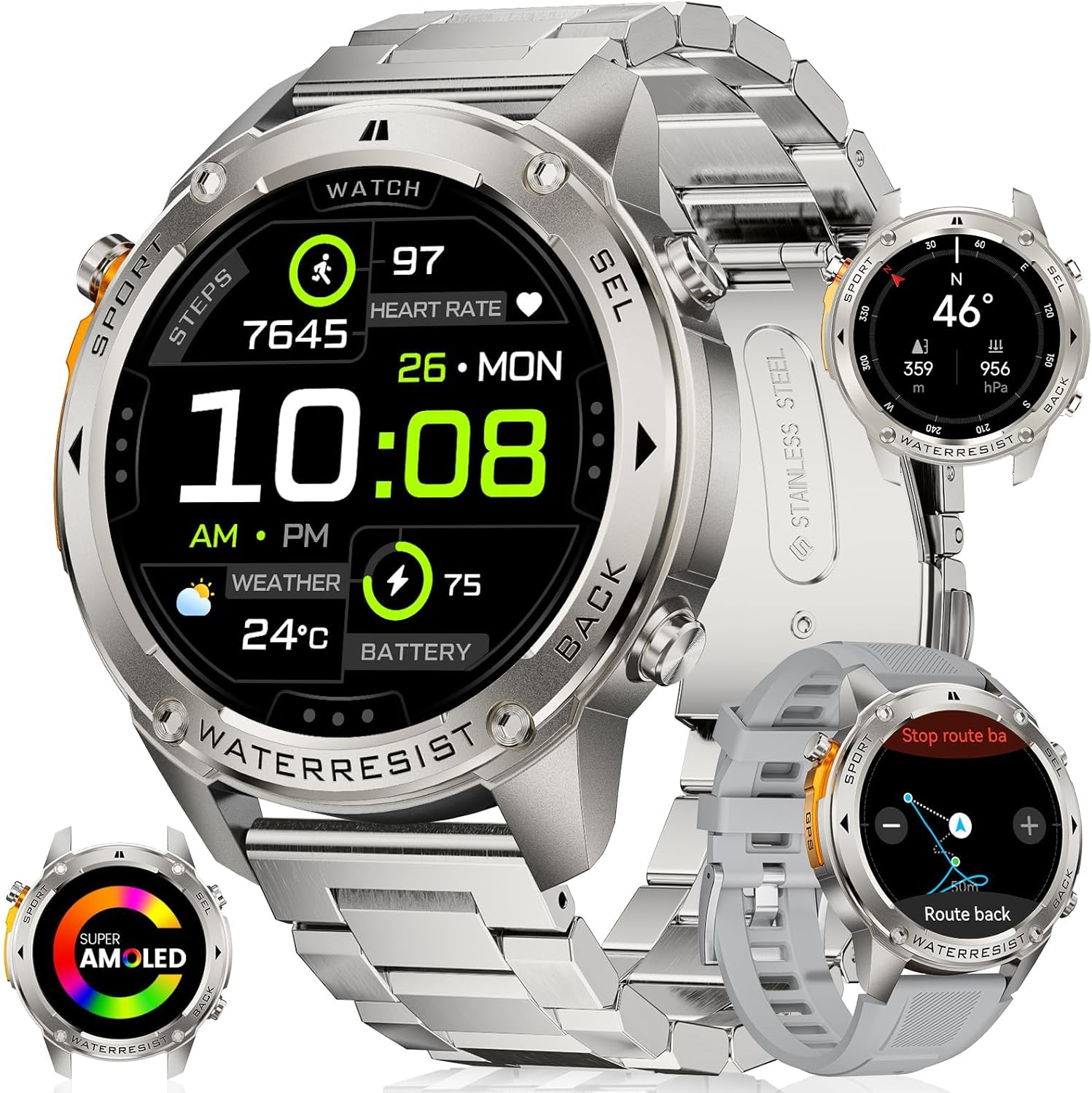
Figure 1: The BRUBOSES DM56 GPS Smart Watch, showcasing its robust design and included interchangeable bands.
Hvad er der i æsken
Upon opening your BRUBOSES DM56 package, you should find the following items:
- 1 x BRUBOSES DM56 GPS Smart Watch (with pre-installed metal band)
- 1 x Silicone Replacement Band
- 1 x magnetisk ladekabel
- 1 x Brugermanual (dette dokument)
- 1 x Link Removal Tool (for adjusting the metal band)

Figure 2: Packaging contents including the smartwatch, two bands, charging cable, and user manual.
Opsætningsvejledning
1. Opladning af smarturet
Before initial use, fully charge your BRUBOSES DM56 smartwatch.
- Tilslut det magnetiske opladningskabel til en USB-strømadapter (medfølger ikke) eller en computers USB-port.
- Align the magnetic end of the cable with the charging contacts on the back of the watch. The watch will vibrate and display a charging icon.
- Allow approximately 2-3 hours for a full charge. A full charge can provide up to 2 weeks of typical usage or over 40 days in power-saving mode.

Figure 3: The smartwatch connected to its magnetic charging cable, illustrating the charging process.
2. Installation af Companion-appen
To unlock all features and synchronize data, download and install the "Fit Cloud Pro" app on your smartphone.
- Til Android: Søg efter "Fit Cloud Pro" on the Google Play Store.
- Til iOS: Søg efter "Fit Cloud Pro" on the Apple App Store.
- Alternatively, scan the QR code provided in the quick start guide (if applicable) to directly download the app.
3. Parring med din smartphone
Sørg for, at din smartphones Bluetooth er aktiveret.
- Open the "Fit Cloud Pro" app on your smartphone.
- Følg instruktionerne på skærmen for at oprette en konto eller logge ind.
- Naviger til afsnittet "Enhed" eller "Min enhed" i appen.
- Tap "Add Device" or "Søg efter Device."
- Select "DM56" from the list of available devices.
- Bekræft parringsanmodningen på både dit ur og din smartphone.
Smartwatchet er kompatibelt med iOS 11.0+ og Android 5.0+ smartphones.

Figure 4: The BRUBOSES DM56 Smart Watch is compatible with a wide range of iOS and Android devices.
Betjeningsvejledning
Grundlæggende navigation
- Berøringsskærm: Stryg til venstre/højre, op/ned for at navigere gennem menuer og funktioner. Tryk for at vælge.
- Sideknapper: The watch features multiple physical buttons for quick access to functions like Sport, Select, and Back. Refer to the watch face for specific button labels.
- "Always On Display" Mode: The 1.43" AMOLED screen supports an "Always On Display" mode, ensuring the time is always visible without needing to wake the screen.
Foretage og modtage opkald
With Bluetooth connectivity, you can answer and make calls directly from your watch.
- Besvarelse af opkald: Når du modtager et opkald, skal du trykke på det grønne telefonikon på urskærmen.
- Foretage opkald: Access the call function from the watch menu. You can dial numbers or select contacts synchronized from your phone.
AI stemmeassistent
Utilize the built-in AI voice assistant for hands-free control.
- Activate the voice assistant through the watch menu.
- Speak commands to ask questions, play music, check weather, set alarms, or even initiate calls.

Figure 5: The smartwatch demonstrating its call answering and AI voice assistant capabilities.
Meddelelser
Modtag notifikationer fra din smartphone direkte på dit ur.
- Enable app notifications in the "Fit Cloud Pro" app settings.
- View incoming texts and social media alerts on your watch screen.

Figure 6: The smartwatch displaying various message notifications from connected apps.
Tilpasning af urskiver
Personalize your watch with over 500 exquisite watch faces available through the companion app.
Nøglefunktioner
Built-in GPS & Satellite Positioning
The DM56 features a military-grade dual-band and 6-satellite system (GPS, Galileo, GLONASS, BeiDou, QZSS, and NAVIC/IRNSS) for fast and accurate positioning (8-45 seconds), significantly faster than standard smartwatches. This ensures clear GPS tracking even in crowded urban environments.

Figure 7: The smartwatch displaying its advanced dual-band GPS tracking capabilities for enhanced accuracy.
Video 1: Demonstrating the robust features of the BRUBOSES DM56, including its durability, low-temperature resistance, dual-band GPS for improved accuracy, professional swimming analysis, and health tracking capabilities. It also highlights the long battery life and built-in compass for outdoor navigation.
Military Grade Standard (MIL-STD-DM56) Durability
Constructed with a military-grade stainless steel body and Panda King glass screen (Mohs hardness up to 9H), the DM56 is built to withstand harsh environments. It has successfully passed 15 military standard tests, including salt spray, rain, and impact, ensuring exceptional toughness and resistance.

Figure 8: Visual representation of the smartwatch undergoing various military-grade durability tests, including anti-impact, 5ATM waterproof, anti-fluid corrosion, and temperature tests.
5ATM vandtæthedsklassificering
With a 5ATM waterproof level, the DM56 can be immersed in up to 50 meters of water, making it suitable for swimming and diving enthusiasts. It also supports professional swimming analysis to optimize your training.

Figure 9: The smartwatch being used underwater, demonstrating its 5ATM waterproof capability for swimming activities.
Langvarig batterilevetid
Equipped with a 500mAh battery and power-saving AI algorithms, the DM56 offers extended usage.
- Normal brug: Op til 2 uger.
- Strømbesparelsestilstand: Over 40 days (with continuous sports mode and health index measurement).
Sundhedsovervågning
The BRUBOSES DM56 provides real-time health data tracking:
- 24-timers pulsmåling
- Real-time Blood Oxygen (SpO2) Monitoring
- All-day Sleep Monitoring (including sleep stages and daytime naps)
- Pedometer for tracking steps and calories burned

Figure 10: The smartwatch displaying various health metrics such as heart rate, blood oxygen, and blood pressure (stress test).

Figure 11: The smartwatch tracking sleep patterns, showing sleep stages and duration for comprehensive sleep analysis.
170+ Sports Modes & Intelligent Recognition
Track your workouts with precision across over 170 sports modes. The watch also features 6 intelligent sports recognition functions, automatically detecting and recording your activity.

Figur 12: En overview of the extensive range of over 170 sports modes supported by the smartwatch, from outdoor running to skiing.
Built-in Sensors: Compass, Altitude, and Air Pressure
The DM56 includes an internal compass, altitude pressurization, and altimeter sensors to provide essential outdoor navigation data.
- Kompas: Orient yourself with accurate directions.
- højdemåler: Track your current altitude and graph altitude trends.
- Barometer: Measure current air pressure and view ændringer.

Figure 13: The smartwatch showing its integrated compass, altimeter, and barometer functions, crucial for outdoor activities.
Vedligeholdelse og pleje
- Rensning: Tør regelmæssigt urets skærm og kabinet af med en blød, tør klud.amp cloth. For the bands, use mild soap and water if necessary, then rinse thoroughly and dry.
- Undgå kemikalier: Brug ikke skrappe kemikalier, rengøringsmidler eller stærke vaskemidler, da de kan beskadige urets finish eller interne komponenter.
- Opbevaring: Når uret ikke er i brug i længere perioder, skal det opbevares et køligt og tørt sted.
- Vandtæthed: While 5ATM waterproof, avoid exposing the watch to hot water, steam, or high-pressure water jets, as this can compromise the seals.
- Opladningskontakter: Hold opladningskontakterne på bagsiden af uret rene og fri for snavs for at sikre effektiv opladning.
Fejlfinding
- Uret tænder ikke: Sørg for, at uret er fuldt opladet. Tilslut det til opladeren, og vent et par minutter, før du forsøger at tænde det.
- Kan ikke parres med telefon:
- Sørg for, at Bluetooth er aktiveret på din telefon.
- Sørg for, at uret er inden for din telefons rækkevidde.
- Genstart både uret og din telefon.
- Check if the "Fit Cloud Pro" app is updated to the latest version.
- Hvis enheden tidligere har været parret, kan du prøve at ophæve parringen og parre den igen.
- Upræcise sundhedsdata: Sørg for, at uret sidder tæt på dit håndled, hverken for stramt eller for løst. Rengør sensoren på bagsiden af uret.
- Notifikationer vises ikke:
- Verify that app notifications are enabled in your phone's settings for the "Fit Cloud Pro" app.
- Check notification settings within the "Fit Cloud Pro" app itself.
- Sørg for, at uret er forbundet via Bluetooth.
- GPS'en forbinder ikke: Sørg for at du er i et åbent område med klar view af himlen. Giv uret tilstrækkelig tid til at opfange satellitsignaler.
Specifikationer
| Feature | Detalje |
|---|---|
| Modelnummer | DM56 |
| Vise | 1.43" AMOLED Screen, 466*466 Pixels, 1000NIT Peak Brightness |
| Batterikapacitet | 500mAh Lithium Ion |
| Vandmodstand | 5 ATM (op til 50 meter) |
| GPS | Built-in Dual-band GPS & 6 Satellite Positioning Systems |
| Holdbarhedsstandard | MIL-STD-DM56 Military Grade, Panda King Glass (9H Mohs hardness) |
| Forbindelse | Bluetooth |
| Operativsystem | Kompatibel med Android 5.0+ og iOS 11.0+ |
| Sensorer | Puls, blodilt, kompas, højdemåler, barometer |
| Dimensioner | 10 x 0.6 x 0.4 inches (Product), 52mm (Watch Diameter), 13.5mm (Thickness) |
| Varens vægt | 10.6 ounce |
| Hukommelseslagring | 4 GB |
Garanti og support
BRUBOSES products are manufactured to the highest quality standards. While specific warranty details are not provided in this manual, please refer to the product packaging or the official BRUBOSES webwebsted for de mest opdaterede garantioplysninger.
For technical support, troubleshooting assistance, or any inquiries regarding your BRUBOSES DM56 Smart Watch, please contact BRUBOSES customer service through the contact information provided on the official webwebsted eller din købsplatform.
Du kan også overveje at købeasing extended protection plans offered at the time of purchase for additional coverage.
Ask a question about this manual
Ask about setup, troubleshooting, compatibility, parts, safety, or missing instructions. Manuals+ will review the question and use this page’s manual context to help answer it.