
Arylic A30+
Arylic A30+ trådløs streaming Amplivligere
Brugermanual
1. Introduktion
Thank you for choosing the Arylic A30+ Wireless Streaming Amplifier. This compact and versatile device allows you to add wireless and network streaming capabilities to your existing speakers, home amplifiers, or stereo systems. With support for Wi-Fi and Bluetooth 5.0, multi-room/multi-zone audio, and various streaming protocols, the A30+ delivers high-quality digital audio for an enhanced listening experience. This manual provides detailed instructions for setup, operation, and troubleshooting to help you get the most out of your device.

Figure 1.1: Arylic A30+ Wireless Streaming Amplivligere
2. Produktet er slutview
2.1 Pakkens indhold
- Arylic A30+ Main Unit
- Brugermanual
- Fjernbetjening
- Strømadapter
- Antenner (2x)
- Screw Terminal Block Connector
- Skruetrækker
- 2-1 RCA-kabel
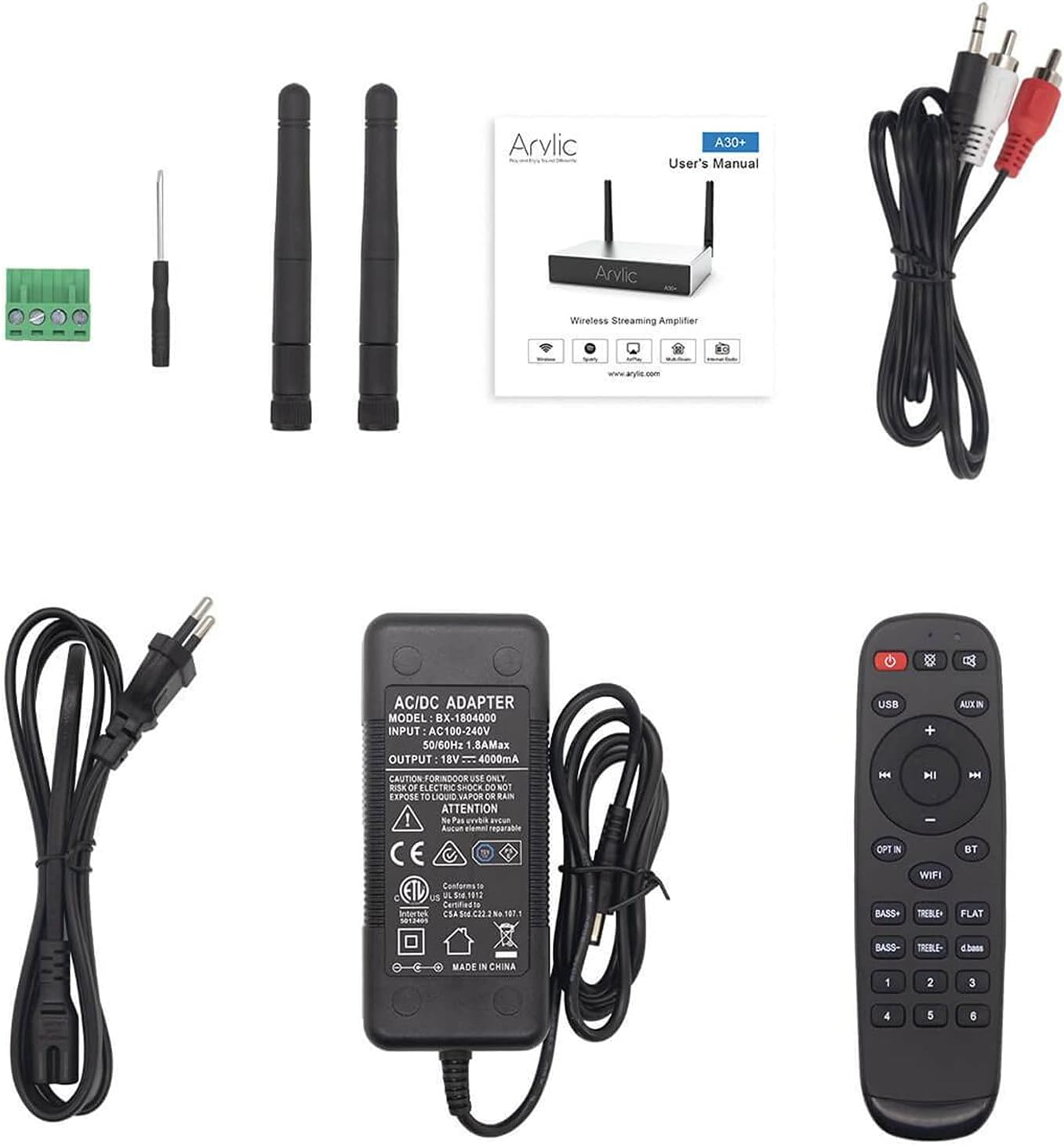
Figure 2.1: Contents included in the Arylic A30+ package.
2.2 Product Diagrams

Figure 2.2: Front Panel Layout. This diagram shows the front panel of the Arylic A30+, highlighting the LED indicators for WiFi, Bluetooth, Line In, USB DAC, and USB, as well as the IR sensor for remote control.

Figure 2.3: Rear Panel Layout. This diagram illustrates the rear panel connections, including the WiFi antenna port, Power/Reset button, RJ45 LAN port, USB port, Micro USB port, AUX IN, Speaker Out (L+, L-, R+, R-), DC Input (12V-18V), and Bluetooth antenna port.
2.3 Nøglefunktioner
- Trådløs stereo Amplivligere: Adds wireless/network streaming capabilities to existing speakers, home amplifiers, home stereo, or receivers.
- Stable Streaming and High Sound Quality: Supports lossless music file playback (MP3, APE, FLAC, WAV) with high-resolution audio. Wi-Fi streaming ensures signal coverage.
- Mobilapplikation: Control the device using the 4stream app for iOS and Android.
- Multiple Music Sources and Protocols: Supports Spotify, Amazon Music, TuneIn, iHeartRadio, XIMALAYA, QQ Music, TIDAL, Napster, Qobuz, QQFM, AirPlay1, Qplay, DLNA, UPnP protocols. Also supports local music, USB flash drives, NAS, and line inputs.
- Alsidig anvendelse: Advanced circuit design with built-in speaker protection circuit, suitable for bookshelf, ceiling, desktop, home speakers, home TV audio, computer sound systems, and even car audio systems.
- Multirumsstyring: Allows multi-room and multi-zone streaming through multiple connected devices on the same network, controllable via your phone.
3. Opsætning
3.1 Første hardwaretilslutning
- Vedhæft antenner: Screw the two provided antennas into the 'WiFi' and 'BT' ports on the rear panel.
- Tilslut højttalere: Use the included screw terminal block connector to connect your passive speakers to the 'SPEAKER OUT' terminals (L+, L-, R+, R-). Ensure correct polarity.
- Tilslut lydkilde (valgfrit): If using a wired audio source, connect it to the 'AUX IN' port using an appropriate audio cable. For USB audio, connect your device to the 'USB' port.
- Tilslut strøm: Plug the power adapter into the 'DC INPUT (12V-18V)' port on the rear panel, then plug the adapter into a wall outlet. The device will power on automatically.
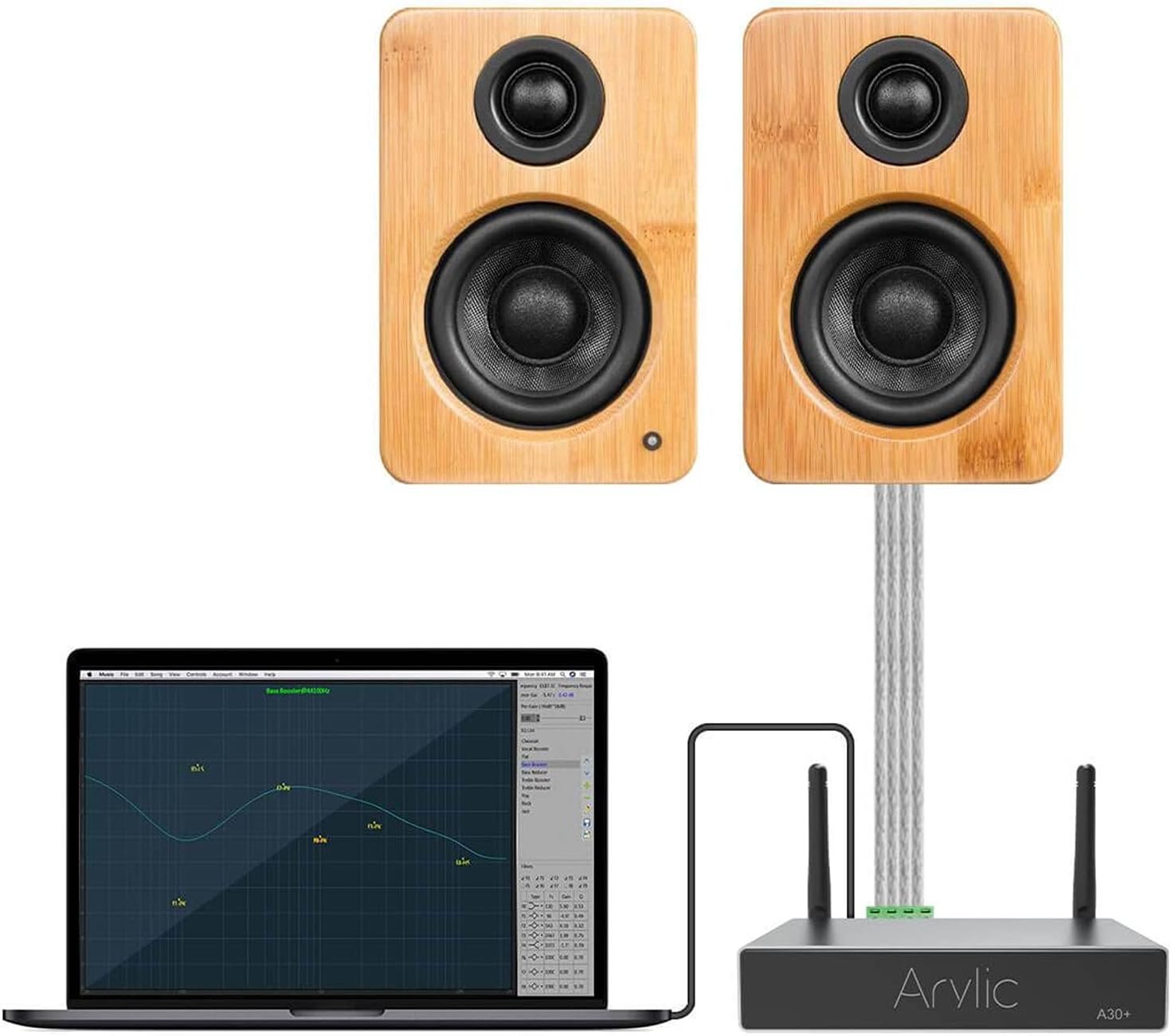
Figur 3.1: Eksample setup showing the Arylic A30+ connected to a laptop and speakers.
3.2 Netværksforbindelse (Wi-Fi)
To utilize the full streaming capabilities and multi-room features, connect your A30+ to your Wi-Fi network using the 4stream app.
- Download 4stream App: Søg efter "4stream" in the Apple App Store or Google Play Store and install the application on your smartphone or tablet.
- Tænd enhed: Ensure your A30+ is powered on. The Wi-Fi LED indicator on the front panel should be blinking, indicating it's ready for setup.
- Åbn appen og tilføj enhed: Open the 4stream app. The app will automatically search for new devices. Follow the on-screen prompts to add your A30+. You will be asked to select your Wi-Fi network and enter the password.
- Bekræftelse: Once connected, the Wi-Fi LED indicator will turn solid, and the app will confirm the successful connection.

Figure 3.2: The 4stream app interface showing the device search process during initial setup.
4. Betjening
4.1 Lydafspilning
The A30+ supports various methods for audio playback:
- Wi-Fi-streaming: Use the 4stream app to access integrated music services (Spotify, Amazon Music, Tidal, etc.), internet radio, or local music files from your network (NAS, USB drive connected to A30+). The app allows you to browse and control playback.
- Bluetooth: Pair your smartphone or other Bluetooth-enabled device directly with the A30+. Select "Arylic A30+" from your device's Bluetooth settings. The Bluetooth LED will illuminate when connected.
- AUX-indgang: Connect any audio device with a 3.5mm or RCA output to the 'AUX IN' port on the A30+. Select the AUX input via the 4stream app or remote control.
- USB DAC: Connect your computer to the Micro USB port on the A30+ to use it as an external DAC for high-quality audio playback from your computer.

Figure 4.1: Using the included remote control to manage playback and settings.
4.2 Multi-Room/Multi-Zone Functionality
The A30+ excels in multi-room audio setups, allowing you to synchronize music across multiple Arylic devices or play different music in different zones.
- Gruppeenheder: In the 4stream app, navigate to the device list. You can drag and drop devices to group them for synchronized playback.
- Uafhængig afspilning: Each A30+ unit can also play independent audio streams, creating distinct audio zones in your home.
- Kontrollere: All multi-room and multi-zone settings are managed directly through the 4stream app, providing flexible control over your entire audio system.

Figure 4.2: The 4stream app displaying multi-room control options, allowing users to manage audio in different areas of their home.
5. Vedligeholdelse
To ensure the longevity and optimal performance of your Arylic A30+ ampLifier, følg disse enkle vedligeholdelsesretningslinjer:
- Rensning: Use a soft, dry cloth to clean the exterior of the device. Avoid using liquid cleaners, aerosols, or abrasive chemicals, as they may damage the finish or internal components.
- Ventilation: Sørg for, at enheden er placeret et godt ventileret område. Bloker ikke ventilationsåbninger.
- Miljø: Behold ampHold apparatet væk fra direkte sollys, varmekilder, for meget støv, fugt og stærke elektromagnetiske felter.
- Sluk: If the device will not be used for an extended period, it is recommended to unplug the power adapter from the wall outlet.
6. Fejlfinding
If you encounter issues with your Arylic A30+, refer to the table below for common problems and their solutions.
| Problem | Mulig årsag | Løsning |
|---|---|---|
| Ingen strøm / Enheden tænder ikke | Strømadapteren er ikke tilsluttet eller defekt; Problem med stikkontakten. | Sørg for, at strømadapteren er korrekt tilsluttet enheden og en fungerende stikkontakt. Prøv en anden stikkontakt. |
| Ingen lydudgang | Speakers not connected correctly; Incorrect input source selected; Volume too low; Faulty audio cable. | Check speaker wire connections (L+, L-, R+, R-). Verify the correct input source is selected in the 4stream app or via remote. Increase volume. Test with a different audio cable. |
| Problemer med Wi-Fi-forbindelse | Incorrect Wi-Fi password; Device too far from router; Network interference; Router settings. | Double-check Wi-Fi password. Move the device closer to the router. Restart your router and the A30+. Ensure your router is on a 2.4GHz band if experiencing issues. |
| Bluetooth-parringsfejl | Device not in pairing mode; Bluetooth disabled on source device; Interference. | Ensure the A30+ is in Bluetooth mode. Make sure Bluetooth is enabled on your source device and it's within range. Try unpairing and re-pairing. |
| App Not Detecting Device | Device not connected to Wi-Fi; App version outdated; Network firewall. | Ensure the A30+ is successfully connected to your Wi-Fi network. Update the 4stream app to the latest version. Check router settings for any firewall restrictions. |
7. Specifikationer
Detailed technical specifications for the Arylic A30+ amplivligere:
| Feature | Specifikation |
|---|---|
| Modelnummer | A30+ |
| Forbindelsesteknologi | Bluetooth 5.0, USB, Wi-Fi |
| Særlige funktioner | Built-In Wi-Fi, Multiroom |
| Varens vægt | 1.87 pund (0.85 kilo) |
| Pakkedimensioner | 10.35 x 7.2 x 2.24 tommer |
| Fabrikant | Rakoit Technology (Shenzhen) Co., Ltd. |
| Første ledige dato | 13. november 2024 |
8. Garanti og support
Arylic products are designed for reliability and performance. For information regarding warranty coverage and technical support, please refer to the warranty card included with your product or visit the official Arylic website. You may also contact Arylic customer service directly for assistance with product setup, operation, or troubleshooting beyond the scope of this manual.
Online ressourcer: For the latest updates, FAQs, and community support, please visit the Arylic official webwebsted.
Ask a question about this manual
Ask about setup, troubleshooting, compatibility, parts, safety, or missing instructions. Manuals+ will review the question and use this page’s manual context to help answer it.