
DEPSTECH DS650, DS300
DEPSTECH DS650 & DS300 Borescope Systems User Manual
Omfattende vejledning til drift, vedligeholdelse og fejlfinding
Indledning
This manual provides detailed instructions for the safe and effective use of your DEPSTECH DS650 Two-Way Articulating Borescope and DS300 Industrial Endoscope Camera. Please read this manual thoroughly before operating the devices.

Image: The DEPSTECH DS650 articulating borescope (right) and the DS300 industrial endoscope (left), showcasing both devices included in the system.
Sikkerhedsforanstaltninger
- Brug ikke enheden i miljøer med brandfarlige eller eksplosive gasser.
- Hold enheden væk fra stærke elektromagnetiske felter.
- Ensure the probe is clean before and after each use.
- Forsøg ikke at adskille eller modificere enheden.
- Opbevar enheden på et tørt, køligt sted, når det ikke er i brug.
Pakkens indhold
Bekræft at alle varer er til stede i din pakke:
- DEPSTECH DS650 Articulating Borescope Unit
- DEPSTECH DS300 Industrial Endoscope Unit
- USB-opladningskabel(er)
- Brugermanual
- Carrying Case (for DS650)
Opsætning og første brug
Opladning af enheden
Before first use, fully charge both borescope units using the provided USB charging cables. The charging indicator will typically change color or turn off when fully charged.
Tænd/sluk
Press and hold the power button (usually marked with a power symbol) for a few seconds to turn the device on or off. The display will illuminate upon successful power-on.
Inserting the Probe (DS300)
The DS300 features a semi-rigid cable. Carefully uncoil the cable and ensure the probe head is securely connected to the main unit. The 5.5mm ultra-thin lens is designed for narrow spaces.

Image: Comparison illustrating the 5.5mm ultra-thin lens of the DS300, highlighting its ability to access confined areas compared to larger lenses.
Articulating Probe (DS650)
The DS650 features a 210° two-way articulating probe. This allows for precise control of the camera angle using the joystick or control wheel on the handle. The 6.2mm (0.24in) slim probe is ideal for detailed inspections in challenging areas. Practice articulating the probe before inserting it into an inspection area.

Image: The 210° two-way articulating probe of the DS650, demonstrating its flexibility for seamless detection without blind spots.

Image: The DEPSTECH DS650 articulating borescope being used to inspect an engine component, showcasing its articulating capability.
Betjeningsvejledning
Display og kontrol
Both models feature an integrated display (4.3" for DS300, 4.5" IPS for DS650) for real-time viewing. Familiarize yourself with the buttons:
- Power knap: Til/Fra.
- Menu-knap: Adgang til indstillinger og valgmuligheder.
- OK/Bekræft-knap: Select options or confirm actions.
- Navigationsknapper: Up/Down/Left/Right for menu navigation, digital zoom, or 180° image rotation (DS300).
- Foto/video knap: Tag billeder eller start/stop videooptagelse.
- LED lysstyrkejustering: Control the intensity of the LED lights on the probe tip.

Image: The DEPSTECH DS300 industrial endoscope unit, showing its 4.3-inch screen and control buttons for operation.
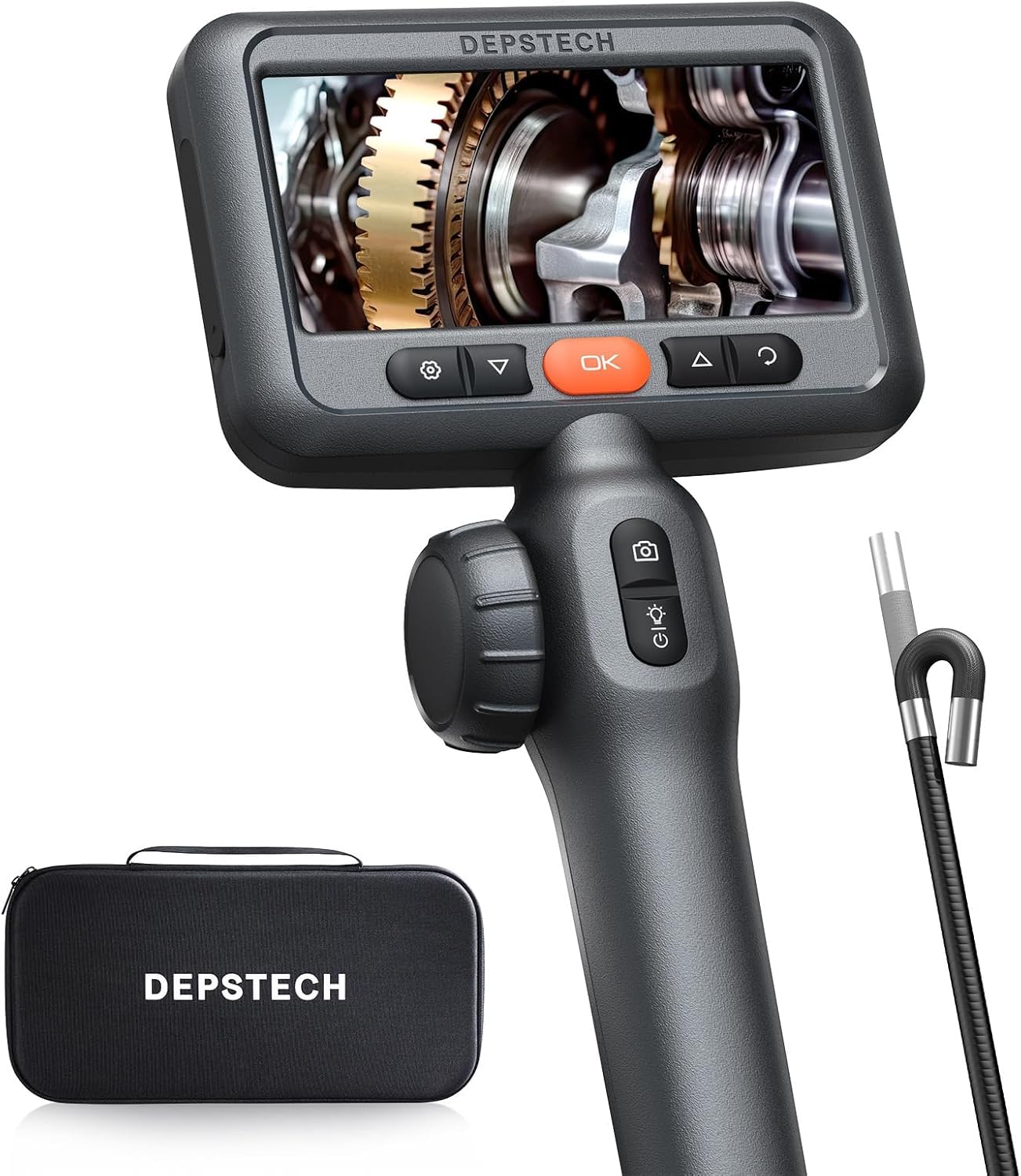
Image: The DEPSTECH DS650 articulating borescope unit, displaying its 4.5-inch IPS screen and ergonomic controls for articulation and image capture.
Justering af LED-lys
Both models feature adjustable LED lights on the probe tip to illuminate dark inspection areas. Use the dedicated button to cycle through brightness levels. The DS300 has 3 adjustable brightness levels, while the DS650 also has adjustable LED lighting for optimal clarity.

Image: The IP67 waterproof probe of the DS300, demonstrating its resistance to water and the functionality of its 6 adjustable LED lights.
Billed- og videooptagelse
Press the photo/video button to capture still images or start/stop video recording. Captured media is saved to the internal memory or an inserted SD card (if applicable). The DS650 utilizes Bluart 3.0 technology for enhanced image clarity and 2.0MP resolution.

Image: Graphic illustrating Bluart 3.0 technology, highlighting improvements in image clarity, processing speed, and low light performance.
Focal Range and Depth of Field
The DS300 camera focal range is 1.96~3.93 inches (5 - 10cm). For optimal image clarity, ensure the object being inspected is within this range.
Opretholdelse
- Rengøring af sonden: After each use, gently wipe the probe and lens with a soft, damp cloth. For the DS300, the probe is IP67 waterproof, allowing for cleaning with water if necessary. Ensure it is dry before storage.
- Batteripleje: Oplad batteriet regelmæssigt, selvom enheden ikke bruges ofte, for at opretholde batteriets tilstand.
- Opbevaring: Store the devices in their original packaging or a protective case in a cool, dry place, away from direct sunlight and extreme temperatures.
Fejlfinding
| Problem | Mulig årsag | Løsning |
|---|---|---|
| Enheden tænder ikke. | Lavt batteri; Tænd/sluk-knappen holdes ikke nede længe nok. | Oplad enheden helt; Tryk på tænd/sluk-knappen og hold den nede i 3-5 sekunder. |
| Billedet er sløret eller uklart. | Object out of focal range; Lens is dirty; Insufficient lighting. | Adjust distance to object (DS300 focal range: 1.96~3.93 in); Clean the lens; Increase LED brightness. |
| Probe articulation is stiff (DS650). | Affald i ledmekanismen; Kablet er knækket. | Gently manipulate the articulation to clear minor obstructions; Ensure cable is not severely bent. If problem persists, contact support. |
| Kan ikke optage billeder/videoer. | Memory full; SD card not inserted or faulty. | Slet gammel files; Insert a compatible SD card or replace existing one. |
Specifikationer
| Feature | DS650 Articulating Borescope | DS300 industrielt endoskop |
|---|---|---|
| Sondediameter | 6.2 mm (0.24in) | 5.5 mm (0.21in) |
| Artikulation | 210° Two-Way | N/A (180° image rotation) |
| Skærmstørrelse | 4.5 tommer IPS | 4.3 tommer LCD |
| Kameraopløsning | 2.0MP (1080P HD Video) | 1080P HD Video |
| Brændvidde | Not specified (optimized by Bluart 3.0) | 1.96~3.93 in (5 - 10cm) |
| Kabellængde | 5ft (approx. 1.5m) | 16.5 fod (5 m) |
| Vandtæt vurdering | Not explicitly stated for DS650 probe, but typically high. | IP67 |
| Forbindelse | Direkte visning | Direct display (No Wi-Fi/Bluetooth) |
| Optagetilstande | Automatisk, manuel | |
| Eksponeringskontrol | Automatisk | |
| Zoom type | Digital Zoom | |
Garantioplysninger
DEPSTECH products typically come with a standard manufacturer's warranty. Please refer to the warranty card included in your product packaging or visit the official DEPSTECH webwebstedet for detaljerede garantivilkår og -betingelser. Gem din købskvittering som købsbevis i tilfælde af garantikrav.
Kundesupport
For technical assistance, troubleshooting not covered in this manual, or warranty inquiries, please contact DEPSTECH customer support:
- Webwebsted: www.depstech.com (Check for support contact details)
- E-mail: Se din produktemballage eller webwebsted for specifik support-e-mail.
When contacting support, please have your product model (DS650, DS300) and ASIN (B0DMSMBJFR) ready.
Ask a question about this manual
Ask about setup, troubleshooting, compatibility, parts, safety, or missing instructions. Manuals+ will review the question and use this page’s manual context to help answer it.